All 57 lessons
Lesson 39 of 57 · Data Visualization
Seaborn: Statistical Plots in a Few Lines
By Skillancy Editorial Team
Run the code in the free Python Compiler or on your own computer. Lessons that read files use the FreshBasket practice data: download the dataset (ZIP).
Matplotlib gives you total control, but control costs lines of code. To draw a box plot of delivery time per city you must group the data yourself, loop, set labels, and colour boxes by hand. Seaborn is a layer on top of Matplotlib that understands DataFrames. You say which columns go on which axis, and it does the grouping, aggregating, colouring and legends for you. A chart that took fifteen lines in Matplotlib takes one in seaborn, and statistical extras such as confidence intervals and regression lines come built in.
Seaborn expects tidy (long) data: one row per observation, one column per variable, exactly the shape the previous pandas lessons taught you to produce with melt and groupby(...).reset_index(). You name the columns with x=, y=, hue= (colour) and col= (small multiples) and seaborn does the rest. Because seaborn returns ordinary Matplotlib axes, everything from the Matplotlib lessons (titles, formatters, annotations, saving) still applies.
Worked examples
Example 1: The seaborn model
Question: Build the tidy table, then draw the first chart.
import pandas as pd
import numpy as np
import matplotlib.pyplot as plt
import seaborn as sns
import skillancy_style

PALETTE = skillancy_style.PALETTE
sns.set_palette(PALETTE)

orders = pd.read_csv("orders.csv", parse_dates=["order_date"])
stores = pd.read_csv("stores.csv")
customers = pd.read_csv("customers.csv")
df = (
    orders.merge(stores[["store_id", "city"]], on="store_id")
    .merge(customers[["customer_id", "is_prime", "acquisition_channel"]], on="customer_id")
)
delivered = df[df["order_status"] == "Delivered"].copy()

fig, ax = plt.subplots()
sns.histplot(data=delivered, x="delivery_minutes", binwidth=2, ax=ax)
ax.set_title("Delivery time distribution")
ax.set_xlabel("Minutes")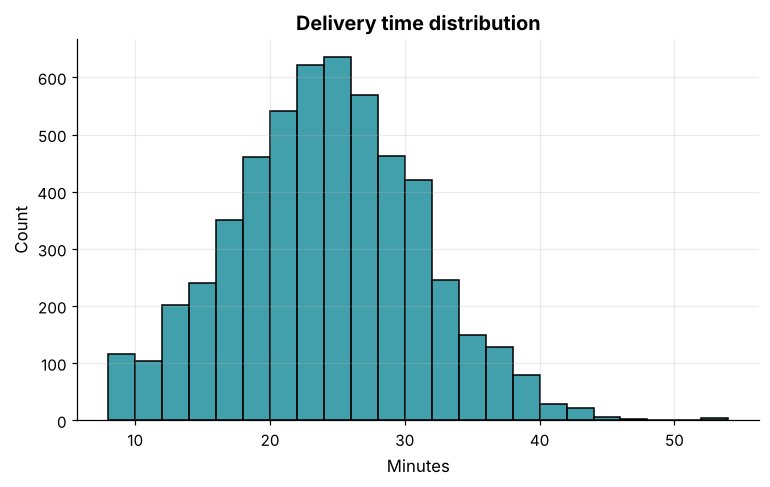
How it works: sns.histplot(data=df, x="column") is the whole recipe: pass the DataFrame and name the column. Seaborn picks sensible defaults and returns a Matplotlib Axes, so you can pass ax= to draw on an existing axes and then use normal Matplotlib calls such as ax.set_title.
Reading the result: The histogram summarises 5,391 delivered orders with a mean of 23.7 minutes. Compare how short this is to the Matplotlib version in the last lesson.
Example 2: Distribution by group (hue)
Question: Do Prime customers get faster deliveries?
fig, ax = plt.subplots()
sns.histplot(data=delivered, x="delivery_minutes", hue="is_prime", binwidth=2, stat="density", common_norm=False, element="step", ax=ax)
ax.set_title("Prime and non-Prime customers see the same delivery times")
ax.set_xlabel("Delivery time (minutes)")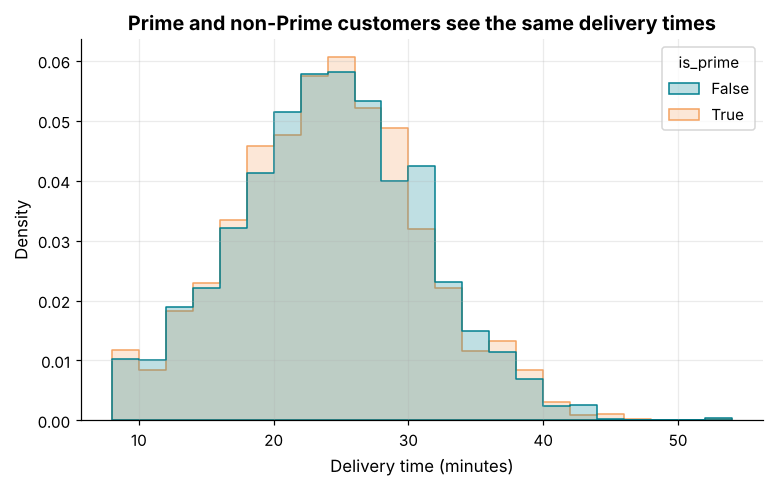
How it works: hue="is_prime" splits the data and colours each group automatically, adding a legend. stat="density" with common_norm=False scales each group to the same total area, so groups of different sizes can be compared by shape. element="step" draws outlines so overlapping groups stay readable.
Reading the result: Prime customers average 23.6 minutes against 23.7 for others, a difference of 0.13 minutes. The curves overlap almost completely.
Example 3: Density and cumulative plots
Question: What share of deliveries finish within a given time?
fig, axes = plt.subplots(1, 2, figsize=(11, 4))
sns.kdeplot(data=delivered, x="delivery_minutes", hue="delivery_slot", common_norm=False, fill=True, alpha=0.2, ax=axes[0])
axes[0].set_title("Density by delivery slot")
axes[0].set_xlabel("Minutes")

sns.ecdfplot(data=delivered, x="delivery_minutes", ax=axes[1], color="#028090")
axes[1].axhline(0.9, color="#E76F51", linestyle="--")
axes[1].axvline(delivered["delivery_minutes"].quantile(0.9), color="#E76F51", linestyle="--")
axes[1].set_title("Cumulative share of deliveries")
axes[1].set_xlabel("Minutes")
axes[1].set_ylabel("Share delivered within")
fig.tight_layout()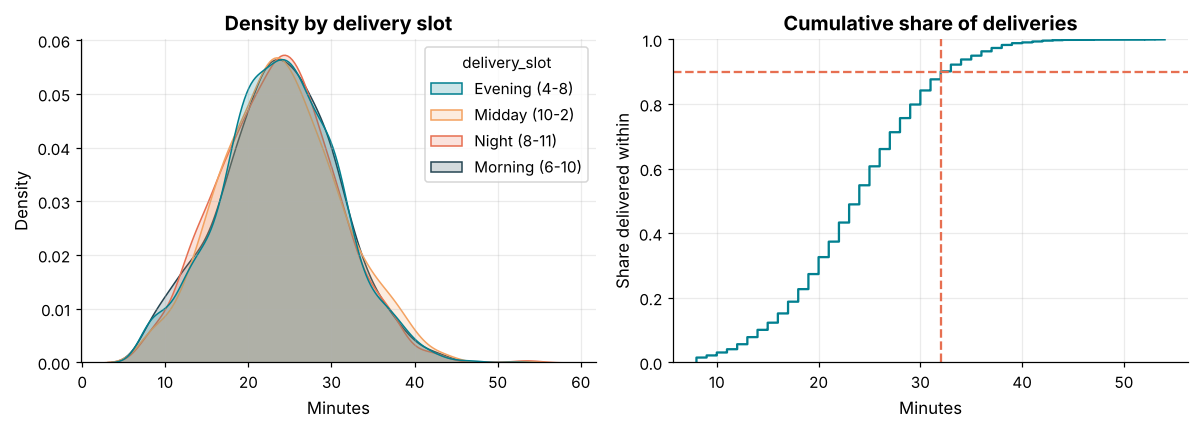
How it works: kdeplot draws a smoothed density curve (a "kernel density estimate"), good for comparing shapes. ecdfplot draws the empirical cumulative distribution: at each time on the x-axis, the height is the share of deliveries that finished by then. It needs no binning, and it answers service-level questions directly, such as "what time covers 90% of orders?".
Reading the result: The dashed lines show that 90% of deliveries arrive within 32 minutes. The four slot curves are almost the same.
Example 4: Bar plots with confidence intervals
Question: Average delivery time by city, with uncertainty.
order = delivered.groupby("city")["delivery_minutes"].mean().sort_values().index

fig, ax = plt.subplots()
sns.barplot(data=delivered, y="city", x="delivery_minutes", order=order, color="#028090", errorbar=("ci", 95), ax=ax)
ax.set_xlabel("Average delivery time (minutes)")
ax.set_ylabel("")
ax.set_title("Average delivery time is about 24 minutes in every city")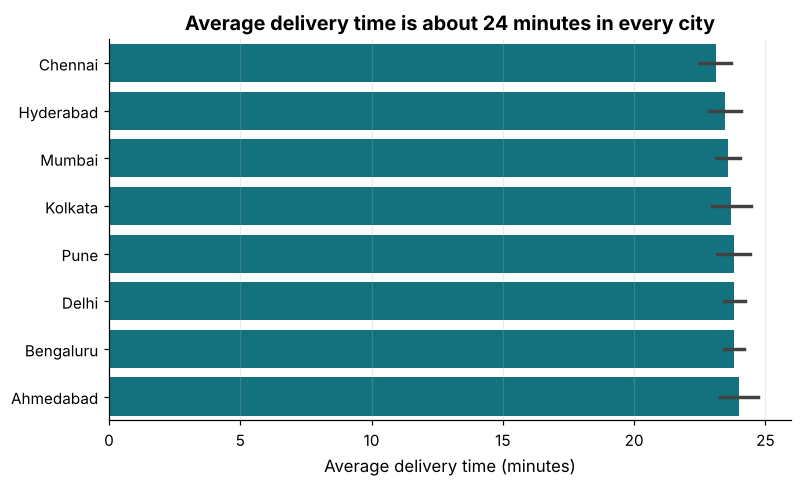
How it works: Unlike Matplotlib's bar, sns.barplot aggregates for you: the bar is the mean of the rows in each category, and the whisker is a 95% confidence interval estimated by bootstrapping. Overlapping whiskers tell you that differences between cities are within the noise. Use estimator="median" or "sum" to change the summary, and order= to control the sequence.
Reading the result: The slowest city, Ahmedabad, averages 24.0 minutes and the fastest, Chennai, 23.1. With overlapping intervals, ranking them would be reading noise.
Example 5: countplot and proportions
Question: How many orders per payment method, split by status?
pay_order = df["payment_method"].value_counts().index

fig, ax = plt.subplots()
sns.countplot(data=df, x="payment_method", hue="order_status", order=pay_order, ax=ax)
ax.set_xlabel("")
ax.set_ylabel("Orders")
ax.set_title("Most orders are delivered, whatever the payment method")
ax.legend(title="Status", frameon=False)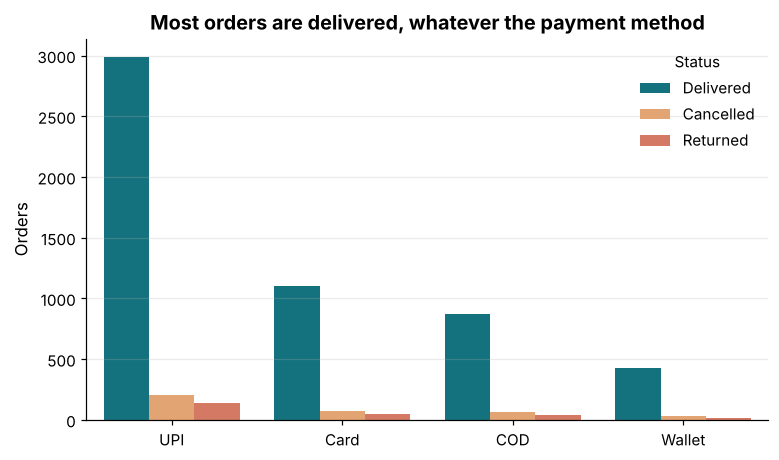
How it works: countplot counts rows for each category without needing a pre-computed table. Adding hue makes grouped bars. Because the bars are counts, differences in total volume dominate; to compare rates (cancellation percentage), compute shares first and plot those with barplot.
Reading the result: The most common payment method is UPI with 3,330 orders. Cancellation rates are 6.0% to 6.7% across methods.
Example 6: Box and violin plots
Question: Compare the spread of delivery time across acquisition channels.
fig, axes = plt.subplots(1, 2, figsize=(12, 4), sharey=True)
chan_order = sorted(delivered["acquisition_channel"].unique())
sns.boxplot(data=delivered, x="acquisition_channel", y="delivery_minutes", order=chan_order, color="#028090", ax=axes[0], fliersize=2)
axes[0].set_title("Box plot")
sns.violinplot(data=delivered, x="acquisition_channel", y="delivery_minutes", order=chan_order, color="#F4A261", inner="quartile", ax=axes[1], cut=0)
axes[1].set_title("Violin plot")
for ax in axes:
    ax.set_xlabel("")
    ax.tick_params(axis="x", rotation=25)
axes[0].set_ylabel("Delivery time (minutes)")
fig.tight_layout()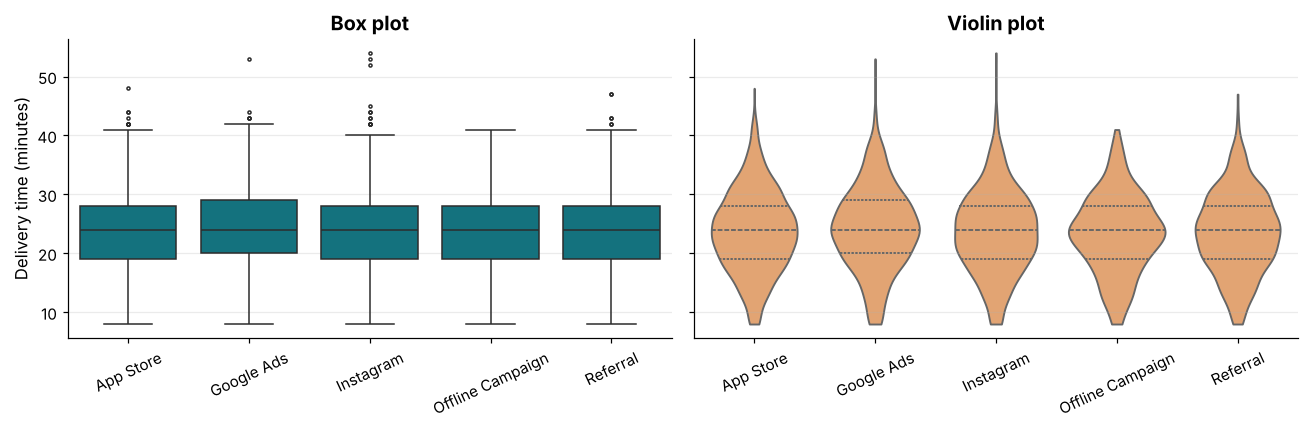
How it works: A violin plot is a box plot's richer cousin: its width shows the density at each value (a mirrored KDE), with quartile lines inside. Violins reveal shapes (two peaks, skew) that a box hides, but they are harder for a general audience to read. cut=0 stops the density from extending past the data range.
Reading the result: There are 5 acquisition channels, and their median delivery times differ by at most 0.0 minutes. How a customer was acquired does not change their delivery experience.
Example 7: Line plots with aggregation
Question: Show the trend of delivery time over months with an uncertainty band.
delivered["month"] = delivered["order_date"].dt.to_period("M").dt.to_timestamp()

fig, ax = plt.subplots()
sns.lineplot(data=delivered, x="month", y="delivery_minutes", errorbar=("ci", 95), marker="o", ax=ax)
ax.set_ylim(15, 35)
ax.set_xlabel("")
ax.set_ylabel("Average delivery time (minutes)")
ax.set_title("Delivery time held steady as volume grew tenfold")
fig.autofmt_xdate()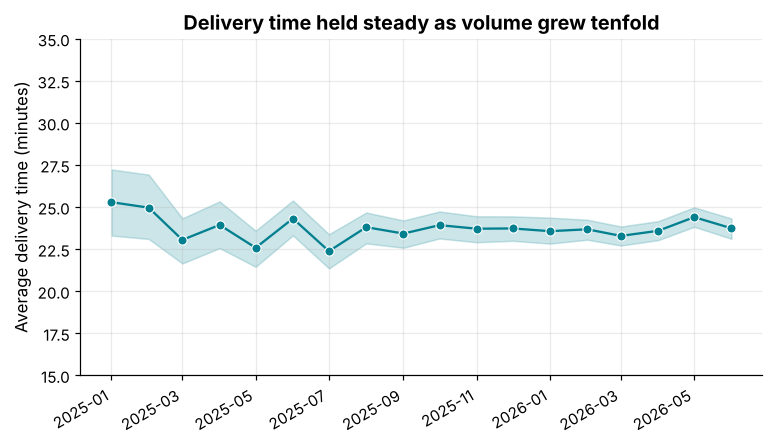
How it works: lineplot aggregates several rows per x value (mean by default) and draws a shaded 95% confidence band. In early months with few orders the band is wide, and it narrows as the sample grows, which is an honest picture of uncertainty. Passing raw rows instead of a pre-aggregated table lets seaborn do all the work.
Reading the result: The monthly average ranges from 22.4 to 25.3 minutes. Early months have wide bands because they have only 55 orders.
Example 8: Regression plots
Question: Is there a relationship between a customer's order count and their average basket value?
items = pd.read_csv("order_items.csv")
order_value = items.assign(v=items["quantity"] * items["unit_price"]).groupby("order_id")["v"].sum().rename("value")
cust = delivered.merge(order_value, on="order_id").groupby("customer_id").agg(orders=("order_id", "count"), avg_value=("value", "mean")).reset_index()

fig, ax = plt.subplots()
sns.regplot(data=cust, x="orders", y="avg_value", scatter_kws=dict(alpha=0.35, s=22), line_kws=dict(color="#E76F51"), ax=ax)
ax.set_xlabel("Delivered orders per customer")
ax.set_ylabel("Average basket value (₹)")
ax.set_title("Frequent customers do not spend more per basket")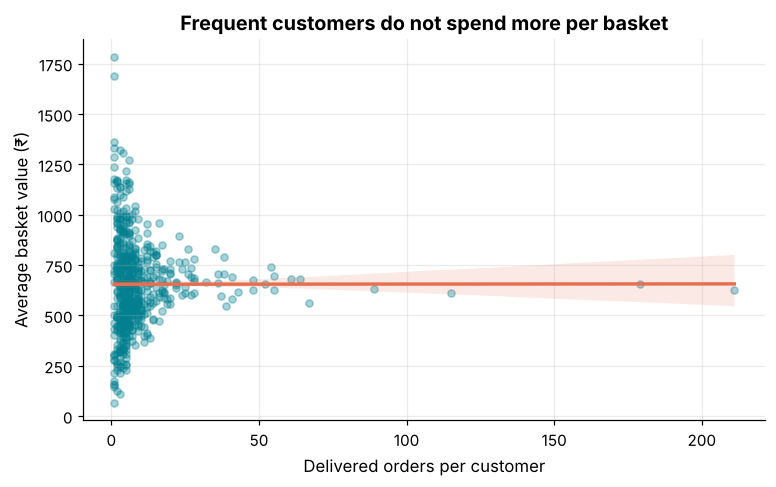
How it works: regplot draws a scatter plot plus a fitted regression line with its confidence band. The slope tells you how much y changes per unit of x; a band that comfortably includes a flat line means the relationship may not be real. For several groups, lmplot adds hue and col.
Reading the result: The correlation across 584 customers is 0.00. Be careful: a correlation near zero is evidence of no linear relationship, not proof of no relationship at all.
Example 9: Correlation heatmap
Question: Which numeric columns move together?
num = delivered.merge(order_value, on="order_id")[["delivery_minutes", "discount_pct", "value"]]
num["units"] = delivered.merge(items.groupby("order_id")["quantity"].sum().rename("units"), on="order_id")["units"].values
corr = num.corr()

fig, ax = plt.subplots(figsize=(5.5, 4.5))
sns.heatmap(corr, annot=True, fmt=".2f", cmap="RdBu_r", vmin=-1, vmax=1, center=0, square=True, linewidths=1, ax=ax)
ax.set_title("Correlation between order measures")
ax.grid(False)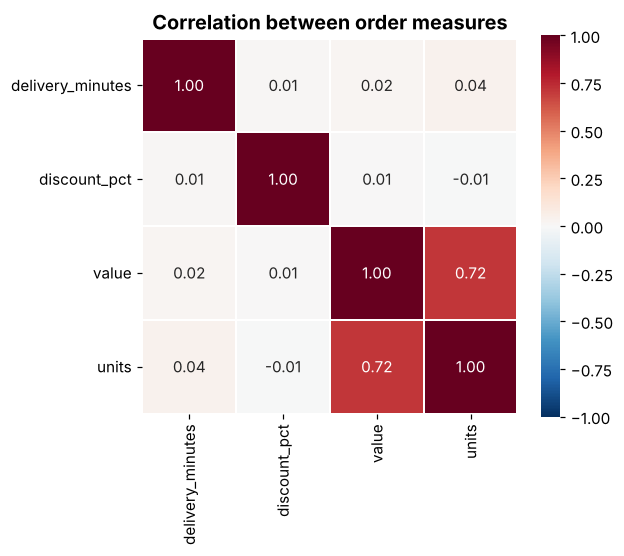
How it works: DataFrame.corr() gives the matrix of pairwise Pearson correlations, and sns.heatmap colours it. For correlations use a diverging palette centred at zero (center=0, vmin=-1, vmax=1) so positive and negative values get opposite colours. Annotating each cell with the number makes it a table you can read.
Reading the result: The strongest relationship is between basket value and units (0.72), which is expected since more items cost more. Delivery time correlates only 0.02 with value.
Example 10: Facets and pair plots
Question: Make the same chart for every group at once, and view all pairs of variables.
g = sns.FacetGrid(delivered, col="city", col_wrap=4, height=2.1, aspect=1.15, sharey=True)
g.map_dataframe(sns.histplot, x="delivery_minutes", binwidth=3, color="#028090")
g.set_titles("{col_name}")
g.set_axis_labels("Minutes", "Orders")
g.figure.suptitle("Delivery time distribution by city", y=1.03, fontweight="bold")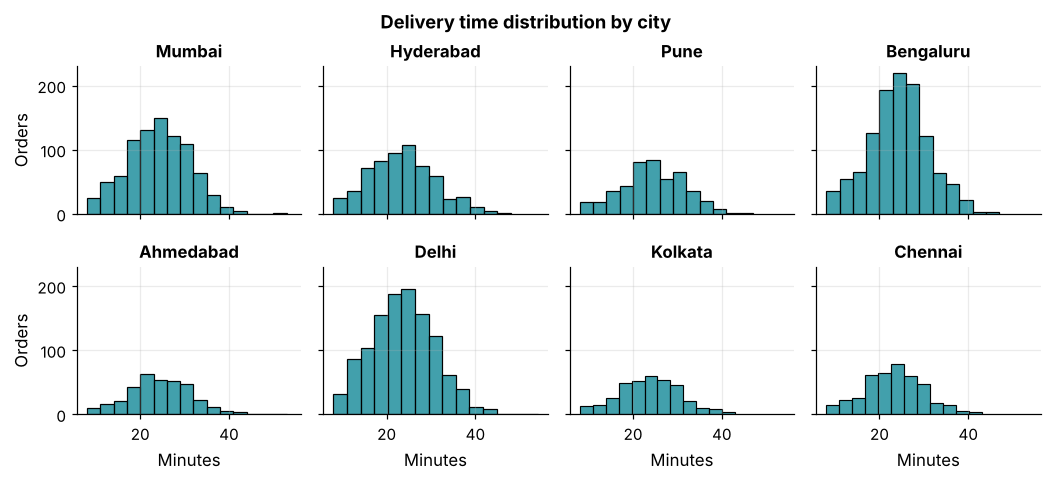
How it works: FacetGrid (and the figure-level functions sns.displot, catplot, relplot with col=) draws one panel per category and keeps the axes aligned, an easy way to build small multiples. pairplot(df) draws a scatter plot for every pair of numeric columns, with distributions on the diagonal, a quick way to explore a new dataset.
Reading the result: The grid has 8 panels with matching axes, and every city has the same bell shape centred near 24 minutes.
Common mistakes
1. Giving seaborn wide data instead of tidy data.
2. Forgetting ax= when mixing seaborn with a Matplotlib subplot grid, so the chart appears elsewhere.
3. Reading overlapping confidence intervals as differences.
4. Using a sequential palette for correlations (use a diverging one centred at zero).
5. Misspelling a column name.
sns.histplot(data=delivered, x="delivery_time")Output
Traceback (most recent call last):
  File "example.py", line 1, in <module>
    sns.histplot(data=delivered, x="delivery_time")
    ~~~~~~~~~~~~^^^^^^^^^^^^^^^^^^^^^^^^^^^^^^^^^^^
  File "example.py", line 1379, in histplot
    p = _DistributionPlotter(
        data=data,
        variables=dict(x=x, y=y, hue=hue, weights=weights),
    )
  File "example.py", line 110, in __init__
    super().__init__(data=data, variables=variables)
    ~~~~~~~~~~~~~~~~^^^^^^^^^^^^^^^^^^^^^^^^^^^^^^^^
  File "example.py", line 634, in __init__
    self.assign_variables(data, variables)
    ~~~~~~~~~~~~~~~~~~~~~^^^^^^^^^^^^^^^^^
  File "example.py", line 679, in assign_variables
    plot_data = PlotData(data, variables)
  File "example.py", line 58, in __init__
    frame, names, ids = self._assign_variables(data, variables)
                        ~~~~~~~~~~~~~~~~~~~~~~^^^^^^^^^^^^^^^^^
  File "example.py", line 232, in _assign_variables
    raise ValueError(err)
ValueError: Could not interpret value `delivery_time` for `x`. An entry with this name does not appear in `data`.Practice questions
Practice 1 (Easy): Count plot of slots
Draw a count plot of orders per delivery slot, in time order.
Show solution
slot_order = ["Morning (6-10)", "Midday (10-2)", "Evening (4-8)", "Night (8-11)"]
fig, ax = plt.subplots()
sns.countplot(data=df, x="delivery_slot", order=slot_order, color="#028090", ax=ax)
ax.set_xlabel("")
ax.set_ylabel("Orders")
ax.set_title("Evening is the busiest slot")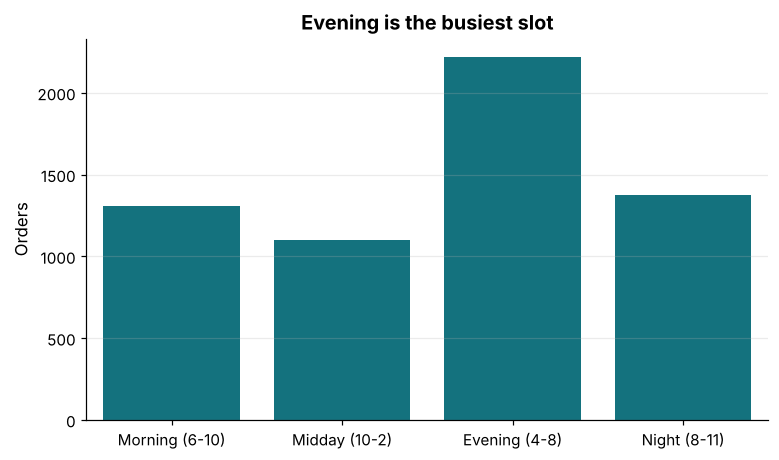
order= fixes the sequence. Evening has 2,220 orders.
Practice 2 (Medium): Violin by weekday
Compare the delivery-time distribution by weekday (Monday to Sunday) with a violin plot.
Show solution
days = ["Monday", "Tuesday", "Wednesday", "Thursday", "Friday", "Saturday", "Sunday"]
delivered["weekday"] = delivered["order_date"].dt.day_name()
fig, ax = plt.subplots(figsize=(9, 4))
sns.violinplot(data=delivered, x="weekday", y="delivery_minutes", order=days, color="#2A9D8F", inner="quartile", cut=0, ax=ax)
ax.set_xlabel("")
ax.set_ylabel("Delivery time (minutes)")
ax.set_title("Delivery time does not depend on the weekday")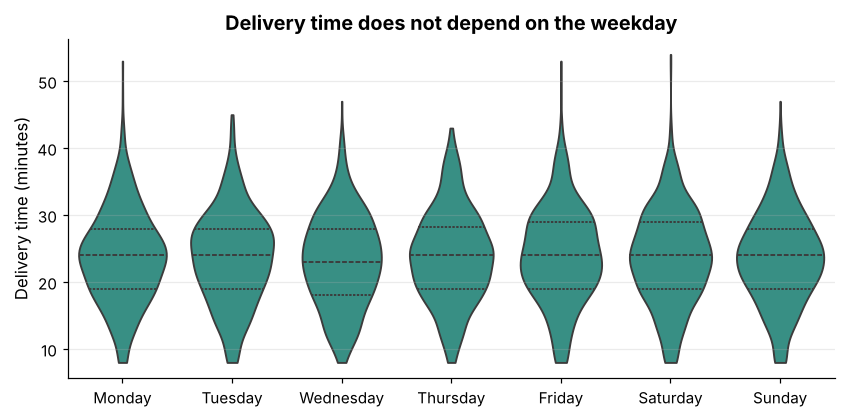
All seven violins share the same shape, with medians between 23 and 24 minutes.
Practice 3 (Hard): Share of cancelled orders with intervals
Plot the cancellation rate per city as a bar chart with confidence intervals, sorted highest first.
Show solution
df["cancelled"] = (df["order_status"] == "Cancelled").astype(int)
rate_order = df.groupby("city")["cancelled"].mean().sort_values(ascending=False).index

fig, ax = plt.subplots()
sns.barplot(data=df, y="city", x="cancelled", order=rate_order, color="#E76F51", errorbar=("ci", 95), ax=ax)
ax.xaxis.set_major_formatter(lambda v, pos: f"{v:.0%}")
ax.set_xlabel("Cancellation rate")
ax.set_ylabel("")
ax.set_title("Cancellation rates differ little between cities")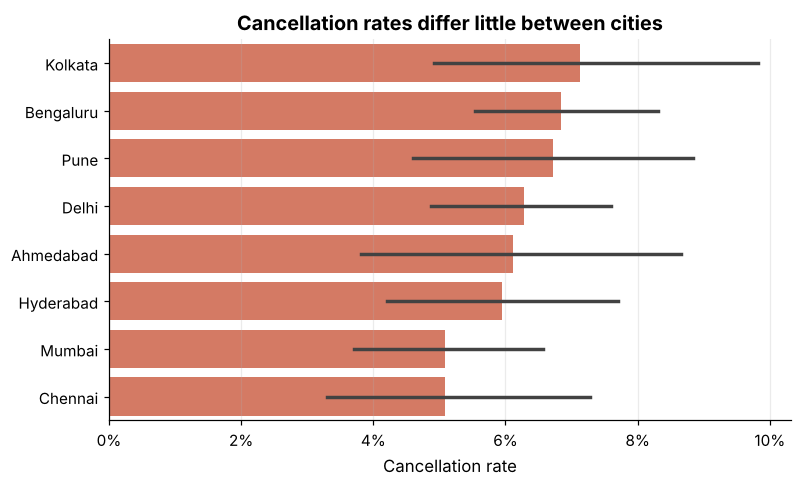
A 0/1 column averages to a rate, which barplot turns into a bar with an interval. The highest rate is 7.1% in Kolkata.
Key takeaways
- Seaborn works from tidy DataFrames: name columns with
x,y,hueandcol. histplot,kdeplotandecdfplotshow distributions; usehueto compare groups.barplotaggregates and draws confidence intervals;countplotcounts rows.boxplotandviolinplotcompare spread across categories.regplotandheatmapexplore relationships; use a diverging palette for correlations.- Facets create small multiples;
pairplotexplores many variables at once. - Seaborn returns Matplotlib axes, so all your Matplotlib skills still apply.
Frequently asked questions
Seaborn or Matplotlib: which should I use?
Both. Use seaborn for fast statistical charts on DataFrames, and Matplotlib for fine control, annotations and layout. They work together because seaborn draws on Matplotlib axes.
What is the difference between axes-level and figure-level functions?
Axes-level functions (histplot, boxplot, scatterplot) draw on one ax. Figure-level functions (displot, catplot, relplot) create their own figure with facets and are controlled with col=, row=, height=.
How do I set a consistent theme?
sns.set_theme(style="whitegrid", palette=...) at the top of your notebook, or import the Skillancy style module as in these lessons.
What does the confidence interval mean?
It is a range that, if you repeated the sampling many times, would contain the true average about 95% of the time. Overlapping intervals suggest the difference may be due to chance.
Why does my seaborn chart look different on each run?
Bootstrapped confidence intervals use random resampling. Set seed=0 in the errorbar argument, or use errorbar=None, for repeatable pictures.
Can seaborn make interactive charts?
No, they are static images. For hover and zoom, use Plotly or Altair.
Keep learning Python
One email a week with Python and analytics guides, new practice questions and cohort dates. No spam, unsubscribe anytime.
Ready to practise? Try the Python interview questions