All 57 lessons
Lesson 42 of 57 · Statistics and Exploratory Analysis
Distributions and Outliers: Histograms, Z-Scores and the IQR Rule
By Skillancy Editorial Team
Run the code in the free Python Compiler or on your own computer. Lessons that read files use the FreshBasket practice data: download the dataset (ZIP).
Two columns can have the same mean and standard deviation and still look completely different. One might be a tidy bell curve, the other a long tail of huge values, a pair of humps or a spike at zero. The distribution of a variable (how often each value or range of values occurs) is the first thing you should look at, because it tells you which summaries, tests and models are safe to use.
This lesson teaches you to look at distributions with histograms, KDE curves and Q-Q plots; to recognise common shapes (symmetric, skewed, bimodal); to test whether data is approximately normal; and to find and handle outliers, the values that sit far from the rest. The golden rule is that an outlier is a question, not an automatic error: it might be a data-entry mistake, a genuine VIP customer or a sign that two different groups are mixed together. We investigate before we delete.
We continue with FreshBasket data: delivery minutes (nearly symmetric) and order values (right-skewed) make a perfect contrast.
Worked examples
Example 1: Load and bin the data
Question: What does the distribution of delivery time look like in numbers?
import pandas as pd
import numpy as np

orders = pd.read_csv("orders.csv", parse_dates=["order_date"])
items = pd.read_csv("order_items.csv")
mins = orders["delivery_minutes"].dropna()
value = (items["quantity"] * items["unit_price"]).groupby(items["order_id"]).sum()

counts, edges = np.histogram(mins, bins=8)
for c, lo, hi in zip(counts, edges[:-1], edges[1:]):
    print(f"{lo:5.1f} to {hi:5.1f} | {c:5d} {'#' * (c // 60)}")
Output
  8.0 to  13.8 |   438 #######
 13.8 to  19.5 |  1102 ##################
 19.5 to  25.2 |  1882 ###############################
 25.2 to  31.0 |  1327 ######################
 31.0 to  36.8 |   678 ###########
 36.8 to  42.5 |   182 ###
 42.5 to  48.2 |    17
 48.2 to  54.0 |     4
How it works: np.histogram splits the range into equal-width bins and counts the values in each. The text bars make the shape visible without a plotting library: a tall middle that tapers on both sides is a bell shape. A histogram is a picture of the distribution, and a good first check on any numeric column.
Reading the result: The tallest bin contains 1882 of 5630 deliveries, and the bins taper on both sides, a roughly symmetric shape centred near 24 minutes.
Example 2: Histograms for symmetric and skewed data
Question: Plot delivery time and order value side by side.
import matplotlib.pyplot as plt
import skillancy_style

fig, axes = plt.subplots(1, 2, figsize=(11, 4))
axes[0].hist(mins, bins=30, color="#028090", edgecolor="white")
axes[0].axvline(mins.mean(), color="#264653", linestyle="--")
axes[0].set_title("Delivery time is roughly symmetric", loc="left")
axes[0].set_xlabel("Minutes")

axes[1].hist(value, bins=40, color="#F4A261", edgecolor="white")
axes[1].axvline(value.mean(), color="#264653", linestyle="--", label="mean")
axes[1].axvline(value.median(), color="#E76F51", linestyle="-", label="median")
axes[1].set_title("Order value has a long right tail", loc="left")
axes[1].set_xlabel("Order value (₹)")
axes[1].legend(frameon=False)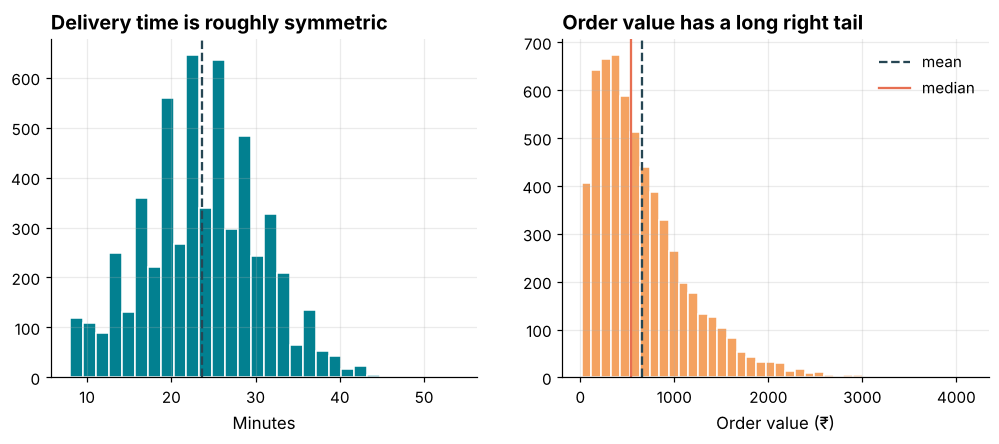
How it works: ax.hist draws the histogram; the dashed lines mark the mean (and the median for the skewed variable). In the symmetric case the lines coincide; in the skewed case the mean is pulled toward the tail. Using a consistent bin count and labelled units keeps the charts honest.
Reading the result: Delivery time centres on 23.7 minutes. For order value, the mean ₹659 is to the right of the median ₹536.
Example 3: Bin width changes the story
Question: Can the number of bins hide or reveal structure?
for bins in (3, 10, 40):
    counts, _ = np.histogram(value, bins=bins)
    print(f"bins={bins:>2}: tallest bin holds {counts.max() / len(value):.1%} of orders")

auto_edges = np.histogram_bin_edges(value, bins="auto")
print("auto picks", len(auto_edges) - 1, "bins")
Output
bins= 3: tallest bin holds 91.0% of orders
bins=10: tallest bin holds 39.8% of orders
bins=40: tallest bin holds 11.2% of orders
auto picks 63 bins
How it works: Too few bins smooth away detail (3 bins lumps most of the data together); too many bins show noise. NumPy and Matplotlib accept rules such as "auto", "fd" (Freedman-Diaconis) or "sturges" that choose a sensible width from the data. When a shape matters, try two or three bin counts before concluding anything.
Reading the result: The tallest bin holds 91% of orders with 3 bins but only 11% with 40, and auto chooses 63 bins. Same data, very different first impressions.
Example 4: KDE: a smooth density curve
Question: Compare delivery time for Prime and non-Prime customers using smooth curves.
customers = pd.read_csv("customers.csv")
d = orders.merge(customers[["customer_id", "is_prime"]], on="customer_id").dropna(subset=["delivery_minutes"])

fig, ax = plt.subplots(figsize=(8, 4))
for flag, color, label in [(True, "#028090", "Prime"), (False, "#F4A261", "Not Prime")]:
    d.loc[d["is_prime"] == flag, "delivery_minutes"].plot(kind="kde", ax=ax, color=color, linewidth=2.5, label=label)
ax.set_xlim(0, 50)
ax.set_xlabel("Delivery minutes")
ax.set_title("Prime and non-Prime delivery times overlap almost completely", loc="left")
ax.legend(frameon=False)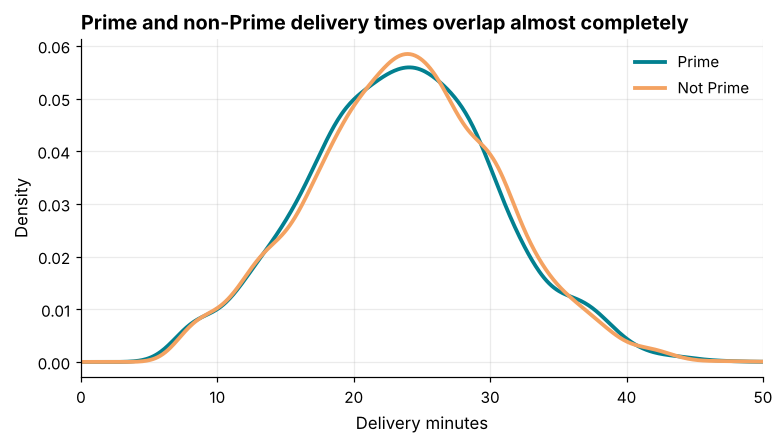
How it works: A kernel density estimate (KDE) replaces the blocky histogram with a smooth curve, which makes it easy to overlay groups with different counts, since each curve integrates to one. Series.plot(kind="kde") uses SciPy under the hood.
Reading the result: Prime customers average 23.5 minutes against 23.7 for others. The curves almost coincide, so Prime membership does not change speed in this data.
Example 5: The normal distribution and the 68-95-99.7 rule
Question: Does delivery time follow the bell-curve rule of thumb?
mu, sigma = mins.mean(), mins.std()
for k, expected in [(1, 0.6827), (2, 0.9545), (3, 0.9973)]:
    inside = ((mins - mu).abs() <= k * sigma).mean()
    print(f"within {k} sd: observed {inside:.3f}  expected {expected:.3f}")
Output
within 1 sd: observed 0.692  expected 0.683
within 2 sd: observed 0.953  expected 0.955
within 3 sd: observed 0.999  expected 0.997
How it works: For a normal distribution about 68% of values lie within one standard deviation of the mean, 95% within two and 99.7% within three. Comparing observed shares with these numbers is a quick, intuitive normality check, with no test statistic needed.
Reading the result: Within one standard deviation we observe 69.2% against 68.3% expected, and within two 95.3%. The match is close, so delivery time behaves almost normally.
Example 6: Q-Q plot and Shapiro-Wilk
Question: Is the data normal, formally?
from scipy import stats

fig, axes = plt.subplots(1, 2, figsize=(10, 4))
stats.probplot(mins, dist="norm", plot=axes[0])
axes[0].set_title("Delivery time: points hug the line", loc="left")
stats.probplot(np.log(value), dist="norm", plot=axes[1])
axes[1].set_title("log(order value): curved ends", loc="left")
for ax in axes:
    ax.set_title("", loc="center")
    ax.get_lines()[0].set_color("#028090")
    ax.get_lines()[1].set_color("#E76F51")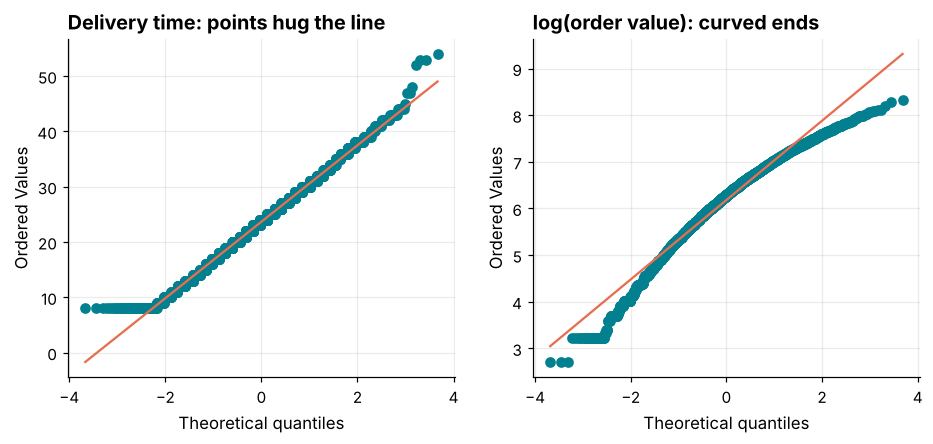
How it works: A Q-Q plot plots the data's quantiles against those of a normal distribution; points on the straight line mean "normal". Curvature shows skew; S-shapes show heavy or light tails. Formal tests exist too, but with thousands of rows they reject normality for tiny, harmless deviations, so the plot usually matters more than the p-value.
Reading the result: The delivery-time points follow the line closely, apart from a floor of 8 minutes at the left end. For 6000 orders, a Shapiro-Wilk test on a 500-row sample gives p = 0.039 for delivery time and p = 1.9e-18 for raw order value; a small p-value means "evidence against normality". Note that even delivery time scrapes under 0.05 on this sample, yet the plot shows a very good fit: tests are strict, so read them together with the picture.
Example 7: Z-scores
Question: How unusual is a 45-minute delivery?
z = (mins - mins.mean()) / mins.std()
print("z for 45 min:", round((45 - mins.mean()) / mins.std(), 2))
print("count |z| > 3:", int((z.abs() > 3).sum()))
print("share |z| > 3:", round((z.abs() > 3).mean(), 4))

from scipy.stats import zscore
print(np.allclose(zscore(mins, ddof=1), z))
Output
z for 45 min: 3.08
count |z| > 3: 8
share |z| > 3: 0.0014
True
How it works: A z-score says how many standard deviations a value is from the mean: z = (x - mean) / sd. A common cut-off flags |z| above 3 as an outlier. Z-scores work best for roughly normal data; for skewed data the mean and standard deviation are themselves distorted by the outliers, which can hide them.
Reading the result: A 45-minute delivery has z = 3.1. 8 deliveries (0.14%) have |z| above 3, fewer than the 0.27% (about 15 deliveries) a perfect normal curve would give, so the tails are slightly lighter than normal.
Example 8: The IQR rule for skewed data
Question: Which order values are outliers, using a robust method?
q1, q3 = value.quantile([0.25, 0.75])
iqr = q3 - q1
low, high = q1 - 1.5 * iqr, q3 + 1.5 * iqr
flagged = value[(value < low) | (value > high)]

zv = (value - value.mean()) / value.std()
print("fences:", round(low, 1), round(high, 1))
print("IQR rule flags:", len(flagged))
print("z-score rule flags:", int((zv.abs() > 3).sum()))
Output
fences: -615.5 1796.5
IQR rule flags: 199
z-score rule flags: 84
How it works: The IQR rule treats values beyond 1.5 x IQR outside the quartiles as outliers. Because quartiles are not much affected by extremes, the rule stays stable on skewed data. Here the z-score rule flags far fewer values, because the large orders inflate the standard deviation and widen the "normal" zone. Pick the rule to suit the shape of the data, and write down which one you used.
Reading the result: The IQR rule flags 199 orders above ₹1796; the z-score rule flags only 84. Neither number is "right": they answer slightly different questions.
Example 9: Investigate before you decide
Question: Who are the biggest-basket customers, and are those orders plausible?
big = value[value > high].rename("value").reset_index()
big = big.merge(orders[["order_id", "customer_id", "order_status", "payment_method"]], on="order_id")

print(big["order_status"].value_counts().to_dict())
print(big["payment_method"].value_counts().head(3).to_dict())
print("avg items in big orders:", round(items[items["order_id"].isin(big["order_id"])].groupby("order_id")["quantity"].sum().mean(), 1))
print("avg items overall      :", round(items.groupby("order_id")["quantity"].sum().mean(), 1))
Output
{'Delivered': 175, 'Cancelled': 14, 'Returned': 10}
{'UPI': 105, 'Card': 47, 'COD': 27}
avg items in big orders: 10.9
avg items overall      : 5.5
How it works: Join the flagged rows back to context: status, payment method, quantity. If big orders are mostly real deliveries with many items, they are legitimate bulk shoppers and should be kept. If they were mostly cancelled, or had impossible quantities, you would suspect a data problem. The decision to keep, cap or drop must come from this investigation, not from the statistic alone.
Reading the result: The big orders contain 10.9 items on average versus 5.5 overall, so they are genuinely larger baskets, not errors.
Example 10: Cap, transform or remove
Question: What happens to the mean under each treatment?
capped = value.clip(upper=value.quantile(0.99))
logged = np.log1p(value)
trimmed = value[value <= high]

summary = pd.DataFrame({
    "raw": value.describe(),
    "capped_p99": capped.describe(),
    "trimmed_iqr": trimmed.describe(),
}).loc[["count", "mean", "std", "max"]].round(1)
print(summary)
print("log1p skew:", round(logged.skew(), 2))
Output
          raw  capped_p99  trimmed_iqr
count  6000.0      6000.0       5801.0
mean    659.2       655.3        605.4
std     499.3       482.6        405.9
max    4137.0      2325.1       1796.0
log1p skew: -0.67
How it works: Winsorising caps values at a percentile (here the 99th) so extremes keep their rank but lose their leverage. Trimming removes them, which also changes the count and can bias totals. Transforming (log) compresses the tail without discarding anything. For revenue reporting never drop real orders; for modelling, capping or a log transform is often better than deletion.
Reading the result: The raw mean is 659.2, the capped mean 655.3 and the trimmed mean 605.4. The standard deviation falls from 499.3 to 482.6 after capping, a modest reduction, because only the top 1% of orders were capped.
Common mistakes
1. Deleting outliers automatically without finding out what they are.
2. Using z-scores on skewed data, where the outliers inflate the standard deviation and hide themselves.
3. Trusting a single histogram, when a different bin count would tell another story.
4. Reading a normality test p-value alone with large samples.
5. Calling something an outlier relative to the wrong group: a ₹3,000 order is ordinary for bulk buyers but extreme for single-item shoppers.
np.histogram(value, bins=0)Output
Traceback (most recent call last):
  File "example.py", line 1, in <module>
    np.histogram(value, bins=0)
    ~~~~~~~~~~~~^^^^^^^^^^^^^^^
  File "example.py", line 792, in histogram
    bin_edges, uniform_bins = _get_bin_edges(a, bins, range, weights)
                              ~~~~~~~~~~~~~~^^^^^^^^^^^^^^^^^^^^^^^^^
  File "example.py", line 423, in _get_bin_edges
    raise ValueError('`bins` must be positive, when an integer')
ValueError: `bins` must be positive, when an integerPractice questions
Practice 1 (Easy): Count extreme deliveries
How many deliveries took longer than 40 minutes, and what share of the total is that?
Show solution
slow = mins[mins > 40]
print(len(slow), round(len(slow) / len(mins), 4))
Output
51 0.009151 deliveries (0.91%) exceeded 40 minutes. A boolean filter followed by len counts them.
Practice 2 (Medium): Winsorise at both ends
Clip delivery minutes to the 1st and 99th percentiles and compare the standard deviation before and after.
Show solution
lo, hi = mins.quantile([0.01, 0.99])
clipped = mins.clip(lo, hi)
print(round(mins.std(), 3), round(clipped.std(), 3))
print(lo, hi)
Output
6.93 6.845
8.0 40.0
Clipping to 8-40 minutes reduces the standard deviation from 6.93 to 6.85. With near-normal data the effect is small; with skewed data it is much larger.
Practice 3 (Hard): Outliers within each group
Apply the IQR rule separately within each payment_method and compare the flagged counts with the global rule.
Show solution
o = orders.merge(value.rename("value"), on="order_id")

def iqr_flags(s):
    q1, q3 = s.quantile([0.25, 0.75])
    return (s > q3 + 1.5 * (q3 - q1)) | (s < q1 - 1.5 * (q3 - q1))

o["global_flag"] = iqr_flags(o["value"])
o["group_flag"] = o.groupby("payment_method")["value"].transform(iqr_flags)
print(o[["global_flag", "group_flag"]].sum().to_dict())
print((o["global_flag"] != o["group_flag"]).sum())
Output
{'global_flag': 199, 'group_flag': 198}
15
groupby().transform() applies the function per group and returns a result aligned to the original rows. The global rule flags 199 orders and the per-group rule 198; they differ on 15 rows. Define "unusual" relative to the group that makes sense.
Key takeaways
- Always plot the distribution before summarising: histogram, KDE and Q-Q plot.
- Compare mean and median, and the 68-95-99.7 shares, to judge symmetry and normality.
- Z-scores suit near-normal data; the IQR rule suits skewed data.
- Investigate flagged values by joining context before deciding to keep, cap, transform or drop.
- Capping (winsorising) and log transforms keep rows; trimming removes them.
- Judge outliers within the right comparison group.
Frequently asked questions
What is a normal distribution and why does it matter?
It is the symmetric bell-shaped curve defined by a mean and standard deviation. Many classical tests (t-tests, confidence intervals from small samples) assume approximate normality, and the central limit theorem explains why averages tend to be normal even when raw data is not.
Should I always remove outliers?
No. Remove or correct them only when you can show they are errors. Genuine extreme values often matter most to the business, such as your highest-value customers.
Which outlier rule should I use?
Use the IQR rule for skewed data and z-scores for roughly normal data. For important decisions, look at the flagged rows themselves.
What does bimodal mean?
A distribution with two peaks, usually a sign that two groups are mixed (for example, weekday and weekend orders). Split the data by the suspected group and check each part.
Does a log transform always help?
It helps for positive, right-skewed data such as money, durations and counts. It cannot be used on zero or negative values directly; use np.log1p for zeros.
How many bins should a histogram have?
Start with the automatic rule (bins="auto"), then try half and double. If the story changes, say so.
Keep learning Python
One email a week with Python and analytics guides, new practice questions and cohort dates. No spam, unsubscribe anytime.
Ready to practise? Try the Python interview questions