All 57 lessons
Lesson 43 of 57 · Statistics and Exploratory Analysis
Correlation: Measuring Relationships Between Variables
By Skillancy Editorial Team
Run the code in the free Python Compiler or on your own computer. Lessons that read files use the FreshBasket practice data: download the dataset (ZIP).
"Do customers who order more items also wait longer for delivery?" "Do bigger baskets come with bigger discounts?" "Is revenue growth just a side effect of more customers?" Every one of these is a question about a relationship between two variables. The most common first answer is the correlation coefficient, a single number between -1 and +1 that says how strongly two variables move together in a straight line.
Correlation is simple to compute and easy to misuse. This lesson shows you how to calculate it with pandas and SciPy, how to read it next to a scatter plot, when to prefer rank-based Spearman correlation to Pearson, and why a high correlation never proves that one thing causes another. We finish with the most common trap in business data: two measures that both grow over time look strongly correlated even when they have nothing to do with each other.
We use FreshBasket's order data at three levels: individual orders, customers, and months.
Worked examples
Example 1: Build an order-level table
Question: Which order-level numbers might be related?
import pandas as pd
import numpy as np

orders = pd.read_csv("orders.csv", parse_dates=["order_date"])
items = pd.read_csv("order_items.csv")

items["line"] = items["quantity"] * items["unit_price"]
basket = items.groupby("order_id").agg(units=("quantity", "sum"), lines=("product_id", "nunique"), value=("line", "sum"))
o = orders.merge(basket, on="order_id")
d = o[o["order_status"] == "Delivered"]

print(d[["units", "lines", "value", "delivery_minutes", "discount_pct"]].describe().round(1).loc[["count", "mean", "std"]])
Output
        units   lines   value  delivery_minutes  discount_pct
count  5391.0  5391.0  5391.0            5391.0        5391.0
mean      5.5     3.3   655.5              23.7           5.8
std       3.0     1.5   497.7               7.0           6.9
How it works: We compute basket size (units), variety (lines) and value for each order, merge them onto the orders table, and keep delivered orders so that delivery time exists. Before correlating, always check the counts and scales of the columns.
Reading the result: We have 5391 delivered orders with an average of 5.5 units and 3.3 different products per order.
Example 2: The correlation coefficient
Question: How strongly are basket value and number of units related?
r = d["units"].corr(d["value"])
print("r =", round(r, 3))
print("r squared =", round(r ** 2, 3))

# by hand: covariance divided by the product of standard deviations
by_hand = d["units"].cov(d["value"]) / (d["units"].std() * d["value"].std())
print(np.isclose(r, by_hand))
Output
r = 0.715
r squared = 0.512
True
How it works: Pearson's r is the covariance of two variables divided by the product of their standard deviations, which rescales it to the range -1 to +1. Positive means they rise together, negative means one rises as the other falls, and 0 means no linear relationship. Squaring r gives r-squared, the share of variation in one variable that a straight line on the other explains.
Reading the result: r = 0.72, so units and value move together strongly; a straight line on units explains about 51% of the variation in basket value. It is not 100% because different products have different prices.
Example 3: Reading the size of r
Question: What does a "weak" correlation look like?
pairs = [("units", "value"), ("lines", "value"), ("units", "delivery_minutes"), ("discount_pct", "value")]
for a, b in pairs:
    print(f"{a:>13} vs {b:<17} r = {d[a].corr(d[b]):+.3f}")
Output
        units vs value             r = +0.715
        lines vs value             r = +0.601
        units vs delivery_minutes  r = +0.042
 discount_pct vs value             r = +0.008
How it works: A rough guide is: |r| below 0.1 is negligible, 0.1 to 0.3 weak, 0.3 to 0.5 moderate, 0.5 to 0.7 strong and above 0.7 very strong. Conventions vary by field, so describe the size in context rather than relying on labels.
Reading the result: Units and value are strongly related (r = 0.72). Units and delivery minutes (r = 0.04) and discount and value (r = 0.01) are close to zero: knowing one tells you almost nothing about the other.
Example 4: Always draw the scatter plot
Question: What do a strong and a negligible relationship look like?
import matplotlib.pyplot as plt
import skillancy_style

sample = d.sample(1200, random_state=7)
fig, axes = plt.subplots(1, 2, figsize=(11, 4.2))
axes[0].scatter(sample["units"], sample["value"], s=14, alpha=0.5, color="#028090")
axes[0].set_title(f"Units vs value: r = {d['units'].corr(d['value']):.2f}", loc="left")
axes[0].set_xlabel("Units in basket")
axes[0].set_ylabel("Order value (₹)")

axes[1].scatter(sample["units"], sample["delivery_minutes"], s=14, alpha=0.5, color="#F4A261")
axes[1].set_title(f"Units vs delivery time: r = {d['units'].corr(d['delivery_minutes']):.2f}", loc="left")
axes[1].set_xlabel("Units in basket")
axes[1].set_ylabel("Delivery minutes")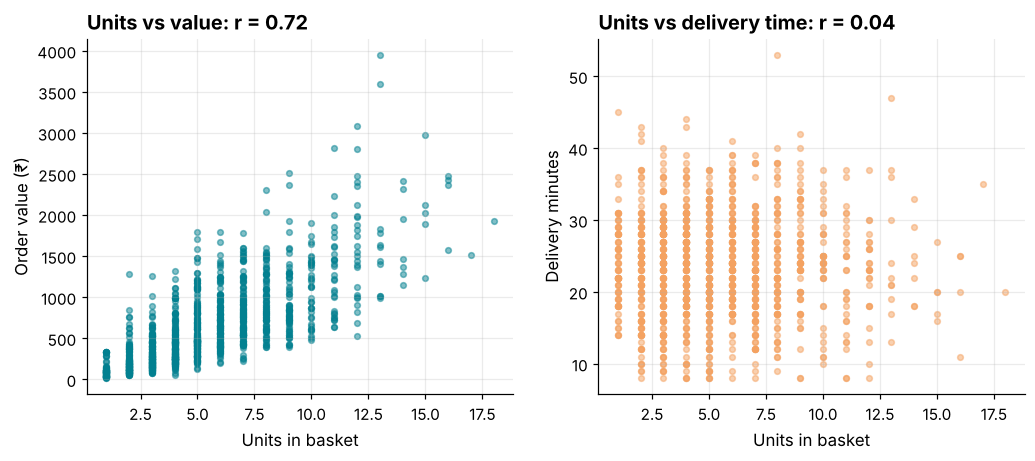
How it works: A scatter plot plots each order as a point. A tilted band of points means a strong relationship; a shapeless cloud means a weak one. We sample 1,200 rows and use transparency so overlapping points do not hide the pattern. A scatter plot also shows things r cannot: curves, clusters and outliers.
Reading the result: The left panel climbs steadily; the right panel is a flat cloud. The second plot is the picture of r = 0.04.
Example 5: A correlation matrix and heatmap
Question: How do all the numeric columns relate at once?
cols = ["units", "lines", "value", "delivery_minutes", "discount_pct"]
cm = d[cols].corr()
print(cm.round(2))

fig, ax = plt.subplots(figsize=(6.2, 5))
im = ax.imshow(cm, cmap="RdBu_r", vmin=-1, vmax=1)
ax.set_xticks(range(len(cols)), cols, rotation=35, ha="right")
ax.set_yticks(range(len(cols)), cols)
for i in range(len(cols)):
    for j in range(len(cols)):
        ax.text(j, i, f"{cm.iloc[i, j]:.2f}", ha="center", va="center", fontsize=9, color="white" if abs(cm.iloc[i, j]) > 0.6 else "#264653")
fig.colorbar(im, ax=ax, shrink=0.8)
ax.set_title("Only the basket measures move together", loc="left")
ax.grid(False)
Output
                  units  lines  value  delivery_minutes  discount_pct
units              1.00   0.85   0.72              0.04         -0.01
lines              0.85   1.00   0.60              0.05         -0.01
value              0.72   0.60   1.00              0.02          0.01
delivery_minutes   0.04   0.05   0.02              1.00          0.01
discount_pct      -0.01  -0.01   0.01              0.01          1.00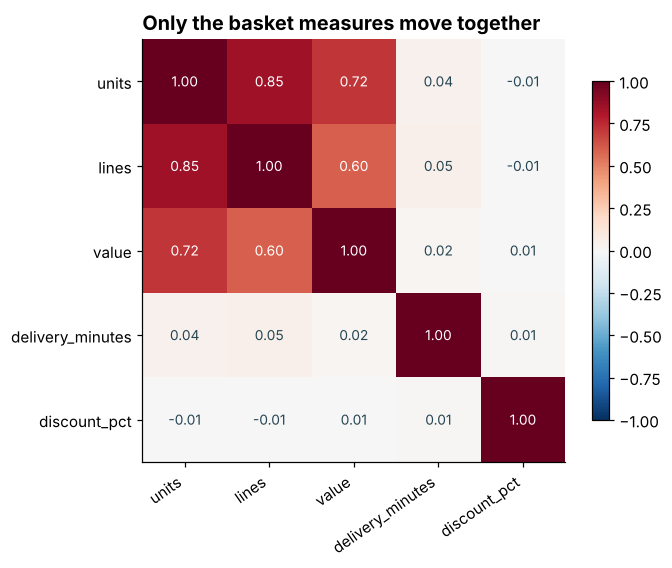
How it works: DataFrame.corr() returns every pairwise correlation. The diagonal is always 1 (a variable correlates perfectly with itself) and the matrix is symmetric. A diverging colour map centred on zero, with fixed limits of -1 and +1, makes the sign and strength readable at a glance.
Reading the result: The strongest off-diagonal pair is units and lines (r = 0.85). Delivery minutes and discount are nearly unrelated to everything else.
Example 6: Pearson versus Spearman
Question: What if the relationship is steady but not a straight line?
from scipy import stats

p = stats.pearsonr(d["units"], d["value"])
s = stats.spearmanr(d["units"], d["value"])
print("pearson :", round(p.statistic, 3))
print("spearman:", round(s.statistic, 3))
print("pandas spearman:", round(d["units"].corr(d["value"], method="spearman"), 3))

x = np.arange(1, 11)
y = np.exp(x)
print("exp curve  pearson:", round(np.corrcoef(x, y)[0, 1], 3), " spearman:", round(stats.spearmanr(x, y).statistic, 3))
Output
pearson : 0.715
spearman: 0.755
pandas spearman: 0.755
exp curve  pearson: 0.717  spearman: 1.0
How it works: Spearman correlation first converts each variable to ranks and then computes Pearson on the ranks. It captures any steadily increasing or decreasing (monotonic) relationship, even a curved one, and is far less sensitive to outliers. The exponential example is perfectly monotonic: Spearman is exactly 1 while Pearson understates it because the curve is not a straight line.
Reading the result: For basket data the two agree (Pearson 0.72, Spearman 0.76). For the exponential curve, Pearson is only 0.72 but Spearman is 1.00. When they disagree, look at the scatter plot.
Example 7: One outlier can move r
Question: How fragile is Pearson's r?
rng = np.random.default_rng(3)
a = rng.normal(0, 1, 30)
b = rng.normal(0, 1, 30)
print("without outlier: pearson", round(np.corrcoef(a, b)[0, 1], 2), " spearman", round(stats.spearmanr(a, b).statistic, 2))

a2, b2 = np.append(a, 8), np.append(b, 8)
print("with one outlier: pearson", round(np.corrcoef(a2, b2)[0, 1], 2), " spearman", round(stats.spearmanr(a2, b2).statistic, 2))
Output
without outlier: pearson 0.01  spearman 0.12
with one outlier: pearson 0.65  spearman 0.2
How it works: We start with two unrelated random columns, then add a single extreme point where both values are large. Pearson jumps because the far-away point has enormous leverage on the covariance, while Spearman, which only uses ranks, barely moves. Always check for outliers before trusting a Pearson r, especially on small samples.
Reading the result: The unrelated columns give r = 0.01; adding one point lifts it to 0.65, a "strong" correlation created by a single row. Spearman moves from 0.12 to 0.20.
Example 8: Significant is not the same as important
Question: Is a tiny correlation "real"?
res = stats.pearsonr(d["units"], d["delivery_minutes"])
print("n =", len(d))
print("r =", round(res.statistic, 3), " p-value =", f"{res.pvalue:.4f}")
print("variation explained:", f"{res.statistic ** 2:.2%}")

small = d.sample(100, random_state=1)
res2 = stats.pearsonr(small["units"], small["delivery_minutes"])
print("n = 100: r =", round(res2.statistic, 3), " p-value =", round(res2.pvalue, 3))
Output
n = 5391
r = 0.042  p-value = 0.0020
variation explained: 0.18%
n = 100: r = 0.093  p-value = 0.357
How it works: pearsonr returns r and a p-value for the null hypothesis that the true correlation is zero. With thousands of rows even a trivial r gets a small p-value, because the test detects any departure from zero. The p-value says the effect is probably not exactly zero; r-squared says whether it matters. In a sample of 100 the same r is no longer significant.
Reading the result: With 5391 orders, r = 0.042 is statistically significant (p = 0.0020), but it explains only 0.18% of the variation in delivery time. Do not reorganise operations over that. With 100 orders the p-value is 0.36.
Example 9: Customer-level correlation
Question: Do customers who order often also spend more per order?
cust = o[o["order_status"] == "Delivered"].groupby("customer_id").agg(orders=("order_id", "count"), total=("value", "sum"), avg_order=("value", "mean"))
cust["avg_order"] = cust["avg_order"].round(2)

print("customers:", len(cust))
print("orders vs total spend   :", round(cust["orders"].corr(cust["total"]), 3))
print("orders vs avg order size:", round(cust["orders"].corr(cust["avg_order"]), 3))
print("spearman orders vs avg  :", round(cust["orders"].corr(cust["avg_order"], method="spearman"), 3))
Output
customers: 584
orders vs total spend   : 0.991
orders vs avg order size: 0.001
spearman orders vs avg  : 0.037
How it works: We aggregate to one row per customer and correlate there. The result is partly built in: total spend is orders times average order, so it must correlate with the order count. The interesting relationship is orders versus average order size, which is a genuine behavioural question: do frequent shoppers buy smaller or larger baskets?
Reading the result: Frequency and total spend are strongly related (r = 0.99), partly by construction. Frequency and average basket size have r = 0.00, so a customer's order count says little about the size of the typical basket.
Example 10: Trends create spurious correlation
Question: Does a company's social-media following "drive" revenue?
monthly = (
    d.assign(month=d["order_date"].dt.to_period("M"))
    .groupby("month")
    .agg(revenue=("value", "sum"))
)

# An invented series with no link to orders: followers drift upward every month by chance
rng = np.random.default_rng(11)
monthly["followers"] = (2000 + 150 * np.arange(len(monthly)) + rng.normal(0, 200, len(monthly))).round()

print("months:", len(monthly))
print("levels      r =", round(monthly["revenue"].corr(monthly["followers"]), 3))

diffs = monthly.diff().dropna()
print("changes     r =", round(diffs["revenue"].corr(diffs["followers"]), 3))
Output
months: 18
levels      r = 0.967
changes     r = -0.253
How it works: Revenue climbs month after month, and the invented follower count also drifts upward, so in levels the two look closely related even though we made the second one up with no connection to orders. To test whether the month-to-month movements are related, we difference each series (diff subtracts the previous month) and correlate the changes. If a relationship survives differencing it is more convincing; if it vanishes, the original correlation was mostly a shared trend.
Reading the result: Across 18 months the levels correlate at r = 0.97, but the monthly changes correlate at only r = -0.25. A shared upward trend is not evidence that one drives the other.
Common mistakes
1. Interpreting correlation as causation. Ice-cream sales and drowning both rise in summer; the heat is the confounder.
2. Skipping the scatter plot, so curves, clusters and outliers go unnoticed.
3. Correlating two trending series without detrending or differencing.
4. Relying on Pearson with outliers or heavily skewed data when Spearman would be safer.
5. Treating a tiny but "significant" r as important when the sample is huge.
d["units"].corr(d["order_status"])Output
Traceback (most recent call last):
  File "example.py", line 1, in <module>
    d["units"].corr(d["order_status"])
    ~~~~~~~~~~~~~~~^^^^^^^^^^^^^^^^^^^
  File "example.py", line 2771, in corr
    other_values = other.to_numpy(dtype=float, na_value=np.nan, copy=False)
  File "example.py", line 664, in to_numpy
    return self.array.to_numpy(dtype, copy=copy, na_value=na_value, **kwargs)
           ~~~~~~~~~~~~~~~~~~~^^^^^^^^^^^^^^^^^^^^^^^^^^^^^^^^^^^^^^^^^^^^^^^
  File "example.py", line 589, in to_numpy
    result = np.asarray(result, dtype=dtype)
ValueError: could not convert string to float: 'Delivered'Practice questions
Practice 1 (Easy): Correlate price and cost
In products.csv, compute the correlation between unit_price and cost_price.
Show solution
products = pd.read_csv("products.csv")
r_pc = products["unit_price"].corr(products["cost_price"])
print(round(r_pc, 4))
Output
0.9884r = 0.988: cost is almost a fixed fraction of price, so the two move together nearly perfectly. That is a sign that one column adds little information if you already have the other.
Practice 2 (Medium): Does shelf life relate to price?
Compute both Pearson and Spearman correlations between shelf_life_days and unit_price, and say which you would trust more and why.
Show solution
pe = products["shelf_life_days"].corr(products["unit_price"])
sp = products["shelf_life_days"].corr(products["unit_price"], method="spearman")
print(round(pe, 3), round(sp, 3))
print(products["shelf_life_days"].describe().round(1).to_dict())
Output
0.258 0.495
{'count': 50.0, 'mean': 312.7, 'std': 309.4, 'min': 3.0, '25%': 30.0, '50%': 190.0, '75%': 638.8, 'max': 1000.0}
Pearson is 0.26 and Spearman 0.49. Shelf life ranges from a few days to many months, so it is heavily skewed; the rank-based Spearman is the safer summary. Both are based on only 50 products, so be cautious.
Practice 3 (Hard): Correlation within a group
Does the units-versus-value correlation differ between cities? Compute it per city and show the lowest and highest.
Show solution
stores = pd.read_csv("stores.csv")
dc = d.merge(stores[["store_id", "city"]], on="store_id")
per_city = dc.groupby("city").apply(lambda g: g["units"].corr(g["value"]), include_groups=False).sort_values()
print(per_city.round(3))
print(round(per_city.max() - per_city.min(), 3))
Output
city
Ahmedabad    0.647
Pune         0.705
Bengaluru    0.713
Chennai      0.716
Delhi        0.720
Mumbai       0.722
Hyderabad    0.724
Kolkata      0.779
dtype: float64
0.132
The correlation ranges from 0.65 (Ahmedabad) to 0.78 (Kolkata), a spread of 0.13: the basket relationship is fairly consistent across cities, with Ahmedabad the weakest. groupby().apply runs a function on each group's sub-table.
Key takeaways
- Pearson's r runs from -1 to +1 and measures straight-line association; r-squared is the share of variation explained.
- Always look at a scatter plot, and use a heatmap to scan many pairs.
- Spearman uses ranks, so it handles curves and outliers better.
- With big samples, tiny correlations become "significant"; judge the size, not just the p-value.
- Correlation is not causation; look for confounders and shared trends, and difference time series before correlating them.
- Correlation is a starting point for questions, not a conclusion.
Frequently asked questions
Does correlation mean causation?
No. A correlation may be caused by A affecting B, B affecting A, a third variable affecting both, or coincidence. Establishing cause needs an experiment (such as an A/B test) or careful causal reasoning.
What is a "good" correlation?
There is no universal threshold. In physics, r = 0.9 may be disappointing; in human behaviour, r = 0.3 can be useful. Judge by what decision the relationship supports.
Pearson or Spearman?
Use Pearson for roughly linear relationships without extreme outliers. Use Spearman for curved-but-steady relationships, ranked data, skewed variables or when outliers are present.
Can I correlate categories like city or payment method?
Not with Pearson. Compare group means (or use a chi-square test, covered in the hypothesis testing lesson). Turning categories into numbers and correlating them is meaningless unless the categories have a natural order.
Why is the diagonal of a correlation matrix always 1?
Every variable is perfectly correlated with itself. Ignore the diagonal when reading the matrix.
What if two variables have a curved relationship?
r can be near zero even when a clear pattern exists (a U-shape, for example). That is why a scatter plot comes first: correlation measures *linear* association only.
Keep learning Python
One email a week with Python and analytics guides, new practice questions and cohort dates. No spam, unsubscribe anytime.
Ready to practise? Try the Python interview questions