All 57 lessons
Lesson 38 of 57 · Data Visualization
Choosing the Right Chart: Bar, Histogram, Scatter, Box and Heatmap
By Skillancy Editorial Team
Run the code in the free Python Compiler or on your own computer. Lessons that read files use the FreshBasket practice data: download the dataset (ZIP).
Knowing how to draw a chart is only half the skill. The other half is knowing which chart to draw. A pie chart of twelve categories, a line chart of unordered categories, or a dual-axis chart of unrelated measures each fail in the same way: the reader has to work to understand what you meant, and often reaches the wrong conclusion. The right chart makes the answer obvious at a glance.
A useful way to choose is to start from the question, not the data. Are you comparing categories (which city sells most)? Looking at a distribution (how long do deliveries usually take)? Finding a relationship between two numbers (do bigger baskets take longer)? Watching change over time (the previous lesson's line charts)? Seeing composition (how revenue splits by category)? Spotting patterns across two dimensions (weekday by slot)? Each question has a best-fit chart. This lesson draws all of them with FreshBasket data and explains the choices and the traps.
Worked examples
Example 1: The decision guide
Question: Which chart for which question?
guide = {
    "Compare categories": "horizontal bar, sorted",
    "Change over time": "line (or column for few periods)",
    "Distribution of one number": "histogram or box plot",
    "Relationship of two numbers": "scatter plot",
    "Parts of a whole (few parts)": "stacked bar, or pie with <= 4 slices",
    "Pattern across two categories": "heatmap",
    "Rank with long labels": "horizontal bar",
}
for question, chart in guide.items():
    print(f"{question:<32}{chart}")
print(len(guide))
Output
Compare categories              horizontal bar, sorted
Change over time                line (or column for few periods)
Distribution of one number      histogram or box plot
Relationship of two numbers     scatter plot
Parts of a whole (few parts)    stacked bar, or pie with <= 4 slices
Pattern across two categories   heatmap
Rank with long labels           horizontal bar
7
How it works: This is a lookup table, not a rulebook, but it covers most real cases. The most valuable habit is asking "what should the reader be able to see in two seconds?" before choosing. If the answer is a ranking, sort the bars. If it is a trend, use a line. If it is a shape, use a histogram.
Reading the result: The guide lists 7 common questions. Keep it by your keyboard until the choices become automatic.
Example 2: Sorted horizontal bars
Question: Which cities earn the most delivered revenue?
import pandas as pd
import numpy as np
import matplotlib.pyplot as plt
import skillancy_style

orders = pd.read_csv("orders.csv", parse_dates=["order_date"])
items = pd.read_csv("order_items.csv")
stores = pd.read_csv("stores.csv")
products = pd.read_csv("products.csv")

d = orders[orders["order_status"] == "Delivered"][["order_id", "store_id", "customer_id", "order_date"]]
lines = items.merge(d, on="order_id").merge(stores[["store_id", "city"]], on="store_id").merge(products[["product_id", "category"]], on="product_id")
lines["value"] = lines["quantity"] * lines["unit_price"]

city_rev = lines.groupby("city")["value"].sum().sort_values()

fig, ax = plt.subplots()
bars = ax.barh(city_rev.index, city_rev.values / 1e5, color="#028090")
ax.bar_label(bars, fmt="₹%.1f L", padding=3, fontsize=9)
ax.set_xlabel("Delivered revenue (₹ lakh)")
ax.set_title("Delhi and Bengaluru lead delivered revenue")
ax.set_xlim(right=city_rev.max() / 1e5 * 1.18)
ax.grid(axis="y", visible=False)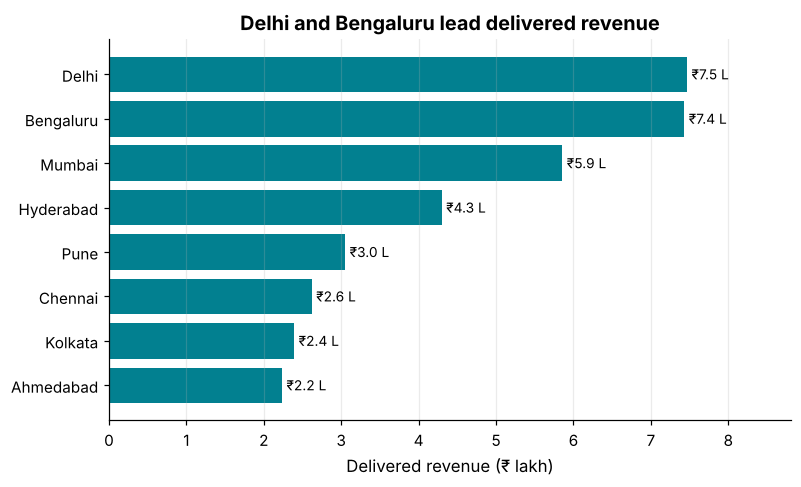
How it works: Category names are easier to read horizontally, and sorting turns a bar chart into a ranking. ax.bar_label writes the value at the end of each bar, so no gridlines or exact-axis reading is needed. Bars encode value by length, so the axis must start at zero.
Reading the result: Delhi leads with ₹7.5 lakh and Ahmedabad is last with ₹2.2 lakh. The sorted order lets you see the ranking without reading a single number.
Example 3: Grouped and stacked bars
Question: How does each city's revenue split across categories?
mix = lines.pivot_table(index="city", columns="category", values="value", aggfunc="sum", fill_value=0)
mix = mix.loc[mix.sum(axis=1).sort_values().index]
share = mix.div(mix.sum(axis=1), axis=0) * 100

fig, ax = plt.subplots(figsize=(9, 4.8))
left = np.zeros(len(share))
colors = ["#028090", "#F4A261", "#E76F51", "#264653", "#2A9D8F", "#8D99AE", "#E9C46A"]
for col, color in zip(share.columns, colors):
    ax.barh(share.index, share[col], left=left, label=col, color=color)
    left += share[col].values
ax.set_xlabel("Share of delivered revenue (%)")
ax.set_xlim(0, 100)
ax.set_title("Category mix is similar in every city")
ax.legend(ncol=4, loc="upper center", bbox_to_anchor=(0.5, -0.15), frameon=False, fontsize=8)
ax.grid(axis="y", visible=False)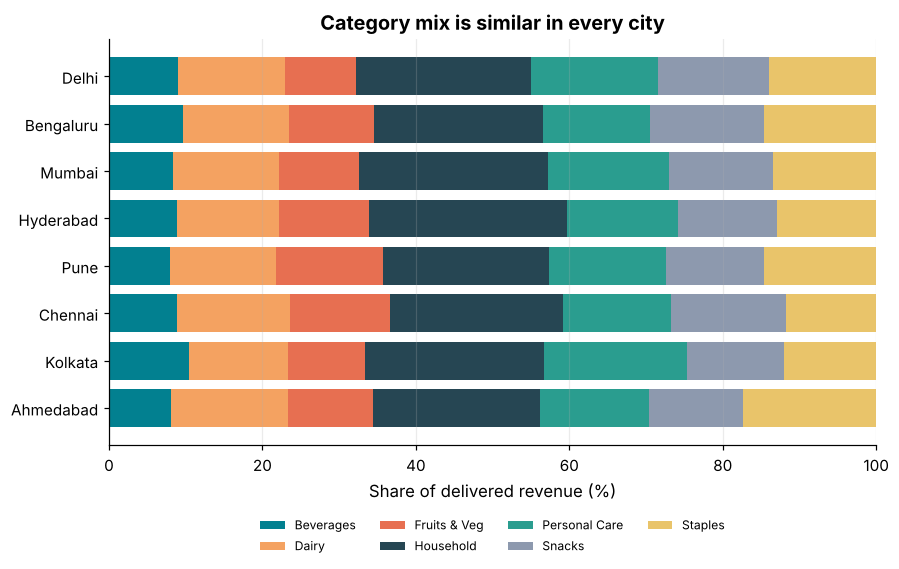
How it works: A stacked bar shows parts of a whole; making each bar sum to 100% (a "100% stacked bar") compares the mix across groups regardless of their size. We draw one barh per category, using left= to start each segment where the previous one ended. Stacked bars are good for the first segment (it shares a baseline) but hard for the others, so limit categories to about five to seven.
Reading the result: The largest category overall is Household at 23% of revenue. The rows each add to 100%.
Example 4: Histogram
Question: How long does a typical delivery take?
minutes = orders["delivery_minutes"].dropna()

fig, ax = plt.subplots()
ax.hist(minutes, bins=range(0, 61, 2), color="#028090", edgecolor="white")
ax.axvline(minutes.mean(), color="#E76F51", linestyle="--", linewidth=2)
ax.axvline(minutes.median(), color="#264653", linestyle=":", linewidth=2)
ax.text(34, ax.get_ylim()[1] * 0.85, f"mean {minutes.mean():.1f} (dashed)\nmedian {minutes.median():.1f} (dotted)", color="#264653")
ax.set_xlabel("Delivery time (minutes)")
ax.set_ylabel("Orders")
ax.set_title("Most deliveries arrive in 18 to 30 minutes")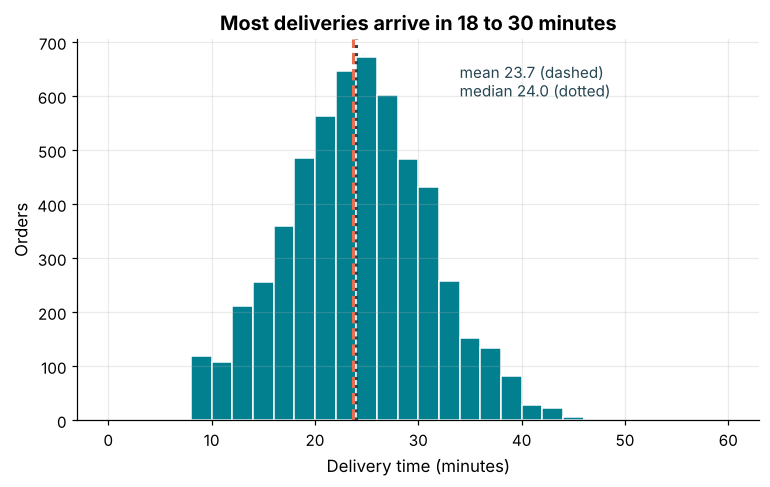
How it works: A histogram splits a numeric range into bins and counts how many values fall into each; the bar area shows frequency. The bin width changes the story: too wide hides the shape, too narrow shows noise. Reference lines for the mean and median show centre and skew (when they differ, the distribution is lopsided).
Reading the result: The mean is 23.7 and the median 24.0 minutes, almost the same, which means the distribution is close to symmetric. 66% of deliveries took between 18 and 30 minutes.
Example 5: Box plots
Question: Compare delivery-time spread across the delivery slots.
slots = ["Morning (6-10)", "Midday (10-2)", "Evening (4-8)", "Night (8-11)"]
present = slots
data = [orders.loc[orders["delivery_slot"] == s, "delivery_minutes"].dropna() for s in present]

fig, ax = plt.subplots()
bp = ax.boxplot(data, tick_labels=[s.split(" ")[0] for s in present], patch_artist=True, widths=0.55)
for patch in bp["boxes"]:
    patch.set_facecolor("#028090")
    patch.set_alpha(0.7)
ax.set_ylabel("Delivery time (minutes)")
ax.set_title("Delivery times are similar across slots, with a few slow outliers")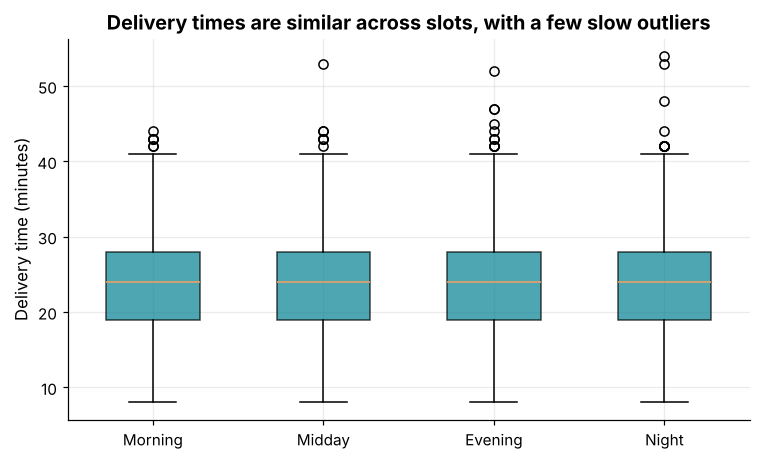
How it works: A box shows the median (line), the interquartile range (the box covers the middle 50% of values) and whiskers reaching to about 1.5 box-lengths; dots beyond are outliers. Box plots compress a whole distribution into a few numbers, which makes them ideal for comparing several groups side by side.
Reading the result: The medians are [24.0, 24.0, 24.0, 24.0] minutes for the four slots, so slot barely changes the typical delivery. The slowest single delivery was 54 minutes.
Example 6: Scatter plot
Question: Do bigger baskets take longer to deliver?
basket = items.assign(value=items["quantity"] * items["unit_price"]).groupby("order_id").agg(units=("quantity", "sum"), value=("value", "sum"))
sc = orders.merge(basket, on="order_id")
sc = sc[sc["delivery_minutes"].notna()]

fig, ax = plt.subplots()
ax.scatter(sc["units"], sc["delivery_minutes"], alpha=0.12, s=18, color="#028090")
slope, intercept = np.polyfit(sc["units"], sc["delivery_minutes"], 1)
xs = np.linspace(sc["units"].min(), sc["units"].max(), 50)
ax.plot(xs, slope * xs + intercept, color="#E76F51", linewidth=2.5)
ax.set_xlabel("Units in basket")
ax.set_ylabel("Delivery time (minutes)")
ax.set_title("Basket size has almost no effect on delivery time")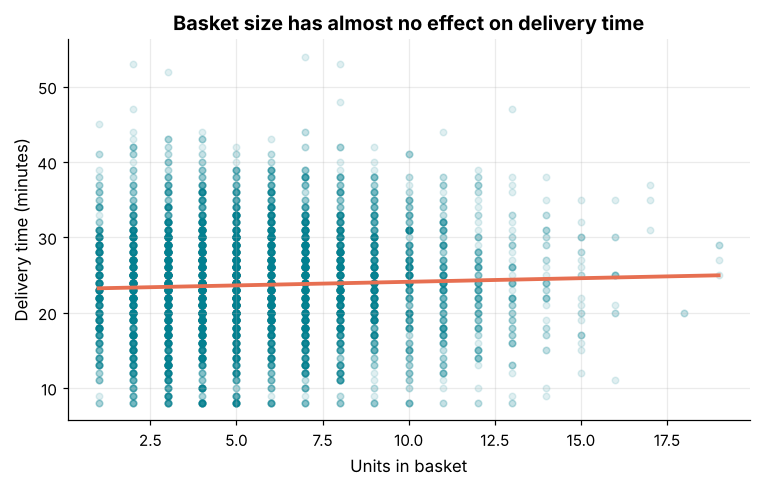
How it works: A scatter plot puts one dot per order, with one number on each axis. When points overlap heavily (overplotting) use transparency (alpha) or smaller dots so density shows through. A fitted line (np.polyfit(x, y, 1)) summarises the trend; its slope says how much y changes per unit of x.
Reading the result: The trend line rises by only 0.10 minutes per extra unit, and the correlation is 0.041. A flat cloud is an answer too: basket size is not what makes deliveries slow.
Example 7: Heatmap
Question: When are orders placed? Weekday against delivery slot.
days = ["Monday", "Tuesday", "Wednesday", "Thursday", "Friday", "Saturday", "Sunday"]
orders["weekday"] = orders["order_date"].dt.day_name()
heat = orders.pivot_table(index="weekday", columns="delivery_slot", values="order_id", aggfunc="count").reindex(days)[["Morning (6-10)", "Midday (10-2)", "Evening (4-8)", "Night (8-11)"]]

fig, ax = plt.subplots(figsize=(8, 4.5))
im = ax.imshow(heat.values, cmap="YlGnBu", aspect="auto")
ax.set_xticks(range(heat.shape[1]), [c.split(" ")[0] for c in heat.columns])
ax.set_yticks(range(heat.shape[0]), heat.index)
for i in range(heat.shape[0]):
    for j in range(heat.shape[1]):
        v = heat.values[i, j]
        ax.text(j, i, int(v), ha="center", va="center", color="white" if v > heat.values.max() * 0.6 else "#264653", fontsize=9)
ax.grid(False)
fig.colorbar(im, ax=ax, label="Orders")
ax.set_title("Sunday evenings are the busiest time")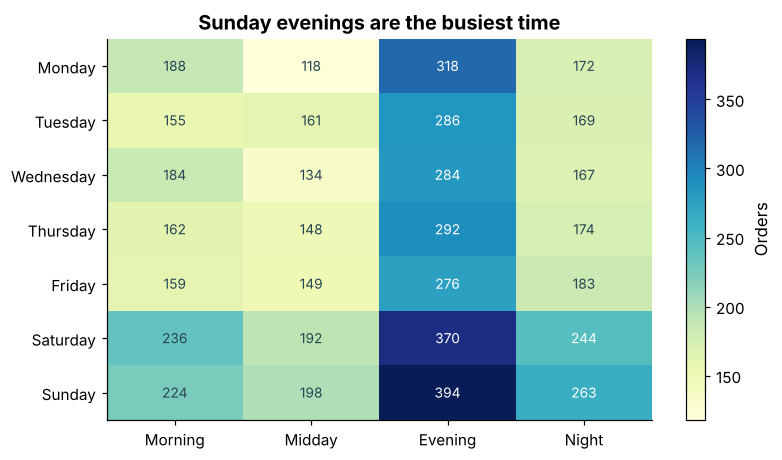
How it works: A heatmap shows a matrix as colours, with the numbers written in the cells for precision. Use a sequential palette (light to dark) for counts, and switch the text colour on dark cells so it stays readable. Heatmaps are excellent for finding hot spots in two-category tables like weekday × hour.
Reading the result: The busiest cell is Sunday evening with 394 orders, while the quietest has 118.
Example 8: Pie and donut charts
Question: When is a pie chart acceptable?
pay = orders["payment_method"].value_counts()

fig, ax = plt.subplots(figsize=(5.5, 4.5))
wedges, texts, autotexts = ax.pie(
    pay.values, labels=pay.index, autopct="%.0f%%", pctdistance=0.78, startangle=90, counterclock=False,
    colors=["#028090", "#F4A261", "#E76F51", "#264653"], wedgeprops=dict(width=0.45, edgecolor="white"),
    textprops=dict(fontsize=10),
)
for t in autotexts:
    t.set_color("white")
ax.set_title("UPI is the most-used payment method")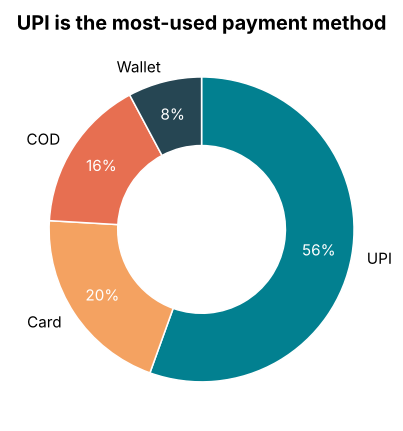
How it works: Pie charts are acceptable when there are few slices (four or fewer), the slices are parts of one whole, and the point is "one slice dominates". Humans compare angles poorly, so a sorted bar chart is almost always more accurate. A donut (a pie with a hole) reads slightly better and leaves room for a total in the middle.
Reading the result: UPI holds 56% of orders, then Card with 20%. If the slices were close in size, a bar chart would be a better choice.
Example 9: Small multiples
Question: Compare the same chart across groups without overloading one plot.
cities = list(city_rev.sort_values(ascending=False).index[:4])
fig, axes = plt.subplots(1, 4, figsize=(12, 3), sharex=True, sharey=True)
for ax, city in zip(axes, cities):
    s = orders.merge(stores[["store_id", "city"]], on="store_id")
    vals = s.loc[s["city"] == city, "delivery_minutes"].dropna()
    ax.hist(vals, bins=range(0, 61, 3), color="#028090", edgecolor="white")
    ax.set_title(city, fontsize=10)
    ax.axvline(vals.median(), color="#E76F51", linestyle="--")
axes[0].set_ylabel("Orders")
fig.supxlabel("Delivery time (minutes)")
fig.tight_layout()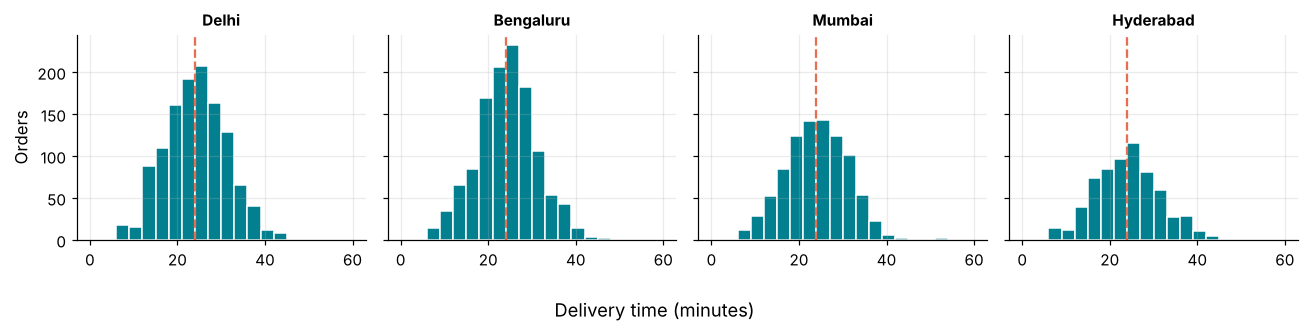
How it works: Instead of overlaying four histograms (which become unreadable), draw four small panels with the same axes (sharex, sharey). Because the scales match, the eye compares shapes instantly. This is the "small multiples" technique, one of the most effective ideas in data visualisation.
Reading the result: The four top-revenue cities, ['Delhi', 'Bengaluru', 'Mumbai', 'Hyderabad'], have medians of [24.0, 24.0, 24.0, 24.0] minutes, so service quality is consistent.
Example 10: Chart crimes to avoid
Question: How do misleading charts mislead?
vals = {"Plan A": 96, "Plan B": 100}
fig, axes = plt.subplots(1, 2, figsize=(10, 3.6))

axes[0].bar(vals.keys(), vals.values(), color="#E76F51")
axes[0].set_ylim(94, 101)
axes[0].set_title("Misleading: axis starts at 94")

axes[1].bar(vals.keys(), vals.values(), color="#028090")
axes[1].set_ylim(0, 110)
axes[1].set_title("Honest: axis starts at 0")
for ax in axes:
    ax.set_ylabel("Score")
fig.tight_layout()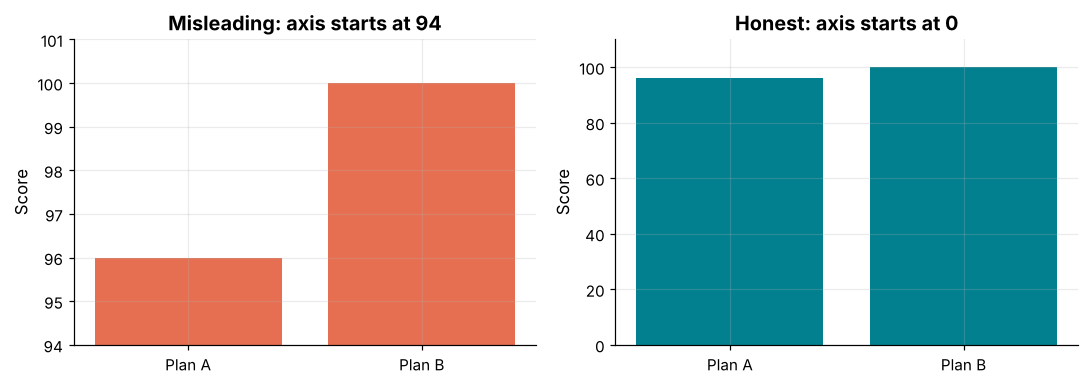
How it works: Both charts show exactly the same numbers. The truncated axis makes Plan B look many times better; the zero-based axis shows a 4% difference. Other classic crimes: 3-D effects that distort sizes, dual axes with arbitrary scales, pie charts with many slices, rainbow colour palettes for ordered data, and cherry-picked time windows. When in doubt, ask whether a reader could reach a wrong conclusion in two seconds.
Reading the result: The real difference between plans is 4.2%, but the left chart makes B look 3 times taller. Your charts are only as honest as their axes.
Common mistakes
1. Pie charts with many slices.
2. Bar charts that do not start at zero.
3. Unsorted bars when the reader wants a ranking.
4. Line charts for unordered categories, which implies a trend that is not there.
5. A rainbow palette for ordered data: use a single-hue sequential palette.
fig, ax = plt.subplots()
ax.bar(["A", "B"], [1, 2, 3])
Output
Traceback (most recent call last):
  File "example.py", line 2523, in bar
    x, height, width, y, linewidth, hatch = np.broadcast_arrays(
                                            ~~~~~~~~~~~~~~~~~~~^
        # Make args iterable too.
        ^^^^^^^^^^^^^^^^^^^^^^^^^
        np.atleast_1d(x), height, width, y, linewidth, hatch
        ^^^^^^^^^^^^^^^^^^^^^^^^^^^^^^^^^^^^^^^^^^^^^^^^^^^^
    )
    ^
  File "example.py", line 651, in broadcast_arrays
    shape = _broadcast_shape(*args)
  File "example.py", line 526, in _broadcast_shape
    b = np.broadcast(*args[:64])
ValueError: shape mismatch: objects cannot be broadcast to a single shape.  Mismatch is between arg 0 with shape (2,) and arg 1 with shape (3,).

The above exception was the direct cause of the following exception:

Traceback (most recent call last):
  File "example.py", line 2, in <module>
    ax.bar(["A", "B"], [1, 2, 3])
    ~~~~~~^^^^^^^^^^^^^^^^^^^^^^^
  File "example.py", line 1531, in inner
    return func(
        ax,
        *map(cbook.sanitize_sequence, args),
        **{k: cbook.sanitize_sequence(v) for k, v in kwargs.items()})
  File "example.py", line 2540, in bar
    raise ValueError(error_message) from e
ValueError: shape mismatch: objects cannot be broadcast to a single shape. Mismatch is between 'x' with shape (2,) and 'height' with shape (3,).Practice questions
Practice 1 (Easy): Sorted bar of orders by store
Draw a horizontal bar chart of order counts per store id, sorted, with value labels.
Show solution
counts = orders["store_id"].value_counts().sort_values()
fig, ax = plt.subplots()
bars = ax.barh(counts.index, counts.values, color="#028090")
ax.bar_label(bars, padding=3, fontsize=9)
ax.set_xlabel("Orders")
ax.set_title("Orders by store")
ax.grid(axis="y", visible=False)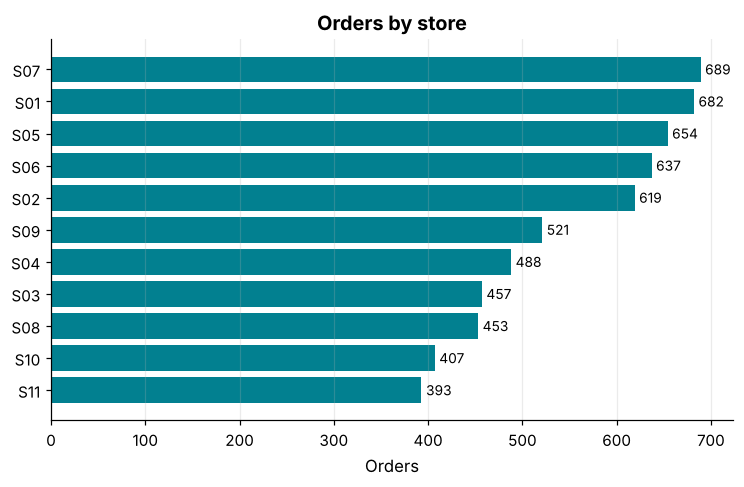
value_counts().sort_values() gives the order ready for plotting. The busiest store is S07 with 689 orders.
Practice 2 (Medium): Discount versus delivery time
Compare delivery time across discount levels with a box plot.
Show solution
levels = sorted(orders["discount_pct"].unique())
data = [orders.loc[orders["discount_pct"] == lv, "delivery_minutes"].dropna() for lv in levels]
fig, ax = plt.subplots()
ax.boxplot(data, tick_labels=[f"{lv}%" for lv in levels])
ax.set_xlabel("Discount")
ax.set_ylabel("Delivery time (minutes)")
ax.set_title("Discounts do not change delivery time")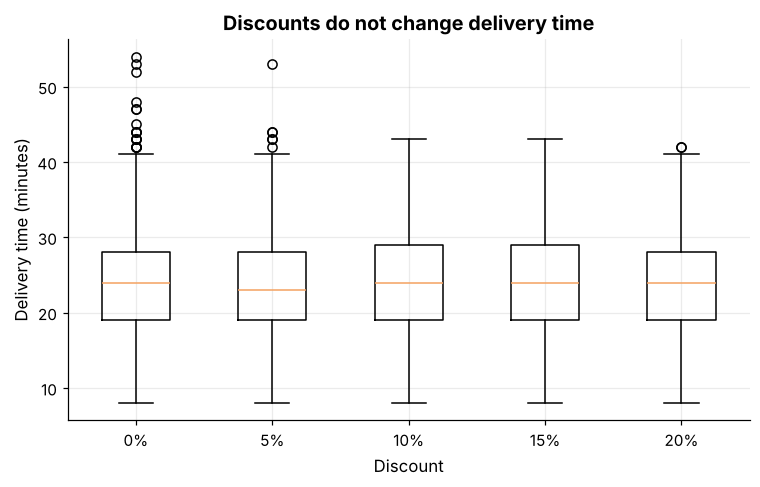
The medians range from 23 to 24 minutes, so no discount level slows deliveries.
Practice 3 (Hard): Share of revenue by quarter and category
Make a 100% stacked column chart of category share of revenue for each quarter.
Show solution
lines["quarter"] = lines["order_date"].dt.to_period("Q").astype(str)
q = lines.pivot_table(index="quarter", columns="category", values="value", aggfunc="sum", fill_value=0)
qs = q.div(q.sum(axis=1), axis=0) * 100

fig, ax = plt.subplots(figsize=(9, 4.5))
bottom = np.zeros(len(qs))
for col, color in zip(qs.columns, ["#028090", "#F4A261", "#E76F51", "#264653", "#2A9D8F", "#8D99AE", "#E9C46A"]):
    ax.bar(qs.index, qs[col], bottom=bottom, label=col, color=color)
    bottom += qs[col].values
ax.set_ylabel("Share of revenue (%)")
ax.set_title("Category mix is stable quarter to quarter")
ax.legend(ncol=4, loc="upper center", bbox_to_anchor=(0.5, -0.1), frameon=False, fontsize=8)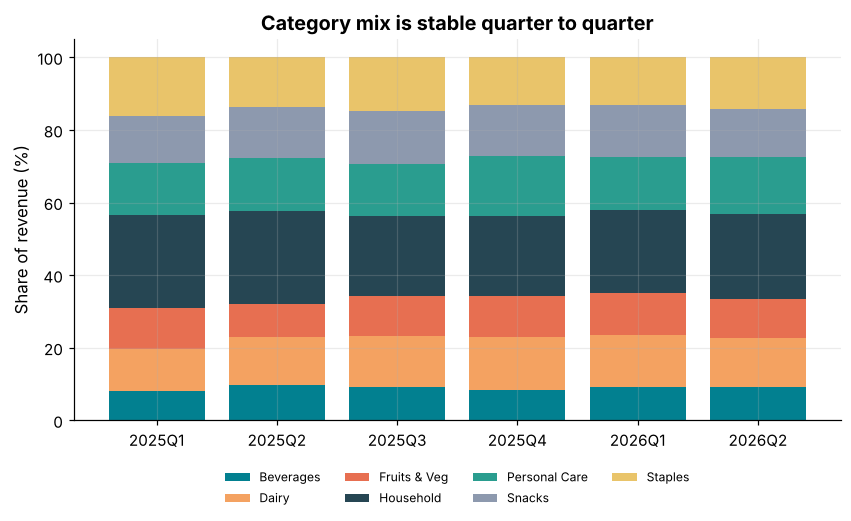
Converting each quarter to shares isolates the mix from total growth. There are 6 quarters and 7 categories.
Key takeaways
- Start from the question: compare, change, distribute, relate, compose, or find patterns.
- Sorted horizontal bars for rankings; start bars at zero.
- Histograms and box plots show distributions; compare groups with boxes or small multiples.
- Scatter plots show relationships; use transparency and a trend line.
- Heatmaps reveal patterns across two categories; use sequential colour.
- Use pies sparingly; avoid truncated axes, 3-D effects and rainbow palettes.
- A chart is honest only if a reader cannot reach a wrong conclusion in two seconds.
Frequently asked questions
How do I choose between a bar chart and a line chart?
Use bars for comparing separate categories (and sometimes for a few time periods), and lines for continuous change over time where the slope matters.
How many bins should a histogram have?
There is no perfect number. Try a few; rules of thumb such as bins="auto" or the Freedman-Diaconis rule give sensible defaults. Choose the width that shows the shape without noise.
When are box plots better than histograms?
When you compare several groups, since boxes stack side by side compactly. Histograms are better for understanding the detailed shape of a single distribution.
What colour palette should I use?
A single-hue sequential palette for ordered values, a diverging palette (two hues meeting at a neutral midpoint) for values above and below a centre, and a small set of distinct hues for categories.
Are pie charts always bad?
Not always, but they are rarely the best choice. They work for two to four slices with an obvious dominant slice. Otherwise use a sorted bar chart.
How do I deal with overplotting in scatter plots?
Use transparency, smaller markers, a 2-D histogram (hexbin) or a sample of the data.
Keep learning Python
One email a week with Python and analytics guides, new practice questions and cohort dates. No spam, unsubscribe anytime.
Ready to practise? Try the Python interview questions