All 57 lessons
Lesson 46 of 57 · Statistics and Exploratory Analysis
Customer Segmentation with RFM Analysis and K-Means
By Skillancy Editorial Team
Run the code in the free Python Compiler or on your own computer. Lessons that read files use the FreshBasket practice data: download the dataset (ZIP).
Not every customer is equally valuable, and not every customer needs the same message. Someone who ordered yesterday and orders weekly needs a loyalty reward; someone who ordered three times last year and then vanished needs a win-back offer; someone who placed one small order needs a nudge to come back. Customer segmentation groups customers so that each group can be treated differently.
The most widely used technique in retail and e-commerce is RFM analysis: score each customer on Recency (how recently did they buy?), Frequency (how often?) and Monetary value (how much in total?). It needs nothing more than an orders table, uses only pandas, and produces segments that business teams understand immediately ("Champions", "At risk", "Hibernating"). In this lesson we build RFM from FreshBasket orders, score customers with quantiles, name the segments, check how concentrated revenue is, and finally compare the hand-built segments with a machine-learning alternative, K-Means clustering.
This is a complete mini-project: it brings together groupby, merge, qcut, plotting and a first taste of scikit-learn.
Worked examples
Example 1: One row per customer
Question: What do R, F and M look like for each customer?
import pandas as pd
import numpy as np

orders = pd.read_csv("orders.csv", parse_dates=["order_date"])
items = pd.read_csv("order_items.csv")
customers = pd.read_csv("customers.csv", parse_dates=["signup_date"])

value = (items["quantity"] * items["unit_price"]).groupby(items["order_id"]).sum().rename("value")
d = orders.merge(value, on="order_id")
d = d[d["order_status"] == "Delivered"]

snapshot = d["order_date"].max() + pd.Timedelta(days=1)
rfm = d.groupby("customer_id").agg(
    recency=("order_date", lambda s: (snapshot - s.max()).days),
    frequency=("order_id", "count"),
    monetary=("value", "sum"),
)
print("snapshot:", snapshot.date())
print(rfm.describe().round(1).loc[["count", "min", "50%", "max"]])
Output
snapshot: 2026-07-01
       recency  frequency  monetary
count    584.0      584.0     584.0
min        1.0        1.0      65.0
50%       31.0        6.0    3678.0
max      372.0      211.0  132681.0
How it works: We keep delivered orders only, because cancelled or returned orders are not real purchases. Recency needs a reference date: the snapshot is the day after the last order in the data, so recency is "days since the customer's last order". Frequency is the number of orders and monetary the total value. Always make the snapshot date explicit; using today's date would make recency grow every time you rerun the analysis.
Reading the result: 584 customers have at least one delivered order. The median customer last ordered 31 days before the snapshot, placed 6 orders and spent ₹3678 in total.
Example 2: Look at the distributions first
Question: Is each measure symmetric or skewed?
for col in rfm:
    s = rfm[col]
    print(f"{col:<10} mean {s.mean():8.1f}  median {s.median():8.1f}  max {s.max():9.1f}  skew {s.skew():5.2f}")

print("customers with one order:", (rfm["frequency"] == 1).sum())
Output
recency    mean     55.4  median     31.0  max     372.0  skew  1.89
frequency  mean      9.2  median      6.0  max     211.0  skew  7.79
monetary   mean   6051.1  median   3678.0  max  132681.0  skew  7.32
customers with one order: 32
How it works: Frequency and monetary value are right-skewed (a few heavy buyers), and frequency has many ties at small values (lots of customers with exactly 1, 2 or 3 orders). This matters for scoring: quantile cut-offs fall on repeated values, which breaks naive qcut. Checking the shape first tells us what to expect.
Reading the result: The mean frequency is 9.2 against a median of 6, and 32 customers ordered exactly once. Monetary skew is 7.32, and the busiest customer placed 211 orders, far beyond the typical 6: an account worth investigating (possibly a business buyer) before it distorts the segments.
Example 3: Quintile scores with qcut
Question: How do we turn each measure into a 1-to-5 score?
rfm["R"] = pd.qcut(rfm["recency"], 5, labels=[5, 4, 3, 2, 1]).astype(int)       # recent = high score
rfm["F"] = pd.qcut(rfm["frequency"].rank(method="first"), 5, labels=[1, 2, 3, 4, 5]).astype(int)
rfm["M"] = pd.qcut(rfm["monetary"], 5, labels=[1, 2, 3, 4, 5]).astype(int)

print(rfm[["R", "F", "M"]].describe().round(2).loc[["mean", "min", "max"]])
print(rfm["F"].value_counts().sort_index().to_dict())
Output
         R    F    M
mean  3.04  3.0  3.0
min   1.00  1.0  1.0
max   5.00  5.0  5.0
{1: 117, 2: 117, 3: 116, 4: 117, 5: 117}
How it works: pd.qcut(x, 5) splits customers into five equal-sized groups by value. Recency is reversed because fewer days since the last order is better, so the labels run 5 to 1. Frequency has many ties, so plain qcut would put every customer with the same order count in the same bin and give uneven groups (and on more skewed data it can fail with an error about duplicate bin edges). We rank the values first (method="first" breaks ties by order of appearance) to get five groups of equal size. A score of 5 always means "best".
Reading the result: Each score runs from 1 to 5. Frequency groups have 116 to 117 customers, equal in size thanks to ranking. The side effect is that customers with the same order count can land in different frequency scores, a compromise to keep in mind.
Example 4: A combined score and segment names
Question: How do we label customers in a way marketing understands?
rfm["RFM_score"] = rfm["R"] + rfm["F"] + rfm["M"]

def segment(r):
    if r["R"] >= 4 and r["F"] >= 4:
        return "Champions"
    if r["R"] >= 3 and r["F"] >= 3:
        return "Loyal"
    if r["R"] >= 4 and r["F"] <= 2:
        return "New / Promising"
    if r["R"] <= 2 and r["F"] >= 3:
        return "At risk"
    if r["R"] <= 2 and r["F"] <= 2:
        return "Hibernating"
    return "Needs attention"

rfm["segment"] = rfm.apply(segment, axis=1)
print(rfm["segment"].value_counts())
Output
segment
Champions          146
Hibernating        146
Loyal              117
At risk             87
New / Promising     52
Needs attention     36
Name: count, dtype: int64
How it works: The rules map score ranges to segment names. Order matters: the first matching rule wins, so the most specific rules come first. There is no universal definition of the segments; the thresholds are business choices you can tune. What matters is that each segment implies a different action.
Reading the result: The largest segment is Champions with 146 customers; there are 6 segments, and every one of the 584 customers lands in exactly one (584).
Example 5: Profile each segment
Question: Do the segments really behave differently?
profile = rfm.groupby("segment").agg(
    customers=("recency", "size"),
    avg_recency=("recency", "mean"),
    avg_orders=("frequency", "mean"),
    avg_spend=("monetary", "mean"),
    revenue=("monetary", "sum"),
)
profile["revenue_share"] = profile["revenue"] / profile["revenue"].sum()
print(profile.sort_values("revenue", ascending=False).round(2))
Output
                 customers  avg_recency  avg_orders  avg_spend    revenue  revenue_share
segment
Champions              146         8.27       21.00   13848.15  2021830.0           0.57
Loyal                  117        24.24        8.56    5632.22   658970.0           0.19
At risk                 87        83.61        7.44    4788.02   416558.0           0.12
Hibernating            146       131.77        2.72    1757.78   256636.0           0.07
New / Promising         52        12.15        3.19    2003.90   104203.0           0.03
Needs attention         36        32.03        3.17    2101.03    75637.0           0.02
How it works: A segmentation is only useful if the groups differ on the things you care about. Averaging R, F and M per segment is the sanity check, and adding the revenue share shows each segment's importance to the business.
Reading the result: Champions contributes the largest share of revenue (57.2%). Champions average 21.0 orders each, against 2.7 for Hibernating customers.
Example 6: Visualise the segments
Question: How do customers and revenue split across segments?
import matplotlib.pyplot as plt
import skillancy_style

order = profile.sort_values("revenue", ascending=True).index
fig, axes = plt.subplots(1, 2, figsize=(11, 4.2))
axes[0].barh(order, profile.loc[order, "customers"], color="#8D99AE")
axes[0].set_title("Customers by segment", loc="left")
axes[0].set_xlabel("Customers")
axes[1].barh(order, profile.loc[order, "revenue"] / 1e5, color="#028090")
axes[1].set_title("Revenue by segment (₹ lakh)", loc="left")
axes[1].set_xlabel("Revenue (₹ lakh)")
for ax in axes:
    ax.grid(axis="y", visible=False)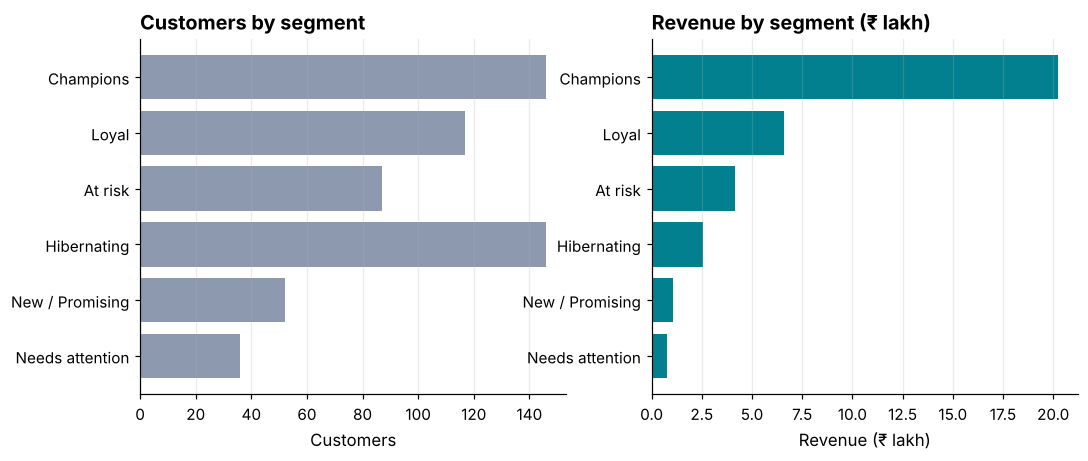
How it works: Putting customer count and revenue next to each other, in the same order, shows which segments punch above their weight. A segment with a small bar on the left and a big bar on the right is an outsized contributor.
Reading the result: Champions has the most customers (146) and Champions the most revenue (₹20.2 lakh), so the same segment leads both charts.
Example 7: Revenue concentration (the Pareto check)
Question: Do the top 20% of customers generate 80% of revenue?
ranked = rfm["monetary"].sort_values(ascending=False)
cum_share = ranked.cumsum() / ranked.sum()
top20 = int(len(ranked) * 0.2)

print("top 20% of customers:", top20)
print("their share of revenue:", round(cum_share.iloc[top20 - 1], 3))
print("top 10% share:", round(cum_share.iloc[int(len(ranked) * 0.1) - 1], 3))
print("bottom 50% share:", round(1 - cum_share.iloc[int(len(ranked) * 0.5) - 1], 3))
Output
top 20% of customers: 116
their share of revenue: 0.586
top 10% share: 0.431
bottom 50% share: 0.164
How it works: Sort customers by spend, take the cumulative sum, and divide by the total to get the running share of revenue. Reading it at 10%, 20% and 50% of customers tells you how concentrated revenue is. The "80/20 rule" is a folk heuristic, and your data may not follow it.
Reading the result: The top 20% of customers (116) generate 58.6% of revenue, and the bottom half just 16.4%. Revenue here is concentrated, though not as extremely as 80/20.
Example 8: Customers who never ordered
Question: Who is missing from the RFM table?
missing = customers[~customers["customer_id"].isin(rfm.index)]
print("customers in master list:", len(customers))
print("in RFM table            :", len(rfm))
print("missing                 :", len(missing))
print(missing["acquisition_channel"].value_counts().to_dict())
Output
customers in master list: 600
in RFM table            : 584
missing                 : 16
{'Referral': 6, 'App Store': 6, 'Instagram': 2, 'Offline Campaign': 1, 'Google Ads': 1}
How it works: RFM only scores customers who have bought. Customers who signed up but never had a delivered order, or whose only orders were cancelled, appear in the master list but not in the RFM table. They are a segment of their own ("never converted") and deserve a separate activation campaign. Always reconcile row counts between the table you scored and the full customer list.
Reading the result: 16 of 600 customers have no delivered orders. Their acquisition channels, most common first, are Referral (6), App Store (6), Instagram (2), Offline Campaign (1), Google Ads (1).
Example 9: K-Means clustering
Question: What segments does an algorithm find if we do not give it rules?
from sklearn.cluster import KMeans
from sklearn.preprocessing import StandardScaler
from sklearn.metrics import silhouette_score

X = np.log1p(rfm[["recency", "frequency", "monetary"]])
Xs = StandardScaler().fit_transform(X)

sil = {}
for k in (2, 3, 4, 5):
    km = KMeans(n_clusters=k, n_init=10, random_state=42).fit(Xs)
    sil[k] = silhouette_score(Xs, km.labels_)
    print(k, "clusters: silhouette =", round(sil[k], 3))

best = KMeans(n_clusters=4, n_init=10, random_state=42).fit(Xs)
rfm["cluster"] = best.labels_
cprofile = rfm.groupby("cluster")[["recency", "frequency", "monetary"]].mean().round(1).assign(n=rfm["cluster"].value_counts().sort_index())
print(cprofile)
Output
2 clusters: silhouette = 0.394
3 clusters: silhouette = 0.347
4 clusters: silhouette = 0.341
5 clusters: silhouette = 0.347
         recency  frequency  monetary    n
cluster
0           54.7        7.1    4783.9  194
1          124.5        2.6    1426.2  156
2           10.3       30.5   20453.1   90
3            9.6        6.0    3767.2  144
How it works: K-Means places k centres in feature space and assigns each customer to the nearest, adjusting until stable. We first apply a log transform (to reduce skew) and standardise the features (so that recency in days and monetary in rupees count equally). The silhouette score ranges from -1 to +1 and measures how well separated the clusters are; higher is better. Unlike RFM, the algorithm discovers its own groups, but you must interpret them afterwards by profiling the averages.
Reading the result: The silhouette scores range only from 0.34 to 0.39, which is modest: FreshBasket customers form a continuum rather than neat islands, so the choice of k is a judgement call, not a certainty. In the four-cluster profile, cluster 2 is a small group of heavy buyers (90 customers averaging 30 orders), while cluster 1 holds 156 light, lapsed customers who last ordered about 124 days ago.
Example 10: Compare RFM segments with clusters
Question: Do the two approaches agree?
agreement = pd.crosstab(rfm["segment"], rfm["cluster"])
print(agreement)

from sklearn.metrics import adjusted_rand_score
codes = rfm["segment"].astype("category").cat.codes
print("adjusted Rand index:", round(adjusted_rand_score(codes, rfm["cluster"]), 3))
Output
cluster           0    1   2   3
segment
At risk          77   10   0   0
Champions        11    0  80  55
Hibernating      22  124   0   0
Loyal            69    0  10  38
Needs attention  15   17   0   4
New / Promising   0    5   0  47
adjusted Rand index: 0.362
How it works: A cross-tabulation shows which RFM segments fall into which cluster. The adjusted Rand index measures agreement between two groupings: 1 means identical, 0 means no better than chance. Different methods rarely produce identical groups, and that is fine. The value of RFM is that its names are explainable; the value of clustering is that it can use many more features.
Reading the result: The adjusted Rand index is 0.36, so the two segmentations only partly agree. Choose by usefulness: RFM when you need simple, explainable rules, clustering when you want to explore.
Common mistakes
1. Using today's date as the snapshot, making recency drift each time you rerun the code.
2. Including cancelled or returned orders in frequency and monetary value.
3. Forgetting that high recency days is bad, and scoring it in the wrong direction.
4. Running K-Means without scaling, so the feature with the largest numbers dominates.
5. Creating segments nobody acts on. Every segment should map to a different action.
pd.qcut(rfm["recency"], 5, labels=[5, 4, 3])Output
Traceback (most recent call last):
  File "example.py", line 1, in <module>
    pd.qcut(rfm["recency"], 5, labels=[5, 4, 3])
    ~~~~~~~^^^^^^^^^^^^^^^^^^^^^^^^^^^^^^^^^^^^^
  File "example.py", line 384, in qcut
    fac, bins = _bins_to_cuts(
                ~~~~~~~~~~~~~^
        x_idx,
        ^^^^^^
    ...<4 lines>...
        duplicates=duplicates,
        ^^^^^^^^^^^^^^^^^^^^^^
    )
    ^
  File "example.py", line 536, in _bins_to_cuts
    raise ValueError(
        "Bin labels must be one fewer than the number of bin edges"
    )
ValueError: Bin labels must be one fewer than the number of bin edgesPractice questions
Practice 1 (Easy): Top customers
List the five customers with the highest monetary value and their order counts.
Show solution
top5 = rfm.nlargest(5, "monetary")[["frequency", "monetary", "segment"]]
print(top5)
Output
             frequency  monetary    segment
customer_id
C0406              211  132681.0  Champions
C0532              179  117468.0  Champions
C0122              115   70221.0  Champions
C0584               89   56415.0  Champions
C0396               64   43683.0  Champions
nlargest sorts by a column and returns the top n rows. The best customer has spent ₹132,681 over 211 orders.
Practice 2 (Medium): Win-back list
Find "At risk" customers whose total spend is above the median, sorted by spend, and report how many there are.
Show solution
cut = rfm["monetary"].median()
winback = rfm[(rfm["segment"] == "At risk") & (rfm["monetary"] > cut)].sort_values("monetary", ascending=False)
print(len(winback), round(winback["monetary"].sum(), 0))
print(winback[["recency", "frequency", "monetary"]].head(3))
Output
58 341150.0
             recency  frequency  monetary
customer_id
C0540             44         15   11974.0
C0454             54         18   10572.0
C0341             62         12    9526.0
There are 58 such customers, together worth ₹341,150 of past revenue: a ready-made list for a targeted offer.
Practice 3 (Hard): Segment migration
Recompute RFM segments using only orders up to 31 March 2026 (snapshot 1 April 2026) and compare with today's segments for the customers in both tables.
Show solution
def build_rfm(df, snap):
    r = df.groupby("customer_id").agg(
        recency=("order_date", lambda s: (snap - s.max()).days),
        frequency=("order_id", "count"),
        monetary=("value", "sum"),
    )
    r["R"] = pd.qcut(r["recency"], 5, labels=[5, 4, 3, 2, 1]).astype(int)
    r["F"] = pd.qcut(r["frequency"].rank(method="first"), 5, labels=[1, 2, 3, 4, 5]).astype(int)
    r["M"] = pd.qcut(r["monetary"], 5, labels=[1, 2, 3, 4, 5]).astype(int)
    r["segment"] = r.apply(segment, axis=1)
    return r

old = build_rfm(d[d["order_date"] <= "2026-03-31"], pd.Timestamp("2026-04-01"))
both = old[["segment"]].join(rfm[["segment"]], lsuffix="_march", rsuffix="_now", how="inner")
moves = pd.crosstab(both["segment_march"], both["segment_now"])
print(len(both), int((both["segment_march"] == both["segment_now"]).sum()))
print(moves.loc["Champions"])
Output
567 227
segment_now
At risk            25
Champions          80
Hibernating         0
Loyal              29
Needs attention     0
New / Promising     0
Name: Champions, dtype: int64
567 customers appear in both tables, and 227 (40%) kept the same segment. Tracking migration shows whether campaigns move customers up or customers slip away.
Key takeaways
- RFM turns an orders table into three customer-level measures: recency, frequency, monetary.
- Fix a snapshot date, count only real (delivered) purchases and score with quantiles, reversing recency.
- Rank before
qcutwhen values have many ties. - Name segments with ordered rules and check that they differ on the metrics that matter.
- Measure revenue concentration and reconcile with the full customer list.
- K-Means needs scaling and a log transform for skewed features; compare it with RFM by usefulness, not by which is more sophisticated.
Frequently asked questions
How many segments should I use?
Enough that each has a different action, but few enough that teams remember them: usually 5 to 8. If two segments get the same treatment, merge them.
Quintiles or fixed thresholds?
Quintiles adapt to your data and always give balanced groups, but the meaning shifts as the business grows. Fixed thresholds (for example, "ordered within 30 days") are stable and easier to explain. Many teams use quintiles to explore and fixed rules in production.
How often should I refresh RFM?
Monthly is typical for e-commerce, weekly for fast-moving businesses. Store each month's segment so that you can analyse migration.
Is RFM better than K-Means?
Neither is better. RFM is transparent and quick; K-Means can use many features and find unexpected groups, but its clusters need interpreting and are less stable.
Should I add more features than R, F and M?
Often yes: category mix, discount usage, city, channel, delivery experience. Adding features moves you from RFM to general customer clustering.
How do I act on segments?
Champions: reward and ask for referrals. Loyal: upsell and subscriptions. New: onboarding offers. At risk: win-back campaigns. Hibernating: low-cost reactivation or exclude from spend.
Keep learning Python
One email a week with Python and analytics guides, new practice questions and cohort dates. No spam, unsubscribe anytime.
Ready to practise? Try the Python interview questions