
Semantic Layers and MCP: The Skill That Makes AI Analytics Agents Actually Work (Python Tutorial with Real Output, 2026)
By Skillancy Editorial Team · 14 November 2026 · 34 min read
Reviewed by Rishav Kumar, Principal Data Analyst, Walmart Global Tech
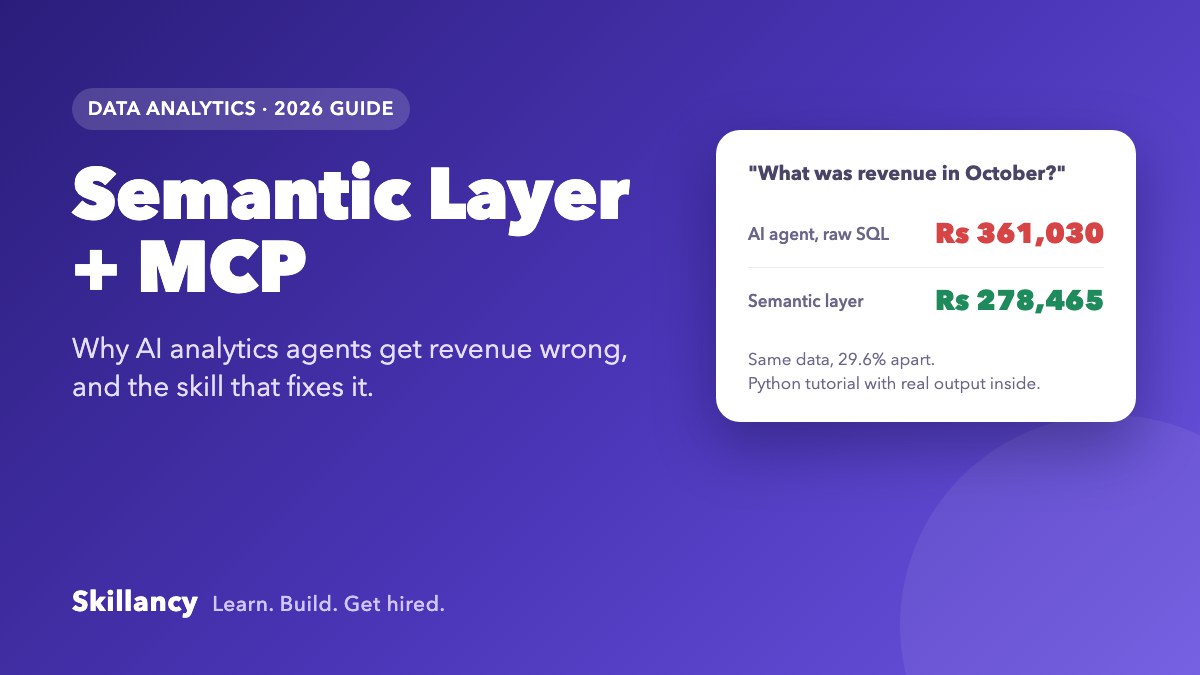
Most AI analytics agents fail in the same quiet way. They do not crash. They return a confident, well-formatted number that is wrong. This guide explains why that happens and how the fix works: a semantic layer for AI agents that holds your business definitions, exposed to agents through MCP (Model Context Protocol). You will learn what a semantic layer is, how it differs from text-to-SQL, what the 2026 tooling and benchmarks look like, and then build a working semantic-layer MCP server in Python. Every output in the tutorial was copied from a real run, including an experiment where one simple question produces four different "revenue" figures.
| Question | Short answer |
|---|---|
| What is a semantic layer? | A governed set of metric, dimension and join definitions that sits between data and every tool that reads it |
| What is MCP? | Model Context Protocol, an open standard for connecting AI apps to tools and data, now under the Linux Foundation |
| Why combine them? | MCP gives the agent a plug. The semantic layer gives it the meaning. Agents need both |
| What problem does it solve? | Metric drift: different queries, people or agents producing different numbers for the same question |
| Does it replace text-to-SQL? | No. Use the semantic layer for KPIs and reported numbers, text-to-SQL for ad hoc exploration |
| Popular tools in 2026 | dbt Semantic Layer (MetricFlow) with the dbt MCP server, Cube, Snowflake semantic views, Databricks metric views, Looker, AtScale |
| Is there a standard format? | Apache Ossie (incubating), formerly the Open Semantic Interchange (OSI), an Apache 2.0 YAML spec |
| What will you build here? | A semantic layer in about 60 lines of Python, served over MCP, tested with a client and real output |
| Who should learn this? | Data analysts, analytics engineers, BI developers and AI engineers who build data agents |
Learn it live: Want to build AI analytics agents on real business data, with a mentor reviewing your work? Explore our Data Analytics with Agentic AI program, or talk to a mentor for a plan that fits your background.
What is a semantic layer?
A semantic layer is a translation layer between raw tables and the people and tools that ask business questions. It stores, in one place and usually as code:
- Metrics: what a number means and how to calculate it. "Net revenue is the sum of completed order amounts after discount, excluding internal test accounts."
- Dimensions: the ways you can slice a metric, such as month, city, product category or customer segment.
- Entities and joins: how tables relate, so nobody has to rediscover that
orders.customer_idjoins tocustomers.customer_id. - Metadata: labels, descriptions, synonyms ("sales" and "turnover" both mean net revenue), owners and certification status.
Every consumer then asks for metrics by name. A dashboard, a spreadsheet, a Python notebook and an AI agent all get the same answer because they all go through the same definitions.
The idea is not new. BI tools have had semantic models for decades (Business Objects universes, SSAS cubes, LookML). What changed is who the consumer is. Until recently, a human analyst sat between the data and the decision, catching odd numbers. With AI agents answering questions directly, the semantic layer is often the only thing between a vague question and a wrong board slide.
Semantic layer, metrics layer, headless BI: are they the same?
Mostly, yes. You will see all three terms:
| Term | What people usually mean |
|---|---|
| Semantic layer | The broad idea: business meaning defined once, on top of data |
| Metrics layer | A semantic layer focused on metric definitions (the term dbt popularised) |
| Headless BI | A semantic layer that is separate from any one dashboard tool and serves many tools through APIs |
| Ontology / knowledge graph | A richer model of business entities and relationships. Apache Ossie now describes itself as a spec for both semantic layer and ontology |
For this guide, "semantic layer" covers all of them.
Why do AI analytics agents give wrong answers?
Ask an LLM agent "What was our revenue in October?" against a raw warehouse and it has to make several decisions you never see:
1. Which table holds revenue?
2. Gross or net of discounts?
3. Do refunded and cancelled orders count?
4. Should internal test accounts be excluded?
5. Is "October" based on order date, ship date or payment date? Which time zone?
Every one of those has a "right" answer inside your company, and none of them is written in the schema. The model fills the gaps with plausible guesses. The SQL runs, the number looks reasonable, and nobody notices until finance's figure disagrees.
We call this metric drift: the same question producing different numbers depending on who (or what) wrote the query. You will see it happen with real numbers in Step 2 of the tutorial below.
The common failure modes, in rough order of how often they hurt:
| Failure | What happens | Why a better model does not fully fix it |
|---|---|---|
| Wrong definition | Gross instead of net, refunds included | The definition lives in people's heads or a wiki, not the schema |
| Missing default filters | Test accounts, internal orders or deleted rows counted | Filters are tribal knowledge |
| Join fan-out | A one-to-many join double-counts revenue | The SQL is valid. The number is silently inflated |
| Wrong time logic | Calendar vs fiscal month, UTC vs IST | Depends on company policy |
| Inconsistent answers | Same question, different SQL on different days | LLMs are non-deterministic by design |
| Unsafe access | The agent can query any table, including salaries | Raw SQL access is a governance problem, not an accuracy one |
Better models help with SQL syntax and reasoning. They cannot know your company's definition of revenue unless something tells them. That something is the semantic layer.
What does MCP add, and what does it not?
MCP (Model Context Protocol) is the open standard that lets AI applications discover and call tools, read resources and use prompt templates through one interface. Anthropic introduced it in November 2024 and donated it to the Agentic AI Foundation under the Linux Foundation in December 2025. If you are new to it, start with our tutorial What Is MCP (Model Context Protocol)? Build Your First MCP Server in Python.
For analytics, MCP solves the plumbing problem. Write one semantic-layer MCP server, and any MCP-compatible host (a chat assistant, an AI IDE, a custom agent built with LangGraph) can use it without a custom integration.
What MCP does not do is supply meaning. An MCP server that exposes a single run_sql(query) tool is still text-to-SQL. It just has a nicer plug. All the failure modes in the table above still apply, and it adds a security problem: the model can now send any SQL it likes.
| Layer | Answers the question | Without it |
|---|---|---|
| MCP | "How does the agent reach the data tools?" | A custom connector for every app and tool pairing |
| Semantic layer | "What do our numbers mean, and how are they calculated?" | Every agent and person guesses definitions |
| Warehouse permissions | "What is this user allowed to see?" | Agents see more than they should |
The skill that makes agents work is designing the middle layer well and exposing it through the first.
How do a semantic layer and MCP fit together?
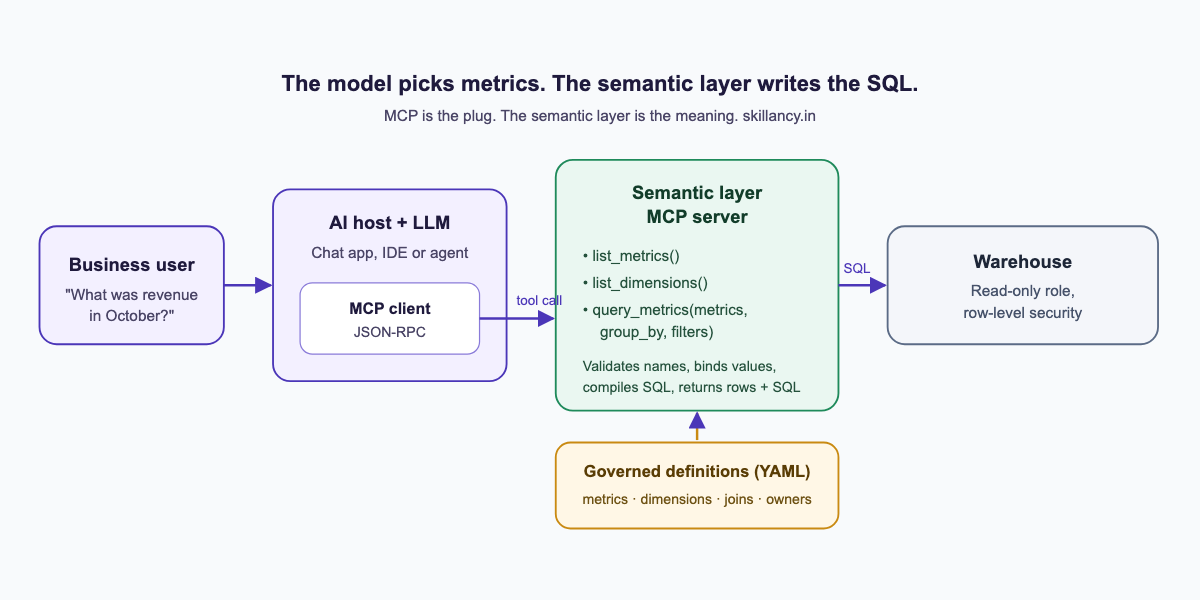
The flow for "What was revenue in October?":
1. Discover. The agent calls list_metrics and sees net_revenue, with its description and synonyms ("revenue", "sales").
2. Choose. The model maps the user's word "revenue" to net_revenue and "October" to a month filter. This is the only part the model decides.
3. Request. It calls query_metrics(metrics=["net_revenue"], month_from="2026-10", month_to="2026-10"). Structured arguments, no SQL.
4. Compile. The semantic layer validates every name, applies default filters (no test accounts), builds the join and binds the filter values safely.
5. Execute. The SQL runs on a read-only connection, with the warehouse's own row-level security still in force.
6. Return. The agent gets rows and the compiled SQL, so the answer can be audited.
The design principle is simple: the model chooses what to ask; the semantic layer decides how to calculate it. That splits the job along the line of what LLMs are good at (understanding language) and what they are bad at (remembering your company's policies exactly, every time).
Semantic layer vs text-to-SQL vs RAG over the schema
These are the three common ways to build a "talk to your data" agent. They are not mutually exclusive.
| Text-to-SQL | RAG over schema and docs | Semantic layer over MCP | |
|---|---|---|---|
| What the model produces | Raw SQL | Raw SQL, with retrieved context | Structured metric requests |
| Where definitions live | Nowhere (model guesses) | Retrieved docs, if they exist and are current | In version-controlled code, reviewed by owners |
| Same question, same answer? | Not guaranteed | Better, still not guaranteed | Yes, deterministic compilation |
| Handles new, unplanned questions | Very well | Well | Only what is modelled. Out-of-scope requests return an error |
| Join and fan-out safety | Model's responsibility | Model's responsibility | Encoded once in the model |
| Security surface | Any SQL the role allows | Any SQL the role allows | Only modelled metrics and dimensions |
| Setup effort | Low | Medium | Medium to high: someone must model the business |
| Best for | Exploration, one-off analysis | Exploration with documented data | KPIs, executive and board numbers, audited reporting, self-serve for non-analysts |
The honest summary: text-to-SQL is flexible and brittle; a semantic layer is reliable and bounded. Mature teams use both. The agent tries the semantic layer first and falls back to text-to-SQL, clearly labelled as exploratory, only when the question is outside the model. dbt Labs' 2026 benchmark reaches the same recommendation.
For a deeper look at the text-to-SQL path, read Agentic Analytics with Natural Language Queries: How AI Agents Turn Questions into SQL.
What do the benchmarks say?
The most cited public comparison is dbt Labs' Semantic Layer vs. Text-to-SQL: 2026 Benchmark Update (7 April 2026). It used the ACME Insurance dataset originally published by data.world (15 tables), 11 business questions, and 20 runs per question per model.
| Model | Text-to-SQL | Semantic Layer |
|---|---|---|
| Claude Sonnet 4.6 | 90.0% | 98.2% |
| GPT-5.3 Codex | 84.1% | 100.0% |
Final results after the project was modelled. Source: dbt Developer Blog, April 2026.
What the full post adds:
- Text-to-SQL has improved a lot. On the unmodelled project, text-to-SQL accuracy rose from 32.7% (GPT-4, 2023) to 64.5% (2026 models). It still produces plausible wrong answers.
- Inside its scope, the semantic layer was close to perfect. For questions the semantic layer could express, both 2026 models reached 100%.
- Outside its scope, it refuses instead of guessing. Questions needing too many entity hops scored 0% on the semantic layer until three extra dbt models were added. That is a feature: an error is better than a wrong number in a board deck.
- More reasoning effort did not fix text-to-SQL. Across model and effort settings, semantic-layer accuracy ranged from 87.2% to 100% on in-scope questions, while text-to-SQL ranged from 50% to 65%. Higher effort mostly added latency.
Caveats you should know: 11 questions on one dataset is a small sample; dbt Labs sells a semantic layer and wrote the benchmark; and the text-to-SQL setup loaded the full schema into context, which the authors note is not practical for large warehouses. An independent April 2026 arXiv paper (2604.25149) reached a compatible conclusion: semantic context, more than model choice, drove performance in its tests. Treat the exact percentages as indicative, and run your own evaluation on your own questions. Our guide How to Evaluate an LLM App: Build an Eval Harness in Python shows how.
Which semantic layer tools support MCP in 2026?
You do not need to build a semantic layer from scratch at work. You need to understand the concepts well enough to model a business in whichever tool your company uses. Here is where the main options stand as of November 2026.
| Tool | What it is | How agents reach it |
|---|---|---|
| dbt Semantic Layer (MetricFlow) | Metrics defined in YAML inside a dbt project. MetricFlow, the engine that compiles definitions to SQL, has been Apache 2.0 since October 2025 | The dbt MCP server exposes Semantic Layer tools (list metrics, dimensions, query metrics) to MCP hosts. dbt also runs a hosted remote option |
| Cube | Code-first, warehouse-agnostic semantic layer with REST, GraphQL and SQL APIs | An MCP server that lets agents search the model and run queries. Works across Snowflake, Databricks, BigQuery, Redshift, Postgres and more |
| Snowflake semantic views | Native semantic objects inside Snowflake. Standard SQL querying of semantic views reached general availability in March 2026 | Cortex Agents, and a Snowflake-managed MCP server for agents outside Snowflake |
| Databricks metric views | Native metric definitions in Unity Catalog | Genie, and an MCP route for external agents |
| Looker (LookML) | The long-standing BI semantic model | Google's MCP tooling for Looker and BigQuery |
| AtScale | Universal semantic layer with an enterprise and OLAP heritage | APIs and MCP integration |
| Apache Ossie (incubating) | Not a tool but a spec: a vendor-neutral YAML format for metrics, dimensions and relationships, so definitions can move between tools | Launched as the Open Semantic Interchange by Snowflake, Salesforce and dbt Labs in September 2025. Renamed and accepted into the Apache Incubator in mid-2026, with 50+ supporting organisations |
How to read this table as a learner:
- The concepts transfer. Metrics, dimensions, entities, joins, default filters, synonyms and owners appear in every tool. Learn them once.
- Native vs universal is the main architectural choice. Warehouse-native layers (Snowflake, Databricks) are simpler if you live in one platform. Universal layers (dbt, Cube, AtScale) serve many warehouses and tools.
- MCP support is now table stakes. In 2024, "AI-ready" was a slide. By late 2026 most serious semantic layers ship an MCP server.
- Check details before you commit. Product features in this space change monthly. Verify tool counts, licences and GA status in each vendor's current docs.
What we will build
Concepts are easier to trust once you have seen them work. In this tutorial you will:
1. Create a small e-commerce database with realistic traps (refunds, discounts, internal test accounts).
2. Watch four reasonable SQL queries give four different "revenue" numbers.
3. Define the business once in a YAML semantic model.
4. Write a tiny compiler that turns metric requests into safe SQL.
5. Serve it over MCP and test it with a client, including out-of-scope and hostile requests.
The semantic layer here is deliberately small (about 60 lines) so you can read every line. In production you would use dbt, Cube or your warehouse's native layer. The design ideas are the same.
Step 0: set up your environment
python -m venv .venv
source .venv/bin/activate        # Windows: .venv\Scripts\activate
pip install mcp pyyaml
Version note: this tutorial usesmcp2.3.0, where the high-level server class isMCPServer(it wasFastMCPin 1.x). If you have an older SDK, adjust the import or upgrade.
Step 1: create the data
Save this as make_data.py. It creates 40 customers (three of them staff test accounts) and 240 orders across September and October 2026, with a mix of completed, refunded and cancelled orders, and some discounts.
import sqlite3, random

random.seed(7)
con = sqlite3.connect("shop.db")
con.executescript("""
DROP TABLE IF EXISTS customers; DROP TABLE IF EXISTS orders;
CREATE TABLE customers (customer_id INTEGER PRIMARY KEY, city TEXT, is_internal INTEGER);
CREATE TABLE orders (
  order_id INTEGER PRIMARY KEY, customer_id INTEGER, order_date TEXT,
  status TEXT,            -- completed | refunded | cancelled
  gross_amount REAL,      -- before discount, in rupees
  discount REAL
);
""")
cities = ["Delhi", "Mumbai", "Bengaluru", "Pune"]
for cid in range(1, 41):
    con.execute("INSERT INTO customers VALUES (?,?,?)",
                (cid, random.choice(cities), 1 if cid <= 3 else 0))  # 3 staff test accounts

oid = 1
for month in ("2026-09", "2026-10"):
    for _ in range(120):
        status = random.choices(["completed", "refunded", "cancelled"], [85, 9, 6])[0]
        gross = round(random.uniform(400, 6000), 0)
        disc = round(gross * random.choice([0, 0, 0.1, 0.2]), 0)
        con.execute("INSERT INTO orders VALUES (?,?,?,?,?,?)",
                    (oid, random.randint(1, 40), f"{month}-{random.randint(1,28):02d}",
                     status, gross, disc))
        oid += 1
con.commit()
print("customers:", con.execute("SELECT COUNT(*) FROM customers").fetchone()[0],
      "| orders:", con.execute("SELECT COUNT(*) FROM orders").fetchone()[0])
Output:
customers: 40 | orders: 240Step 2: the experiment, one question and four answers
Here is the question every analytics agent gets on day one: "What was our revenue in October 2026?"
Below are four SQL queries an LLM (or a new analyst) could reasonably write. None of them is a syntax error. Save as drift.py:
import sqlite3
con = sqlite3.connect("shop.db")

# Four queries a model could reasonably write for:
# "What was our revenue in October 2026?"
candidates = {
    "A  sum of gross_amount": """
        SELECT SUM(gross_amount) FROM orders
        WHERE order_date LIKE '2026-10%'""",
    "B  completed orders only": """
        SELECT SUM(gross_amount) FROM orders
        WHERE order_date LIKE '2026-10%' AND status = 'completed'""",
    "C  completed, net of discount": """
        SELECT SUM(gross_amount - discount) FROM orders
        WHERE order_date LIKE '2026-10%' AND status = 'completed'""",
    "D  C + exclude internal test accounts": """
        SELECT SUM(o.gross_amount - o.discount) FROM orders o
        JOIN customers c USING (customer_id)
        WHERE o.order_date LIKE '2026-10%' AND o.status = 'completed'
          AND c.is_internal = 0""",
}
for name, sql in candidates.items():
    print(f"{name:<40} Rs {con.execute(sql).fetchone()[0]:>12,.0f}")
The real output:
A  sum of gross_amount                   Rs      361,030
B  completed orders only                 Rs      322,441
C  completed, net of discount            Rs      300,250
D  C + exclude internal test accounts    Rs      278,465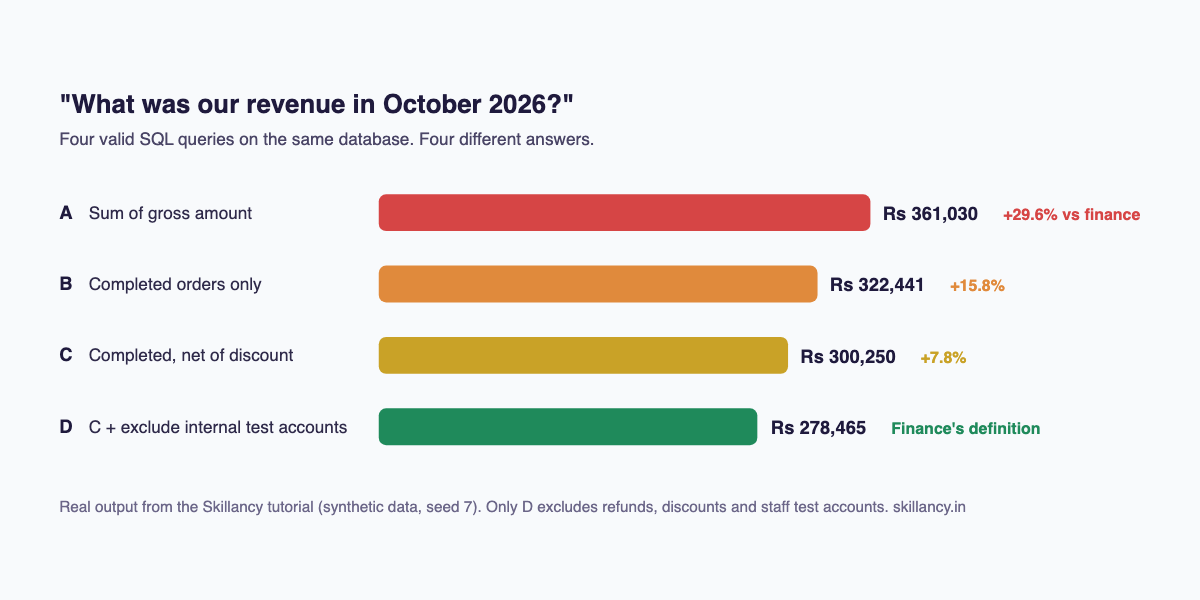
Only D matches finance's definition. Query A, the most "obvious" one, overstates revenue by Rs 82,565, or 29.6%. Every query ran without error. Every number looks plausible. That is metric drift, and no amount of SQL skill fixes it, because the problem is missing knowledge, not bad syntax.
Now imagine an agent picking between A and D on different days because the model is non-deterministic. That is the experience that makes business teams stop trusting AI analytics.
Step 3: define the business once, in a semantic model
Save this as semantic_model.yml. This file is the semantic layer. In a company, finance and ops would review it in a pull request, just like code.
# One place where the business defines its numbers.
model: shop
base_table: orders o
joins:
  - "JOIN customers c ON c.customer_id = o.customer_id"
default_filters:            # applied to every metric, always
  - "c.is_internal = 0"     # staff test accounts are never real business

metrics:
  net_revenue:
    label: Net revenue (Rs)
    description: Completed orders, after discount, excluding internal accounts. Finance's definition.
    synonyms: [revenue, sales, turnover, net sales]
    sql: "SUM(CASE WHEN o.status = 'completed' THEN o.gross_amount - o.discount END)"
    owner: finance@shop.example
  orders:
    label: Completed orders
    description: Count of completed orders.
    synonyms: [order count, number of orders]
    sql: "COUNT(CASE WHEN o.status = 'completed' THEN 1 END)"
    owner: ops@shop.example
  aov:
    label: Average order value (Rs)
    description: Net revenue divided by completed orders.
    synonyms: [average order value, basket size]
    sql: "ROUND(SUM(CASE WHEN o.status = 'completed' THEN o.gross_amount - o.discount END) * 1.0 / COUNT(CASE WHEN o.status = 'completed' THEN 1 END), 0)"
    owner: finance@shop.example
  refund_rate:
    label: Refund rate (%)
    description: Refunded orders as a share of all non-cancelled orders.
    synonyms: [refunds, return rate]
    sql: "ROUND(100.0 * COUNT(CASE WHEN o.status = 'refunded' THEN 1 END) / COUNT(CASE WHEN o.status != 'cancelled' THEN 1 END), 1)"
    owner: ops@shop.example

dimensions:
  month: {sql: "substr(o.order_date, 1, 7)", description: Order month, YYYY-MM}
  city:  {sql: "c.city", description: Customer city}
What each part is for:
| Part | Why it matters for agents |
|---|---|
default_filters | The rule "never count test accounts" is applied to every query automatically. No agent can forget it |
description | Written for a model to read. This is the text the agent sees when deciding which metric to use |
synonyms | Maps business language ("sales", "turnover") to one governed metric |
sql | The calculation, owned by a human, reviewed once, reused everywhere |
owner | Who to ask when a number looks wrong. Essential for trust |
dimensions | The only ways the agent may slice data. Anything else is rejected |
Step 4: write the semantic layer engine
Save as semantic_layer.py. Its job is to turn a structured request into SQL, and to refuse anything it cannot express safely.
"""A deliberately tiny semantic layer: YAML definitions in, safe SQL out."""
import sqlite3, yaml, difflib

MODEL = yaml.safe_load(open("semantic_model.yml"))
DB = "shop.db"

class SemanticError(ValueError):
    pass

def _resolve_metric(name: str) -> str:
    """Map a name or synonym to a governed metric, or fail with suggestions."""
    for key, m in MODEL["metrics"].items():
        if name == key or name.lower() in m.get("synonyms", []):
            return key
    vocab = list(MODEL["metrics"]) + [s for m in MODEL["metrics"].values() for s in m.get("synonyms", [])]
    hint = difflib.get_close_matches(name, vocab, n=3)
    raise SemanticError(f"Unknown metric '{name}'. Not defined in the semantic layer. "
                        f"Closest: {hint or 'none'}. Ask the data team to add it.")

def compile_query(metrics, group_by=(), month_from=None, month_to=None, city=None):
    """Turn a structured request into SQL. The model never writes SQL itself."""
    if not metrics:
        raise SemanticError("Ask for at least one metric.")
    keys = [_resolve_metric(m) for m in metrics]
    for d in group_by:
        if d not in MODEL["dimensions"]:
            raise SemanticError(f"Unknown dimension '{d}'. Allowed: {list(MODEL['dimensions'])}")

    select = [f"{MODEL['dimensions'][d]['sql']} AS {d}" for d in group_by]
    select += [f"{MODEL['metrics'][k]['sql']} AS {k}" for k in keys]
    where, params = list(MODEL["default_filters"]), []
    if month_from:
        where.append("substr(o.order_date, 1, 7) >= ?"); params.append(month_from)
    if month_to:
        where.append("substr(o.order_date, 1, 7) <= ?"); params.append(month_to)
    if city:
        where.append("c.city = ?"); params.append(city)   # values are bound, never pasted in

    sql = (f"SELECT {', '.join(select)}\nFROM {MODEL['base_table']}\n"
           + "\n".join(MODEL["joins"]) + "\nWHERE " + "\n  AND ".join(where))
    if group_by:
        cols = ", ".join(str(i + 1) for i in range(len(group_by)))
        sql += f"\nGROUP BY {cols}\nORDER BY {cols}"
    return sql, params, keys

def run(metrics, group_by=(), **filters):
    sql, params, keys = compile_query(metrics, group_by, **filters)
    con = sqlite3.connect(f"file:{DB}?mode=ro", uri=True)    # read-only, always
    try:
        cur = con.execute(sql, params)
        cols = [c[0] for c in cur.description]
        return {"metrics": keys, "rows": [dict(zip(cols, r)) for r in cur.fetchall()], "sql": sql}
    finally:
        con.close()
Four guardrails are doing the heavy lifting here:
1. Allow-lists, not free text. Metric and dimension names must exist in the model. SQL fragments only ever come from the YAML file, never from the model.
2. Bound parameters. Filter values like a city name go in as ? parameters, so they are treated as data, not code.
3. Read-only connection. Even if something slipped through, the database refuses writes.
4. Helpful refusals. Unknown metrics fail with a clear message and suggestions, which an agent can relay to the user instead of inventing a number.
Step 5: serve it over MCP
Save as server.py. Notice what is missing: there is no run_sql tool.
from mcp.server.mcpserver import MCPServer
import semantic_layer as sl

mcp = MCPServer("shop-semantic-layer")

@mcp.tool()
def list_metrics() -> list[dict]:
    """List governed business metrics with definitions and synonyms. Call this first."""
    return [{"name": k, "label": m["label"], "description": m["description"],
             "synonyms": m.get("synonyms", [])} for k, m in sl.MODEL["metrics"].items()]

@mcp.tool()
def list_dimensions() -> dict:
    """List the dimensions you can group or filter by."""
    return {k: d["description"] for k, d in sl.MODEL["dimensions"].items()}

@mcp.tool()
def query_metrics(metrics: list[str], group_by: list[str] = [],
                  month_from: str | None = None, month_to: str | None = None,
                  city: str | None = None) -> dict:
    """Query governed metrics. Months are YYYY-MM. Never write SQL; name metrics and dimensions.
    Returns rows plus the compiled SQL so answers can be audited."""
    try:
        return sl.run(metrics, group_by, month_from=month_from, month_to=month_to, city=city)
    except sl.SemanticError as e:
        return {"error": str(e)}

@mcp.resource("semantic://model")
def model_yaml() -> str:
    """The full semantic model, for hosts that want to load it as context."""
    return open("semantic_model.yml").read()

if __name__ == "__main__":
    mcp.run()
The tool docstrings matter more than they look. They are the instructions the model reads when it decides what to call. "Call this first" and "Never write SQL; name metrics and dimensions" shape agent behaviour directly.
Step 6: test it with a client
Before connecting any AI model, prove the server behaves correctly with a plain client. Save as client.py:
import asyncio, sys, json
from mcp import Client, StdioServerParameters

params = StdioServerParameters(command=sys.executable, args=["server.py"])

def payload(res):
    return json.loads(res.content[0].text)

def show(res):
    data = payload(res)
    if isinstance(data, dict) and "rows" in data:
        for row in data["rows"]:
            print("  ", row)
    else:
        print("  ", json.dumps(data, ensure_ascii=False)[:400])

async def main():
    async with Client(params) as client:
        print("== Tools")
        for t in (await client.list_tools()).tools:
            print(f"- {t.name}")

        print("\n== list_metrics (names only)")
        res = await client.call_tool("list_metrics", {})
        print("  ", [m["name"] for m in res.structured_content["result"]])

        print("\n== 'What was revenue in October?'  -> synonym 'revenue' resolves to net_revenue")
        res = await client.call_tool("query_metrics",
              {"metrics": ["revenue"], "month_from": "2026-10", "month_to": "2026-10"})
        show(res)

        print("\n== Revenue, orders and AOV by month")
        show(await client.call_tool("query_metrics",
              {"metrics": ["net_revenue", "orders", "aov"], "group_by": ["month"]}))

        print("\n== Refund rate by city, October")
        show(await client.call_tool("query_metrics",
              {"metrics": ["refund_rate"], "group_by": ["city"],
               "month_from": "2026-10", "month_to": "2026-10"}))

        print("\n== Out of scope: 'profit margin'")
        show(await client.call_tool("query_metrics", {"metrics": ["profit margin"]}))

        print("\n== Hostile filter value")
        show(await client.call_tool("query_metrics",
              {"metrics": ["net_revenue"], "city": "Delhi' OR '1'='1"}))

        print("\n== Compiled SQL for the October question (audit trail)")
        res = await client.call_tool("query_metrics",
              {"metrics": ["revenue"], "month_from": "2026-10", "month_to": "2026-10"})
        print(payload(res)["sql"])

asyncio.run(main())
Run it with python client.py. The client starts server.py as a subprocess over stdio.
The real output
Copied from an actual run of the code above:
== Tools
- list_metrics
- list_dimensions
- query_metrics

== list_metrics (names only)
   ['net_revenue', 'orders', 'aov', 'refund_rate']

== 'What was revenue in October?'  -> synonym 'revenue' resolves to net_revenue
   {'net_revenue': 278465.0}

== Revenue, orders and AOV by month
   {'month': '2026-09', 'net_revenue': 271273.0, 'orders': 95, 'aov': 2856.0}
   {'month': '2026-10', 'net_revenue': 278465.0, 'orders': 101, 'aov': 2757.0}

== Refund rate by city, October
   {'city': 'Bengaluru', 'refund_rate': 0.0}
   {'city': 'Delhi', 'refund_rate': 8.7}
   {'city': 'Mumbai', 'refund_rate': 9.1}
   {'city': 'Pune', 'refund_rate': 8.0}

== Out of scope: 'profit margin'
   {"error": "Unknown metric 'profit margin'. Not defined in the semantic layer. Closest: none. Ask the data team to add it."}

== Hostile filter value
   {'net_revenue': None}

== Compiled SQL for the October question (audit trail)
SELECT SUM(CASE WHEN o.status = 'completed' THEN o.gross_amount - o.discount END) AS net_revenue
FROM orders o
JOIN customers c ON c.customer_id = o.customer_id
WHERE c.is_internal = 0
  AND substr(o.order_date, 1, 7) >= ?
  AND substr(o.order_date, 1, 7) <= ?
What the output teaches
- The right number, every time. "Revenue" resolved to
net_revenueand returned Rs 278,465, exactly matching query D, the finance-correct answer from Step 2. Ask a hundred times and you get the same number, because the SQL is compiled, not generated. - Synonyms bridge language and governance. The user said "revenue". The model did not have to guess which of four calculations that meant.
- Composability for free. Revenue, orders and AOV by month came from one request. The agent did not have to write a
GROUP BYor worry about join fan-out. - Refusal beats invention. "Profit margin" is not modelled (there is no cost data), so the layer returned an error instead of a guess. A good agent passes that on: "Profit margin isn't defined yet. I can show net revenue or AOV."
- Injection goes nowhere. The classic
' OR '1'='1trick was bound as a literal city name, matched no rows and returned nothing. With a rawrun_sqltool, the same pattern could have returned every row. - Auditability. Every answer carries the SQL that produced it, so an analyst can check any number an agent reports.
Learn it live: Modelling metrics, writing tool descriptions models understand and testing agents on real data are hands-on skills. Our Data Analytics with Agentic AI cohort covers them with mentor code reviews.
Step 7: connect it to an AI host
To use the server from an MCP-compatible desktop assistant or IDE, register it in the host's MCP configuration. The exact file location varies by host. The shape is usually:
{
  "mcpServers": {
    "shop-semantic-layer": {
      "command": "python",
      "args": ["/absolute/path/to/server.py"],
      "cwd": "/absolute/path/to/project"
    }
  }
}
For Claude Code, the equivalent one-liner is:
claude mcp add shop-semantic-layer -- python /absolute/path/to/server.pyThen ask in plain English: "Compare net revenue and AOV for September and October, and tell me which city has the highest refund rate." The model will call list_metrics, then query_metrics, and answer from governed numbers.
How do you design a semantic layer for AI agents?
A semantic layer built for dashboards is not automatically good for agents. Humans read a metric catalogue once and remember it. Models read it on every request, literally. Design for that.
1. Write descriptions for a model, not a wiki. State what is included and excluded, the unit and the grain: "Completed orders, after discount, excluding internal accounts. Rupees. Order-date month." Vague descriptions produce vague metric choices.
2. Add synonyms from real questions. Pull them from Slack threads, support tickets and dashboard search logs. If sales calls it "bookings" and finance calls it "revenue", decide whether they are the same metric. If they are not, model both and say how they differ.
3. Keep the menu small and certified. Twenty well-defined, owned metrics beat four hundred auto-generated ones. Large, overlapping catalogues make models choose wrongly, the same way they confuse humans.
4. Make default filters non-negotiable. Test accounts, deleted rows, internal transfers and currency conversions belong in the layer, not in each query.
5. Return the SQL and the definition with every answer. It turns "the AI said so" into "here is exactly how this was calculated", which is what earns trust from finance.
6. Design refusals. An out-of-scope request should return a clear message, close matches, and who owns the gap. That message is part of the user experience.
7. Version and test it like code. Put the semantic model in Git. Review changes in pull requests. Add tests that pin key numbers ("September net revenue must equal the finance close figure") so a change that breaks a definition fails before it reaches an agent.
8. Evaluate with a golden question set. Keep 30 to 100 real business questions with known answers and run your agent against them on every change. See our LLM eval harness tutorial.
Is a semantic layer enough for security and governance?
A semantic layer reduces risk a lot, but it is not a security boundary by itself.
| Risk | What to do |
|---|---|
| Agent sees data the user should not | Pass the user's identity through to the warehouse, so row-level and column-level security still apply. Do not run every agent under one powerful service account |
| Prompt injection via data | Text inside your data (product reviews, ticket notes) can carry instructions. Keep tools read-only and require human approval for any action that writes, sends or deletes. Read our guide to MCP security risks |
| Remote server without auth | Use OAuth on remote MCP servers. Never expose an unauthenticated server that can reach production data |
| Over-broad fallback | If you add a text-to-SQL fallback, give it a separate, narrower read-only role and label its answers as exploratory |
| No audit trail | Log every tool call: who asked, which metrics, which filters, compiled SQL, row counts |
| Silent definition changes | Require owner approval for metric changes and announce them, because every agent's answers change at once |
What changes from demo to production?
| Demo (this tutorial) | Production |
|---|---|
| Hand-written Python compiler | dbt Semantic Layer, Cube, or your warehouse's native semantic views |
| SQLite file | Snowflake, BigQuery, Databricks, Redshift or Postgres |
| stdio on your laptop | Remote MCP server over Streamable HTTP, with OAuth |
| One YAML file | Semantic models in Git, reviewed by metric owners, with CI tests |
| Four metrics | A certified core of 20 to 50 metrics, expanded based on real questions |
| Manual testing | A golden question set run on every change, tracking accuracy and refusals |
| Trust by default | User identity passed through, row-level security, logging and alerts |
Production checklist for a semantic-layer MCP server
- No raw SQL tool exposed to the model, or a clearly separate, restricted fallback
- Every metric has a description, unit, grain, synonyms and an owner
- Default filters (test data, deletions, currency) encoded in the layer
- Read-only credentials, with user-level permissions enforced by the warehouse
- Compiled SQL and definitions returned with every answer
- Clear, helpful errors for out-of-scope questions
- Golden question eval set with an accuracy threshold that blocks releases
- Tool calls logged and reviewed weekly for missing metrics
Common mistakes
1. Wrapping the warehouse in a run_sql MCP tool and calling it a semantic layer. It is still text-to-SQL, with a bigger security surface.
2. Auto-generating hundreds of metrics from column names. You get a big menu with no meaning. Start with the 20 numbers leadership actually discusses.
3. Skipping owners. When an agent's number disagrees with finance, someone must be able to say which is right, and fix the definition.
4. Treating the benchmark as a guarantee. 98% on one public benchmark does not mean 98% on your data. Measure your own.
5. Ignoring refusals. If 30% of questions hit "unknown metric", that is not an agent problem. It is your modelling roadmap.
6. Forgetting time. Fiscal calendars, time zones and late-arriving data cause more wrong numbers than exotic SQL. Model them explicitly.
7. Building the agent before the definitions. The order that works is: agree definitions, model them, test them, then expose them to agents.
Why this is a career skill, not just a tool
Look at what changed in the tutorial. The hard part was not the Python or the MCP plumbing. It was deciding what "revenue" means, encoding refunds, discounts and test accounts correctly, and making that definition usable by a machine. That is analytics judgement, written as code.
That is why semantic modelling is becoming one of the most valuable skills for data professionals in the AI era:
- For data analysts, it is the step up from writing queries to defining how the whole company measures itself. When agents answer routine questions, the analyst who designs the definitions those agents use becomes more valuable, not less. See how interviews are shifting in How Data Analyst Interviews Have Changed with AI.
- For analytics engineers, dbt models, metrics YAML, tests and CI are the daily work, and MCP is now one more consumer of what you build.
- For AI engineers, it is the difference between a demo that impresses and an agent that finance will sign off. Knowing when to use a semantic layer, RAG or text-to-SQL is a system design question you will be asked.
- For BI developers, LookML and semantic model experience transfers directly. The consumer has changed from dashboards to agents.
What to learn, in order:
| Stage | Skills |
|---|---|
| Foundations | SQL with joins, CTEs and window functions; grain and fan-out; dimensional modelling (facts and dimensions) |
| Semantic modelling | Metrics, dimensions, entities, default filters, time spines, dbt models and MetricFlow YAML or Cube schemas |
| AI integration | How LLM tool calling works, MCP servers and clients, writing tool descriptions, RAG vs text-to-SQL vs semantic layer |
| Production | Testing and CI for metrics, evaluation sets, warehouse security, OAuth, observability |
Brush up the foundations with our free SQL tutorials, window functions guide, joins guide and CTE guide.
Your 30-60-90 day plan
Days 1 to 30: understand the problem.
Run this tutorial end to end. Then take a dataset you know (a Kaggle e-commerce set works) and write down five metrics in plain English, with every inclusion and exclusion. Write three different SQL queries for one of them and see how far the numbers drift.
Days 31 to 60: model it properly.
Build a small dbt project on DuckDB or Postgres. Define the same five metrics in MetricFlow YAML or a Cube schema. Add tests that pin known values. Connect the dbt MCP server or Cube's MCP server to an AI assistant and ask it ten questions.
Days 61 to 90: make it production-shaped.
Write a golden set of 30 questions with answers. Measure your agent's accuracy with the semantic layer versus plain text-to-SQL. Add a refusal path and an audit log. Write it up as a portfolio project with the before-and-after accuracy numbers. That one project shows modelling, AI integration and evaluation, which is exactly what hiring managers for agentic analytics roles look for. For more project ideas, see Data Analysis Projects for Your Portfolio.
Learn to build and supervise AI analytics agents
Learn it live: Our Data Analytics with Agentic AI program is a live, mentor-led cohort of 12 weeks and 96 hours. You will build SQL and Python foundations, model business metrics and connect agents to governed data, with mentors from companies like Walmart Global Tech and Oracle reviewing your work. Already coding and want to build AI products? See the Generative AI program. Not sure which fits? Talk to a mentor.
Frequently asked questions
What is a semantic layer in simple words?
A semantic layer is one shared dictionary of business numbers. It defines what each metric means, how to calculate it and how tables connect, so every dashboard, spreadsheet and AI agent gets the same answer to the same question.
Why do AI agents need a semantic layer?
Because business definitions are not in the database schema. Without a semantic layer, an agent has to guess whether "revenue" is gross or net, whether refunds count and which accounts to exclude. Those guesses produce plausible but wrong numbers. A semantic layer replaces guessing with governed, reusable definitions.
What is the difference between a semantic layer and MCP?
MCP is the connection standard that lets AI apps discover and call tools. A semantic layer is the business logic that defines metrics. MCP is how the agent reaches the semantic layer; the semantic layer is what makes the answer correct. You need both.
Is a semantic layer better than text-to-SQL?
For governed numbers such as KPIs, board metrics and audited reports, yes. dbt Labs' April 2026 benchmark found semantic-layer accuracy of 98 to 100% versus 84 to 90% for text-to-SQL on the same questions. For ad hoc exploration of questions nobody has modelled, text-to-SQL is more flexible. Most teams use the semantic layer first and text-to-SQL as a labelled fallback.
What are the best semantic layer tools in 2026?
The most widely used options are the dbt Semantic Layer (powered by MetricFlow, Apache 2.0), Cube, Snowflake semantic views, Databricks metric views, Looker's LookML and AtScale. Most now offer an MCP server or MCP integration for AI agents. Pick based on your warehouse, existing BI tools and whether you need one platform or many.
Does the dbt Semantic Layer work with MCP?
Yes. The dbt MCP server exposes Semantic Layer tools, such as listing metrics and dimensions and querying metrics, to MCP-compatible AI hosts. Check dbt's current documentation for the exact tool list and setup steps, as these change often.
What is Apache Ossie (OSI)?
Apache Ossie, formerly the Open Semantic Interchange (OSI), is a vendor-neutral, Apache 2.0 licensed YAML specification for metrics, dimensions and relationships. It was launched by Snowflake, Salesforce and dbt Labs in September 2025 and entered the Apache Incubator in mid-2026. Its aim is to let semantic definitions move between tools without rewriting them.
Can a semantic layer stop prompt injection?
It reduces the impact a lot, because the model can only request modelled metrics with bound parameters, not arbitrary SQL. It does not remove the risk entirely. You still need read-only access, user-level permissions in the warehouse, authenticated MCP servers and human approval for any action that changes data.
Do data analysts need to learn semantic layers?
Increasingly, yes. As AI agents take over routine querying, the analyst's value moves to defining metrics correctly, modelling business logic and validating what agents report. Semantic modelling, dbt and an understanding of MCP are becoming standard expectations for analytics engineering and agentic analytics roles.
How long does it take to learn semantic layer modelling?
If you are comfortable with SQL joins and aggregations, you can build a working semantic layer for a small project in two to four weeks of part-time practice. Doing it well for a real business, with tests, owners and evaluation, takes longer and is best learned on real data with feedback.
Recommended reading and practice on Skillancy
- What Is MCP (Model Context Protocol)? Build Your First MCP Server in Python
- Agentic Analytics with Natural Language Queries: How AI Agents Turn Questions into SQL
- The Role of Agentic AI in Automating Everyday Analytics Tasks
- Agentic AI for Analysts: 5 Repetitive Tasks You Can Automate This Month
- How to Evaluate an LLM App: Build an Eval Harness in Python
- How to Build a Multi-Agent Workflow in Python with LangGraph
- RAG vs Fine-Tuning: What Should You Use for Generative AI Applications?
- Data Analyst Skills in 2026: What You Actually Need to Learn to Get Hired
Practice: SQL interview questions · Python interview questions · SQL compiler · Python compiler
Sources
- Semantic Layer vs. Text-to-SQL: 2026 Benchmark Update (dbt Developer Blog, 7 April 2026): accuracy figures, methodology and caveats. Code and data: dbt-labs/dbt-llm-sl-bench
- dbt Labs affirms commitment to Open Semantic Interchange by open sourcing MetricFlow: MetricFlow under Apache 2.0, October 2025
- Open Semantic Interchange specs finalized (Snowflake): OSI v0.1 spec, January 2026
- Apache Ossie (Incubating): the new name for Open Semantic Interchange and Snowflake's announcement: Apache Incubator entry and rename, mid-2026
- AI-ready data in practice: what the dbt Semantic Layer, MCP server and agent skills do (dbt Labs)
- 5 dbt MCP server patterns that work in production (dbt Labs)
- Best semantic layer for AI and BI in 2026 (Cube): Cube's MCP server and multi-warehouse support
- Snowflake semantic views vs Cube vs AtScale (Atlan): native vs universal comparison
- Text-to-SQL for enterprise: why it fails without a context layer (Atlan)
- arXiv 2604.25149: semantic context as the dominant driver of text-to-SQL performance
- Model Context Protocol specification
Reproducibility note
All code in Steps 1 to 6 was run on Python 3.13 with mcp 2.3.0 and PyYAML, and every output block was copied from those runs on 14 November 2026. The data is synthetic and generated with a fixed random seed (7), so you should see identical numbers. The host configuration JSON and the claude mcp add command in Step 7 are illustrative: we did not connect a commercial AI host for this article. Product details in the landscape table (tool counts, GA dates, licences) come from vendor and third-party sources listed above and change frequently, so check each vendor's current documentation before choosing a tool. The benchmark figures are dbt Labs' own and are based on 11 questions over one dataset.
Learn it live: Ready to build AI analytics agents your business can trust? Explore Data Analytics with Agentic AI, or talk to a mentor. Learn. Build. Get hired.
Get the Skillancy field notes
One email a week: AI and analytics guides, cohort dates and hiring signals. No spam, unsubscribe anytime.