
Agentic Analytics with Natural Language Queries: How AI Agents Turn Questions into SQL
By Skillancy Editorial Team · 19 September 2026 · Updated 19 October 2026 · 17 min read
Reviewed by Rishav Kumar, Principal Data Analyst, Walmart Global Tech
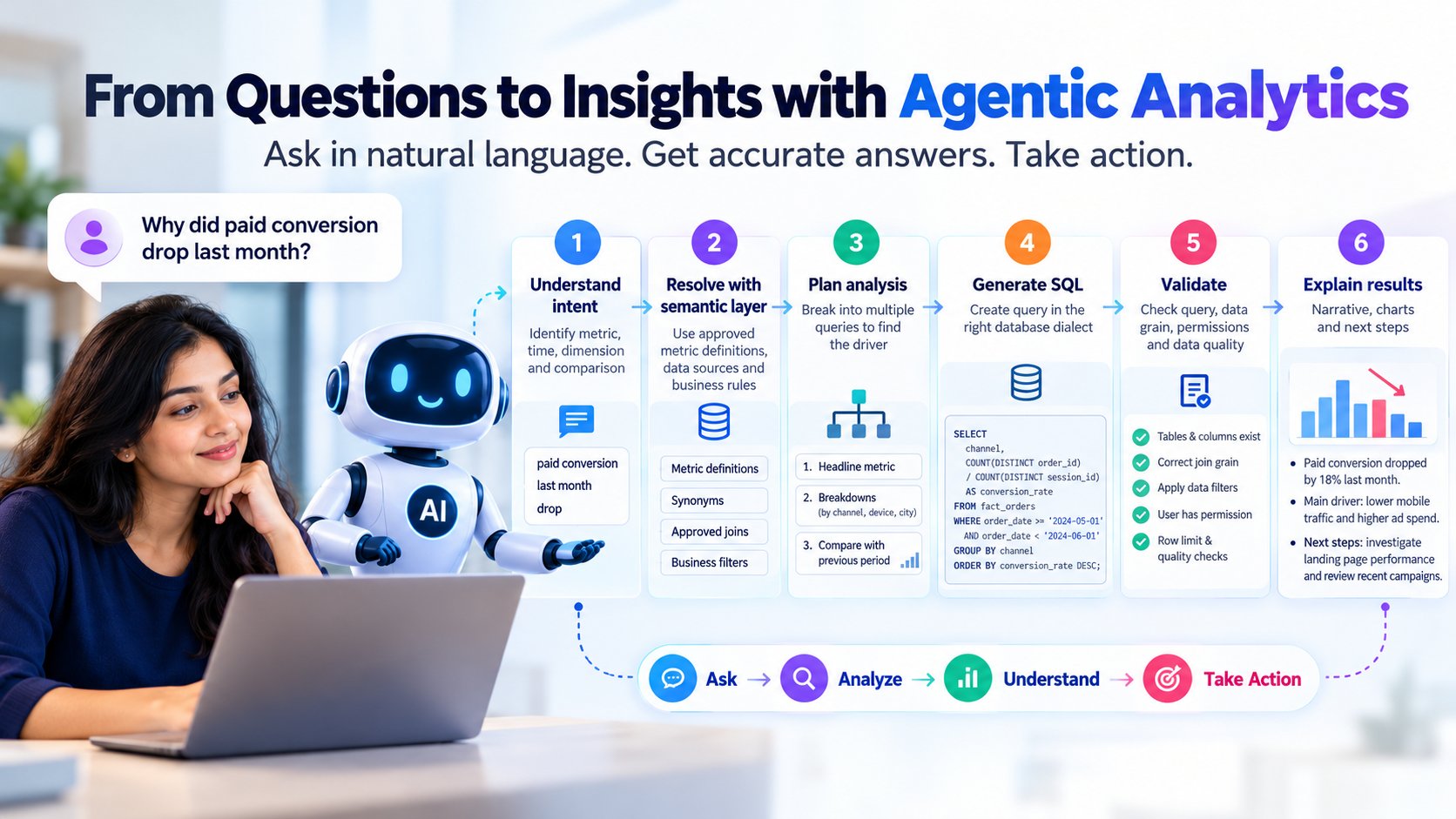
Agentic analytics with natural language query capability means anyone in a business can type a question like "Why did paid conversion drop last month?" and get a correct, explained answer without writing SQL. Behind that single question, an AI agent plans several steps: it interprets the intent, looks up approved metric definitions, generates a query, checks it, runs it against governed data and turns the numbers into a short narrative.
In 2026 this has moved from demos into mainstream BI platforms. Microsoft, Salesforce (Tableau), Databricks and Snowflake all now ship natural-language experiences grounded in a semantic layer, and Gartner Peer Insights lists "agentic analytics" as its own market category. This guide explains how the technology works, where it fails, the tools available, and the skills analysts need to stay valuable as it spreads.
What is agentic analytics?
Agentic analytics is the use of AI agents that can plan and carry out multi-step analysis toward a goal, using approved tools and data, with human oversight. The word "agentic" matters: a chatbot answers once, but an agent can decide what to do next — query another table, compare against last quarter, check a data-quality rule or draft a report.
Gartner's market description of agentic analytics platforms highlights five capabilities: connecting to structured and unstructured data, answering questions asked in natural language (typed or spoken), surfacing patterns and anomalies with explanations, managing multi-step tasks semi-autonomously or autonomously, and helping prepare data. Vendors listed in that category include Tableau, Microsoft Power BI, Looker, Amazon QuickSight, Databricks, Snowflake, SAP Joule, Zoho Analytics, Tellius and WisdomAI.
How agentic analytics differs from traditional BI and older NLQ
| Capability | Traditional BI dashboards | Classic NLQ (search-style Q&A) | Agentic analytics |
|---|---|---|---|
| How you ask | Click filters on pre-built charts | Type a keyword-style question | Ask in full natural language, including follow-ups |
| What it can answer | Only what the dashboard was built for | Simple lookups on one dataset | Multi-step "why" and "what next" questions |
| Who writes the logic | Analyst, in advance | Rules mapped to fields | Agent generates SQL from a governed semantic layer |
| Explains the result | No — you interpret the chart | Rarely | Yes — narrative plus the query it ran |
| Takes action | No | No | Can draft reports, raise alerts or open tickets (with approval) |
| Main risk | Stale or unused dashboards | Misread keywords | Confidently wrong answers if context and validation are weak |
What is a natural language query (NLQ) in analytics?
A natural language query is a data question written the way a person speaks, which the system converts into a database query. "Top 5 cities by revenue this quarter" or "Which couriers missed their SLA most often in Mumbai?" are both natural language queries.
The conversion step is usually called text-to-SQL (or NL2SQL). On its own, text-to-SQL only translates a sentence into a query. Agentic analytics wraps text-to-SQL inside a larger loop: understanding ambiguous terms, choosing the right data source, validating the query, retrying when something fails, and explaining the answer.
How does agentic analytics answer a natural-language question?
Most production systems follow a similar sequence. Here is what happens between a user typing a question and seeing an answer.
- Step 1 — Understand intent. The agent identifies the metric ("conversion"), the dimension ("by channel"), the time window ("last month") and the comparison ("drop" implies versus the previous period).
- Step 2 — Resolve business terms with the semantic layer. It looks up what "conversion" means in this company — orders per session, or customers per visitor? — plus synonyms, approved joins and filters such as "exclude test orders".
- Step 3 — Plan. For a "why" question, the agent plans several queries: the headline number, then breakdowns by device, city or campaign to find the driver.
- Step 4 — Generate SQL. The model writes a query in the right dialect (Snowflake, BigQuery, Postgres, Databricks SQL and so on), ideally reusing verified example queries.
- Step 5 — Validate. Before running, the system checks the query: do the tables and columns exist, is the join at the right grain, is there a sensible row limit, does the user have permission to see this data?
- Step 6 — Execute and check results. It runs the query and sanity-checks the output — for example, a conversion rate above 100% is a red flag that triggers a retry.
- Step 7 — Explain. The agent writes a short narrative, shows a chart, and exposes the SQL it used so an analyst can audit it.
- Step 8 — Suggest next steps or act. It proposes follow-ups ("Paid conversion fell 10 points; want a breakdown by campaign?") or, with approval, schedules a report or raises an alert.
Why is the semantic layer the most important part?
A semantic layer is a governed map of your business: metric definitions, dimensions, relationships between tables, synonyms and approved filters. It is what stops an agent from inventing its own definition of "revenue" or "active user".
The major platforms have converged on this design:
- Snowflake Cortex Analyst recommends semantic views that define logical tables, dimensions, facts, metrics and relationships, plus verified queries — sample questions paired with correct SQL — to guide generation and to measure accuracy.
- Tableau Next is built on Tableau Semantics, Salesforce's unified semantic layer, which its Concierge agent uses to answer natural-language questions.
- Databricks Genie asks data teams to configure Genie Agents with datasets, sample queries, instructions, metrics, business rules and verified answers, all governed through Unity Catalog.
- Microsoft 365 Copilot with Power BI grounds its answers in Power BI reports and semantic models and respects existing permissions.
The practical lesson for analysts: the quality of answers depends more on the semantic layer and example queries than on which language model is underneath. Building and maintaining that layer is fast becoming a core analytics skill.
How accurate is text-to-SQL in 2026?
Accuracy depends heavily on how realistic the test is. On older academic benchmarks, text-to-SQL looks close to solved: the Spider 2.0 paper (presented at ICLR 2025) notes earlier methods reaching 91.2% on Spider 1.0 and 73.0% on BIRD.
Real enterprise data is much harder. Spider 2.0 contains 632 workflow tasks built on enterprise-style databases that often have over 1,000 columns, spread across BigQuery, Snowflake, SQLite, DuckDB, PostgreSQL and ClickHouse — and nearly 86% of tasks need dialect-specific functions. When the paper was published, the best agent framework solved only about 21% of those tasks.
Models and agent frameworks have improved since, but the gap between clean benchmarks and messy company data is the reason every serious vendor now leans on semantic layers, verified queries and human review. Treat an NLQ answer as a draft from a capable junior analyst: often right, sometimes confidently wrong, and always worth checking when the decision matters.
Worked example: from question to SQL (and the mistake an agent can make)
Let's make this concrete. A growth manager asks: "How did conversion change by channel last month?" Assume conversion is defined in the semantic layer as orders divided by sessions, and "last month" is September 2026.
Here is a tiny dataset you can paste into the free Skillancy SQL compiler (it runs real PostgreSQL in your browser):
CREATE TABLE sessions (session_id INT, user_id INT, session_date DATE, channel TEXT);
CREATE TABLE orders (order_id INT, user_id INT, order_date DATE, channel TEXT, amount NUMERIC);

INSERT INTO sessions VALUES
(1,101,'2026-08-03','paid'),(2,102,'2026-08-05','paid'),(3,103,'2026-08-09','paid'),(4,104,'2026-08-12','paid'),
(5,201,'2026-08-04','organic'),(6,202,'2026-08-10','organic'),(7,203,'2026-08-21','organic'),
(8,101,'2026-09-02','paid'),(9,101,'2026-09-03','paid'),(10,101,'2026-09-04','paid'),(11,105,'2026-09-08','paid'),(12,106,'2026-09-15','paid'),
(13,201,'2026-09-06','organic'),(14,204,'2026-09-11','organic'),(15,205,'2026-09-19','organic'),(16,206,'2026-09-25','organic');

INSERT INTO orders VALUES
(1,101,'2026-08-03','paid',1200),(2,103,'2026-08-09','paid',800),
(3,201,'2026-08-04','organic',650),
(4,101,'2026-09-04','paid',1500),(5,101,'2026-09-04','paid',300),
(6,204,'2026-09-11','organic',900),(7,206,'2026-09-25','organic',400);
The plausible-but-wrong query
An agent without good context might join sessions to orders on the customer and count rows:
SELECT s.channel,
       COUNT(o.order_id) AS orders,
       COUNT(s.session_id) AS sessions,
       ROUND(100.0 * COUNT(o.order_id) / COUNT(s.session_id), 1) AS conversion_pct
FROM sessions s
LEFT JOIN orders o ON o.user_id = s.user_id
WHERE s.session_date >= DATE '2026-09-01'
  AND s.session_date <  DATE '2026-10-01'
GROUP BY s.channel
ORDER BY s.channel;
It runs without errors and returns organic at 75.0% and paid at 81.8%. Both numbers are wrong. Customer 101 had three September sessions and three orders in total, so the join multiplies them into nine rows. Orders are also never filtered to September, so an August purchase leaks into the result. The query answers neither "conversion" nor "change".
The correct query
The fix is to aggregate each table to the same grain (channel and month) before joining, then compare months with a window function:
WITH monthly_sessions AS (
  SELECT channel,
         DATE_TRUNC('month', session_date)::date AS month,
         COUNT(*) AS sessions
  FROM sessions
  WHERE session_date >= DATE '2026-08-01'
    AND session_date <  DATE '2026-10-01'
  GROUP BY channel, DATE_TRUNC('month', session_date)
),
monthly_orders AS (
  SELECT channel,
         DATE_TRUNC('month', order_date)::date AS month,
         COUNT(*) AS orders
  FROM orders
  WHERE order_date >= DATE '2026-08-01'
    AND order_date <  DATE '2026-10-01'
  GROUP BY channel, DATE_TRUNC('month', order_date)
),
conversion AS (
  SELECT s.channel,
         s.month,
         s.sessions,
         COALESCE(o.orders, 0) AS orders,
         ROUND(100.0 * COALESCE(o.orders, 0) / s.sessions, 1) AS conversion_pct
  FROM monthly_sessions s
  LEFT JOIN monthly_orders o
    ON o.channel = s.channel AND o.month = s.month
)
SELECT channel,
       month,
       sessions,
       orders,
       conversion_pct,
       conversion_pct - LAG(conversion_pct) OVER (PARTITION BY channel ORDER BY month) AS change_pts
FROM conversion
ORDER BY channel, month;| Channel | Month | Sessions | Orders | Conversion | Change vs previous month |
|---|---|---|---|---|---|
| organic | Aug 2026 | 3 | 1 | 33.3% | — |
| organic | Sep 2026 | 4 | 2 | 50.0% | +16.7 pts |
| paid | Aug 2026 | 4 | 2 | 50.0% | — |
| paid | Sep 2026 | 5 | 2 | 40.0% | −10.0 pts |
The real story is the opposite of what the first query suggested: paid conversion fell by 10 points while organic rose by 16.7 points. A good agentic system catches this through grain checks in validation, a sanity rule that flags suspicious results, and verified example queries that show the correct pattern. A good analyst catches it by reading the SQL — which is why SQL fluency matters more, not less, in the age of AI.
Agentic analytics tools with natural language query in 2026
| Platform | Natural-language experience | How it stays grounded | Worth knowing |
|---|---|---|---|
| Microsoft Power BI + Microsoft 365 Copilot | Ask Copilot questions and get answers drawn from Power BI reports and semantic models | Power BI semantic models; existing permissions respected | Worldwide rollout began in late August 2026; needs a Microsoft 365 Copilot licence plus Power BI licensing |
| Tableau Next (Salesforce) | Concierge agent answers questions; Inspector flags anomalies; Data Pro helps with data prep | Tableau Semantics unified semantic layer | Launched at Tableau Conference on 5 May 2026; the three agents are in preview, while Tableau Agent for conversational analytics is generally available |
| Databricks Genie | Genie One for business users, Genie Agents for domain data spaces, Genie Code for technical users | Unity Catalog governance plus configured datasets, instructions, metrics and verified answers | User access to Genie One and Genie Agents is free through 31 January 2027 |
| Snowflake Cortex Analyst | REST API that answers business questions over Snowflake data | Semantic views and verified queries; generated SQL runs in your warehouse | Snowflake now recommends Cortex Agents, which include all Cortex Analyst capabilities; it does not reuse earlier results in multi-turn chats |
Other platforms in Gartner's agentic analytics category include Looker, Amazon QuickSight, SAP Joule, Zoho Analytics, Tellius and WisdomAI. Features, licences and availability change quickly, so check each vendor's current documentation before choosing.
Use cases: what can agentic analytics do beyond answering questions?
- Self-serve Q&A for business teams. Sales, marketing and operations managers get answers in minutes instead of waiting days for an analyst ticket.
- Anomaly investigation. When a KPI moves unexpectedly, an agent breaks it down by region, product, channel and time to suggest likely drivers — clearly labelling facts versus hypotheses.
- Recurring management reporting. Agents gather approved metrics, run quality checks, build charts and draft a weekly summary for human review.
- Data-quality triage. When a quality check fails, an agent can inspect metadata, trace the source and draft a remediation ticket — with write access kept restricted.
- Root-cause "why" analysis. Multi-step questions such as "Why did repeat purchase rate fall in Tier-2 cities?" become a guided investigation instead of a dozen manual queries.
Example questions by industry (India)
| Industry | Example natural-language questions |
|---|---|
| E-commerce & quick commerce | "Which pin codes had the highest cart abandonment last week?" "Did the festive sale lift conversion for new users or only repeat users?" |
| BFSI & fintech | "How did UPI transaction failure rates change by bank this month?" "Which loan products have rising 30-day delinquency?" |
| Supply chain & logistics | "Which couriers missed delivery SLAs most often in Bengaluru?" "What is the stock-out risk for top SKUs next week?" |
| Edtech & SaaS | "Which acquisition channel brings learners with the best completion rate?" "Which accounts show churn risk signals this quarter?" |
What are the risks of agentic analytics, and how do you control them?
| Risk | What goes wrong | Guardrail |
|---|---|---|
| Wrong grain joins | Rows multiply and metrics inflate, as in the worked example | Pre-defined relationships in the semantic layer; grain checks before execution |
| Ambiguous metrics | "Revenue" means gross in one team and net in another | Single governed metric definitions with synonyms |
| Hallucinated tables or columns | Query references fields that don't exist | Schema validation; restrict the agent to approved objects |
| Permission leaks | Users see data they shouldn't, including personal data | Row- and column-level security inherited from the data platform; minimise personal data |
| Silent wrong answers | A query runs but answers a slightly different question | Show the SQL and assumptions; result sanity rules; human review for high-stakes decisions |
| Runaway cost | Many large queries per conversation | Row limits, query cost caps and budget controls |
| Over-trust | Teams stop questioning numbers | Confidence cues, verified-answer badges and analyst ownership of key metrics |
A short guardrail checklist
- Build a golden set of 50–100 real business questions with verified SQL and expected results, and test every tool or prompt change against it.
- Keep agents read-only by default; require approval for any write, alert or external message.
- Always display the generated SQL and the metric definitions used.
- Log every question, query and answer so failures can be investigated.
- Define an escalation path to a named analyst for ambiguous or high-impact questions.
How do you evaluate an agentic analytics tool?
- Accuracy on your own data: measure the share of golden-set questions where the result matches the verified answer, not whether the SQL "looks right".
- Transparency: can users see the SQL, assumptions and data sources behind every answer?
- Governance: does it inherit your existing permissions, and can you restrict it to certified datasets?
- Semantic layer support: can you define metrics, synonyms and verified queries once and reuse them?
- Follow-up handling: does it keep context across turns, and does it degrade gracefully when the topic shifts?
- Cost and limits: how is usage billed, and what controls exist for budgets and query size?
- Fit with your stack: warehouse, BI tool, collaboration tools such as Slack or Microsoft Teams, and the SQL dialect you use.
Will agentic analytics replace data analysts?
No — it changes what analysts spend their time on. Routine "pull this number" requests shrink, while work that requires judgement grows: defining metrics, building the semantic layer, writing verified queries, evaluating AI answers, framing the right business question and turning findings into decisions.
The worked example shows why. An analyst who can read a query and spot a fan-out join is exactly the person a company needs to trust its AI answers. Analysts who combine strong SQL with AI workflow skills become more valuable, not less. For a task-by-task view of what agents should automate, assist with or leave to humans, read The Role of Agentic AI in Automating Everyday Analytics Tasks.
Skills you need to work with agentic analytics
| Skill | Why it matters |
|---|---|
| SQL (joins, CTEs, window functions) | To read, verify and correct AI-generated queries |
| Data modelling and metric design | To build the semantic layer agents depend on |
| BI tools such as Power BI or Tableau | Where most natural-language experiences now live |
| Python and pandas | For deeper analysis, automation and testing agent outputs |
| Prompt and context design | To write instructions, examples and verified queries that steer agents |
| Evaluation and testing | To build golden sets and measure accuracy objectively |
| Business communication | To turn an AI-generated answer into a recommendation people act on |
You can practise the SQL side today with our free SQL interview questions — several of them, such as running revenue totals and month-1 cohort retention, use the same CTE and window-function patterns as the worked example above.
Portfolio project: build a mini natural-language analytics agent
A strong project for your resume is a small "ask your data" assistant:
- Data: pick a public e-commerce or ride-hailing dataset and load it into PostgreSQL or DuckDB.
- Semantic layer: write a short file defining 5–10 metrics (revenue, orders, conversion, AOV), approved joins and synonyms.
- Golden set: create 30 questions with verified SQL and expected results.
- Agent loop: take a question, retrieve the relevant schema and metric definitions, generate SQL, validate it (tables exist, grain check, row limit), run it and summarise the result.
- Evaluation: report accuracy on the golden set, list the failure types you saw and show how adding verified queries improved results.
- Demo: a simple web page or notebook where a reviewer can ask questions and see the SQL behind each answer.
Documenting the failures and guardrails is what separates this project from a basic chatbot demo — it shows you understand how to make AI analytics trustworthy.
Where Skillancy fits
Skillancy's Data Analytics with Agentic AI program is a live, mentor-led cohort covering Excel, SQL, Power BI, Python and AI-driven workflows, taught by practitioners who build analytics systems in industry. It is built for exactly this shift: strong SQL and BI fundamentals first, then agentic workflows and projects you can show in interviews.
Key takeaways
- Agentic analytics turns plain-English questions into validated SQL, results and explanations through a multi-step agent loop.
- Natural language query is the interface; the semantic layer, verified queries and validation are what make answers trustworthy.
- Text-to-SQL scores very well on clean benchmarks but much lower on realistic enterprise databases, so human review still matters.
- Power BI with Microsoft 365 Copilot, Tableau Next, Databricks Genie and Snowflake Cortex all ground answers in a governed semantic layer.
- Analysts who can verify SQL, design metrics and evaluate AI output are the people companies need to make agentic analytics work.
Frequently asked questions
What is agentic analytics in simple words?
It is analytics done by AI agents that can understand a business question, decide which data and steps are needed, run the analysis and explain the answer — instead of only showing a fixed dashboard.
What is natural language query (NLQ) in data analytics?
NLQ lets you ask a data question in everyday language, such as "top 5 cities by revenue this quarter", and the system converts it into a database query and returns the answer.
What is the difference between text-to-SQL and agentic analytics?
Text-to-SQL only translates a sentence into a SQL query. Agentic analytics adds planning, semantic-layer lookups, validation, retries, explanation and follow-up actions around that translation.
Can I query a database in natural language without knowing SQL?
Yes, tools such as Power BI with Copilot, Tableau Next, Databricks Genie and Snowflake Cortex Analyst support this. For important decisions, someone who knows SQL should still check the generated query.
How accurate is natural language to SQL?
It is very accurate on simple, well-documented data but much weaker on large enterprise databases with many tables and ambiguous metrics. Accuracy improves sharply with a good semantic layer and verified example queries.
What is a semantic layer and why do AI agents need it?
A semantic layer defines your business metrics, dimensions, table relationships and synonyms in one governed place. Agents use it so that "revenue" or "active user" always means the same thing.
Which tools offer agentic analytics in 2026?
Major options include Microsoft Power BI with Microsoft 365 Copilot, Salesforce Tableau Next, Databricks Genie and Snowflake Cortex Analyst and Cortex Agents, along with Looker, Amazon QuickSight, SAP Joule, Zoho Analytics, Tellius and WisdomAI.
Will AI agents replace data analysts?
They replace repetitive query-pulling, not analysts. Demand is shifting toward analysts who can design metrics, verify AI-generated SQL and translate results into business decisions.
What skills should I learn to work with agentic analytics?
Start with SQL and data modelling, then a BI tool such as Power BI, Python for analysis, and prompt design and evaluation for AI workflows.
Is agentic analytics safe for sensitive data?
It can be, if the agent inherits your existing access controls, works read-only by default, logs every query and keeps humans in the loop for high-impact actions.
Related reading
- AI agents and multi-agent orchestration: the complete 2026 guide
- Data analytics with AI in 2026: how AI is changing the analyst role
- Data analyst skills in 2026
- Prompt engineering for LLMs: the 2026 guide
- Free online SQL compiler
Sources
- Gartner Peer Insights — Agentic Analytics market
- Spider 2.0: Evaluating Language Models on Real-World Enterprise Text-to-SQL Workflows (arXiv)
- Snowflake documentation — Cortex Analyst
- Databricks documentation — Genie
- Microsoft 365 message center MC1323266 — Power BI integration with Microsoft 365 Copilot
- Enterprise DNA — Salesforce launches Tableau Next and agentic analytics at TC26
Get the Skillancy field notes
One email a week: AI and analytics guides, cohort dates and hiring signals. No spam, unsubscribe anytime.