
How to Build a Multi-Agent Workflow in Python with LangGraph: Step-by-Step Tutorial with Real Output (2026)
By Skillancy Editorial Team · 27 October 2026 · 22 min read
Reviewed by Rishav Kumar, Principal Data Analyst, Walmart Global Tech
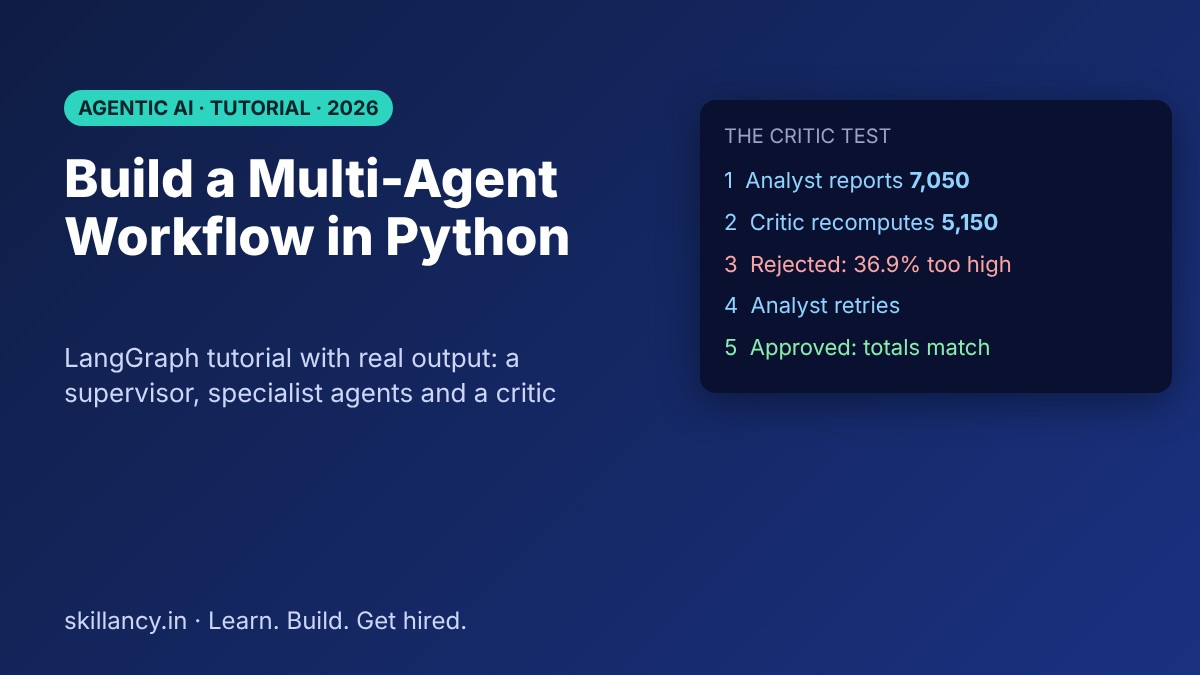
A multi-agent workflow splits one job between several specialised agents, each with a narrow task, and lets a coordinator decide who works next. Teams reach for it when a single prompt or a single agent starts to fail on longer, riskier tasks: the work is too wide for one context, nobody checks the answer, or a mistake in step two quietly poisons step five. This tutorial builds one from scratch in Python with LangGraph. You get a supervisor, three specialist agents and a critic, run on a small sales dataset, with every output copied from a real run. You will also see what happens when the critic is removed, how to cap a runaway loop, how the same design looks in CrewAI, and a checklist for taking it to production.
| Question | Short answer |
|---|---|
| What is a multi-agent workflow? | Several specialised agents sharing state, coordinated by a supervisor |
| Which framework does this tutorial use? | LangGraph (graph of nodes, typed state, conditional edges) |
| Do I need an LLM API key to follow along? | No. The demo agents are deterministic so the output is reproducible |
| What does the critic add? | An independent check that catches wrong answers and triggers a retry |
| When is one agent enough? | Short, low-risk tasks with one tool and one decision |
| What is the biggest production risk? | Unbounded loops and unchecked output, so cap steps and verify results |
What is a multi-agent workflow?
An agent is a unit of work that reads some state, does one job (often with a tool such as a database query or a calculator, sometimes with a language model) and writes its result back. A workflow is the plan for how those units run: in what order, under which conditions, and when to stop. A multi-agent workflow uses several agents with distinct responsibilities instead of one agent that does everything.
Three ideas make it work:
- Shared state. Agents do not talk to each other in free text. They read from and write to one structured state object, so every step is inspectable.
- A coordinator. Something decides which agent runs next. That can be fixed code, a rule, or a language model. It is usually called the supervisor.
- Separation of duties. The agent that produces an answer should not be the only one that judges it.
If you have already read our guide to AI agents and multi-agent orchestration, this post is the hands-on companion: the same ideas, as code you can run in a few minutes.
Single agent vs multi-agent: when you actually need more than one
More agents are not automatically better. Every extra agent adds a handoff, a place for state to go wrong and more to monitor. Use the simplest design that is reliable.
| Situation | Single agent | Multi-agent workflow |
|---|---|---|
| One tool, one clear decision | Good fit | Overkill |
| Task needs several different skills (clean, analyse, write) | Context gets crowded | Each agent stays focused |
| Wrong answers are costly (finance, compliance, customer-facing numbers) | Nobody checks the work | A critic or verifier can block bad output |
| Steps can run in parallel | Sequential and slow | Parallel branches are possible |
| You need an audit trail of who did what | Hard to separate | One trace line per agent step |
| Prototype in an afternoon | Faster to build | Slower to set up |
A useful rule: add a second agent when you can name a specific failure it prevents, such as "nobody validates the total" or "the prompt is too long for one context". If you cannot name the failure, stay with one agent.
LangGraph vs CrewAI: which framework should you use?
Both are popular Python frameworks for agent workflows, and they make different trade-offs.
| LangGraph | CrewAI | |
|---|---|---|
| Core idea | An explicit graph: nodes, edges, typed state | Agents with roles, tasks and a crew that runs them |
| How you define flow | You draw it: conditional edges route on state | You choose a process, such as sequential or hierarchical |
| Control and debuggability | High: every transition is code you can read and cap | Higher-level: quicker to start, less low-level control |
| State | One typed state object that nodes read and update | Task outputs passed between agents |
| Persistence and human approval | Checkpointers and interrupt points for pausing and resuming | See the CrewAI documentation for current options |
| Best for | Workflows with branches, retries and strict guardrails | Role-based pipelines you want running quickly |
This tutorial uses LangGraph because the control flow is visible in the code, which makes it the better teaching tool: you can see exactly why the supervisor chose each step. A CrewAI version of the same idea appears near the end. Check each project's documentation for the current API, because both frameworks change quickly.
Learn it live: Agentic workflows are at the centre of our Data Analytics with Agentic AI program, a live, mentor-led cohort of 12 weeks and 96 hours. Talk to a mentor about whether it fits your goals.
What we will build
The scenario is deliberately ordinary, because most real agent work is: a weekly sales review where someone asks for net paid revenue by region. The raw data has the usual problems: a duplicated order, a cancelled order and a missing amount. A careless pass over it produces a number that looks fine and is wrong.
| Agent | Job | Reads | Writes |
|---|---|---|---|
| Supervisor | Decide who runs next, or stop | Whole state | next |
| Profiler | Count duplicates, nulls and cancelled orders | raw | profile |
| Analyst | Compute revenue by region | raw, issues | metrics, attempts |
| Critic | Recompute the total independently and approve or reject | raw, metrics | issues, verdict |
| Writer | Format the final report | metrics | report |
The flow is a hub and spoke: every worker returns to the supervisor, and the supervisor picks the next step. 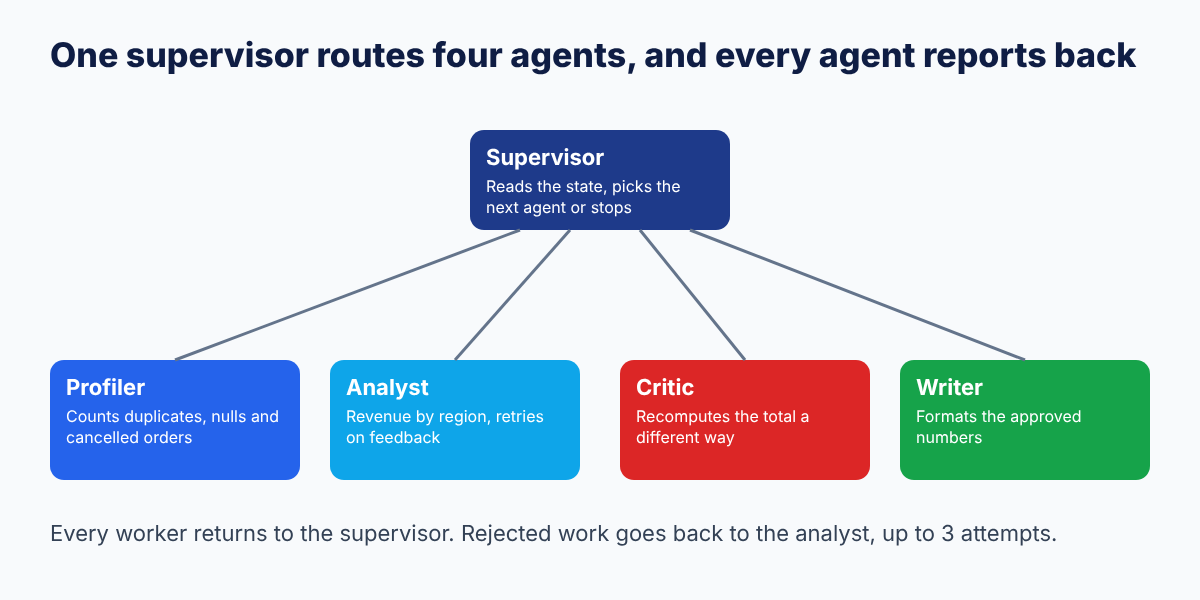
You can print LangGraph's own diagram of this graph with app.get_graph().draw_mermaid(). In it, solid arrows always happen and dotted arrows are conditional, chosen by the supervisor at run time.
Step 0: set up your environment
You need Python 3.10 or newer. Install the two packages used here:
pip install langgraph pandasThe outputs in this post were produced with Python 3.13, LangGraph 1.2.18 and pandas 3.0.5. Newer versions should behave the same, but if something differs, compare against the versions listed in the reproducibility note at the end.
Step 1: create the data
Eight rows with three planted problems: order 1003 appears twice, order 1004 is cancelled, and order 1006 has no amount.
import operator
from typing import Annotated, TypedDict

import pandas as pd
from langgraph.graph import END, START, StateGraph

RAW = pd.DataFrame({
    "order_id": [1001, 1002, 1003, 1003, 1004, 1005, 1006, 1007],
    "region":   ["North", "North", "South", "South", "South", "East", "East", "West"],
    "amount":   [1200, 800, 1500, 1500, 400, 950, None, 700],
    "status":   ["paid", "paid", "paid", "paid", "cancelled", "paid", "paid", "paid"],
})
The correct answer, worked out by hand: drop the duplicate, exclude the cancelled order, exclude the order with no amount. That leaves North 2,000, South 1,500, East 950 and West 700, a total of 5,150.
Step 2: define the shared state
State is the contract between agents. Defining it as a typed dictionary means a missing or misnamed field fails loudly instead of silently.
class State(TypedDict, total=False):
    task: str
    raw: pd.DataFrame
    profile: dict
    metrics: dict
    issues: list
    verdict: str
    attempts: int
    report: str
    next: str
    trace: Annotated[list, operator.add]  # every node appends; nothing is overwritten
Most fields are simply replaced when an agent writes them. The trace field is different: Annotated[list, operator.add] tells LangGraph to append each agent's entries instead of overwriting the list. That gives you a complete, ordered audit trail for free, and it is the field you will read first when something goes wrong.
Step 3: write the specialist agents
Each agent is a plain function that takes the state and returns only the fields it changes.
def profiler(s: State):
    df = s["raw"]
    p = {
        "rows": len(df),
        "duplicate_rows": int(df.duplicated().sum()),
        "null_amounts": int(df.amount.isna().sum()),
        "cancelled": int((df.status == "cancelled").sum()),
    }
    return {"profile": p, "trace": [f"profiler: {p}"]}


def analyst(s: State):
    n = s.get("attempts", 0) + 1
    df = s["raw"]
    if s.get("issues"):  # feedback from the critic -> apply the fixes
        df = df.drop_duplicates()
        df = df[df.status == "paid"].dropna(subset=["amount"])
    m = df.groupby("region").amount.sum().to_dict()
    return {
        "metrics": m,
        "attempts": n,
        "verdict": None,
        "trace": [f"analyst (attempt {n}): total={sum(m.values()):.0f}"],
    }
Two design choices are worth noticing.
1. The analyst's first pass is intentionally naive. It sums the raw data. This stands in for a hurried first draft, which is what a language model or a rushed analyst often produces. On a retry, when the critic has left issues in the state, it applies the fixes.
2. The analyst resets verdict to None. A new result needs a new review, so the old approval or rejection must not carry over.
Step 4: add the critic, the agent that earns its place
The critic is the reason to build a multi-agent workflow rather than a single script. It does not trust the analyst. It recomputes the total by a different method, a plain Python loop instead of a pandas group-by, and compares the two.
def critic(s: State):
    # Independent check: recompute the control total in plain Python
    seen, control = set(), 0.0
    for r in s["raw"].itertuples():
        key = (r.order_id, r.region, r.amount, r.status)
        if key in seen or r.status != "paid" or pd.isna(r.amount):
            continue
        seen.add(key)
        control += r.amount
    total = sum(s["metrics"].values())
    issues = [] if total == control else [f"total {total:.0f} != control {control:.0f}"]
    verdict = "approved" if not issues else "rejected"
    return {"issues": issues, "verdict": verdict,
            "trace": [f"critic: {verdict} (analyst {total:.0f} vs control {control:.0f})"]}
The key principle is independence. If the critic reused the analyst's code, a bug in that code would pass both checks. A different method, a different data path or a different model is what gives the review any value.
Step 5: add the writer and the supervisor
The writer formats the approved numbers. The supervisor is the coordinator: a function that reads the state and names the next step.
def writer(s: State):
    lines = [f"{region}: {amt:,.0f}" for region, amt in sorted(s["metrics"].items())]
    report = "Net paid revenue by region\n" + "\n".join(lines) + f"\nTotal: {sum(s['metrics'].values()):,.0f}"
    return {"report": report, "trace": ["writer: report drafted"]}


def supervisor(s: State):
    if "profile" not in s:
        nxt = "profiler"
    elif "metrics" not in s or s.get("verdict") == "rejected":
        nxt = "analyst" if s.get("attempts", 0) < 3 else "FINISH"
    elif s.get("verdict") is None:
        nxt = "critic"
    elif "report" not in s:
        nxt = "writer"
    else:
        nxt = "FINISH"
    return {"next": nxt, "trace": [f"supervisor -> {nxt}"]}
Read the supervisor as a short decision table: profile first; analyse; get the analysis reviewed; if rejected, go back to the analyst, but give up after three attempts; once approved, write the report; then stop. The attempts cap is your first guardrail against an infinite loop.
Step 6: wire the graph and run it
g = StateGraph(State)
for name, fn in [("supervisor", supervisor), ("profiler", profiler), ("analyst", analyst),
                 ("critic", critic), ("writer", writer)]:
    g.add_node(name, fn)
g.add_edge(START, "supervisor")
g.add_conditional_edges("supervisor", lambda s: s["next"],
                        {"profiler": "profiler", "analyst": "analyst", "critic": "critic",
                         "writer": "writer", "FINISH": END})
for worker in ["profiler", "analyst", "critic", "writer"]:
    g.add_edge(worker, "supervisor")
app = g.compile()

out = app.invoke({"task": "Net paid revenue by region", "raw": RAW})
for i, line in enumerate(out["trace"], 1):
    print(f"{i:>2}. {line}")
print(out["report"])
add_conditional_edges is where the supervisor's decision becomes routing: it reads s["next"] and maps that string to a node. The loop for worker in [...] sends every worker back to the supervisor, which gives the hub-and-spoke shape.
The real output
Every line below was produced by running this exact script.
== Trace
 1. supervisor -> profiler
 2. profiler: {'rows': 8, 'duplicate_rows': 1, 'null_amounts': 1, 'cancelled': 1}
 3. supervisor -> analyst
 4. analyst (attempt 1): total=7050
 5. supervisor -> critic
 6. critic: rejected (analyst 7050 vs control 5150)
 7. supervisor -> analyst
 8. analyst (attempt 2): total=5150
 9. supervisor -> critic
10. critic: approved (analyst 5150 vs control 5150)
11. supervisor -> writer
12. writer: report drafted
13. supervisor -> FINISH

== Final report
Net paid revenue by region
East: 950
North: 2,000
South: 1,500
West: 700
Total: 5,150
What the trace teaches
| Trace lines | What happened | Why it matters |
|---|---|---|
| 2 | The profiler found 1 duplicate row, 1 null amount and 1 cancelled order | The problems were visible before any number was computed |
| 4 | The first analysis reported 7,050 | A plausible-looking figure with no error raised |
| 6 | The critic's independent control total was 5,150, so it rejected | The wrong number was stopped before it reached a report |
| 7-8 | The supervisor sent the work back and the analyst's second pass reported 5,150 | The loop corrected itself using the critic's feedback |
| 10 | The critic approved because the two totals matched exactly | Approval means two independent methods agree |
| 11-13 | Only then did the writer run, and the supervisor stopped | Output is produced only from checked numbers |
The shape of this trace, work then review then retry then approve, is the real value of the pattern. The profile, the routing and the report are conveniences. The independent check is the safety.
Learn it live: Reconciling totals and catching silent data errors is a core analyst skill. Practise the same checks in our Python compiler and Python interview questions.
The experiment: what happens without the critic?
To see what the critic is worth, the same graph was run again with the critic replaced by a rubber stamp that approves everything.
 1. supervisor -> profiler
 2. profiler: {'rows': 8, 'duplicate_rows': 1, 'null_amounts': 1, 'cancelled': 1}
 3. supervisor -> analyst
 4. analyst (attempt 1): total=7050
 5. supervisor -> critic
 6. critic: approved (no independent check)
 7. supervisor -> writer
 8. writer: report drafted
 9. supervisor -> FINISH

Net paid revenue by region
East: 950
North: 2,000
South: 3,400
West: 700
Total: 7,050

overstatement: 1900 = 36.9%| With independent critic | With rubber-stamp critic | |
|---|---|---|
| Reported total | 5,150 | 7,050 |
| South region | 1,500 | 3,400 |
| Error vs correct figure | None | Overstated by 1,900 (36.9%) |
| Did anything raise an error? | n/a | No |
| Steps taken | 13 | 9 |
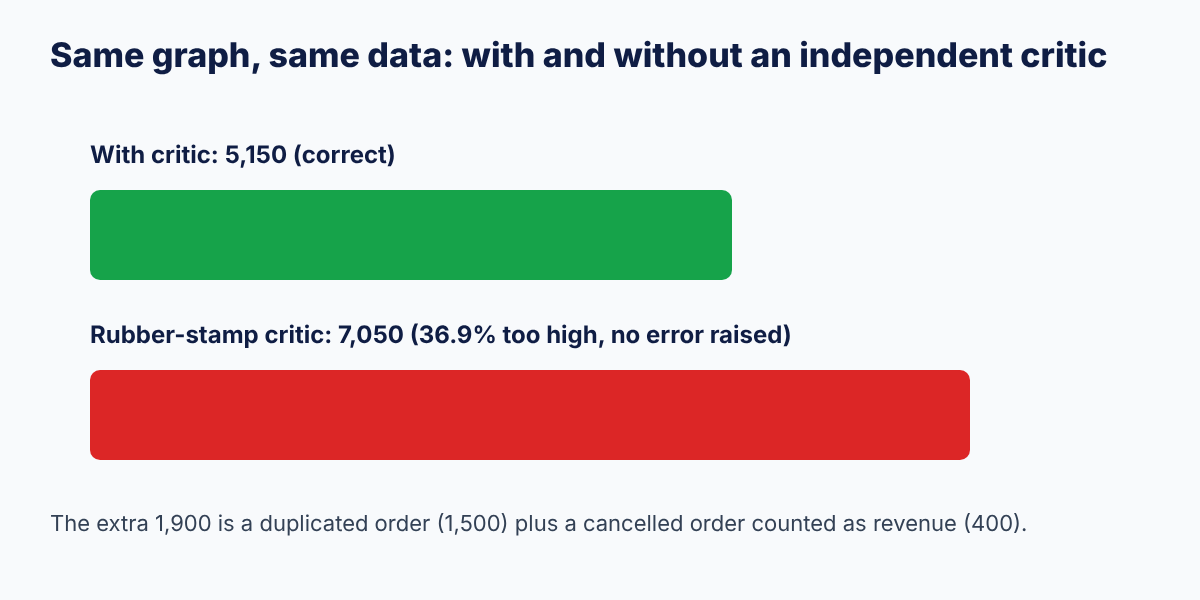
The South region is overstated because it holds both problems at once: the duplicated order counted twice (1,500 extra) and the cancelled order counted as revenue (400 extra). Nothing crashed. The graph ran in fewer steps and produced a clean-looking report, which is exactly why unchecked agent output is dangerous: failure is quiet. The rubber-stamp version is not a strawman. A critic that shares the analyst's code, data path or assumptions behaves the same way.
Guardrail: stop a loop that never ends
Agent loops can run forever if the supervisor keeps routing back to a worker that keeps failing. The demo caps retries in the supervisor (attempts < 3), and LangGraph adds a second, framework-level cap. Running the same graph with a recursion limit of 6, deliberately too low for the 13 steps this workflow needs:
app.invoke({"task": "Net paid revenue by region", "raw": RAW},
           config={"recursion_limit": 6})
GraphRecursionError
Recursion limit of 6 reached without hitting a stop condition. You can increase the limit by setting the `recursion_limit` config key.Use both guards. The attempts cap in your own logic produces a graceful stop with a clear reason. The framework limit is the backstop that prevents a bug in your routing from running up a bill.
From demo to a real LLM-powered workflow
Everything above is deterministic on purpose, so that the output is reproducible and the control flow is the thing you study. To make the agents intelligent, replace the logic inside nodes with model calls, and keep the structure.
Which nodes to hand to an LLM first. Start with the writer (turning numbers into a readable summary) and the analyst's reasoning (choosing which fixes to apply). Keep the critic's arithmetic in code wherever you can, because a calculation you can recompute exactly should not be re-judged by a language model.
An LLM supervisor. The pattern below is illustrative: call_llm stands for whichever model client you use, and this snippet was not executed as part of the run above.
ALLOWED = {"profiler", "analyst", "critic", "writer", "FINISH"}

def llm_supervisor(s: State):
    prompt = (
        "You route work between agents. Steps so far: "
        f"{s.get('trace', [])[-3:]}. "
        "Reply with exactly one of: profiler, analyst, critic, writer, FINISH."
    )
    choice = call_llm(prompt).strip()            # call_llm = your model client
    nxt = choice if choice in ALLOWED else "FINISH"   # never trust free text
    return {"next": nxt, "trace": [f"supervisor -> {nxt}"]}
The line that matters is the validation. A model can return anything, so the supervisor checks the reply against an allow-list before routing. Fail closed: an unrecognised answer should stop the run, not send it somewhere unplanned.
The same idea in CrewAI. CrewAI expresses a pipeline as agents with roles, tasks assigned to them and a crew that runs the tasks in a chosen process. This sketch follows the pattern in CrewAI's documentation and was also not executed here; it needs a configured model, and you should check the current docs for exact parameters.
from crewai import Agent, Task, Crew, Process

analyst = Agent(role="Analyst", goal="Compute net paid revenue by region",
                backstory="A careful analyst who removes duplicates and cancellations")
reviewer = Agent(role="Reviewer", goal="Verify the analyst's total independently",
                 backstory="A sceptical reviewer who recomputes every number")

analyse = Task(description="Compute net paid revenue by region from the orders data",
               expected_output="A table of revenue by region", agent=analyst)
review = Task(description="Recompute the total independently and approve or reject",
              expected_output="Approved or rejected, with the control total", agent=reviewer)

crew = Crew(agents=[analyst, reviewer], tasks=[analyse, review],
            process=Process.sequential)
result = crew.kickoff()
CrewAI gets you to a working role-based pipeline quickly. What it does not give you by default is the explicit "reject and retry up to three times" loop that the LangGraph supervisor encodes in a few lines, so decide which kind of control your use case needs.
Production checklist for multi-agent workflows
A demo that works once is not a system. Before real users or real money touch a workflow like this, check each row.
| Area | What to do | Why |
|---|---|---|
| Step limits | Cap retries in your logic and set a framework recursion limit | Prevents runaway loops and surprise bills |
| Independent verification | Check high-stakes output with a different method or model | Same-method checks share the same blind spots |
| Typed state | Define the state schema and validate agent outputs against it | Bad data fails at the boundary, not three steps later |
| Allow-listed routing | Accept only known next-step names from an LLM supervisor | Free text from a model is not a safe control signal |
| Tracing | Log every step and handoff with inputs and outputs | The trace is how you debug a wrong answer |
| Evaluation set | Keep a set of real tasks with known correct answers and re-run it after each change | You cannot claim it works without measuring |
| Cost budgets | Track tokens per run and set per-run limits | Multi-agent runs multiply model calls |
| Human approval | Pause for review before irreversible actions such as sending or paying | Some decisions should not be fully automated |
| Least privilege | Give each agent only the tools and data it needs | A compromised or confused agent can do less damage |
| Idempotent tools | Make tool calls safe to retry | Retries should not duplicate side effects |
| Persistence | Save state so a failed run can resume | Long workflows should not restart from zero |
If you build only three of these, build step limits, independent verification and tracing.
Common mistakes when building multi-agent systems
| Mistake | Why it hurts | Do this instead |
|---|---|---|
| Adding agents because it sounds advanced | More handoffs, more failure points | Add an agent only for a named failure |
| A critic that shares the producer's logic | Both fail the same way | Verify with a different method or data path |
| Passing long free-text between agents | Detail is lost and errors compound | Pass structured state |
| No step cap | A routing bug becomes an infinite loop | Cap retries and set a recursion limit |
| Trusting the supervisor's free-text output | Unexpected output sends the run off-plan | Validate against an allow-list |
| Evaluating on one happy-path example | Hidden failures stay hidden | Test on messy, realistic cases |
| Letting every agent use every tool | Wide blast radius | Scope tools per agent |
| Hiding the trace | You cannot explain a wrong answer | Log every step and keep it readable |
Where to go next
Once this runs, extend it one change at a time:
1. Add a branch. Let the profiler route severe data problems to a "needs human review" node instead of the analyst.
2. Run steps in parallel. Fan out one analyst per region and join the results before the critic.
3. Swap one node for a model. Put an LLM in the writer first, then measure whether the reports improve on your evaluation set.
4. Add persistence and an approval step. Save state after each node and pause before the final report is sent anywhere.
5. Use your own data. Point the same graph at a real extract and see which checks fail first.
Learn it live: If you want mentor feedback while you build agentic workflows on real analytics problems, see the Data Analytics with Agentic AI program, or practise your explanation of a project like this in a mock interview.
Frequently asked questions
What is a multi-agent workflow?
A multi-agent workflow is a system where several specialised agents work on one task, share a structured state and are coordinated by a supervisor that decides who acts next. Splitting responsibilities lets each agent stay focused and lets one agent check another's work.
What is LangGraph used for?
LangGraph is a Python framework for building stateful AI workflows as explicit graphs. You define nodes (steps), edges (transitions) and a typed state, and use conditional edges to route between steps based on the current state, for example to retry or to stop.
LangGraph vs CrewAI: which is better?
Neither is better in general. LangGraph gives explicit, inspectable control over branches, retries and state, which suits workflows with strict guardrails. CrewAI lets you define agents with roles and tasks and run them in a sequential or hierarchical process, which suits getting a role-based pipeline running quickly. Choose by how much control your use case needs.
Do I need an LLM to build a multi-agent workflow?
No. An agent is any unit that reads state, does a job and writes results back. The demo in this tutorial uses deterministic Python functions so the output is reproducible and the control flow is easy to study. You can replace individual nodes with model calls later.
What is the supervisor pattern?
The supervisor pattern uses one coordinator node that receives control after every worker finishes and decides the next step: which worker to call, whether to retry, or whether to stop. The supervisor can be fixed rules or a language model, but its output should be validated against a list of allowed next steps.
How do you stop a multi-agent loop from running forever?
Use two limits. Cap retries in your own routing logic so the workflow stops with a clear reason, and set the framework's recursion limit as a backstop. In LangGraph, exceeding the limit raises a GraphRecursionError instead of running indefinitely.
How do you check the output of an AI agent?
Add an independent verifier: a separate agent or function that recomputes or validates the result by a different method, plus an evaluation set of real tasks with known answers. In this tutorial, the critic recomputed the total in plain Python and caught a 36.9% overstatement.
How many agents should I use?
As few as you can while still preventing the failures you care about. Start with one agent, then add a second only when you can name a specific problem it solves, such as missing validation or an overloaded context. Every additional agent adds handoffs to monitor.
Is a multi-agent system more accurate than a single agent?
Not automatically. It can be more reliable when the extra agents add independent checks or keep each task focused, as the critic does here. Without verification, more agents can simply add more places for errors to enter. Measure it on your own evaluation set.
Recommended reading and practice on Skillancy
- AI Agents & Multi-Agent Orchestration: The Complete 2026 Guide
- Agentic Analytics with Natural Language Queries: How AI Agents Turn Questions into SQL
- Generative AI Roadmap 2026: From LLM Fundamentals to RAG and AI Agents
- How to Become an AI Engineer in India in 2026
- RAG vs Fine-Tuning: What Should You Use for Generative AI Applications?
- Data Analytics with AI in 2026: How AI Is Changing the Data Analyst Role
- Forward Deployed Engineer (FDE): What It Is, Skills, Salary and How to Become One
- Python compiler and Python interview questions
- Data Analytics with Agentic AI, Generative AI and Data Science with AI
Sources
- LangGraph overview of state, nodes, edges, conditional routing, persistence and human-in-the-loop: Leanware, "LangGraph Agents: Build Stateful, Controllable AI Workflows"
- CrewAI agents, tasks, crews and the sequential process: CrewAI documentation, sequential process
- Run results (trace, report, rubber-stamp comparison, recursion error): produced by running the code in this post, see the reproducibility note.
Framework APIs change quickly. Treat the CrewAI and LLM-supervisor snippets as patterns and confirm parameters against the current documentation before using them.
Reproducibility note
The code in Steps 1 to 6 was run as one script with Python 3.13, LangGraph 1.2.18 and pandas 3.0.5 on 27 October 2026, and the outputs shown are copied from that run. The rubber-stamp experiment used the same graph with the critic function replaced by one that always approves. The recursion-limit result came from invoking the same graph with recursion_limit set to 6. The agents are deterministic rule-based functions and make no model calls. The LLM-supervisor and CrewAI snippets are illustrative and were not run. The dataset is a small made-up example, not real company data.
Learn it live: Ready to build agentic workflows on real analytics problems? Explore Data Analytics with Agentic AI, or talk to a mentor. Learn. Build. Get hired.
Get the Skillancy field notes
One email a week: AI and analytics guides, cohort dates and hiring signals. No spam, unsubscribe anytime.