
What Is MCP (Model Context Protocol)? Build Your First MCP Server in Python: Step-by-Step Tutorial with Real Output (2026)
By Skillancy Editorial Team · 29 October 2026 · 25 min read
Reviewed by Rishav Kumar, Principal Data Analyst, Walmart Global Tech
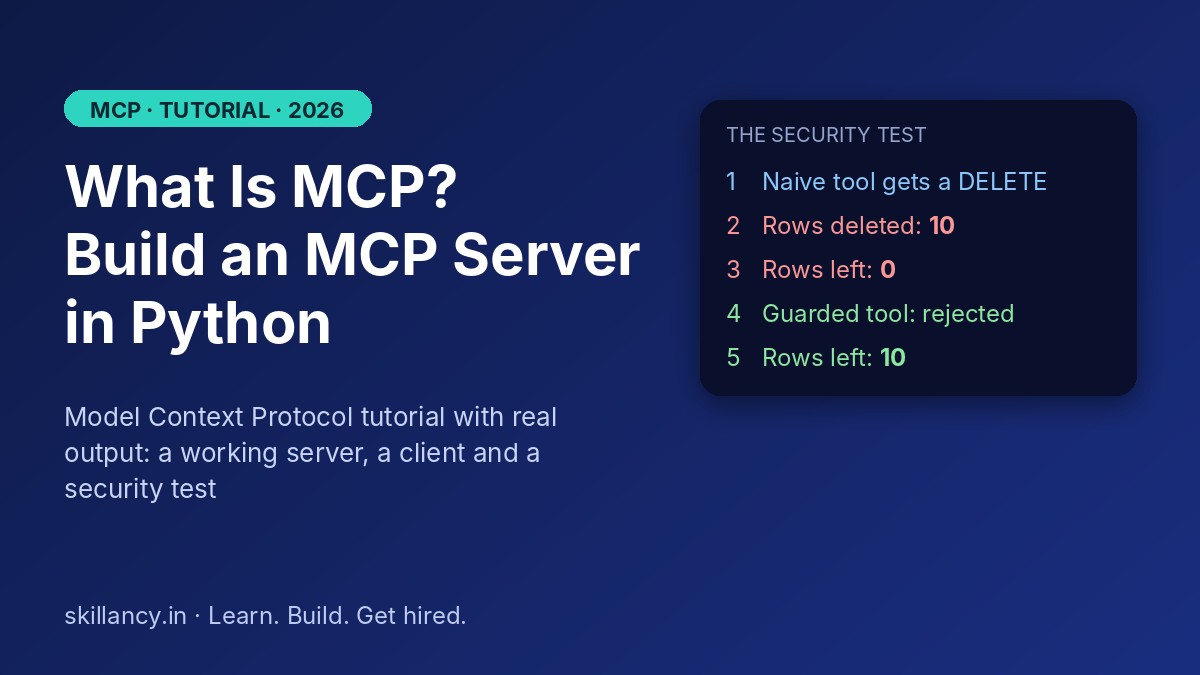
MCP, the Model Context Protocol, is the open standard that lets AI apps connect to tools and data without a custom integration for every pairing. This tutorial explains what it is, how hosts, clients and servers fit together, and how MCP differs from APIs, function calling and agent skills. Then you build a working MCP server in Python on a small sales dataset, run a client against it with every output copied from a real run, watch a naive SQL tool delete a table, and finish with a security guide and a production checklist.
| Question | Short answer |
|---|---|
| What is MCP? | An open protocol that standardises how AI apps connect to external tools and data |
| What does MCP stand for? | Model Context Protocol |
| Who maintains it? | The Agentic AI Foundation, a directed fund under the Linux Foundation (since December 2025) |
| What are its three building blocks? | Tools (actions), resources (data to read), prompts (reusable templates) |
| How does it travel? | JSON-RPC 2.0 messages over stdio (local) or Streamable HTTP (remote) |
| Is it the same as an API? | No. APIs are for developers; MCP is a layer that lets models discover and use capabilities at run time |
| What will you build here? | A read-only sales-analytics MCP server in about 40 lines of Python, plus a client that calls it |
| Biggest risk? | Prompt injection and tool poisoning. Your server must not trust what the model sends it |
Learn it live: Want to build agents that work on real data, with a mentor reviewing your work? Explore our Data Analytics with Agentic AI program, or talk to a mentor for a plan that fits your background.
What is MCP (Model Context Protocol)?
The Model Context Protocol is a specification that defines how an AI application asks an external system two simple questions: "what can you do?" and "please do this." The external system, called an MCP server, answers in a standard format. The AI application, called the host, talks to servers through a built-in client.
Three ideas make it useful:
- Discovery. A server describes its tools, resources and prompts. The model reads those descriptions and decides what to use. You do not hard-code the menu into your app.
- A shared format. Requests and responses are JSON-RPC 2.0 messages, the same lightweight remote-call format many web services already use.
- Reuse. Write a Postgres server once, and every MCP-compatible app can use it. Write a new AI app once, and it can use every MCP server that exists.
If you are new to agents, read AI Agents & Multi-Agent Orchestration: The Complete 2026 Guide first. MCP is the connection layer that sits underneath what that guide describes.
Why MCP exists: the N x M integration problem
Before MCP, connecting AI apps to services was a grid. With 5 AI apps and 8 services, you could end up with 40 custom connectors, each with its own authentication, error handling and maintenance burden. Add one app and you write 8 more.
MCP turns that multiplication into addition. Each app implements the client side once (5 clients). Each service implements the server side once (8 servers). That is 13 pieces instead of 40, and the number grows slowly as the ecosystem grows.
| Without MCP | With MCP | |
|---|---|---|
| Pieces to build for 5 apps x 8 services | 40 custom connectors | 5 clients + 8 servers = 13 |
| Add a 6th app | Write 8 new connectors | Write 1 client |
| Add a 9th service | Write 5 new connectors | Write 1 server |
| Where tool descriptions live | Hard-coded in each app | Published by each server |
How MCP works: host, client, server
There are three roles.
| Role | What it is | Example |
|---|---|---|
| Host | The AI application the user interacts with | A chat assistant, an AI-enabled IDE, your own agent |
| Client | A connector inside the host that speaks MCP to one server | One client per server connection |
| Server | A program that exposes capabilities | Your sales-analytics server, a GitHub server, a file server |
A server can expose three kinds of capability (called primitives):
| Primitive | Who controls it | What it does | Analytics example |
|---|---|---|---|
| Tool | The model decides when to call it | Performs an action or computes something | revenue_by_region() |
| Resource | The application decides what to load | Provides read-only data as context | The table schema, a data dictionary |
| Prompt | The user picks it | A reusable, parameterised prompt template | "Review this region's sales" |
The picture below shows the layout: one host, several clients, many servers.
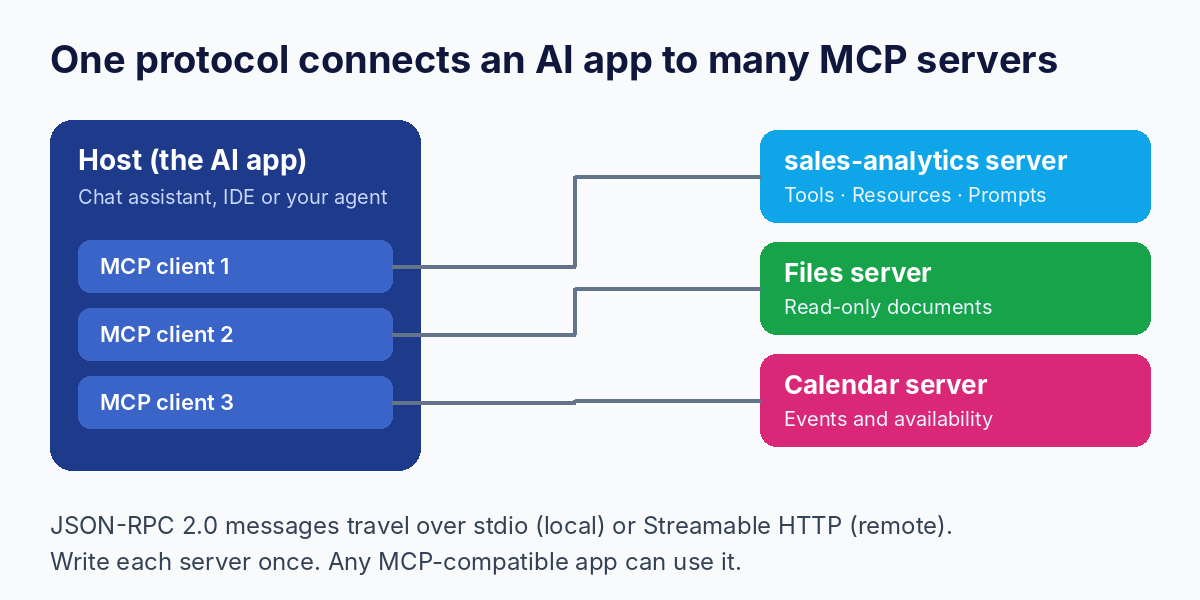
And messages travel over one of two transports:
- stdio: the host launches the server as a local subprocess and talks over standard input and output. Simple and private. Best for development and local tools.
- Streamable HTTP: the server runs as a web service. Best for remote and shared servers, and it is the transport that supports proper authentication. It replaced the older SSE transport.
Here is the shape of a message. This is simplified for readability and was not captured from a live run:
{ "jsonrpc": "2.0", "id": 7, "method": "tools/call",
  "params": { "name": "top_products", "arguments": { "limit": 2 } } }
MCP vs function calling vs REST API vs Agent Skills vs A2A
This is the question most readers search for, so here is the clean comparison.
| What it is | Who it serves | Discovery at run time? | Reusable across AI apps? | |
|---|---|---|---|---|
| REST API | An interface for software to call a service | Developers | No, you read docs and write code | Only via your own glue code |
| Function calling | A model feature: the model returns a structured request to call your function | One app's developer | No, you pass the function list in each request | No, tied to that app and provider |
| MCP | A protocol so any AI app can find and use a server's tools, resources and prompts | AI apps and their users | Yes | Yes |
| Agent Skills | Packaged instructions (and scripts) an agent loads when a task matches | An agent's behaviour | Yes, by name and description | Yes, as an open format |
| A2A (Agent2Agent) | A protocol for independent agents to talk to each other as peers | Multi-agent systems | Yes, via agent cards | Yes |
The simple mental model:
- Use function calling when one app needs a handful of its own functions.
- Use MCP when you want a capability reusable across apps, or you want to plug into the existing ecosystem of servers.
- Use Skills to teach an agent how to do a task (a procedure), and MCP to give it access to live systems.
- Use A2A when the thing on the other end is another agent, not a tool.
MCP does not replace APIs. Most MCP servers are thin wrappers around an existing API or database. MCP simply makes that API usable by models without custom plumbing.
MCP in 2026: where the standard stands
MCP has moved quickly. These are the milestones worth knowing:
| Date | What happened |
|---|---|
| Nov 2024 | Anthropic releases MCP; first spec revision is dated 2024-11-05 (tools, resources, prompts) |
| 2025 | Other major AI vendors, including OpenAI and Google DeepMind, adopt the protocol |
| Mar 2025 (spec 2025-03-26) | Streamable HTTP transport introduced, replacing SSE |
| Jun 2025 (spec 2025-06-18) | OAuth 2.1-based authorization and "elicitation" (servers can ask the user for input) |
| Nov 2025 (spec 2025-11-25) | A stable revision that many SDKs and servers still target |
| Dec 2025 | Anthropic donates MCP to the Agentic AI Foundation, a Linux Foundation fund co-founded with Block and OpenAI |
| 28 Jul 2026 (spec 2026-07-28) | The protocol becomes stateless at its core: the old initialize handshake and session tracking are removed, and each request carries its own version and capability information |
Two practical takeaways. First, MCP is no longer one company's project, which lowers the risk of building on it. Second, SDKs adopt new spec revisions at their own pace, so always check which version your SDK targets. The Python SDK we use below is version 2.x, which renamed some classes (more on that in Step 0).
What we will build
A small sales-analytics MCP server that:
1. Reads from a SQLite database of 10 orders, using a read-only connection.
2. Exposes two tools (revenue_by_region, top_products), one resource (the table schema) and one prompt (weekly_review).
3. Is called by a Python client over stdio, with a failure test.
Everything runs on your laptop with no API keys and no LLM. That is deliberate. MCP is a protocol, not a model feature, so you can learn and test the whole thing without paying for tokens.
Prefer to practise Python basics first? Use the free Python tutorial and run snippets in the online Python compiler.
Step 0: set up your environment
You need a recent Python 3. We ran everything below on Python 3.13 with mcp 2.3.0, so if something differs on your machine, check your versions first.
python -m venv .venv
source .venv/bin/activate        # Windows: .venv\Scripts\activate
pip install mcp
Version note that will save you an hour. Inmcp2.x the high-level server class was renamed fromFastMCPtoMCPServerand now lives inmcp.server.mcpserver. Many tutorials online still show the oldfrom mcp.server.fastmcp import FastMCPimport, which fails on 2.x with a "no module named" error. If you are following an older tutorial, either use the new import shown here or pin the older SDK withpip install "mcp<2".
Step 1: create the data
Save this as make_db.py and run it once. It builds a tiny sales.db.
import sqlite3

con = sqlite3.connect("sales.db")
con.executescript("""
DROP TABLE IF EXISTS orders;
CREATE TABLE orders (
    order_id INTEGER PRIMARY KEY,
    region   TEXT,
    product  TEXT,
    amount   REAL,
    order_date TEXT
);
INSERT INTO orders VALUES
 (1,'North','Laptop',1200,'2026-09-02'),
 (2,'North','Mouse',  25,'2026-09-03'),
 (3,'South','Laptop',1150,'2026-09-05'),
 (4,'South','Monitor',300,'2026-09-07'),
 (5,'East', 'Laptop',1300,'2026-09-09'),
 (6,'East', 'Mouse',  30,'2026-09-12'),
 (7,'West', 'Monitor',320,'2026-09-15'),
 (8,'West', 'Laptop',1100,'2026-09-18'),
 (9,'North','Monitor',310,'2026-09-21'),
 (10,'South','Mouse', 28,'2026-09-25');
""")
con.commit()
print("rows:", con.execute("SELECT COUNT(*) FROM orders").fetchone()[0])
Output:
rows: 10New to SQL? The free SQL tutorial covers everything used here, and you can try queries in the SQL compiler.
Step 2: write the MCP server
Save this as server.py. Read the comments, because each design choice matters.
import sqlite3
from mcp.server.mcpserver import MCPServer

mcp = MCPServer("sales-analytics")
DB = "sales.db"


def _query(sql: str, params: tuple = ()):
    # Read-only connection: even a bad query cannot change data.
    con = sqlite3.connect(f"file:{DB}?mode=ro", uri=True)
    try:
        return con.execute(sql, params).fetchall()
    finally:
        con.close()


@mcp.tool()
def revenue_by_region() -> dict:
    """Total revenue per region, highest first."""
    rows = _query("SELECT region, SUM(amount) FROM orders GROUP BY region ORDER BY 2 DESC")
    return {region: total for region, total in rows}


@mcp.tool()
def top_products(limit: int = 3) -> list[dict]:
    """Best-selling products by revenue. `limit` is capped at 10."""
    limit = max(1, min(limit, 10))
    rows = _query(
        "SELECT product, SUM(amount) FROM orders GROUP BY product ORDER BY 2 DESC LIMIT ?",
        (limit,),
    )
    return [{"product": p, "revenue": r} for p, r in rows]


@mcp.resource("schema://orders")
def orders_schema() -> str:
    """The orders table schema, so a model knows what it can ask about."""
    return "orders(order_id INTEGER, region TEXT, product TEXT, amount REAL, order_date TEXT)"


@mcp.prompt()
def weekly_review(region: str) -> str:
    """A reusable prompt template for a regional sales review."""
    return f"Review last month's sales for the {region} region. Use the tools, then summarise in 3 bullets."


if __name__ == "__main__":
    mcp.run()  # stdio by default
What each part does:
| Part | Why it is written this way |
|---|---|
MCPServer("sales-analytics") | Names the server. Hosts show this name to users |
@mcp.tool() | Registers a function as a tool. The function name, type hints and docstring become the tool description the model reads, so write them for a model, not just for yourself |
Read-only connection (mode=ro) | The database itself refuses writes. This is a guardrail that does not depend on the model behaving |
limit = max(1, min(limit, 10)) | Never trust arguments. A model can send limit=1000000 |
@mcp.resource("schema://orders") | Read-only context the host can load without a tool call |
@mcp.prompt() | A template the user can pick, for example from a slash-command menu |
mcp.run() | Starts the server. With no argument it uses stdio |
Notice what is not here: no generic run_sql(query) tool. That omission is the most important design decision in the file, and the experiment later shows why.
Step 3: write a client and run it
A real AI app would be the host, but a plain Python client proves your server works before any model is involved. Save this as client.py.
import asyncio, sys
from mcp import Client, StdioServerParameters

params = StdioServerParameters(command=sys.executable, args=["server.py"])


async def main():
    async with Client(params) as client:
        print("== Server info")
        print(client.server_info.name)

        print("\n== Tools")
        for t in (await client.list_tools()).tools:
            print(f"- {t.name}: {t.description}")

        print("\n== Resources")
        for r in (await client.list_resources()).resources:
            print(f"- {r.uri}")

        print("\n== Prompts")
        for p in (await client.list_prompts()).prompts:
            print(f"- {p.name}")

        print("\n== Call: revenue_by_region")
        res = await client.call_tool("revenue_by_region", {})
        print(res.content[0].text)

        print("\n== Call: top_products(limit=2)")
        res = await client.call_tool("top_products", {"limit": 2})
        print(res.structured_content)

        print("\n== Read resource")
        res = await client.read_resource("schema://orders")
        print(res.contents[0].text)

        print("\n== Failure test: unknown tool")
        try:
            res = await client.call_tool("drop_table", {"name": "orders"})
            print("is_error:", res.is_error, "|", res.content[0].text)
        except Exception as e:
            print(type(e).__name__, "|", e)


asyncio.run(main())
Run it with python client.py. The client launches server.py itself as a subprocess.
The real output
This output was copied from an actual run of the code above:
== Server info
sales-analytics

== Tools
- revenue_by_region: Total revenue per region, highest first.
- top_products: Best-selling products by revenue. `limit` is capped at 10.

== Resources
- schema://orders

== Prompts
- weekly_review

== Call: revenue_by_region
{
  "North": 1535.0,
  "South": 1478.0,
  "West": 1420.0,
  "East": 1330.0
}

== Call: top_products(limit=2)
{'result': [{'product': 'Laptop', 'revenue': 4750.0}, {'product': 'Monitor', 'revenue': 930.0}]}

== Read resource
orders(order_id INTEGER, region TEXT, product TEXT, amount REAL, order_date TEXT)

== Failure test: unknown tool
is_error: True | Unknown tool: drop_table
What the output teaches
| Observation | Lesson |
|---|---|
| Tool descriptions came straight from your docstrings | Docstrings are the interface. Vague docstrings produce wrong tool choices by the model |
| The numbers are correct. North = 1200 + 25 + 310 = 1535, and Laptop = 1200 + 1150 + 1300 + 1100 = 4750 | Always verify tool results by hand once. A server that returns confident wrong numbers is worse than none |
| The server advertised tools, a resource and a prompt, and the client discovered them without any hard-coding | This is discovery, the core MCP idea |
drop_table returned is_error: True instead of crashing | Failures come back as structured results the model can read and recover from |
This is the same verification mindset we teach in Agentic AI for Data Analytics: never accept an AI-produced number without a check.
Step 4: connect the server to a real AI app
Once the client test passes, point a real host at the same file. Hosts differ, so check your app's MCP documentation, but most use the same shape of configuration. The snippets below are illustrative and were not executed here.
A JSON config used by several desktop assistants and editors:
{
  "mcpServers": {
    "sales-analytics": {
      "command": "python",
      "args": ["/absolute/path/to/server.py"]
    }
  }
}
A command-line coding agent can often add it in one line:
claude mcp add sales-analytics -- python /absolute/path/to/server.pyThen ask the assistant a plain-English question such as "Which region had the highest revenue last month?" The host reads your tool descriptions, decides revenue_by_region fits, calls it, and writes the answer from the result. Use absolute paths. Relative paths are the most common reason a server "connects" but never appears.
Learn it live: Building agents that call real tools and data is easier with a mentor beside you. See the Generative AI program and the Data Analytics with Agentic AI program, or practise related skills with Python interview questions.
The experiment: what happens if the tool trusts the model?
The most common first MCP server exposes one tool, run_sql(query), and calls it a day. It feels powerful. Here is why it is dangerous. We ran two versions against copies of the same data. The first connects with write access and runs whatever it receives. The second is read-only and allows only SELECT.
import sqlite3

def naive_run_sql(sql):           # a tool that trusts whatever the model sends
    con = sqlite3.connect("naive.db")
    cur = con.execute(sql); con.commit()
    return cur.rowcount

def safe_run_sql(sql):            # same idea, but read-only + SELECT-only
    if not sql.lstrip().lower().startswith("select"):
        return "rejected: only SELECT is allowed"
    con = sqlite3.connect("file:sales.db?mode=ro", uri=True)
    return con.execute(sql).fetchall()
Then we sent both the same destructive statement, as if a model had been tricked into producing it. Real output:
== Naive tool
rows deleted: 10
rows left: 0

== Guarded tool
rejected: only SELECT is allowed
rows left: 10
One careless tool wiped the table. The guarded tool refused. We also confirmed the read-only database connection used in server.py rejects writes on its own, even if the SELECT check were bypassed:
OperationalError | attempt to write a readonly database
rows still: 10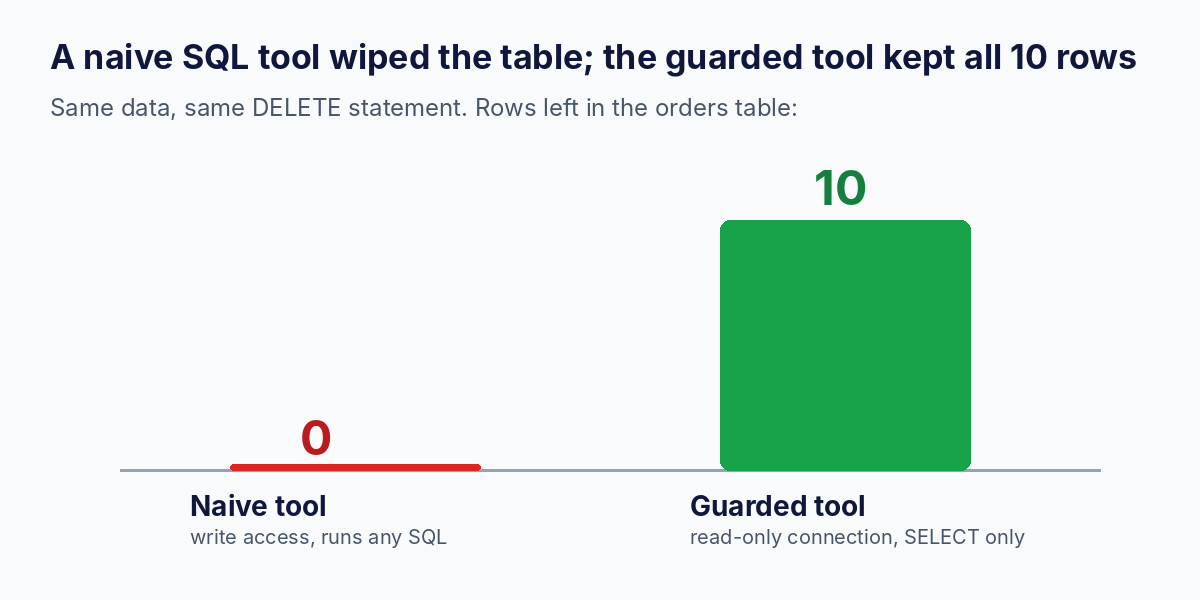
Two layers beat one. A text check like "starts with select" is easy to bypass on its own. A read-only credential or connection enforces the rule at the data layer, where a clever prompt cannot reach it. Use both, and prefer purpose-built tools like revenue_by_region over a general query tool whenever you can.
MCP security: what can go wrong in 2026
MCP did not invent these risks, but it gave them new surfaces. Security researchers have documented a steady stream of problems since adoption took off, and nearly all of them are implementation choices rather than flaws in the protocol itself.
| Threat | What it means | Defence |
|---|---|---|
| Prompt injection | Untrusted content (a web page, a ticket, a database row) contains instructions the model follows as if they came from the user | Treat tool output as data, not commands. Limit what tools can do |
| Tool poisoning | A malicious server hides instructions in a tool's description, which the model reads but the user does not see | Review tool descriptions before approving a server. Pin versions. Scan with a tool such as mcp-scan |
| Rug pull | A server changes a tool's behaviour after you approved it | Pin and monitor tool definitions for changes |
| Excessive permissions | A server holds broad credentials, so one bad call does large damage | Least privilege. Read-only by default. Separate credentials per server |
| Weak or missing auth | Remote servers exposed without authentication | Use OAuth-based authorization on remote servers. Never expose an unauthenticated server to the internet |
| Classic code flaws | Path traversal, command injection, code injection inside the server | Validate every argument. Never pass model input to a shell or an unrestricted file path |
| Supply-chain risk | Installing an unvetted community server | Prefer maintained servers from known publishers. Read the code |
To give a sense of scale: a 2026 survey by Endor Labs of 2,614 MCP server implementations reported that roughly 82% used file operations prone to path traversal, about 67% exposed APIs open to code injection, and about 34% were open to command injection. Treat those as a snapshot from one study rather than a permanent verdict, but the direction is clear: review before you install. OWASP has also published a dedicated MCP Top 10 of risks, and it is worth reading alongside its separate list for agentic applications.
A rule you can remember: the model is an untrusted user typing into your server. Design every tool as if the argument might be hostile.
From demo to production: what changes
Your stdio server is a great start. Shipping something shared takes more.
1. Move to Streamable HTTP for remote use. The same server can run over HTTP by changing one line. This snippet is illustrative. We confirmed the server starts with this transport but did not run a full remote session.
if __name__ == "__main__":
    mcp.run(transport="streamable-http")
2. Add authentication. Remote servers need real authorization. The spec builds on OAuth 2.1, and the SDK accepts token-verification and auth settings when you create the server. Do not roll your own scheme.
3. Expect statelessness. Since the 2026-07-28 revision, requests are self-describing and there is no protocol-level session to track. That makes horizontal scaling and load balancing simpler. Do not store per-user state in server memory and assume the next request will land on the same instance.
4. Replace SQLite with your real source, but keep the same guardrails: read-only credentials, row limits, query timeouts, and purpose-built tools.
Production checklist for MCP servers
| Area | What to do | Why |
|---|---|---|
| Scope | Expose narrow, named tools instead of a generic query or shell tool | Smaller blast radius, better tool selection by the model |
| Credentials | Read-only and least-privilege, one set per server | A tricked model cannot do more than the credential allows |
| Input validation | Validate types, ranges and allowed values on every argument | Models send unexpected values, and attackers send hostile ones |
| Descriptions | Write clear, honest docstrings. Never include hidden instructions | The model reads them, and so do security scanners |
| Limits | Cap rows, runtime, payload size and call rate | Stops runaway cost and denial of service |
| Auth | OAuth on every remote server. No anonymous endpoints | Public unauthenticated servers get found and abused |
| Human approval | Require confirmation for any tool that writes, sends or deletes | Keeps a person in the loop for irreversible actions |
| Logging | Log every call with arguments, caller and result status | You cannot investigate what you did not record |
| Testing | Test tools with a plain client (like ours) and with adversarial inputs | Finds bugs before a model does |
| Versioning | Pin SDK and spec versions. Re-test on upgrade | SDKs adopt spec revisions at different speeds |
Common mistakes when building MCP servers
| Mistake | Why it hurts | Do this instead |
|---|---|---|
One giant run_sql or run_shell tool | One injected prompt can do anything the credential allows | Many small, purpose-built, read-only tools |
| Vague tool descriptions | The model picks the wrong tool or none | State what it does, its inputs and its limits in the docstring |
| Following an old tutorial with the old import | FastMCP import fails on SDK 2.x | Use MCPServer from mcp.server.mcpserver, or pin mcp<2 |
| Relative file paths in host config | The server silently fails to start | Use absolute paths and test with a plain client first |
| Printing debug text to stdout in a stdio server | Stdout carries protocol messages, so stray prints corrupt the stream | Log to stderr or a file |
| Trusting tool results blindly | Wrong or poisoned results flow straight into answers | Verify key numbers and treat returned text as untrusted |
| Installing random community servers | Supply-chain and poisoning risk | Prefer vetted publishers and read the code first |
| Skipping error handling | The model gets a stack trace instead of guidance | Return clear, short, actionable error messages |
MCP for data analysts: where it actually helps
You do not need to be an AI engineer for MCP to matter to your work. Analysts and data teams are among the best-placed users, because so much analysis is "ask a question of a system and get an answer back."
- Natural-language access to the warehouse. A governed MCP server with read-only, parameterised tools lets stakeholders ask questions without writing SQL, while you control what is exposed. See Agentic Analytics with Natural Language Queries for the full workflow and its failure modes.
- A shared semantic layer. Expose your agreed metric definitions (revenue, active user, on-time delivery) as tools so every AI app computes them the same way.
- BI and reporting automation. Tools that fetch a dashboard's numbers, refresh an extract or draft a weekly summary.
- Operational use cases. In supply chain, a server can expose shipment status, lane performance and cost-to-serve metrics, so an agent can answer "which lanes slipped this week and why?" from live data.
- Documentation and data dictionaries as resources. Give the model the meaning of every column so it stops guessing.
If you are mapping out a career path around this, the Forward Deployed Engineer guide and Data Analytics with AI in 2026 show where these skills are in demand, and How Data Analyst Interviews Have Changed with AI shows how to talk about them.
Where to go next
1. Add one write tool, safely. Build a tool that records a note, and require explicit user confirmation in the host before it runs.
2. Swap SQLite for Postgres using a read-only database role.
3. Connect your server to an agent. Take the multi-agent system from How to Build a Multi-Agent Workflow in Python with LangGraph and give its agents your MCP tools.
4. Add evaluation. Write ten test questions with known answers and check that the agent picks the right tool and returns the right number.
5. Read the spec revision your SDK targets, especially the authorization section.
6. Pair MCP with retrieval. MCP gives access to live systems, and RAG gives access to documents. Our RAG vs Fine-Tuning guide explains when to use which.
Learn it live: Want a mentor to review your first MCP server? Join a cohort or book a mock interview to practise explaining it under pressure.
Frequently asked questions
What is MCP in simple words?
MCP is a standard way for AI apps to connect to tools and data. A service publishes an MCP server once, and any MCP-compatible AI app can discover and use it, without a custom integration for each app.
What does MCP stand for?
MCP stands for Model Context Protocol. "Context" refers to the tools, data and prompts a model can be given so it can answer with live, relevant information instead of only what it learned in training.
Who created MCP, and who maintains it now?
Anthropic introduced MCP in November 2024. In December 2025 it was donated to the Agentic AI Foundation, a directed fund under the Linux Foundation, co-founded by Anthropic, Block and OpenAI. That makes it a vendor-neutral standard.
Is MCP the same as an API?
No. An API is an interface that developers call from code. MCP is a protocol layered on top that lets AI applications discover what a server can do at run time and call it in a standard way. Most MCP servers wrap an existing API or database.
What is the difference between MCP and function calling?
Function calling is a model feature in which the model returns a structured request to call a function you defined for one app. MCP standardises how tools are published and discovered, so the same server works across many apps. They work together: an app often uses function calling internally to act on tools it found through MCP.
What is an MCP server?
An MCP server is a program that exposes tools, resources and prompts through the protocol. It can be a few lines of Python like the one in this guide, or a large service. It can run locally over stdio or remotely over Streamable HTTP.
Do I need an LLM to build an MCP server?
No. A server is ordinary code, and you can test it fully with a plain client, as we did above. You only need a model when you connect a host that uses it to decide which tools to call.
Is MCP secure?
The protocol can be used securely, but many real-world servers are not. Documented risks include prompt injection, tool poisoning, over-broad permissions and missing authentication. Use least privilege, read-only access, input validation, OAuth on remote servers and human approval for risky actions.
Which programming language should I use for MCP?
Official SDKs exist for several languages, and Python and TypeScript are the most common starting points. Pick the one your team already uses, and check the official SDK list for current language support.
What is the difference between MCP and A2A?
MCP connects an agent to tools and data. A2A (Agent2Agent) connects independent agents to each other as peers. A system can use both: MCP for tool access and A2A for agent-to-agent collaboration.
Recommended reading and practice on Skillancy
- AI Agents & Multi-Agent Orchestration: The Complete 2026 Guide
- How to Build a Multi-Agent Workflow in Python with LangGraph
- Agentic Analytics with Natural Language Queries: How AI Agents Turn Questions into SQL
- Generative AI Roadmap 2026: From LLM Fundamentals to RAG and AI Agents
- RAG vs Fine-Tuning: What Should You Use for Generative AI Applications?
- Prompt Engineering for LLMs: The Complete 2026 Guide
- How to Become an AI Engineer in India in 2026
- Forward Deployed Engineer (FDE): What It Is, Skills, Salary and How to Become One
- Practice: Python interview questions · Python compiler · SQL compiler · Mock interviews
Sources
- Model Context Protocol (Wikipedia): launch, adoption by other AI vendors, December 2025 donation to the Agentic AI Foundation, and the stateless 2026 revision
- Anthropic donates MCP to the Linux Foundation under a new Agentic AI initiative
- Model Context Protocol specification releases tracker: revision dates through 2026-07-28
- Official MCP specification
- MCP patterns: spec feature maturity (Streamable HTTP, OAuth 2.1, elicitation)
- MCP vs A2A: how agent protocols fit together (Metorial)
- Agent skills vs Model Context Protocol: how do you choose?
- MCP security in 2026: tool poisoning, prompt injection and hardening (Godberry Studios, citing Endor Labs' 2,614-server survey)
- MCP security 2026: tool poisoning, OWASP MCP Top 10 and mcp-scan
- MCP security: prompt injection and tool poisoning (Microsoft MCP for Beginners)
Reproducibility note
All code in Steps 1 to 3 and in the experiment was run on Python 3.13 with mcp 2.3.0, and the output blocks were copied from those runs on 29 October 2026. The JSON message shape, the host configuration snippets, the one-line CLI command and the streamable-http line are illustrative: we confirmed the HTTP transport starts, but we did not run a full remote session or connect a commercial AI host. SDK class names changed between 1.x and 2.x, so if your installed version differs, check its migration notes. The 2024 to 2026 spec timeline and security figures come from the third-party sources listed above, so verify against the official specification before relying on them in production.
Learn it live: Ready to build agentic workflows on real analytics problems? Explore Data Analytics with Agentic AI, or talk to a mentor. Learn. Build. Get hired.
Get the Skillancy field notes
One email a week: AI and analytics guides, cohort dates and hiring signals. No spam, unsubscribe anytime.