
Agentic AI for Analysts: 5 Repetitive Tasks You Can Automate This Month (with Real Python Output, 2026)
By Skillancy Editorial Team · 30 October 2026 · 17 min read
Reviewed by Rishav Kumar, Principal Data Analyst, Walmart Global Tech
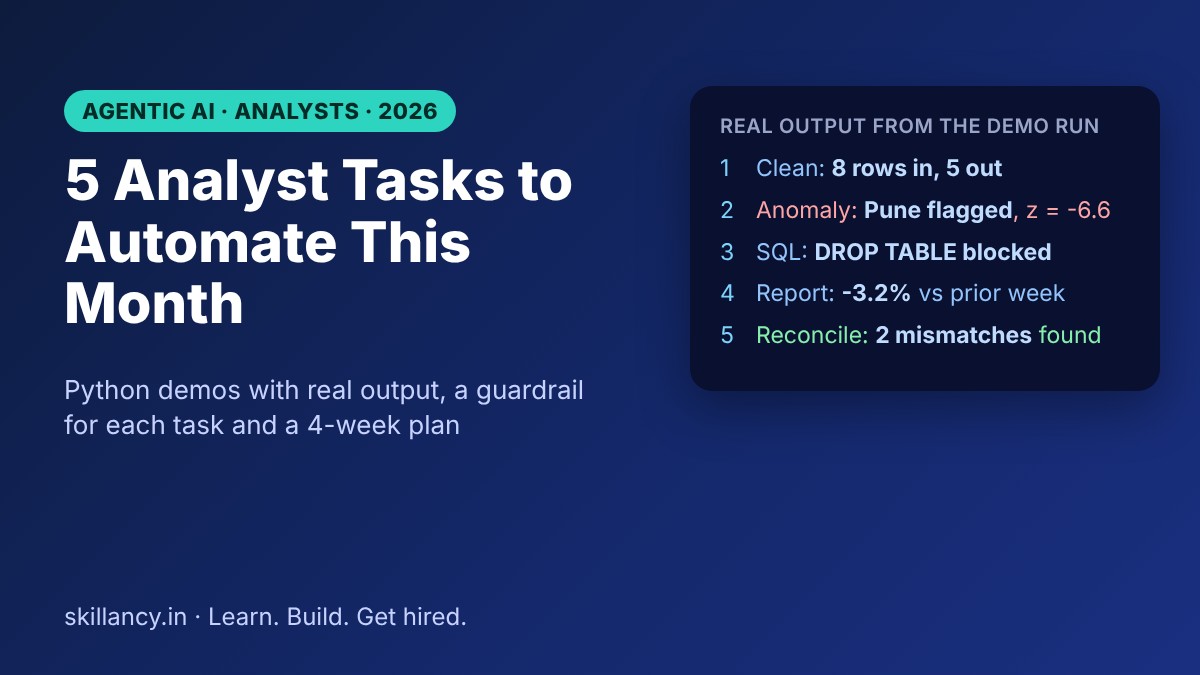
Most analysts lose a large part of every week to work that is repetitive rather than hard: fixing the same date format again, re-running the Monday report, chasing why two systems disagree by a few thousand rows, and answering "can you just pull the numbers for..." from five stakeholders. Agentic AI is a good fit for exactly this kind of work, because it can plan the steps, run tools such as SQL and Python, check its own result and report back. This guide gives you five concrete analyst tasks to automate this month, runnable Python for each, real output from a real run, and the guardrail that keeps every one of them from putting a wrong number in front of your manager.
| Question | Short answer |
|---|---|
| What is agentic AI for analysts? | Software that plans, uses tools and verifies a result for a goal you set, instead of answering one prompt at a time |
| Which task should I automate first? | Cleaning and profiling: it repeats often, is low risk and is easy to audit |
| Do I need to code? | Python and SQL help a lot. Each task below is a short block of code |
| Do I need an LLM API key to follow along? | No. The demo agents are deterministic so the output is reproducible |
| Will it replace analysts? | It automates repetitive work. Framing the question and judging what a number means stay human |
| What is the biggest risk? | A confident wrong number. Each task has a check built in for that reason |
What is agentic AI, in analyst terms?
A normal AI chat answers one prompt. An agentic system works toward a goal in a loop:
1. Plan: break the goal into steps, such as "profile the file, list the issues, fix them, confirm the row counts".
2. Act: call a tool: a SQL query, a Python function, an API.
3. Observe: read what the tool returned.
4. Check: compare the result with a rule you set, for example "the row count should not drop by more than 10%".
5. Decide: continue, retry, or stop and ask a human.
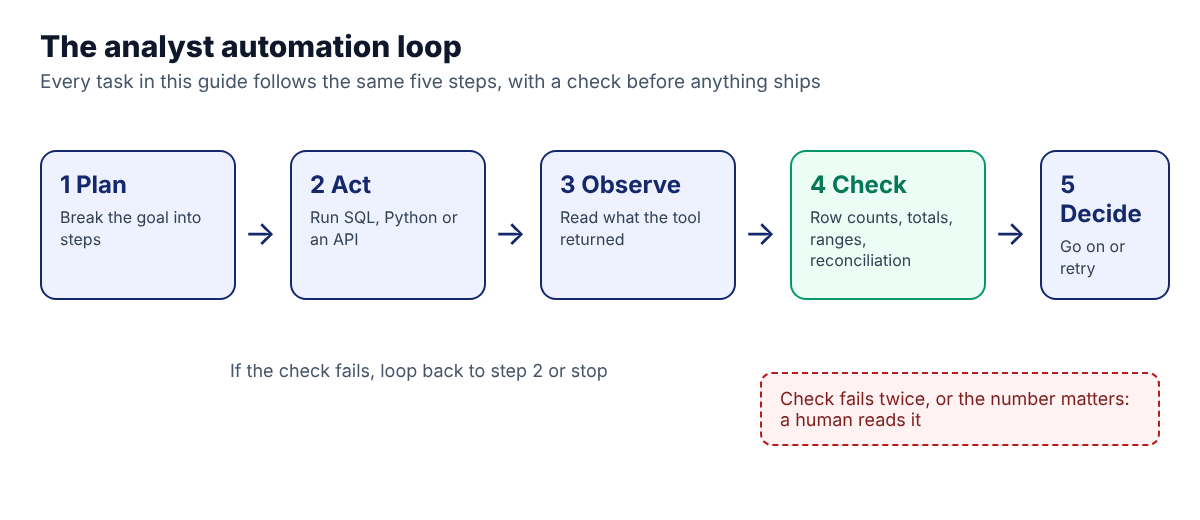
The difference from a script is that the plan can adapt. The difference from a plain chatbot is that it acts on your data and verifies the outcome. For the wider picture, read our guide to agentic analytics with natural language queries, and for the multi-agent version see how to build a multi-agent workflow in Python with LangGraph.
| Scheduled script | Chatbot | Agentic workflow | |
|---|---|---|---|
| Handles surprises | No, it breaks | Only if you notice | Adapts, or escalates to a human |
| Touches your data | Yes | No, you paste it in | Yes, through approved tools |
| Checks its own work | Only if you coded it | No | Built into the loop |
| Best for | Fixed, stable jobs | Drafting and explaining | Repeated tasks that vary a little each time |
How to choose which task to automate first
Score each candidate on three questions before you build anything.
| Question | Good sign |
|---|---|
| How often does it repeat? | Weekly or more |
| How costly is a wrong output? | Low, or easy to catch before it ships |
| Can a rule verify the result? | Yes: row counts, totals, ranges, a reconciliation |
If a task scores well on all three, automate it. If it is high stakes and nothing can check it automatically, keep it human and use AI only to draft. The five tasks below run from lowest to highest risk, which is also the order we recommend building them.
How the demo works (read this once)
To keep every number in this post reproducible, the demo uses small, deterministic Python functions in place of a language model. The "decisions" (which issues to look for, which SQL to run) are fixed, so you get the same output on your machine with no API key. In production, an LLM would write the plan and the SQL, and the check steps would stay exactly as shown here. The data is synthetic: three cities, 30 days of orders, with one incident planted on purpose so you can see the agents find it.
Each task follows the same shape: find, fix or answer, verify. Run the blocks in order in one Python file or notebook. You need pandas and numpy; SQLite ships with Python.
import sqlite3, re
import pandas as pd
import numpy as np

rng = np.random.default_rng(7)   # seeded so the numbers repeat
Task 1: Data cleaning and profiling agent
The pain. Every new extract arrives with duplicates, nulls, inconsistent casing, numbers stored as text and dates in two formats. You fix the same things every time.
What the agent does. It profiles the file, lists the issues it found, applies the fixes and reports rows in versus rows out, so nothing disappears silently.
raw = pd.DataFrame({
    "order_id": [1,2,2,3,4,5,6,7],
    "city": ["Bengaluru","bengaluru "," Pune","Pune","Mumbai","MUMBAI","Chennai",None],
    "amount": ["1200","1,450","980","980","abc","2200","1750","640"],
    "order_date": ["2026-10-01","2026-10-01","2026-10-02","2026-10-02",
                   "2026-10-03","03/10/2026","2026-10-04","2026-10-04"],
})

print("TASK 1 - cleaning agent")
issues = {
    "duplicate order_id": int(raw.duplicated("order_id").sum()),
    "null city": int(raw.city.isna().sum()),
    "non-numeric amount": int((~raw.amount.str.replace(",", "").str.fullmatch(r"\d+")).sum()),
    "mixed date format": int((~raw.order_date.str.fullmatch(r"\d{4}-\d{2}-\d{2}")).sum()),
}
for k, v in issues.items():
    print(f"  found {k}: {v}")

c = raw.drop_duplicates("order_id").copy()
c["city"] = c.city.str.strip().str.title()
c["amount"] = pd.to_numeric(c.amount.str.replace(",", ""), errors="coerce")
iso = pd.to_datetime(c.order_date, format="%Y-%m-%d", errors="coerce")
dmy = pd.to_datetime(c.order_date, format="%d/%m/%Y", errors="coerce")
c["order_date"] = iso.fillna(dmy)   # parse each known format explicitly, never guess
c = c.dropna(subset=["city", "amount"])

print(f"  rows in: {len(raw)} -> rows out: {len(c)} (rejected rows logged, not silently dropped)")
in_range = c.order_date.between("2026-10-01", "2026-10-04").all()
print("  date check - every order_date inside 1-4 Oct 2026:", in_range)
Real output from our run:
TASK 1 - cleaning agent
  found duplicate order_id: 1
  found null city: 1
  found non-numeric amount: 1
  found mixed date format: 1
  rows in: 8 -> rows out: 5 (rejected rows logged, not silently dropped)
  date check - every order_date inside 1-4 Oct 2026: True
Why the checks matter. Eight rows went in and five came out: one duplicate, one missing city and one unreadable amount were removed, while the odd date format was converted rather than dropped. A good agent does not just say "cleaned". It reports what it removed and why, so you can open the rejected rows and confirm none were valid.
The date check earned its place while we wrote this post. Our first version let pandas guess the date format, and it quietly read 03/10/2026 as 10 March instead of 3 October. Setting dayfirst=True made it worse, because it then swapped the day and month of the ISO dates. The fix was to parse each known format explicitly, and the range check is what would have caught the problem in a real run. Treat any silent date guess as a bug waiting to happen.
The guardrail. Set a maximum acceptable drop. If rows out fall below, say, 90% of rows in, the agent stops and asks you. Our demo drops 3 of 8 rows on purpose to show the report; on real data a drop that size would trigger that stop.
Task 2: Anomaly detection with automatic drill-down
The pain. A number on the dashboard looks off, and someone spends two hours working out where the problem is.
What the agent does. It compares each day with its own recent history, flags a day that is statistically unusual, then drills into the segments (here, cities) to find which one caused it.
print("\nTASK 2 - anomaly agent")
days = pd.date_range("2026-09-01", periods=30)
rows = []
for d in days:
    for city, base in [("Bengaluru", 100), ("Pune", 60), ("Mumbai", 80)]:
        n = int(rng.normal(base, 4))
        if d == days[24] and city == "Pune":
            n = 18                      # injected incident
        rows.append((d, city, n))
df = pd.DataFrame(rows, columns=["day", "city", "orders"])

tot = df.groupby("day").orders.sum()
z = (tot - tot.rolling(14).mean().shift(1)) / tot.rolling(14).std().shift(1)
flag = z[z.abs() > 3]
for d, v in flag.items():
    worst = df[df.day == d].sort_values("orders").iloc[0]
    print(f"  {d.date()}: total orders {tot[d]} (z={v:.1f}) -> drill-down: {worst.city} had {worst.orders} orders")
Real output from our run:
TASK 2 - anomaly agent
  2026-09-25: total orders 201 (z=-6.6) -> drill-down: Pune had 18 orders
The method is a rolling 14-day mean and standard deviation, shifted by one day so the day being tested is not part of its own baseline. A z-score beyond 3 in either direction raises a flag. The agent then sorts that day's rows and reports the weakest segment.
The insight. The alert did not just say "orders dropped". It said where. That is the difference between an alert you read and an alert you act on.
The guardrail. An anomaly is a question, not a conclusion. The agent should say "Pune looks unusual on 25 September", never "Pune had an outage". The cause is for a human to confirm. For a supply chain version of the same idea, the drill-down chain is network total, then region, then lane, then carrier, then order.
Task 3: Natural-language-to-SQL with guardrails
The pain. Stakeholders ask one-off questions all day. Each is a small query, but together they fragment your attention.
What the agent does. It turns a plain-English question into SQL, runs a safety check, executes the query and returns the result.
print("\nTASK 3 - SQL agent")
con = sqlite3.connect(":memory:")
df.assign(day=df.day.dt.strftime("%Y-%m-%d")).to_sql("orders", con, index=False)

q = "Which city had the highest average daily orders in September?"
candidate = ("SELECT city, ROUND(AVG(orders),1) AS avg_daily_orders "
             "FROM orders GROUP BY city ORDER BY avg_daily_orders DESC LIMIT 1")

def guard(sql):
    if not re.match(r"(?is)^\s*select\b", sql):
        return "blocked: not a SELECT"
    if re.search(r"(?i)\b(drop|delete|update|insert|alter|attach)\b", sql):
        return "blocked: write keyword"
    return "ok"

print("  question:", q)
print("  guardrail check:", guard(candidate), "| on 'DROP TABLE orders':", guard("DROP TABLE orders"))
print("  result:", con.execute(candidate).fetchall())
Real output from our run:
TASK 3 - SQL agent
  question: Which city had the highest average daily orders in September?
  guardrail check: ok | on 'DROP TABLE orders': blocked: not a SELECT
  result: [('Bengaluru', 97.9)]
In this demo the SQL is written by us. In production an LLM would write candidate from the question, and the guardrail would sit between the model and the database. Notice that the guard rejects a destructive statement outright.
Production guardrails to add on top. A regex is a seatbelt, not a wall. It is also blunt: it would block a harmless query that merely mentions a column called update. Real protection comes from the layers around it:
- Connect with a read-only database user.
- Limit result size and add a query timeout.
- Expose only approved tables or a governed semantic layer, not the whole warehouse.
- Log the question, the SQL and the result for audit.
- Show the SQL next to the answer so the requester can see how it was derived.
The caution. NL-to-SQL gets confidently wrong when column names are ambiguous or a metric has a business-specific definition ("active customer" means different things in different teams). Give the agent a short data dictionary and treat metric definitions as something a human owns. Practise writing and checking this kind of query in our free SQL compiler.
Task 4: The weekly report that writes itself
The pain. The same Monday report, rebuilt by hand, with the same two sentences of commentary.
What the agent does. It computes this week against last week, picks the biggest mover and drafts the narrative.
print("\nTASK 4 - reporting agent")
wk = df[df.day >= days[-7]].groupby("city").orders.sum()
prev = df[(df.day >= days[-14]) & (df.day < days[-7])].groupby("city").orders.sum()
chg = ((wk - prev) / prev * 100).round(1)
print(f"  Orders last 7 days: {wk.sum()} ({(wk.sum() - prev.sum()) / prev.sum() * 100:+.1f}% vs prior week).")
print(f"  Biggest mover: {chg.abs().idxmax()} ({chg[chg.abs().idxmax()]:+.1f}%).")
Real output from our run:
TASK 4 - reporting agent
  Orders last 7 days: 1626 (-3.2% vs prior week).
  Biggest mover: Pune (-11.5%).
This agrees with Task 2, where Pune had the planted incident. A reporting agent that reads the same governed data as your anomaly agent will surface the same story, which is what you want.
The guardrail. Let the agent compute every number in code and let the language model only phrase the sentence around numbers it was handed. Never let a model do arithmetic in its head. This one rule prevents most embarrassing report errors.
A review step worth keeping. A human reads the draft before it is sent, at least for the first month. After that, review only when the agent flags a movement above your threshold.
Task 5: Reconciliation between two systems
The pain. The warehouse says one number, finance says another, and finding the difference takes an afternoon.
What the agent does. It joins the two sources at the right grain, calculates the difference and lists only the mismatches.
print("\nTASK 5 - reconciliation agent")
a = df.groupby("city").orders.sum()
b = a.copy(); b["Pune"] -= 37; b["Mumbai"] += 5    # stand-in for a second system, with planted gaps
rec = pd.DataFrame({"warehouse": a, "finance": b})
rec["diff"] = rec.warehouse - rec.finance
print(rec.to_string())
print("  mismatches:", list(rec[rec["diff"] != 0].index))
Real output from our run:
TASK 5 - reconciliation agent
           warehouse  finance  diff
city
Bengaluru       2938     2938     0
Mumbai          2353     2358    -5
Pune            1767     1730    37
  mismatches: ['Mumbai', 'Pune']
Here the "finance" figures are a copy of the warehouse figures with two gaps planted on purpose, standing in for a second system. Bengaluru ties out exactly, Mumbai is off by 5 and Pune by 37. The agent's value is that you look at two lines, not three thousand.
The guardrail. Reconciliation is where an agent should never "fix" anything on its own. It reports differences and a likely category (timing, duplicate, missing mapping), and a human decides what to correct. Moving numbers between systems is a controls question, not a convenience.
All five tasks at a glance
| # | Task | Risk | Check that keeps it safe | Typical first build |
|---|---|---|---|---|
| 1 | Clean and profile | Low | Rows in vs rows out, rejected-row log, date-range check | About a day |
| 2 | Anomaly and drill-down | Low to medium | Rolling baseline, flag as a question not a conclusion | A day or two |
| 3 | NL-to-SQL | Medium | Read-only user, SELECT-only, show the SQL | Two to three days |
| 4 | Weekly report | Medium | Numbers computed in code, human review | One to two days |
| 5 | Reconciliation | Medium to high | Report only, never auto-correct | Two days |
Build times are rough estimates for an analyst comfortable with Python and SQL. Data access and approvals usually take longer than the coding.
A realistic 4-week plan to automate all five
| Week | Focus | Done when |
|---|---|---|
| 1 | Task 1: a cleaning agent on your most annoying recurring extract | You stop hand-cleaning it and review a rejected-rows log instead |
| 2 | Task 2: anomaly detection on one KPI you already track | It flags a real or planted anomaly with a correct drill-down |
| 3 | Tasks 3 and 4: the SQL agent with guardrails, then the weekly report | A teammate gets an answer without asking you |
| 4 | Task 5: reconciliation, plus a short run-book | Someone else can run it and read the result |
By the end of the month you have five small, checked, reusable workflows, not one fragile mega-agent.
From demo to production: what changes
The demo uses fixed functions so you can study the loop. Taking it to real work changes four things.
| In the demo | In production |
|---|---|
| Fixed "decisions" in code | An LLM proposes the plan or the SQL; your code validates it |
| Synthetic in-memory data | Governed tables with a data dictionary and read-only access |
| Printed output | Logged runs with inputs, queries and results you can audit |
| You watch it run | Scheduled runs that alert a human when a check fails |
Keep the check steps identical when you swap in a model. The model makes the agent flexible; the checks make it trustworthy.
Common mistakes to avoid
| Mistake | Why it hurts | Fix |
|---|---|---|
| Automating a task you do not fully understand yet | You bake in a wrong assumption | Do it by hand twice first |
| Letting the model do arithmetic | Plausible but wrong totals | Compute in code, narrate with the model |
| Letting a library guess formats | Silent errors, like the date swap above | Parse explicit formats and add a range check |
| No stop condition | Loops forever or runs up cost | Cap steps and set a maximum retry count |
| Read-write database access | One bad query can change data | Read-only credentials by default |
| No log of what the agent did | You cannot defend or debug a number | Log inputs, queries and outputs |
| Skipping human review at the start | Trust is built, not assumed | Review everything for the first month |
What this means for your career
Analysts who can build and supervise these workflows are doing a different job from analysts who only write queries: they own a system, not a task list. In interviews this shows up quickly, because describing how you verified an automated output is a stronger answer than describing the output. Our guide to data analyst interviews in 2026 covers how AI skills are now assessed, and Data Analytics with AI in 2026 looks at how the analyst role is changing.
Learn it live: Agentic workflows are at the centre of our Data Analytics with Agentic AI program, a live, mentor-led cohort of 12 weeks and 96 hours. Talk to a mentor about whether it fits your goals.
Frequently asked questions
What is agentic AI for data analysts?
It is AI that works toward a goal in a loop: it plans steps, uses tools such as SQL and Python, checks its own result against rules you set, and reports back or asks for help. It goes beyond answering a single prompt.
Which analyst tasks are best to automate with AI agents?
Data cleaning and profiling, anomaly detection with drill-down, natural-language-to-SQL for routine questions, recurring reports and reconciliation between systems. All five are repetitive and can be checked by a rule.
Can an AI agent write SQL reliably?
Often yes for well-defined questions, but it can be confidently wrong when column names are ambiguous or a metric has a business-specific definition. Use a read-only database user and a data dictionary, and show the generated SQL next to every answer.
Do I need to know Python to automate analyst tasks?
It helps a great deal. Each task in this guide is a short block of Python and SQL. Low-code tools can cover simpler cases, but you will hit limits when you need custom checks.
Will agentic AI replace data analysts?
It automates the repetitive part of the job, not the framing of the question, the judgement about what a number means or the conversation with a stakeholder. Analysts who can supervise these systems become more valuable, not less.
How do I stop an AI agent from making up numbers?
Compute every figure in code and let the language model only write the sentence around it. Add a verification step such as totals, row counts or a reconciliation, and log every query.
Is it safe to give an AI agent access to my company database?
Only with limits. Use read-only credentials, restrict the agent to approved tables, cap result size and runtime, and log everything. Follow your organisation's data policy and get approval before connecting any tool to production data.
How long does it take to automate these five tasks?
For an analyst comfortable with Python and SQL, about four weeks if you build one at a time and review each before moving on. Approvals and data access are usually the slowest part.
What is the difference between an agent and a scheduled script?
A script runs fixed steps and breaks when something unexpected happens. An agent can adapt its plan, retry, and escalate to a human when a check fails.
Recommended reading and practice on Skillancy
- Agentic Analytics with Natural Language Queries: How AI Agents Turn Questions into SQL
- How to Build a Multi-Agent Workflow in Python with LangGraph
- AI Agents & Multi-Agent Orchestration: The Complete 2026 Guide
- What Is MCP (Model Context Protocol)? Build Your First MCP Server in Python
- Data Analytics with AI in 2026: How AI Is Changing the Data Analyst Role
- Data Analyst Interviews in 2026
- Window Functions in SQL and Python for Data Analysis: A Complete Beginner's Roadmap
- SQL compiler, Python compiler and Python interview questions
- Data Analytics with Agentic AI, Generative AI and Data Science with AI
Sources
- Every output shown in this post was produced by running the code in this post, see the reproducibility note. No outside statistics are cited.
Reproducibility note
The code in Tasks 1 to 5 was run as one script, in order, with Python 3.13, pandas 3.0.5 and NumPy 2.5.3 on 30 October 2026, and the outputs shown are copied from that run. The random generator is seeded (np.random.default_rng(7)), and a second run produced identical output; exact order counts can differ on other NumPy versions. The agents are deterministic rule-based functions and make no model calls. The dataset is synthetic, the Pune incident and the warehouse-versus-finance gaps were planted on purpose, and none of it is real company data.
Learn it live: Want to build workflows like these on real analytics problems, with a mentor? Explore Data Analytics with Agentic AI, or talk to a mentor. Learn. Build. Get hired.
Get the Skillancy field notes
One email a week: AI and analytics guides, cohort dates and hiring signals. No spam, unsubscribe anytime.