
SQL Order of Execution: How Your Query Really Runs (Tested on Postgres, DuckDB and SQLite)
By Skillancy Editorial Team · 22 November 2026 · 34 min read
Reviewed by Rishav Kumar, Principal Data Analyst, Walmart Global Tech
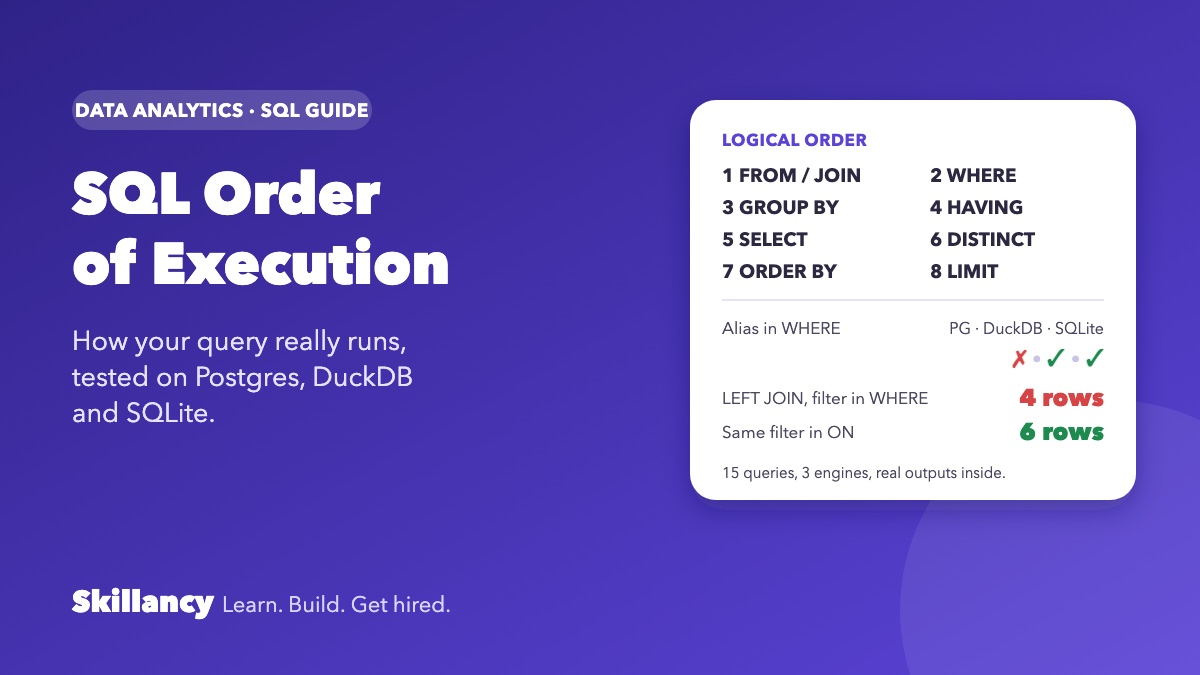
The SQL order of execution is the order in which a database logically processes the clauses of a query. You write SELECT first, but the database starts with FROM. It then runs WHERE, GROUP BY, HAVING, the SELECT list (including window functions), DISTINCT, ORDER BY and finally LIMIT. Knowing this order explains most of the confusing errors in SQL: why an alias "does not exist" in WHERE, why you cannot filter on SUM() without HAVING, why a LEFT JOIN quietly loses rows, and why a window function cannot go in WHERE. This guide walks one query through every step with the real intermediate rows. Then it runs 15 tricky queries on PostgreSQL 18, DuckDB 2.0 and SQLite 3.51. The result most tutorials get wrong: "you can never use an alias in WHERE" is true in PostgreSQL, but SQLite and DuckDB both accept it.
| Question | Short answer |
|---|---|
| Which clause runs first in SQL? | FROM (including joins). SELECT runs near the end |
| Which runs first, WHERE or HAVING? | WHERE filters rows before grouping. HAVING filters groups after it |
| Why can't I use an alias in WHERE? | The alias is created in SELECT, which runs after WHERE. PostgreSQL, MySQL and SQL Server reject it. SQLite and DuckDB allow it |
| Where can I always use an alias? | ORDER BY, because it runs after SELECT |
| When do window functions run? | After GROUP BY and HAVING, inside the SELECT step, before DISTINCT, ORDER BY and LIMIT |
| Does LIMIT run before ORDER BY? | No. ORDER BY sorts first, then LIMIT keeps the first rows |
| Is this the real execution order? | It is the logical order. The physical plan (EXPLAIN) can differ, with the same result |
New to SQL clauses? The free SQL tutorial has short lessons on SELECT, WHERE, GROUP BY, HAVING and window functions, each with a practice question. Every PostgreSQL query below runs in the free Skillancy SQL compiler, which uses the same PostgreSQL engine we used for this article.
SQL order of execution at a glance
| Step | Clause | What it does | What it can see |
|---|---|---|---|
| 1 | FROM, JOIN ... ON | Picks the tables and combines them into one set of rows | Table columns |
| 2 | WHERE | Keeps only the rows that match a condition | Table columns (no aliases, no aggregates) |
| 3 | GROUP BY | Collapses rows into one row per group | Table columns |
| 4 | HAVING | Keeps only the groups that match a condition | Grouped columns and aggregates |
| 5 | SELECT | Computes the output columns, aliases and window functions | Everything above |
| 6 | QUALIFY | Filters on window function results (Snowflake, BigQuery, Databricks, DuckDB and others) | Window results |
| 7 | DISTINCT | Removes duplicate output rows | Output columns |
| 8 | ORDER BY | Sorts the result | Output columns and aliases |
| 9 | LIMIT / OFFSET / FETCH | Keeps a slice of the sorted rows | The sorted result |
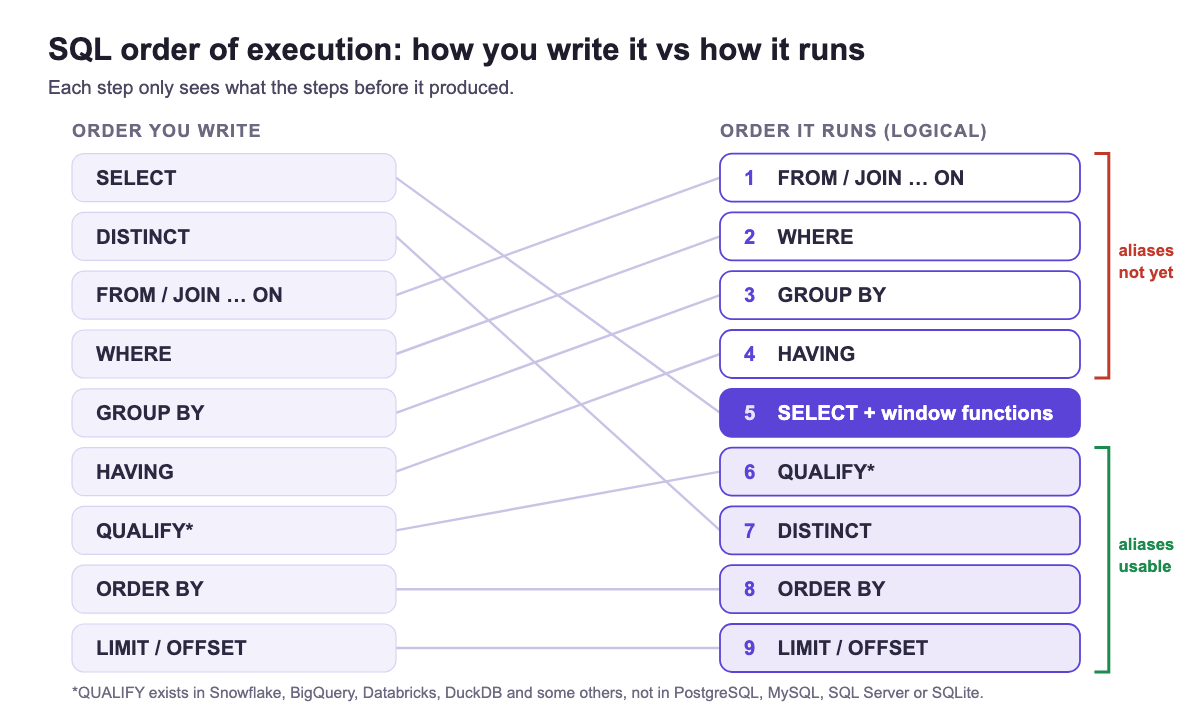
An easy way to remember it: "Few Writers Get Happy Seeing Data Out Late": FROM, WHERE, GROUP BY, HAVING, SELECT, DISTINCT, ORDER BY, LIMIT. Joins belong to FROM, and window functions belong to SELECT.
Writing order vs execution order
The order you write a query in is fixed by SQL's grammar:
SELECT DISTINCT ...   -- 1st written, 5th to 7th executed
FROM ... JOIN ... ON  -- 2nd written, 1st executed
WHERE ...             -- 3rd written, 2nd executed
GROUP BY ...          -- 4th written, 3rd executed
HAVING ...            -- 5th written, 4th executed
ORDER BY ...          -- 6th written, 8th executed
LIMIT ...             -- 7th written, 9th executed
SQL reads like English ("select the name from customers where..."), but it is processed like a pipeline: get the rows, filter them, group them, compute the output, then sort and cut. Every clause takes the result of the previous step as its input. A name only exists once the step that creates it has run.
The sample data
We use two small tables from an online store, so you can follow every row by hand:
| customer_id | name | city |
|---|---|---|
| 1 | Asha | Pune |
| 2 | Kabir | Mumbai |
| 3 | Meera | Pune |
| 4 | Rohan | Delhi |
| 5 | Zara | Mumbai |
| order_id | customer_id | order_date | amount | status |
|---|---|---|---|---|
| 101 | 1 | 2026-10-02 | 1200 | paid |
| 102 | 1 | 2026-10-09 | 800 | refunded |
| 103 | 2 | 2026-10-11 | 300 | paid |
| 104 | 3 | 2026-10-15 | 2500 | paid |
| 105 | 3 | 2026-10-20 | 1500 | paid |
| 106 | 4 | 2026-10-21 | 450 | paid |
| 107 | 2 | 2026-10-25 | 700 | paid |
| 108 | 1 | 2026-10-28 | 600 | paid |
| 109 | 4 | 2026-10-30 | 1800 | paid |
Zara has never ordered, and one of Asha's orders was refunded. Both details matter later.
CREATE TABLE customers (customer_id INT PRIMARY KEY, name TEXT, city TEXT);
INSERT INTO customers VALUES
  (1, 'Asha', 'Pune'), (2, 'Kabir', 'Mumbai'), (3, 'Meera', 'Pune'),
  (4, 'Rohan', 'Delhi'), (5, 'Zara', 'Mumbai');

CREATE TABLE orders (order_id INT PRIMARY KEY, customer_id INT, order_date DATE,
                     amount INT, status TEXT);
INSERT INTO orders VALUES
  (101, 1, '2026-10-02', 1200, 'paid'), (102, 1, '2026-10-09', 800, 'refunded'),
  (103, 2, '2026-10-11', 300, 'paid'),  (104, 3, '2026-10-15', 2500, 'paid'),
  (105, 3, '2026-10-20', 1500, 'paid'), (106, 4, '2026-10-21', 450, 'paid'),
  (107, 2, '2026-10-25', 700, 'paid'),  (108, 1, '2026-10-28', 600, 'paid'),
  (109, 4, '2026-10-30', 1800, 'paid');
One query, step by step
Question: which two cities brought in the most paid revenue in October, and how do they rank? We only want cities with more than ₹900 of paid orders. This query uses every common clause:
Example 1: the full query
SELECT c.city,
       COUNT(DISTINCT o.customer_id) AS buyers,
       SUM(o.amount) AS revenue,
       RANK() OVER (ORDER BY SUM(o.amount) DESC) AS city_rank
FROM orders o
JOIN customers c ON c.customer_id = o.customer_id
WHERE o.status = 'paid'
GROUP BY c.city
HAVING SUM(o.amount) > 900
ORDER BY revenue DESC
LIMIT 2;| city | buyers | revenue | city_rank |
|---|---|---|---|
| Pune | 2 | 5800 | 1 |
| Delhi | 1 | 2250 | 2 |
Now let's see how the database got there, one step at a time.
Step 1: FROM and JOIN ... ON
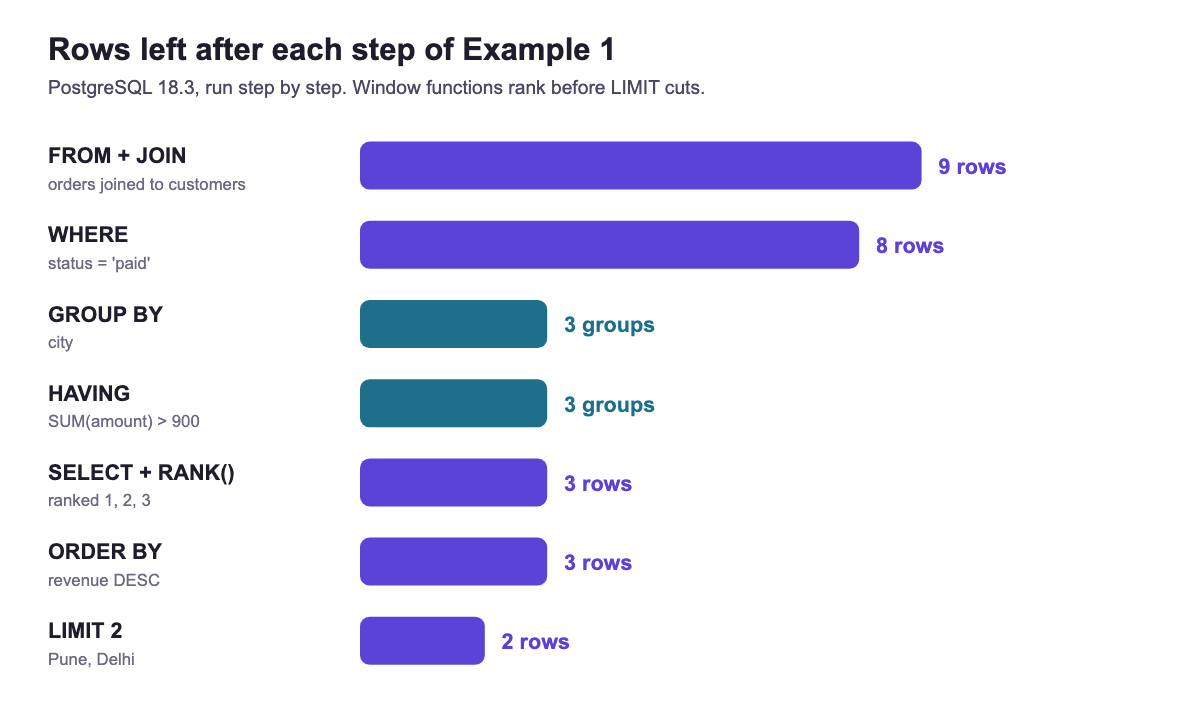
The database first builds the working set of rows. orders is joined to customers using the ON condition. Every order finds its customer, so we get 9 rows. Zara has no orders, so an inner join leaves her out.
| order_id | name | city | amount | status |
|---|---|---|---|---|
| 101 | Asha | Pune | 1200 | paid |
| 102 | Asha | Pune | 800 | refunded |
| 103 | Kabir | Mumbai | 300 | paid |
| 104 | Meera | Pune | 2500 | paid |
| 105 | Meera | Pune | 1500 | paid |
| 106 | Rohan | Delhi | 450 | paid |
| 107 | Kabir | Mumbai | 700 | paid |
| 108 | Asha | Pune | 600 | paid |
| 109 | Rohan | Delhi | 1800 | paid |
Subqueries and CTEs in FROM are also resolved here. Each one is a complete query with its own order of execution, and its result becomes an input table.
Step 2: WHERE
WHERE o.status = 'paid' is checked row by row. The refunded order 102 is removed, leaving 8 rows. At this point there are no groups yet, so WHERE cannot use SUM() or COUNT().
| order_id | name | city | amount |
|---|---|---|---|
| 101 | Asha | Pune | 1200 |
| 103 | Kabir | Mumbai | 300 |
| 104 | Meera | Pune | 2500 |
| 105 | Meera | Pune | 1500 |
| 106 | Rohan | Delhi | 450 |
| 107 | Kabir | Mumbai | 700 |
| 108 | Asha | Pune | 600 |
| 109 | Rohan | Delhi | 1800 |
Step 3: GROUP BY
GROUP BY c.city collapses the 8 rows into 3 groups, one per city. Aggregates such as SUM and COUNT are calculated per group. After this step, each output row is a city, not an order, so only city and aggregates can be selected.
| city | orders in the group | buyers | revenue |
|---|---|---|---|
| Delhi | 106, 109 | 1 | 2250 |
| Mumbai | 103, 107 | 1 | 1000 |
| Pune | 101, 104, 105, 108 | 2 | 5800 |
Step 4: HAVING
HAVING SUM(o.amount) > 900 is checked group by group. All three cities pass (Mumbai just makes it with 1,000). If the condition were > 1000, Mumbai would be removed here.
| city | revenue |
|---|---|
| Delhi | 2250 |
| Mumbai | 1000 |
| Pune | 5800 |
Step 5: SELECT, including the window function
Now the SELECT list is computed: city, buyers and revenue get their names (aliases), and the window function RANK() OVER (ORDER BY SUM(o.amount) DESC) runs over the 3 groups that survived HAVING:
| city | buyers | revenue | city_rank |
|---|---|---|---|
| Delhi | 1 | 2250 | 2 |
| Mumbai | 1 | 1000 | 3 |
| Pune | 2 | 5800 | 1 |
Notice that Mumbai has rank 3. The window function ranked all three cities before LIMIT removed one.
Steps 6 to 9: DISTINCT, ORDER BY, LIMIT
There is no DISTINCT or QUALIFY here. ORDER BY revenue DESC sorts the rows; it can use the alias revenue because SELECT has already run. Finally, LIMIT 2 keeps the first two rows: Pune and Delhi. That is the result of Example 1.
Why can't I use an alias in WHERE?
This is the most common question about SQL order of execution, and the most common error it causes.
Example 2: an alias in WHERE fails in PostgreSQL
Say you want orders whose amount including 18% GST is above ₹2,000:
SELECT order_id, amount * 1.18 AS amount_with_gst
FROM orders
WHERE amount_with_gst > 2000;
ERROR: column "amount_with_gst" does not existWHERE runs at step 2. The alias amount_with_gst is created at step 5. When WHERE runs, the name does not exist yet. MySQL rejects it too (Unknown column 'amount_with_gst' in 'where clause'), and its manual explains why: standard SQL does not allow aliases in WHERE, because the value may not be known yet when WHERE runs.
There are three standard fixes, and all of them return the same two rows:
-- Fix 1: repeat the expression
SELECT order_id, amount * 1.18 AS amount_with_gst
FROM orders
WHERE amount * 1.18 > 2000;

-- Fix 2: compute the alias in a subquery (or CTE) first
SELECT *
FROM (SELECT order_id, amount * 1.18 AS amount_with_gst FROM orders) AS t
WHERE amount_with_gst > 2000;

-- Fix 3 (PostgreSQL): compute it in a LATERAL subquery inside FROM
SELECT o.order_id, g.amount_with_gst
FROM orders o
CROSS JOIN LATERAL (SELECT o.amount * 1.18 AS amount_with_gst) AS g
WHERE g.amount_with_gst > 2000;| order_id | amount_with_gst |
|---|---|
| 104 | 2950.00 |
| 109 | 2124.00 |
Fix 2 works because the subquery is in FROM, which runs first, so its columns already exist when the outer WHERE runs. Fix 3 does the same thing without a separate query block. Repeating the expression (Fix 1) does not make the query slower: the database computes simple expressions like this cheaply, and readability is the only cost. Use a CTE when the expression is long. For when to choose a subquery or a CTE, see Subquery vs CTE vs Temp Table.
Example 3: aliases in GROUP BY, HAVING and ORDER BY
In PostgreSQL, an alias works in GROUP BY and in ORDER BY, but not in HAVING:
-- works: alias in GROUP BY
SELECT DATE_TRUNC('week', order_date)::date AS week, COUNT(*) AS orders
FROM orders
GROUP BY week
ORDER BY week;| week | orders |
|---|---|
| 2026-09-28 | 1 |
| 2026-10-05 | 2 |
| 2026-10-12 | 1 |
| 2026-10-19 | 3 |
| 2026-10-26 | 2 |
-- fails: alias in HAVING
SELECT customer_id, SUM(amount) AS total
FROM orders
GROUP BY customer_id
HAVING total > 2000;
ERROR: column "total" does not existThe fix is to repeat the aggregate, HAVING SUM(amount) > 2000, which returns customers 1 (2,600), 3 (4,000) and 4 (2,250).
Wait: GROUP BY runs before SELECT, so how can it use an alias? This is a PostgreSQL convenience, not the logical order changing. The PostgreSQL docs say an output column name can be used in ORDER BY and GROUP BY, but not in WHERE or HAVING. MySQL allows aliases in GROUP BY, HAVING and ORDER BY. SQL Server allows them only in ORDER BY. So the only alias position that works everywhere is ORDER BY.
Example 4: ORDER BY accepts the alias, but not inside an expression
SELECT order_id, amount * 1.18 AS amount_with_gst
FROM orders
ORDER BY amount_with_gst DESC
LIMIT 3;| order_id | amount_with_gst |
|---|---|
| 104 | 2950.00 |
| 109 | 2124.00 |
| 105 | 1770.00 |
But use the alias inside a calculation and PostgreSQL rejects it:
SELECT order_id, amount * 1.18 AS amount_with_gst
FROM orders
ORDER BY amount_with_gst * -1;
ERROR: column "amount_with_gst" does not existIn PostgreSQL, an ORDER BY item can be an output column's name, its position (ORDER BY 2), or an expression made from input columns. A bare alias counts as the first kind. An expression that contains the alias does not. SQLite and DuckDB accept both forms.
Example 5: reusing an alias in the same SELECT
SELECT order_id,
       amount * 1.18 AS amount_with_gst,
       amount_with_gst - amount AS gst
FROM orders;
PostgreSQL and SQLite reject this: all items in a SELECT list are computed "at the same time", so one item cannot see another item's alias. DuckDB accepts it and returns 101 | 1416.00 | 216.00 for the first order. This feature is called a lateral column alias. Snowflake, Databricks and Amazon Redshift support it. BigQuery supports it as "reusable column aliases" only after an admin turns the feature on.
The same name, two meanings
Example 6: an alias that shadows a column
This is the clearest way to see the order of execution at work. The alias amount has the same name as a real column, but holds the negative value:
SELECT order_id, -amount AS amount
FROM orders
ORDER BY amount
LIMIT 3;| order_id | amount |
|---|---|
| 104 | -2500 |
| 109 | -1800 |
| 105 | -1500 |
ORDER BY sorted by the alias (the negative numbers, smallest first). Now filter on the same name:
SELECT order_id, -amount AS amount
FROM orders
WHERE amount > 1000
ORDER BY order_id;| order_id | amount |
|---|---|
| 101 | -1200 |
| 104 | -2500 |
| 105 | -1500 |
| 109 | -1800 |
If WHERE had used the alias, -amount > 1000 would match nothing. Instead, it returned four rows, because WHERE ran before the alias existed and used the table column. One query, one name, two different values. All three engines we tested behaved this way, including SQLite and DuckDB, which otherwise allow aliases in WHERE: when the names clash, the real column wins. BigQuery documents the same rule. Never give an alias the same name as a column.
WHERE vs HAVING: filter rows or filter groups
Example 7: an aggregate in WHERE is an error everywhere
SELECT customer_id, SUM(amount)
FROM orders
WHERE SUM(amount) > 2000
GROUP BY customer_id;| Engine | Result |
|---|---|
| PostgreSQL 18.3 | ERROR: aggregate functions are not allowed in WHERE |
| DuckDB 2.0.1 | Binder Error: WHERE clause cannot contain aggregates! |
| SQLite 3.51.0 | misuse of aggregate: SUM() |
WHERE runs before GROUP BY, so a total per customer does not exist yet. Filters on aggregates go in HAVING.
Example 8: WHERE and HAVING together give a different answer
Question: which customers have more than ₹2,000 of paid orders?
SELECT customer_id, COUNT(*) AS paid_orders, SUM(amount) AS paid_total
FROM orders
WHERE status = 'paid'          -- step 2: drop refunded rows
GROUP BY customer_id           -- step 3
HAVING SUM(amount) > 2000      -- step 4: keep big groups
ORDER BY customer_id;| customer_id | paid_orders | paid_total |
|---|---|---|
| 3 | 2 | 4000 |
| 4 | 2 | 2250 |
Remove the WHERE and run the same HAVING:
| customer_id | orders | total |
|---|---|---|
| 1 | 3 | 2600 |
| 3 | 2 | 4000 |
| 4 | 2 | 2250 |
Asha (customer 1) now appears, because her refunded ₹800 order was counted before the groups were filtered. Her paid total is only 1,800. Order matters: WHERE decides which rows enter each group, and HAVING decides which groups survive. Put row conditions in WHERE and aggregate conditions in HAVING.
Example 9: the optimizer moves simple HAVING conditions into WHERE
What if you write a non-aggregate condition in HAVING?
EXPLAIN (COSTS OFF)
SELECT status, COUNT(*)
FROM orders
GROUP BY status
HAVING status = 'paid';
GroupAggregate
-> Seq Scan on orders
Filter: (status = 'paid'::text)The result is correct, and PostgreSQL is smart enough to apply the filter while scanning the table, before grouping, exactly as if you had written WHERE. That is our first look at the difference between the logical order and the physical plan. Still, write it in WHERE. It is clearer, and not every engine does this rewrite.
Example 10: every selected column must be grouped or aggregated
SELECT customer_id, status, SUM(amount)
FROM orders
GROUP BY customer_id;
PostgreSQL and DuckDB reject this: after GROUP BY customer_id, each customer is one row, and there is no single status for a customer with both paid and refunded orders. SQLite runs it and returns 1 | paid | 2600 for Asha. That row hides her refunded order: SQLite simply picked status from one row of the group. MySQL with ONLY_FULL_GROUP_BY turned off behaves similarly. If your query only works in SQLite, it is probably wrong.
JOIN ... ON vs WHERE: why a LEFT JOIN loses rows
Example 11: the same filter in WHERE and in ON
Question: list every customer, with their orders above ₹1,000 if they have any.
-- filter in WHERE
SELECT c.name, o.order_id, o.amount
FROM customers c
LEFT JOIN orders o ON o.customer_id = c.customer_id
WHERE o.amount > 1000
ORDER BY c.customer_id, o.order_id;| name | order_id | amount |
|---|---|---|
| Asha | 101 | 1200 |
| Meera | 104 | 2500 |
| Meera | 105 | 1500 |
| Rohan | 109 | 1800 |
Kabir and Zara are gone, so this behaves like an inner join. Move the condition into ON:
-- filter in ON
SELECT c.name, o.order_id, o.amount
FROM customers c
LEFT JOIN orders o ON o.customer_id = c.customer_id AND o.amount > 1000
ORDER BY c.customer_id, o.order_id;| name | order_id | amount |
|---|---|---|
| Asha | 101 | 1200 |
| Kabir | NULL | NULL |
| Meera | 104 | 2500 |
| Meera | 105 | 1500 |
| Rohan | 109 | 1800 |
| Zara | NULL | NULL |
6 rows instead of 4. ON runs during the join (step 1): orders that fail the condition are not matched, and the LEFT JOIN keeps every customer, filling the gaps with NULL. WHERE runs after the join (step 2). For Kabir and Zara, o.amount is NULL, and NULL > 1000 is not true, so their rows are thrown away. For more examples like this, read SQL Joins with NULL Values.
Rule: for an outer join, conditions on the optional table go in ON. Conditions that should remove rows from the final result go in WHERE. For an inner join, the two places give the same result.
Where do window functions run?
Window functions (ROW_NUMBER, RANK, LAG, SUM() OVER) are computed in the SELECT step, after WHERE, GROUP BY and HAVING, and before DISTINCT, ORDER BY and LIMIT. Three things follow from that.
Example 12: a window function cannot be filtered in WHERE
Find each customer's biggest order:
SELECT order_id, customer_id, amount
FROM orders
WHERE ROW_NUMBER() OVER (PARTITION BY customer_id ORDER BY amount DESC) = 1;
ERROR: window functions are not allowed in WHEREAll three engines refuse. The row numbers do not exist when WHERE runs. The portable fix is a CTE (or subquery): compute the window function in an inner query, then filter in the outer one.
WITH ranked AS (
  SELECT order_id, customer_id, amount,
         ROW_NUMBER() OVER (PARTITION BY customer_id ORDER BY amount DESC) AS rn
  FROM orders
  WHERE status = 'paid'
)
SELECT order_id, customer_id, amount
FROM ranked
WHERE rn = 1
ORDER BY customer_id;| order_id | customer_id | amount |
|---|---|---|
| 101 | 1 | 1200 |
| 107 | 2 | 700 |
| 104 | 3 | 2500 |
| 109 | 4 | 1800 |
Example 13: QUALIFY, the shortcut some databases add
QUALIFY is to window functions what HAVING is to aggregates: a filter that runs after window functions are computed. In DuckDB:
SELECT order_id, customer_id, amount
FROM orders
QUALIFY ROW_NUMBER() OVER (PARTITION BY customer_id ORDER BY amount DESC) = 1;
DuckDB returns one row per customer: 101, 107, 104 and 109 (its CTE twin above filtered on paid too, which changes nothing here). PostgreSQL and SQLite return syntax error at or near "ROW_NUMBER".
| Database | QUALIFY |
|---|---|
| Snowflake, BigQuery, Databricks, DuckDB, ClickHouse | Supported |
| Microsoft Fabric Data Warehouse | Supported (listed after HAVING in its logical order) |
| PostgreSQL | Not supported. A patch was still under review in 2026 |
| MySQL, SQL Server, SQLite | Not supported. Use a CTE |
QUALIFY is not part of the SQL standard yet, so in interviews, write the CTE version and mention QUALIFY as the shorter alternative.
Example 14: a window function can wrap an aggregate
Because window functions run after GROUP BY, they can use aggregates. This gives each city's share of revenue in one query:
SELECT c.city,
       SUM(o.amount) AS revenue,
       ROUND(100.0 * SUM(o.amount) / SUM(SUM(o.amount)) OVER (), 1) AS pct_of_total
FROM orders o
JOIN customers c ON c.customer_id = o.customer_id
WHERE o.status = 'paid'
GROUP BY c.city
ORDER BY revenue DESC;| city | revenue | pct_of_total |
|---|---|---|
| Pune | 5800 | 64.1 |
| Delhi | 2250 | 24.9 |
| Mumbai | 1000 | 11.0 |
SUM(SUM(o.amount)) OVER () looks odd, but it follows the order exactly: the inner SUM is the per-city aggregate from step 3, and the outer SUM ... OVER () adds those city totals up in step 5.
Example 15: a window only sees rows that passed WHERE
SELECT order_id, amount, COUNT(*) OVER () AS rows_window_saw
FROM orders
WHERE status = 'paid'
ORDER BY order_id
LIMIT 3;| order_id | amount | rows_window_saw |
|---|---|---|
| 101 | 1200 | 8 |
| 103 | 300 | 8 |
| 104 | 2500 | 8 |
The window counted 8 rows, not 9 (the refunded order had already been removed by WHERE) and not 3 (LIMIT had not run yet). This is why "total count" columns in paginated reports show the count of all matching rows, not just the rows on the current page. For more on window functions, read Window Functions in SQL.
DISTINCT, ORDER BY and LIMIT: the last three steps
Example 16: DISTINCT with ORDER BY on a column you did not select
SELECT DISTINCT city
FROM customers
ORDER BY name;
PostgreSQL refuses: for SELECT DISTINCT, ORDER BY expressions must appear in select list. After DISTINCT, there is one Mumbai row standing for both Kabir and Zara, so which name should it sort by? There is no single answer. SQLite and DuckDB run the query and return Pune, Mumbai, Delhi, an order based on whichever name each engine happened to use. PostgreSQL's error is the honest answer. Sort by a selected column, or use GROUP BY city ORDER BY MIN(name).
DISTINCT also runs after window functions. SELECT DISTINCT customer_id, COUNT(*) OVER (PARTITION BY customer_id) returns one row per customer (1 → 3, 2 → 2, 3 → 2, 4 → 2). The window function counted all 9 order rows first, and DISTINCT then removed the duplicates.
Example 17: ORDER BY runs before LIMIT, and ties are not ordered
LIMIT always applies to the sorted result, so ORDER BY amount DESC LIMIT 3 returns the three largest orders (104, 109, 105). It never takes three random rows and sorts them.
Ties are a different matter:
SELECT name, city FROM customers ORDER BY city LIMIT 2;| name | city |
|---|---|
| Rohan | Delhi |
| Kabir | Mumbai |
Kabir and Zara are both in Mumbai. PostgreSQL returned Kabir this time, but nothing in the query guarantees it. Another database, or the same one after an update, may return Zara. Two fixes:
-- add a tiebreaker: always Rohan, Kabir
SELECT name, city FROM customers ORDER BY city, name LIMIT 2;

-- or keep all ties (PostgreSQL 13+, Oracle, SQL Server uses TOP ... WITH TIES)
SELECT name, city FROM customers ORDER BY city FETCH FIRST 2 ROWS WITH TIES;| name | city |
|---|---|
| Rohan | Delhi |
| Kabir | Mumbai |
| Zara | Mumbai |
We saw this in our own engine tests: in an earlier run where two customers tied on revenue, DuckDB listed them in the opposite order to PostgreSQL and SQLite, with the same data and the same query. If the order of the rows matters, the ORDER BY must make it unique.
Each query block has its own order
A subquery in FROM is a complete query, so its own ORDER BY and LIMIT run before the outer query sees it:
SELECT *
FROM (SELECT order_id, amount FROM orders ORDER BY amount DESC LIMIT 3) AS top3
ORDER BY amount;| order_id | amount |
|---|---|
| 105 | 1500 |
| 109 | 1800 |
| 104 | 2500 |
The inner query picks the top 3 orders, and the outer query re-sorts those three from smallest to largest. With UNION, the final ORDER BY and LIMIT apply to the combined result, after all the SELECT blocks have run.
Logical order vs physical order: what EXPLAIN shows
Everything above is the logical order. It defines what a query means. The physical order, the plan the database actually runs, is chosen by the query optimizer. The optimizer can reorder work freely as long as the result is the same.
Example 18: the real plan for our walkthrough query
EXPLAIN (COSTS OFF)
SELECT c.city, COUNT(DISTINCT o.customer_id) AS buyers, SUM(o.amount) AS revenue,
       RANK() OVER (ORDER BY SUM(o.amount) DESC) AS city_rank
FROM orders o JOIN customers c ON c.customer_id = o.customer_id
WHERE o.status = 'paid'
GROUP BY c.city
HAVING SUM(o.amount) > 900
ORDER BY revenue DESC
LIMIT 2;
PostgreSQL 18.3's plan (read it from the bottom up):
Limit
  ->  WindowAgg
        Window: w1 AS (ORDER BY (sum(o.amount)) ROWS UNBOUNDED PRECEDING)
        ->  Sort
              Sort Key: (sum(o.amount)) DESC
              ->  GroupAggregate
                    Group Key: c.city
                    Filter: (sum(o.amount) > 900)
                    ->  Sort
                          Sort Key: c.city, o.customer_id
                          ->  Hash Join
                                Hash Cond: (c.customer_id = o.customer_id)
                                ->  Seq Scan on customers c
                                ->  Hash
                                      ->  Seq Scan on orders o
                                            Filter: (status = 'paid'::text)
What this shows:
WHEREmoved inside the table scan.Filter: (status = 'paid')sits onSeq Scan on orders, so the refunded order is dropped before the join, not after it. This is called predicate pushdown, and it is the most important optimization in SQL. Logically,WHEREcomes afterFROM. Physically, it runs whileFROMis reading.HAVINGbecame a filter on the aggregate (Filter: (sum(o.amount) > 900)onGroupAggregate).- One sort serves two clauses. The window function needs the rows sorted by revenue, and so does
ORDER BY revenue DESC, so PostgreSQL sorts once andLimitsimply stops after two rows.
DuckDB 2.0.1 made the same choices in its own style: Filters: status = 'paid' inside the scan of orders, a Top N operator that fuses ORDER BY and LIMIT 2, and even an extra filter it worked out by itself on customers (customer_id <= 4, because no order has a higher customer ID).
Two takeaways. First, the logical order tells you what is allowed and what a query means. Second, it does not tell you what is fast. For performance, read EXPLAIN (or EXPLAIN ANALYZE), not the clause order. A WHERE condition is not "slow because it runs late".
SQL order of execution in PostgreSQL vs DuckDB vs SQLite
We ran the same 15 queries, on the same data, on three engines. Every engine follows the same logical order, but they differ in how strictly they enforce it, mostly around aliases.
| Query pattern | PostgreSQL 18.3 | DuckDB 2.0.1 | SQLite 3.51.0 |
|---|---|---|---|
Alias in WHERE | ❌ column does not exist | ✅ works | ✅ works |
Alias in GROUP BY | ✅ works | ✅ works | ✅ works |
Alias in HAVING | ❌ column does not exist | ✅ works | ✅ works |
Alias alone in ORDER BY | ✅ works | ✅ works | ✅ works |
Alias inside an ORDER BY expression | ❌ column does not exist | ✅ works | ✅ works |
Reuse an alias in the same SELECT | ❌ | ✅ works | ❌ no such column |
Aggregate in WHERE | ❌ | ❌ | ❌ |
Window function in WHERE | ❌ | ❌ | ❌ |
QUALIFY | ❌ syntax error | ✅ works | ❌ syntax error |
SELECT DISTINCT + ORDER BY a column not selected | ❌ must appear in select list | ⚠️ runs, order is arbitrary | ⚠️ runs, order is arbitrary |
Column not in GROUP BY or an aggregate | ❌ | ❌ | ⚠️ runs, picks a value from one row |
GROUP BY 1 (column position) | ✅ | ✅ | ✅ |
Alias with the same name as a column, in WHERE | Uses the column | Uses the column | Uses the column |
| Window function over an aggregate | ✅ | ✅ | ✅ |
And for databases we did not run, from their official documentation:
| Database | Alias in WHERE | Alias in GROUP BY / HAVING | Reuse alias in same SELECT | QUALIFY |
|---|---|---|---|---|
| MySQL 8.4 | No | Yes / Yes | No | No |
| SQL Server | No | No / No (only ORDER BY) | No | No (Fabric Data Warehouse: yes) |
| Snowflake | Yes* | Yes / Yes* | Yes | Yes |
| BigQuery | Only with reusable column aliases turned on | Yes / Yes | Only with reusable column aliases turned on | Yes |
| Databricks SQL | No | Yes / Yes | Yes (lateral column alias) | Yes |
\*Snowflake's alias behaviour is widely used and described by practitioners, but its documentation does not spell it out clause by clause. Test it in your account before relying on it. In Databricks, if an alias has the same name as a table column, HAVING uses the table column.
What this means for you:
- For portable SQL, only use aliases in
ORDER BY. It is the one place every database allows them. - SQLite and DuckDB are forgiving. They are great for learning and analysis, but a query that works there can fail when you move it to PostgreSQL, SQL Server or a company warehouse.
- Interviews almost always assume standard behaviour. If an interviewer asks why an alias fails in
WHERE, explain the order of execution, then mention that some engines allow it as an extension.
Common mistakes
- Using a
SELECTalias inWHEREorHAVING, and assuming it will work everywhere because it worked in SQLite or DuckDB (Examples 2 and 3). - Putting an aggregate condition in
WHEREinstead ofHAVING(Example 7). - Filtering in
HAVINGwithoutWHEREand counting rows that should have been excluded, such as refunds (Example 8). - Putting a condition on the optional table of a
LEFT JOINinWHERE, which turns it into an inner join (Example 11). - Filtering on
ROW_NUMBER()inWHEREinstead of wrapping it in a CTE (Example 12). - Giving an alias the same name as a column (Example 6).
- Using
LIMITwithout a uniqueORDER BY, so the rows returned can change between runs (Example 17). - Assuming the clause order is the speed order. Read
EXPLAINinstead (Example 18).
Interview questions on SQL order of execution
1. What is the logical order of execution of a SQL query? FROM and joins, WHERE, GROUP BY, HAVING, SELECT (with window functions), DISTINCT, ORDER BY, LIMIT. Some databases add QUALIFY after window functions.
2. Why can't you use a column alias in the WHERE clause? Because the alias is created in SELECT, which is processed after WHERE. Some engines, such as SQLite, DuckDB and Snowflake, allow it as an extension.
3. What is the difference between WHERE and HAVING? WHERE filters individual rows before grouping and cannot use aggregates. HAVING filters groups after GROUP BY and can.
4. Can you use a column alias in ORDER BY? Yes, in every major database, because ORDER BY runs after SELECT.
5. At which step do window functions run? After HAVING, as part of SELECT, and before DISTINCT, ORDER BY and LIMIT. That is why you cannot filter them in WHERE.
6. How do you filter on a window function's result? Wrap the query in a CTE or subquery and filter in the outer query, or use QUALIFY where it exists.
7. Does LIMIT run before ORDER BY? No. ORDER BY runs first, and LIMIT keeps the first rows of the sorted result.
8. Why does adding a WHERE condition make my LEFT JOIN act like an INNER JOIN? Because WHERE runs after the join. Rows with NULLs from the right table fail the condition and are removed. Move the condition into ON.
9. Is the logical order the same as the actual execution order? No. The optimizer can push filters down, reorder joins and combine sorts, as long as the result is the same. EXPLAIN shows the real plan.
10. Which runs first, SELECT or DISTINCT? SELECT computes the output columns first, then DISTINCT removes duplicate output rows.
Practise these ideas on real problems in our free SQL interview questions, such as top two products per category (window function plus filter), loyal buyer cities (WHERE vs HAVING) and products never ordered (LEFT JOIN filtering).
Learn it live: Writing correct SQL on real business data, and explaining why it works in an interview, is a core skill in our Data Analytics with Agentic AI program, with mentors reviewing your queries. Not sure where to start? Talk to a mentor.
Key takeaways
- SQL is written
SELECT-first but processedFROM-first: FROM/JOIN → WHERE → GROUP BY → HAVING → SELECT (window functions) → QUALIFY → DISTINCT → ORDER BY → LIMIT. - A name exists only after the step that creates it. That one rule explains the alias, aggregate and window-function errors.
- Aliases are safe only in
ORDER BY. PostgreSQL also allows them inGROUP BY. SQLite and DuckDB allow them almost everywhere. WHEREfilters rows,HAVINGfilters groups, and a filter inWHEREon aLEFT JOIN's right table removes the unmatched rows.- Window functions see the rows left after
WHERE,GROUP BYandHAVING, but beforeLIMIT. Filter them with a CTE orQUALIFY. - The logical order defines meaning, not speed. The optimizer pushes
WHEREfilters into table scans, whichEXPLAINshows.
Frequently asked questions
What is the order of execution in SQL?
The logical order of execution in SQL is: FROM (including JOIN and ON), WHERE, GROUP BY, HAVING, SELECT (including window functions), DISTINCT, ORDER BY, and finally LIMIT or OFFSET. Databases that support QUALIFY evaluate it after window functions and before DISTINCT.
Does SQL execute SELECT first?
No. Although SELECT is written first, it is processed after FROM, WHERE, GROUP BY and HAVING. That is why columns and aliases defined in the SELECT list are not available in WHERE or HAVING in standard SQL.
Why can't I use an alias in the WHERE clause?
Because WHERE is evaluated before SELECT, the alias does not exist yet when WHERE runs. PostgreSQL, MySQL and SQL Server return an error such as column "x" does not exist. Repeat the expression, compute it in a subquery or CTE, or use LATERAL in PostgreSQL. SQLite, DuckDB and Snowflake allow aliases in WHERE as an extension.
Which runs first, WHERE or HAVING?
WHERE runs first. It filters individual rows before they are grouped. HAVING runs after GROUP BY and filters whole groups, so it can use aggregate functions such as SUM() and COUNT(). In our test, moving a status = 'paid' filter out of WHERE changed which customers passed the HAVING condition.
Does ORDER BY run before or after SELECT?
After. ORDER BY is one of the last steps, after SELECT and DISTINCT, which is why it can refer to column aliases and column positions such as ORDER BY 2. Only LIMIT, OFFSET and FETCH run after it.
Does LIMIT run before ORDER BY?
No. ORDER BY sorts the full result first, and LIMIT then keeps the requested number of rows. If the ORDER BY columns have ties, which tied rows you get is not guaranteed, so add a tiebreaker column or use FETCH FIRST n ROWS WITH TIES.
Where do window functions run in the SQL order of execution?
Window functions are evaluated in the SELECT step, after WHERE, GROUP BY and HAVING, and before DISTINCT, ORDER BY and LIMIT. They therefore cannot appear in WHERE or HAVING. To filter on them, use a CTE or subquery, or QUALIFY in Snowflake, BigQuery, Databricks and DuckDB.
Is the SQL order of execution the same as the execution plan?
No. The order of execution is the logical order that defines what the query returns. The execution plan is how the database actually runs it, and the optimizer can reorder steps, for example by applying WHERE filters while scanning a table, before a join. Use EXPLAIN to see the real plan.
What is the order of execution of JOIN and WHERE?
Joins, together with their ON conditions, are processed first, as part of FROM. WHERE is applied to the joined result. For inner joins this makes no difference to the result, but for a LEFT JOIN, a condition on the right table in WHERE removes the unmatched rows, while the same condition in ON keeps them with NULL values.
Is the order of execution the same in MySQL, PostgreSQL, SQL Server and SQLite?
The logical order is the same in all of them. What differs is how strictly each database enforces it. For example, MySQL allows aliases in GROUP BY and HAVING, SQL Server allows them only in ORDER BY, PostgreSQL allows them in GROUP BY and ORDER BY, and SQLite and DuckDB also allow them in WHERE.
Recommended reading and practice on Skillancy
- Subquery vs CTE vs Temp Table: Which One to Use
- Window Functions in SQL: ROW_NUMBER, RANK, LAG, Running Totals and Frames
- SQL Joins with NULL Values: 12 Real Examples
- CTE in SQL: How to Use WITH Clauses and Recursive CTEs
- Joins in SQL: INNER, LEFT, RIGHT, FULL and Self Joins with Examples
- Data Analyst Interview Questions for 2026: SQL, Excel, Statistics, Python & Case Rounds
- SQL tutorial lessons: SELECT, WHERE, GROUP BY, HAVING, DISTINCT and aliases, ORDER BY and LIMIT, Window functions
Practice: SQL interview questions · SQL compiler
Sources
- PostgreSQL documentation: SELECT: output column names in
GROUP BYandORDER BY, not inWHEREorHAVING;FETCH ... WITH TIES - Microsoft Learn: SELECT (Transact-SQL), logical processing order: FROM, ON, JOIN, WHERE, GROUP BY, HAVING, (QUALIFY in Fabric Data Warehouse), SELECT, DISTINCT, ORDER BY, TOP
- MySQL 8.4 Reference Manual: Problems with Column Aliases: aliases allowed in
GROUP BY,ORDER BYandHAVING, not inWHERE - DuckDB documentation: Friendly SQL: column aliases in
WHERE,GROUP BYandHAVING; QUALIFY clause - SQLite documentation: SELECT: bare columns in aggregate queries
- Snowflake documentation: QUALIFY
- BigQuery documentation: Reusable column aliases: opt-in setting, table columns take priority over aliases
- Databricks documentation: Name resolution: lateral column aliases
- Modern SQL: QUALIFY support by database: not in ISO/IEC 9075-2:2023
- PostgreSQL commitfest: Proposal: QUALIFY clause
- CMU 15-445 lecture notes: Query Optimization: logical vs physical plans, predicate pushdown
Reproducibility note
All query outputs and plans on this page were produced on 22 November 2026, by running the queries on three engines with identical data: PGlite 0.5.5 (PostgreSQL 18.3 compiled to WebAssembly, the same engine as the Skillancy SQL compiler), DuckDB 2.0.1 (Python) and SQLite 3.51.0 (Python's built-in sqlite3), on an Apple M1 Pro laptop. Where tied rows can come back in any order (Example 17), we say so in the text. Behaviour for databases we did not run (MySQL, SQL Server, Snowflake, BigQuery, Databricks, ClickHouse, Oracle) comes from their official documentation listed above.
Get the Skillancy field notes
One email a week: AI and analytics guides, cohort dates and hiring signals. No spam, unsubscribe anytime.