
Subquery vs CTE vs Temp Table: Which One to Use (with Real Query Plans and Timings)
By Skillancy Editorial Team · 21 November 2026 · 23 min read
Reviewed by Rishav Kumar, Principal Data Analyst, Walmart Global Tech
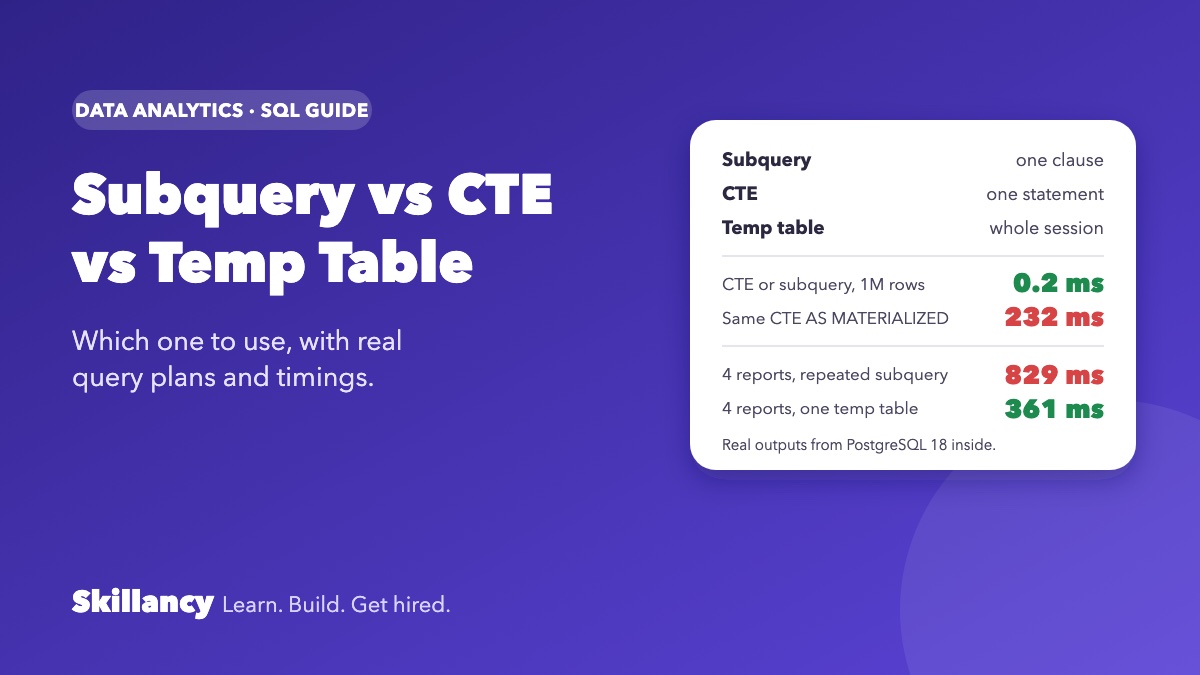
Subquery vs CTE vs temp table is one of the most common "which one should I use?" questions in SQL. All three let you build a query in steps, and for most small queries they return exactly the same result. The real differences are scope (how long the intermediate result lives), reuse, readability and, on large data, performance. This guide solves the same problems all three ways, shows the real output and query plan of every example on PostgreSQL 18, and measures where the choice actually matters: in one test, a single keyword made a CTE about 1,000 times slower.
| Question | Short answer |
|---|---|
| Is a CTE faster than a subquery? | No, not by itself. In PostgreSQL 12+, a CTE used once gets the same plan as the subquery |
| When is a temp table better? | When several queries reuse the same expensive result, or it needs an index. In our test: 361 ms vs 829 ms for four reports |
| Can I use a CTE in the next query? | No. A CTE exists only for the one statement it is written in |
| Which one supports recursion? | Only CTEs, with WITH RECURSIVE |
| How long does a temp table last? | Until the session ends, or the transaction ends with ON COMMIT DROP |
| What is the biggest temp table gotcha? | Autovacuum never analyzes temp tables. Run ANALYZE yourself after loading one |
| Which one do interviewers expect? | CTEs for multi-step answers, plus knowing when EXISTS or a temp table is the better tool |
New to these? The free SQL tutorial has short lessons on subqueries, CTEs and correlated subqueries and EXISTS, each with a practice question. For a deeper look at the WITH clause itself, read CTE in SQL: How to Use WITH Clauses and Recursive CTEs. Every query below runs in the free Skillancy SQL compiler, which uses the same PostgreSQL engine we used for this article.
Subquery vs CTE vs temp table at a glance
| Subquery | CTE | Temporary table | |
|---|---|---|---|
| Syntax | (SELECT ...) inside another query | WITH name AS (SELECT ...) before the query | CREATE TEMP TABLE name AS SELECT ... |
| Lives for | One clause | One statement | The session, or the transaction |
| Reuse in the same query | Write it again | Reference it by name, any number of times | Reference it by name |
| Reuse in the next query | No | No | Yes |
| Can be recursive | No | Yes (WITH RECURSIVE) | No |
| Can be indexed | No | No | Yes |
| Has its own statistics | No | No | Only after you run ANALYZE |
| Needs CREATE permission | No | No | Yes (temporary-table privilege) |
| Best for | Short filters, EXISTS, single values | Multi-step logic, readability, recursion | Expensive results reused by several queries |
The sample data
The small examples use two tables from an online store:
| customer_id | name | city |
|---|---|---|
| 1 | Asha | Bengaluru |
| 2 | Kabir | Mumbai |
| 3 | Meera | Delhi |
| 4 | Rohan | Pune |
| 5 | Zara | Mumbai |
| order_id | customer_id | order_date | amount |
|---|---|---|---|
| 101 | 1 | 2026-01-05 | 1200 |
| 102 | 1 | 2026-02-11 | 800 |
| 103 | 2 | 2026-01-20 | 300 |
| 104 | 3 | 2026-01-25 | 2500 |
| 105 | 3 | 2026-03-02 | 1500 |
| 106 | 4 | 2026-02-14 | 450 |
| 107 | 2 | 2026-03-18 | 700 |
| 108 | 1 | 2026-03-21 | 600 |
Zara has never ordered. For the performance tests, we generated a larger version: 50,000 customers and 1,000,000 orders, with an index on big_orders.customer_id.
CREATE TABLE customers (customer_id INT PRIMARY KEY, name TEXT, city TEXT);
INSERT INTO customers VALUES
  (1, 'Asha', 'Bengaluru'), (2, 'Kabir', 'Mumbai'), (3, 'Meera', 'Delhi'),
  (4, 'Rohan', 'Pune'), (5, 'Zara', 'Mumbai');

CREATE TABLE orders (order_id INT PRIMARY KEY, customer_id INT, order_date DATE, amount INT);
INSERT INTO orders VALUES
  (101, 1, '2026-01-05', 1200), (102, 1, '2026-02-11', 800),
  (103, 2, '2026-01-20', 300),  (104, 3, '2026-01-25', 2500),
  (105, 3, '2026-03-02', 1500), (106, 4, '2026-02-14', 450),
  (107, 2, '2026-03-18', 700),  (108, 1, '2026-03-21', 600);
One question, three ways
Question: which customers spent more than the average customer? This needs two steps: total spend per customer, then the average of those totals.
Example 1a: with subqueries
SELECT c.name, t.total_spent
FROM (
  SELECT customer_id, SUM(amount) AS total_spent
  FROM orders
  GROUP BY customer_id
) AS t
JOIN customers c ON c.customer_id = t.customer_id
WHERE t.total_spent > (
  SELECT AVG(total_spent)
  FROM (SELECT SUM(amount) AS total_spent FROM orders GROUP BY customer_id) AS x
)
ORDER BY t.total_spent DESC;| name | total_spent |
|---|---|
| Meera | 4000 |
| Asha | 2600 |
It works, but the "total per customer" logic is written twice, and you have to read from the inside out.
Example 1b: with a CTE
WITH customer_totals AS (
  SELECT customer_id, SUM(amount) AS total_spent
  FROM orders
  GROUP BY customer_id
)
SELECT c.name, t.total_spent
FROM customer_totals t
JOIN customers c ON c.customer_id = t.customer_id
WHERE t.total_spent > (SELECT AVG(total_spent) FROM customer_totals)
ORDER BY t.total_spent DESC;| name | total_spent |
|---|---|
| Meera | 4000 |
| Asha | 2600 |
Same result. The step has a name, is written once and is used twice, and the query reads top to bottom.
Example 1c: with a temp table
CREATE TEMP TABLE customer_totals AS
SELECT customer_id, SUM(amount) AS total_spent
FROM orders
GROUP BY customer_id;

SELECT c.name, t.total_spent
FROM customer_totals t
JOIN customers c ON c.customer_id = t.customer_id
WHERE t.total_spent > (SELECT AVG(total_spent) FROM customer_totals)
ORDER BY t.total_spent DESC;| name | total_spent |
|---|---|
| Meera | 4000 |
| Asha | 2600 |
Same result again (the average is 2,012.50). The difference: customer_totals still exists after the query, so the next query can use it too. For a single question like this one, that is overhead you do not need. The CTE is the best fit.
Scope: how long does each one live?
This is the difference that decides most real cases.
Example 2: a CTE disappears after its statement, a temp table does not
WITH march AS (SELECT * FROM orders WHERE order_date >= '2026-03-01')
SELECT COUNT(*) AS march_orders FROM march;| march_orders |
|---|
| 3 |
Now try to use march in the next statement:
SELECT SUM(amount) AS march_revenue FROM march;ERROR: relation "march" does not existA CTE belongs to the statement it is written in. With a temp table, both statements work:
CREATE TEMP TABLE march AS
SELECT * FROM orders WHERE order_date >= '2026-03-01';

SELECT COUNT(*) AS march_orders FROM march;     -- 3
SELECT SUM(amount) AS march_revenue FROM march; -- 2800
PostgreSQL stores it as a real table in a private schema for your session (pg_temp_N), with relpersistence = 't'. Other sessions cannot see it, and it is dropped automatically when you disconnect.
Rule of thumb: if the intermediate result is needed by one statement, use a subquery or CTE. If it is needed by several statements, use a temp table.
Reusing a result in the same query
Example 3: month-over-month revenue
Comparing each month with the previous one means joining the monthly totals to themselves. With a CTE, you define them once:
WITH monthly AS (
  SELECT DATE_TRUNC('month', order_date)::date AS month, SUM(amount) AS revenue
  FROM orders
  GROUP BY 1
)
SELECT cur.month, cur.revenue, prev.revenue AS prev_revenue,
       cur.revenue - prev.revenue AS change
FROM monthly cur
LEFT JOIN monthly prev ON prev.month = cur.month - INTERVAL '1 month'
ORDER BY cur.month;| month | revenue | prev_revenue | change |
|---|---|---|---|
| 2026-01-01 | 4000 | NULL | NULL |
| 2026-02-01 | 1250 | 4000 | -2750 |
| 2026-03-01 | 2800 | 1250 | 1550 |
The subquery version returns the same rows, but the whole SELECT ... GROUP BY 1 block has to be pasted twice, once as cur and once as prev. If someone later fixes one copy and not the other, the numbers quietly stop matching. A CTE removes that risk. (For this particular task, LAG() is even simpler. See Window Functions in SQL.)
Where subqueries are still the right choice
CTEs are not always better. Some things read most naturally as a subquery.
Example 4: correlated subqueries and EXISTS
A correlated subquery refers to the outer row, so it is evaluated per row. The classic good use is EXISTS:
SELECT c.name
FROM customers c
WHERE EXISTS (
  SELECT 1 FROM orders o
  WHERE o.customer_id = c.customer_id
    AND o.order_date >= '2026-03-01'
)
ORDER BY c.name;| name |
|---|
| Asha |
| Kabir |
| Meera |
This says exactly what it means: "customers for whom a March order exists." Rewriting it as a CTE plus a join would be longer and needs a DISTINCT to avoid duplicates. Use NOT EXISTS (not NOT IN) for the opposite question; SQL Joins with NULL Values shows why NOT IN can return no rows at all.
A correlated subquery in the SELECT list also works for small results:
SELECT c.name,
       (SELECT MAX(o.order_date) FROM orders o WHERE o.customer_id = c.customer_id) AS last_order
FROM customers c
ORDER BY c.customer_id;| name | last_order |
|---|---|
| Asha | 2026-03-21 |
| Kabir | 2026-03-18 |
| Meera | 2026-03-02 |
| Rohan | 2026-02-14 |
| Zara | NULL |
A CTE that groups once and then LEFT JOINs gives the identical result. On five customers, either is fine. On large tables, the difference shows up, as Example 7 measures.
What only a CTE can do: recursion
Example 5: fill in months with zero orders
A subquery cannot refer to itself, and a temp table would need a loop. A recursive CTE generates the months directly:
WITH RECURSIVE months AS (
  SELECT DATE '2026-01-01' AS month
  UNION ALL
  SELECT (month + INTERVAL '1 month')::date FROM months WHERE month < DATE '2026-04-01'
)
SELECT m.month, COALESCE(SUM(o.amount), 0) AS revenue
FROM months m
LEFT JOIN orders o ON DATE_TRUNC('month', o.order_date) = m.month
GROUP BY m.month
ORDER BY m.month;| month | revenue |
|---|---|
| 2026-01-01 | 4000 |
| 2026-02-01 | 1250 |
| 2026-03-01 | 2800 |
| 2026-04-01 | 0 |
April has no orders, but it still appears with 0. Recursive CTEs are also how you walk org charts and category trees; the CTE guide covers both. (In PostgreSQL, generate_series is a shortcut for dates specifically.)
Is a CTE faster than a subquery? What the query plan shows
Short answer: in PostgreSQL 12 and later, usually neither is faster, because they become the same plan. PostgreSQL inlines a non-recursive, side-effect-free CTE that is referenced once into the main query. Before version 12, every CTE was materialized (computed in full first), which is where the old advice "CTEs are slow" came from.
Example 6: inlined CTE vs subquery vs MATERIALIZED
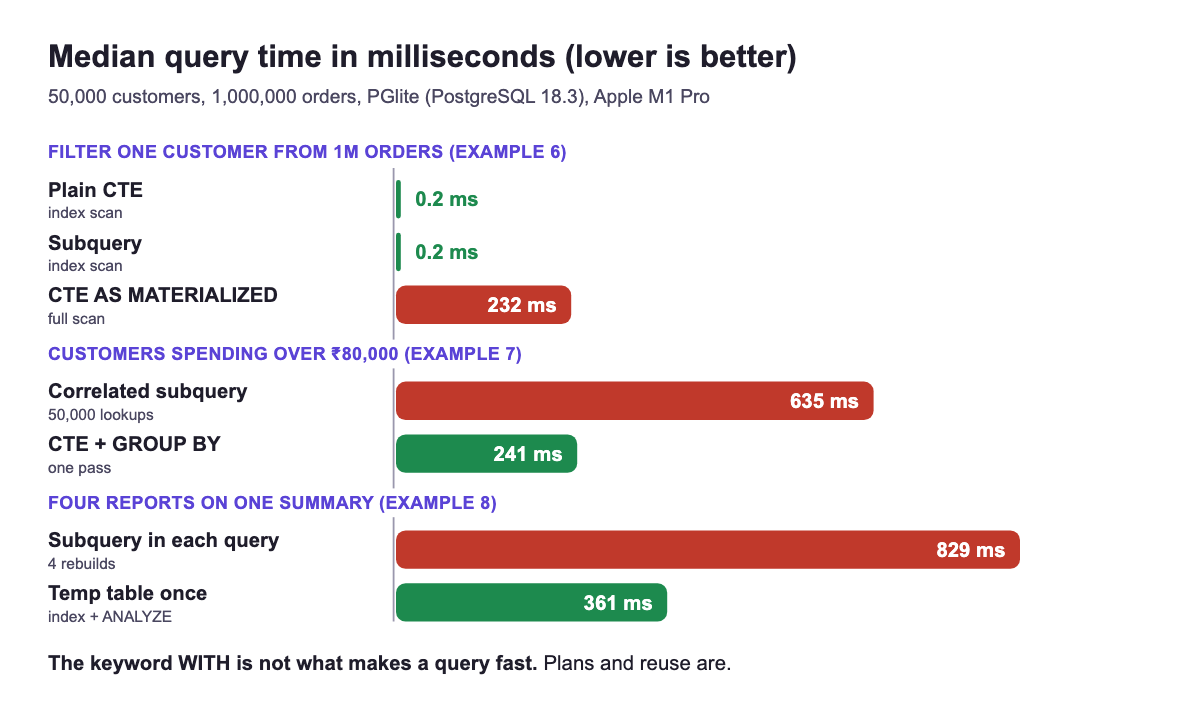
Count one customer's orders from the million-row table, written three ways. All three return count = 17, sum = 42091.
-- plain CTE
WITH o AS (SELECT * FROM big_orders)
SELECT COUNT(*), SUM(amount) FROM o WHERE customer_id = 4242;

-- subquery
SELECT COUNT(*), SUM(amount)
FROM (SELECT * FROM big_orders) AS o
WHERE customer_id = 4242;

-- materialized CTE
WITH o AS MATERIALIZED (SELECT * FROM big_orders)
SELECT COUNT(*), SUM(amount) FROM o WHERE customer_id = 4242;
The plain CTE and the subquery produce the identical plan: the filter is pushed down and the index is used.
Aggregate
  ->  Bitmap Heap Scan on big_orders
        Recheck Cond: (customer_id = 4242)
        ->  Bitmap Index Scan on big_orders_customer_idx
              Index Cond: (customer_id = 4242)
AS MATERIALIZED forces PostgreSQL to compute the whole CTE first, then filter it. The index can no longer help:
Aggregate
  CTE o
    ->  Seq Scan on big_orders
  ->  CTE Scan on o
Filter: (customer_id = 4242)| Version | Median time |
|---|---|
| Plain CTE (inlined) | 0.2 ms |
| Subquery | 0.2 ms |
CTE AS MATERIALIZED | 232 ms |
Two more planner rules worth knowing:
- A CTE referenced two or more times is materialized automatically. That is often what you want (compute once, read twice). If it hurts,
AS NOT MATERIALIZEDforces inlining. MATERIALIZEDis a useful fence, for example to stop the planner from evaluating an expensive function many times. Use it on purpose, after readingEXPLAIN, not by habit.
Other databases differ, which matters when you move queries between them (see the table below). In particular, BigQuery runs a non-recursive CTE once for every reference, so a CTE used three times is computed three times.
Example 7: correlated subquery vs CTE with GROUP BY at scale
Count customers whose lifetime spend is over ₹80,000. Both versions return 929.
-- correlated subquery: one index lookup per customer
SELECT COUNT(*) FROM big_customers c
WHERE (SELECT SUM(amount) FROM big_orders o WHERE o.customer_id = c.customer_id) > 80000;

-- CTE: one pass, one GROUP BY
WITH spend AS (
  SELECT customer_id, SUM(amount) AS total FROM big_orders GROUP BY customer_id
)
SELECT COUNT(*) FROM spend WHERE total > 80000;| Version | Median time |
|---|---|
| Correlated subquery | 635 ms |
| CTE + GROUP BY | 241 ms |
PostgreSQL does not rewrite a correlated scalar subquery into a join, so it ran 50,000 separate lookups. The set-based version was 2.6 times faster. Notice the speed came from rewriting the logic (one GROUP BY instead of 50,000 lookups), not from the word WITH. An uncorrelated subquery with the same GROUP BY would be just as fast.
When a temp table wins
Example 8: four reports from one expensive summary
A common analyst workflow: build a 2026 summary per customer (a join plus a GROUP BY over a million orders), then run several reports on it. We timed four reports (revenue by city, top 10 customers, customers with 15+ orders, one customer lookup) two ways:
1. Repeat the summary as a subquery inside each of the four queries.
2. Build it once as a temp table, add an index, run ANALYZE, then run the four queries.
CREATE TEMP TABLE cust_2026 AS
SELECT o.customer_id, c.city, COUNT(*) AS orders, SUM(o.amount) AS total
FROM big_orders o JOIN big_customers c USING (customer_id)
WHERE o.order_date >= DATE '2026-01-01'
GROUP BY o.customer_id, c.city;

CREATE INDEX ON cust_2026 (customer_id);
ANALYZE cust_2026;

SELECT city, SUM(total) AS revenue_2026
FROM cust_2026 GROUP BY city ORDER BY revenue_2026 DESC LIMIT 3;| city | revenue_2026 |
|---|---|
| Mumbai | 153362434 |
| Hyderabad | 153201870 |
| Delhi | 152760639 |
| Approach | Total median time |
|---|---|
| Same subquery inside each of 4 queries | 829 ms |
| Temp table once (with index and ANALYZE), then 4 queries | 361 ms |
The temp table more than halved the total time even after paying for the index and ANALYZE, and the gap grows with every extra report. A CTE cannot help here, because each report is a separate statement.
Example 9: the ANALYZE trap
PostgreSQL's autovacuum never vacuums or analyzes temporary tables, so a freshly loaded temp table has no statistics. Here is the planner guessing how many of 50,000 customers have spent over ₹80,000:
CREATE TEMP TABLE hot (customer_id INT, total BIGINT);
INSERT INTO hot SELECT customer_id, SUM(amount) FROM big_orders GROUP BY customer_id;

EXPLAIN ANALYZE SELECT * FROM hot WHERE total > 80000;| Estimated rows | Actual rows | |
|---|---|---|
Before ANALYZE | 18,428 | 929 |
After ANALYZE hot; | 925 | 929 |
Without statistics, the estimate was 20 times too high. On a simple scan that is harmless, but when the temp table feeds a join, a wrong estimate can pick the wrong join type. CREATE TEMP TABLE ... AS SELECT followed by ANALYZE should be a habit.
Temp table gotchas
Example 10: a temp table can hide a real table
PostgreSQL searches your temp schema before public. A temp table with the same name as a real table silently replaces it in every query of your session:
CREATE TEMP TABLE customers AS
SELECT * FROM customers WHERE city = 'Mumbai';

SELECT * FROM customers ORDER BY customer_id;| customer_id | name | city |
|---|---|---|
| 2 | Kabir | Mumbai |
| 5 | Zara | Mumbai |
The real table still has 5 rows (SELECT COUNT(*) FROM public.customers returns 5), and current_schemas(true) shows the search order: pg_temp_0, pg_catalog, public. Give temp tables distinct names, like tmp_customers or customers_2026.
Example 11: dropping a temp table at the end of a transaction
BEGIN;
CREATE TEMP TABLE scratch ON COMMIT DROP AS
SELECT * FROM orders WHERE amount > 1000;

SELECT COUNT(*) AS big_orders FROM scratch;  -- 3
COMMIT;

SELECT COUNT(*) FROM scratch;
-- ERROR: relation "scratch" does not exist
ON COMMIT DROP is useful in scripts and with connection pools, where a "session" can be reused by the next user of the connection.
Other temp table limits to know:
- You need permission to create them. Many read-only BI tools, replicas and SQL editors do not allow
CREATE. CTEs and subqueries always work. - Some tools run each statement in a new connection, so the temp table is gone by the next query.
- MySQL cannot refer to a temporary table more than once in the same query. Self-joining one fails with
ERROR 1137: Can't reopen table. MySQL's own docs suggest a CTE instead.
Subquery vs CTE vs temp table in other databases
| Database | CTE behaviour | Temporary tables |
|---|---|---|
| PostgreSQL 12+ | Referenced once: inlined. Twice or more: materialized. Override with MATERIALIZED / NOT MATERIALIZED | CREATE TEMP TABLE, session or ON COMMIT DROP. Not auto-analyzed |
| MySQL 8.0+ | CTEs supported since 8.0. The optimizer merges or materializes them | CREATE TEMPORARY TABLE, session-scoped. Cannot be referenced twice in one query |
| SQL Server | No MATERIALIZED option. CTEs are expanded into the query, so a CTE referenced twice is usually computed twice | #name local temp tables (session, or until the creating procedure ends), ##name global ones, plus @table variables |
| Oracle | WITH (subquery factoring). The optimizer decides whether to materialize | Global temporary tables, and private temporary tables (18c+, names prefixed ORA$PTT_ by default) |
| BigQuery | Non-recursive CTEs are not materialized and run once per reference | CREATE TEMP TABLE in multi-statement queries and sessions |
| Snowflake | The optimizer decides | CREATE TEMPORARY TABLE, dropped at the end of the session |
The practical rule holds everywhere: CTEs organize one statement, temp tables carry results between statements. What changes is how a CTE referenced several times is executed, so in SQL Server and BigQuery, a heavy CTE used three times is a good candidate for a temp table.
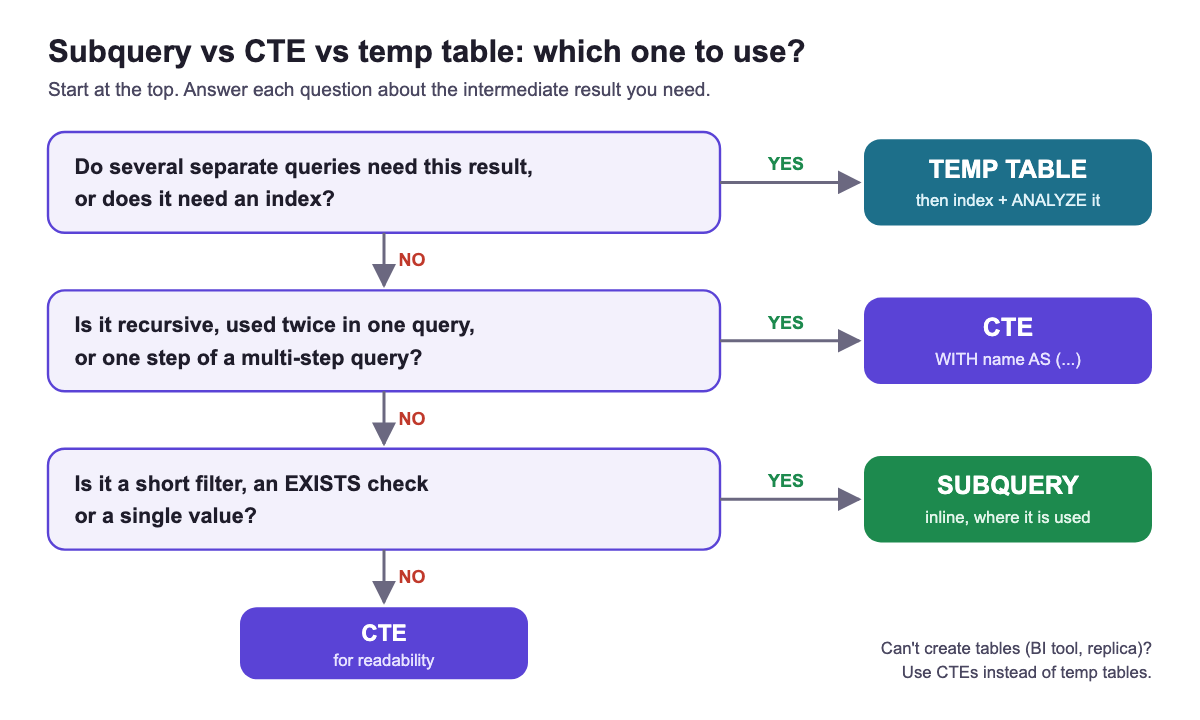
How to choose: a checklist
1. Is it a short filter, an existence check or one value? Use a subquery: WHERE x IN (...), EXISTS (...), > (SELECT AVG(...)).
2. Does the query have two or more logical steps? Use CTEs, one per step, named after what they hold.
3. Do you need the same result twice in one query? Use a CTE, not two copies of a subquery.
4. Is it recursive? Use WITH RECURSIVE.
5. Do several separate queries need the result? Use a temp table.
6. Does the intermediate result need an index, or is it large and reused? Use a temp table, then ANALYZE it.
7. Can you not create tables (BI tool, read replica)? Stay with CTEs.
8. Is a query slow? Read EXPLAIN before switching forms. Look for CTE Scan over a big table, or a SubPlan running once per row.
Common mistakes
- Believing CTEs are always faster, or always slower, than subqueries. In PostgreSQL 12+ a single-use CTE runs as a subquery (Example 6).
- Adding
AS MATERIALIZED"for performance" and blocking index use (Example 6). - Copying the same subquery into several places instead of naming it once (Example 3).
- Using a correlated subquery over a large table where one GROUP BY would do (Example 7).
- Expecting a CTE to be available in the next statement (Example 2).
- Creating a temp table and forgetting
ANALYZE(Example 9). - Naming a temp table the same as a real table (Example 10).
- Using
NOT IN (subquery)on a nullable column instead ofNOT EXISTS.
Interview questions on subqueries, CTEs and temp tables
1. What is the difference between a CTE and a subquery? A CTE is named and defined before the main query, can be referenced several times and can be recursive. A subquery is written inline where it is used. In PostgreSQL 12+, a CTE used once performs the same as the subquery.
2. What is the difference between a CTE and a temp table? A CTE lasts one statement and is not stored. A temp table is a real table that lasts the session, can be indexed and is reused across queries.
3. Can you index a CTE? No. If you need an index on an intermediate result, use a temp table.
4. What is a correlated subquery? A subquery that refers to a column of the outer query, so it is logically evaluated once per outer row.
5. When would you use EXISTS instead of a JOIN? When you only need to know whether a match exists, so the result does not duplicate rows.
6. What does AS MATERIALIZED do in PostgreSQL? It forces the CTE to be computed once, in full, before the main query, which stops filters from being pushed into it.
7. How do you find customers who spent more than the average? Compute totals in a CTE, then compare with (SELECT AVG(total) FROM totals) (Example 1b).
8. Why might a temp table query be slow right after you create it? It has no statistics until you run ANALYZE, so the planner guesses row counts.
Practise them on real data with the above-average spenders and orders above the customer's average problems in our free SQL interview questions set.
Learn it live: Writing clear, multi-step SQL on real business data is a core skill in our Data Analytics with Agentic AI program, with mentors reviewing your queries. Not sure where to start? Talk to a mentor.
Key takeaways
- Subquery: one clause. CTE: one statement. Temp table: the whole session.
- For one query, a CTE is usually the clearest choice, and in PostgreSQL 12+ a single-use CTE runs exactly like the subquery (0.2 ms each in our test).
AS MATERIALIZEDcan block indexes: 232 ms instead of 0.2 ms on a million rows.- Set-based beats per-row: one GROUP BY was 2.6 times faster than a correlated subquery.
- Temp tables pay off when several queries reuse a result: 361 ms vs 829 ms for four reports. Index and
ANALYZEthem. - Only CTEs can be recursive, and only temp tables survive to the next statement.
Frequently asked questions
What is the difference between a subquery, a CTE and a temp table?
A subquery is a query nested inside one clause of another query. A CTE is a named query defined with WITH that lasts for one statement and can be referenced several times. A temporary table is a real table that lasts for the session or transaction and can be reused by many queries, indexed and analyzed.
Is a CTE faster than a subquery?
Not by itself. In PostgreSQL 12 and later, a non-recursive CTE referenced once is inlined into the main query, so it gets the same plan as the equivalent subquery. In our test, both ran in 0.2 ms. A CTE referenced several times is materialized, which can be faster or slower depending on the query.
When should I use a temp table instead of a CTE?
Use a temp table when several separate queries need the same intermediate result, when that result is expensive to compute, or when it needs an index. In our test, building a temp table once and running four reports on it took 361 ms, against 829 ms when each report repeated the same subquery.
Can I use a CTE in multiple queries?
No. A CTE exists only within the single statement it is defined in. Referencing it in the next statement gives an error such as relation "name" does not exist. Use a temporary table or a view if several queries need it.
Do temp tables get deleted automatically?
Yes. In PostgreSQL, a temporary table is dropped when the session ends. With ON COMMIT DROP, it is dropped at the end of the current transaction. In SQL Server, a local #temp table created in a stored procedure is dropped when the procedure finishes.
What does MATERIALIZED mean in a PostgreSQL CTE?
WITH name AS MATERIALIZED (...) forces PostgreSQL to compute the CTE in full before running the main query. This prevents filters from being pushed into it, which can stop index use. AS NOT MATERIALIZED forces the CTE to be inlined even if it is referenced more than once.
Are correlated subqueries slow?
They can be on large tables, because they are logically evaluated once per outer row. In our test, a correlated subquery over 50,000 customers took 635 ms, while one GROUP BY in a CTE took 241 ms for the same answer. EXISTS subqueries are usually efficient, because PostgreSQL turns them into semi-joins.
Can you create an index on a CTE?
No. A CTE is not stored as a table, so it cannot be indexed. If an intermediate result needs an index, create a temporary table and index it.
Why is my temp table query slow?
Often because the temp table has no statistics. Autovacuum cannot analyze temporary tables in PostgreSQL, so the planner guesses row counts. In our test, it estimated 18,428 rows where 929 matched. Run ANALYZE table_name after loading it.
Should I use CTEs in SQL interviews?
Yes, for multi-step problems. CTEs make your logic easy to follow, and interviewers can see each step. Mention that a single-use CTE performs like a subquery in modern PostgreSQL, and use EXISTS for simple existence checks.
Recommended reading and practice on Skillancy
- CTE in SQL: How to Use WITH Clauses and Recursive CTEs
- Window Functions in SQL: ROW_NUMBER, RANK, LAG, Running Totals and Frames
- SQL Joins with NULL Values: 12 Real Examples
- Joins in SQL: INNER, LEFT, RIGHT, FULL and Self Joins with Examples
- Data Analyst Interview Questions for 2026: SQL, Excel, Statistics, Python & Case Rounds
- SQL tutorial lessons: Subqueries, CTEs, Recursive CTEs, EXISTS and correlated subqueries
Practice: SQL interview questions · SQL compiler
Sources
- PostgreSQL documentation: WITH Queries (Common Table Expressions): inlining of CTEs referenced once,
MATERIALIZEDandNOT MATERIALIZED - PostgreSQL documentation: CREATE TABLE:
TEMPORARY,ON COMMIT DROP, and autovacuum not analyzing temporary tables - PostgreSQL documentation: Subquery Expressions:
EXISTS,IN,NOT IN - MySQL 8.4 Reference Manual: TEMPORARY Table Problems: a temporary table cannot be referenced twice in one query
- SQL Server: CREATE TABLE (Transact-SQL), temporary tables
- Oracle Database SQL Language Reference: CREATE TABLE: global and private temporary tables
- BigQuery documentation: WITH clause: non-recursive CTEs run once per reference
- Snowflake documentation: Temporary and transient tables
Reproducibility note
All SQL outputs and query plans on this page were produced by running the queries on PGlite 0.5.5 (PostgreSQL 18.3 compiled to WebAssembly, the same engine as the Skillancy SQL compiler) on an Apple M1 Pro laptop, on 21 November 2026. The large tables were generated with setseed(0.42) and random(), so a rerun gives the same data. Timings are medians of five runs (three for Examples 7 and 8) on one machine, and will differ on server databases, but the plans and the relative gaps are what matter. Behaviour for databases we did not run (MySQL, SQL Server, Oracle, BigQuery, Snowflake) comes from their official documentation listed above.
Get the Skillancy field notes
One email a week: AI and analytics guides, cohort dates and hiring signals. No spam, unsubscribe anytime.