
NULL Never Equals NULL: SQL Joins with NULL Values Explained with 12 Real Examples
By Skillancy Editorial Team · 20 November 2026 · 26 min read
Reviewed by Rishav Kumar, Principal Data Analyst, Walmart Global Tech
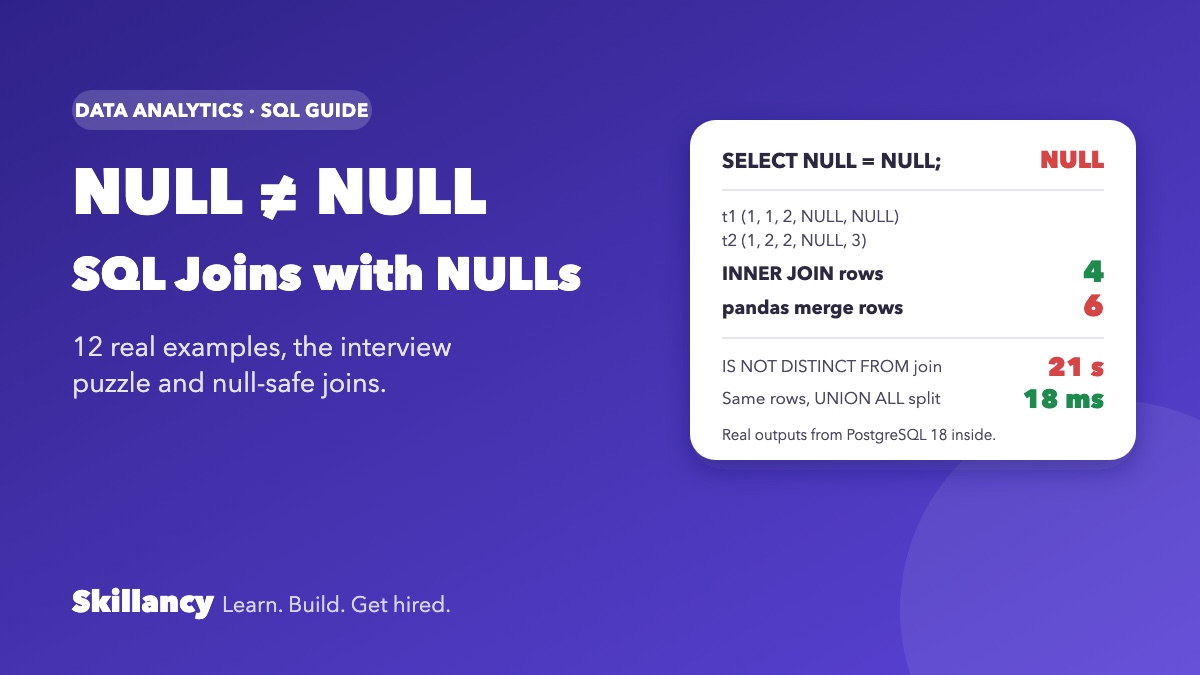
SQL joins with NULL values behave differently from what most people expect: a NULL in a join column never matches anything, not even another NULL. That one rule explains disappearing rows, wrong revenue totals, NOT IN queries that return nothing, and one of the most common SQL interview puzzles. This guide explains why NULL = NULL is not true in SQL, then walks through 12 examples with the exact output of every query, run on PostgreSQL 18. It also covers null-safe joins in every popular database, a performance trap that made one query about 1,600 times slower, and the pandas behaviour that does the opposite of SQL.
| Question | Short answer |
|---|---|
| Does NULL equal NULL in SQL? | No. NULL = NULL returns NULL (unknown), not true |
| Do NULL keys match in an INNER JOIN? | No. Rows with a NULL join key are dropped |
| What does a LEFT JOIN do with NULL keys? | Keeps the left row and fills the right-side columns with NULL |
| How do I join on NULL values? | Use IS NOT DISTINCT FROM, <=> (MySQL) or a = b OR (a IS NULL AND b IS NULL) |
Why does NOT IN return no rows? | One NULL in the subquery makes every NOT IN check unknown. Use NOT EXISTS |
COUNT(*) or COUNT(column) after a LEFT JOIN? | COUNT(column) from the right table. COUNT(*) counts unmatched rows as 1 |
| Is a null-safe join slower? | It can be much slower, because PostgreSQL cannot hash it. Test it on large tables |
Does pandas merge behave the same way? | No. pandas matches missing keys to each other, unlike SQL |
New to joins? Start with Joins in SQL: INNER, LEFT, RIGHT, FULL and Self Joins, or the free SQL NULL lesson in our SQL tutorial. Every query below runs in the free Skillancy SQL compiler, which uses the same PostgreSQL engine we used for this article.
Why does NULL not equal NULL in SQL?
NULL is not a value. It is a marker for "unknown" or "missing", so SQL cannot say whether two unknowns are equal. SQL uses three-valued logic: a condition can be true, false or unknown, and any comparison involving NULL is unknown.
Example 1: comparing NULLs
SELECT
  NULL = NULL          AS null_equals_null,
  NULL <> NULL         AS null_not_equals_null,
  1 = NULL             AS one_equals_null,
  NULL IS NULL         AS null_is_null,
NULL IS NOT DISTINCT FROM NULL AS null_safe_equal;| null_equals_null | null_not_equals_null | one_equals_null | null_is_null | null_safe_equal |
|---|---|---|---|---|
| NULL | NULL | NULL | true | true |
NULL = NULL is not false. It is NULL, meaning unknown. Even NULL <> NULL is unknown. Only the operators built for NULLs give a real true or false: IS NULL and IS NOT DISTINCT FROM.
Why this matters for joins: WHERE and ON keep a row only when the condition is true. Unknown is treated the same as false. So when a join compares a.key = b.key and either side is NULL, the result is unknown and the rows do not match.
Think of two forms where the "city" field was left blank. You cannot say both people live in the same city just because both fields are empty. SQL takes the same view.
The SQL join NULL interview puzzle: how many rows?
This question comes up again and again in data analyst and data engineer interviews in India. It looks simple, but most candidates miscount because of the NULLs and duplicates.
Example 2: count the rows for every join type
CREATE TABLE t1 (id INT);
CREATE TABLE t2 (id INT);
INSERT INTO t1 VALUES (1), (1), (2), (NULL), (NULL);
INSERT INTO t2 VALUES (1), (2), (2), (NULL), (3);
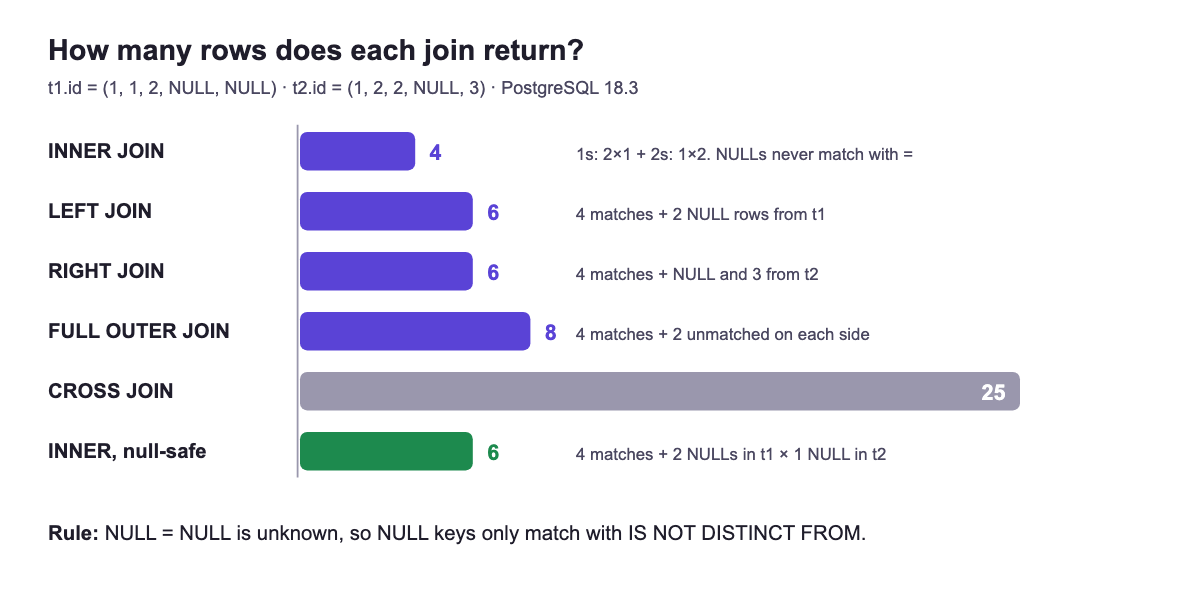
Before you read on, predict how many rows each join returns.
SELECT 'INNER JOIN' AS join_type, COUNT(*) AS rows_returned FROM t1 JOIN t2 ON t1.id = t2.id
UNION ALL
SELECT 'LEFT JOIN',  COUNT(*) FROM t1 LEFT JOIN t2 ON t1.id = t2.id
UNION ALL
SELECT 'RIGHT JOIN', COUNT(*) FROM t1 RIGHT JOIN t2 ON t1.id = t2.id
UNION ALL
SELECT 'FULL OUTER JOIN', COUNT(*) FROM t1 FULL JOIN t2 ON t1.id = t2.id
UNION ALL
SELECT 'CROSS JOIN', COUNT(*) FROM t1 CROSS JOIN t2
UNION ALL
SELECT 'INNER, null-safe', COUNT(*) FROM t1 JOIN t2 ON t1.id IS NOT DISTINCT FROM t2.id;| join_type | rows_returned |
|---|---|
| INNER JOIN | 4 |
| LEFT JOIN | 6 |
| RIGHT JOIN | 6 |
| FULL OUTER JOIN | 8 |
| CROSS JOIN | 25 |
| INNER, null-safe | 6 |
How to work it out:
- INNER JOIN = 4. Value 1 appears twice in t1 and once in t2: 2 × 1 = 2 rows. Value 2 appears once in t1 and twice in t2: 1 × 2 = 2 rows. The NULLs match nothing. Total 4.
- LEFT JOIN = 6. The 4 matches, plus the 2 NULL rows from t1, kept with NULL on the right.
- RIGHT JOIN = 6. The 4 matches, plus t2's unmatched NULL and 3.
- FULL OUTER JOIN = 8. The 4 matches, plus 2 unmatched rows from each side.
- CROSS JOIN = 25. 5 × 5. A cross join has no condition, so NULLs do not matter.
- Null-safe INNER JOIN = 6. The 4 matches, plus the 2 NULLs in t1 each matching the 1 NULL in t2.
Here is the full outer join, row by row. Notice that the three NULL-NULL rows are not matches: each NULL appears on its own, padded with NULL on the other side.
SELECT t1.id AS t1_id, t2.id AS t2_id
FROM t1 FULL JOIN t2 ON t1.id = t2.id
ORDER BY t1.id NULLS LAST, t2.id NULLS LAST;| t1_id | t2_id |
|---|---|
| 1 | 1 |
| 1 | 1 |
| 2 | 2 |
| 2 | 2 |
| NULL | 3 |
| NULL | NULL |
| NULL | NULL |
| NULL | NULL |
Interview tip: say the rule out loud before you count. "NULLs never match with =, and duplicates multiply." Interviewers care more about that reasoning than about the number.
The sample store tables
Examples 3 to 11 use a small online store. Two orders were guest checkouts, so their customer_id is NULL. Meera never filled in her city. One order has no status yet.
customers
| customer_id | name | city |
|---|---|---|
| 1 | Asha | Bengaluru |
| 2 | Rohan | Delhi |
| 3 | Meera | NULL |
| 4 | Kabir | Pune |
orders
| order_id | customer_id | amount | status |
|---|---|---|---|
| 101 | 1 | 1200 | delivered |
| 102 | 1 | 800 | cancelled |
| 103 | 2 | 450 | NULL |
| 104 | 3 | 2000 | delivered |
| 105 | NULL | 650 | delivered |
| 106 | NULL | 300 | returned |
CREATE TABLE customers (customer_id INT, name TEXT, city TEXT);
INSERT INTO customers VALUES
  (1, 'Asha',  'Bengaluru'),
  (2, 'Rohan', 'Delhi'),
  (3, 'Meera', NULL),
  (4, 'Kabir', 'Pune');

CREATE TABLE orders (order_id INT, customer_id INT, amount INT, status TEXT);
INSERT INTO orders VALUES
  (101, 1,    1200, 'delivered'),
  (102, 1,     800, 'cancelled'),
  (103, 2,     450, NULL),
  (104, 3,    2000, 'delivered'),
  (105, NULL,  650, 'delivered'),
  (106, NULL,  300, 'returned');
What happens to NULL keys in an INNER JOIN vs a LEFT JOIN?
An INNER JOIN silently drops rows whose join key is NULL. A LEFT JOIN keeps them and fills the right-hand columns with NULL.
Example 3: guest orders disappear from an INNER JOIN
SELECT o.order_id, o.customer_id, c.name, o.amount
FROM orders o
JOIN customers c ON c.customer_id = o.customer_id
ORDER BY o.order_id;| order_id | customer_id | name | amount |
|---|---|---|---|
| 101 | 1 | Asha | 1200 |
| 102 | 1 | Asha | 800 |
| 103 | 2 | Rohan | 450 |
| 104 | 3 | Meera | 2000 |
Orders 105 and 106 are gone. Nothing errors and nothing warns you. Switch to a LEFT JOIN from orders and they come back:
SELECT o.order_id, o.customer_id, c.name, o.amount
FROM orders o
LEFT JOIN customers c ON c.customer_id = o.customer_id
ORDER BY o.order_id;| order_id | customer_id | name | amount |
|---|---|---|---|
| 101 | 1 | Asha | 1200 |
| 102 | 1 | Asha | 800 |
| 103 | 2 | Rohan | 450 |
| 104 | 3 | Meera | 2000 |
| 105 | NULL | NULL | 650 |
| 106 | NULL | NULL | 300 |
This is not just cosmetic. Here is what it does to a revenue number:
SELECT
  (SELECT SUM(amount) FROM orders) AS total_revenue,
(SELECT SUM(o.amount) FROM orders o JOIN customers c ON c.customer_id = o.customer_id) AS inner_join_revenue;| total_revenue | inner_join_revenue |
|---|---|
| 5400 | 4450 |
The INNER JOIN under-reports revenue by ₹950, or 17.6%, because guest orders have no customer. Rule of thumb: start from the table whose rows you must not lose, and LEFT JOIN everything else onto it. Then compare row counts and totals before and after the join.
Example 4: two different NULLs in one LEFT JOIN result
After a LEFT JOIN, a NULL can mean two different things: "there was no matching row" or "there was a matching row, but this column is empty". Telling them apart is a common analyst task.
SELECT o.order_id, o.customer_id, c.name, c.city,
       CASE
         WHEN c.customer_id IS NULL THEN 'no matching customer'
         WHEN c.city IS NULL        THEN 'customer has no city'
         ELSE 'ok'
       END AS why
FROM orders o
LEFT JOIN customers c ON c.customer_id = o.customer_id
ORDER BY o.order_id;| order_id | customer_id | name | city | why |
|---|---|---|---|---|
| 101 | 1 | Asha | Bengaluru | ok |
| 102 | 1 | Asha | Bengaluru | ok |
| 103 | 2 | Rohan | Delhi | ok |
| 104 | 3 | Meera | NULL | customer has no city |
| 105 | NULL | NULL | NULL | no matching customer |
| 106 | NULL | NULL | NULL | no matching customer |
The trick is to test the right table's join key (or primary key) for NULL. If the key is NULL, there was no match. If the key is present but another column is NULL, the data itself is missing.
How do you join on NULL values in SQL?
Use a null-safe comparison, which treats two NULLs as equal and a NULL and a value as not equal. The standard SQL operator is IS NOT DISTINCT FROM.
You usually want this for composite keys where NULL has a meaning: for example, a target table where city IS NULL means "region-level target, no specific city".
city_targets and city_sales
| region | city | target | region | city | sales | |
|---|---|---|---|---|---|---|
| South | Bengaluru | 5000 | South | Bengaluru | 4200 | |
| North | Delhi | 3000 | North | Delhi | 3100 | |
| West | Pune | 2000 | West | Pune | 1800 | |
| West | NULL | 1500 | West | NULL | 900 |
Example 5: a composite-key join drops the NULL row
SELECT t.region, t.city, t.target, s.sales
FROM city_targets t
JOIN city_sales s ON s.region = t.region AND s.city = t.city
ORDER BY t.region, t.city NULLS LAST;| region | city | target | sales |
|---|---|---|---|
| North | Delhi | 3000 | 3100 |
| South | Bengaluru | 5000 | 4200 |
| West | Pune | 2000 | 1800 |
The West region-level row (target 1,500, sales 900) has vanished. Now use IS NOT DISTINCT FROM on the nullable column:
SELECT t.region, t.city, t.target, s.sales
FROM city_targets t
JOIN city_sales s
  ON s.region = t.region
 AND s.city IS NOT DISTINCT FROM t.city
ORDER BY t.region, t.city NULLS LAST;| region | city | target | sales |
|---|---|---|---|
| North | Delhi | 3000 | 3100 |
| South | Bengaluru | 5000 | 4200 |
| West | Pune | 2000 | 1800 |
| West | NULL | 1500 | 900 |
If your database has no null-safe operator, spell it out. This version works everywhere and returned the same 4 rows:
ON s.region = t.region
AND (s.city = t.city OR (s.city IS NULL AND t.city IS NULL))
Example 6: why COALESCE is a risky shortcut
A popular trick is to replace NULL with a placeholder on both sides: COALESCE(s.city, 'N/A') = COALESCE(t.city, 'N/A'). It works until a real row contains the placeholder. We added one sales row whose city is literally 'N/A' (sales 50):
SELECT t.region, t.city, t.target, s.city AS sales_city, s.sales
FROM city_targets t
JOIN city_sales s
  ON s.region = t.region
 AND COALESCE(s.city, 'N/A') = COALESCE(t.city, 'N/A')
ORDER BY t.region, t.city NULLS LAST, s.sales;| region | city | target | sales_city | sales |
|---|---|---|---|---|
| North | Delhi | 3000 | Delhi | 3100 |
| South | Bengaluru | 5000 | Bengaluru | 4200 |
| West | Pune | 2000 | Pune | 1800 |
| West | NULL | 1500 | N/A | 50 |
| West | NULL | 1500 | NULL | 900 |
The region-level target now matches two sales rows, so it appears twice and any total built on this result is inflated. Use COALESCE in joins only with a placeholder that cannot occur in real data (and enforce that with a constraint). Otherwise prefer IS NOT DISTINCT FROM.
Null-safe equality in every popular database
| Database | Null-safe equals | Example |
|---|---|---|
| PostgreSQL | IS NOT DISTINCT FROM | a.k IS NOT DISTINCT FROM b.k |
| SQL Server 2022 and later | IS NOT DISTINCT FROM | same as PostgreSQL. Older versions: a = b OR (a IS NULL AND b IS NULL) |
| MySQL and MariaDB | <=> (spaceship operator) | a.k <=> b.k |
| Oracle | No operator | DECODE(a.k, b.k, 1, 0) = 1, or the explicit OR form |
| BigQuery | IS NOT DISTINCT FROM | a.k IS NOT DISTINCT FROM b.k |
| Snowflake | IS NOT DISTINCT FROM or EQUAL_NULL() | EQUAL_NULL(a.k, b.k) |
| Databricks / Spark SQL | <=> or IS NOT DISTINCT FROM | a.k <=> b.k |
| PySpark DataFrame | eqNullSafe() | df1.k.eqNullSafe(df2.k) |
| DuckDB | IS NOT DISTINCT FROM | a.k IS NOT DISTINCT FROM b.k |
| SQLite | IS (and IS NOT DISTINCT FROM from 3.39) | a.k IS b.k |
We ran the SQLite version too (SQLite 3.51.0): = returned 4 rows for the puzzle in Example 2 and IS returned 6, exactly like PostgreSQL. Oracle has one more surprise: it stores an empty string '' as NULL, so empty text keys also fail to match.
Why does NOT IN return no rows when there are NULLs?
If the subquery behind NOT IN returns even one NULL, NOT IN can never be true, so the query returns nothing. This is one of the most famous NULL bugs in SQL.
Example 7: "which customers have never ordered?"
Kabir has no orders, so the answer should be Kabir.
SELECT name
FROM customers
WHERE customer_id NOT IN (SELECT customer_id FROM orders);| name |
|---|
| (0 rows) |
Zero rows. The two guest orders put NULL into the subquery's result. Here is why:
SELECT 4 NOT IN (1, 2, 3)       AS without_null,
       4 NOT IN (1, 2, 3, NULL) AS with_null,
1 IN (1, 2, NULL) AS in_with_null;| without_null | with_null | in_with_null |
|---|---|---|
| true | NULL | true |
4 NOT IN (1, 2, 3, NULL) means 4 <> 1 AND 4 <> 2 AND 4 <> 3 AND 4 <> NULL. The last part is unknown, and true AND unknown is unknown, so the row is filtered out. IN is safe when a match exists (1 IN (1, 2, NULL) is true), which is why this bug often hides until NULLs show up in production data.
Two correct versions, both returning Kabir:
-- NOT EXISTS: the safest choice
SELECT c.name
FROM customers c
WHERE NOT EXISTS (
  SELECT 1 FROM orders o WHERE o.customer_id = c.customer_id
);

-- LEFT JOIN anti-join
SELECT c.name
FROM customers c
LEFT JOIN orders o ON o.customer_id = c.customer_id
WHERE o.order_id IS NULL;| name |
|---|
| Kabir |
Prefer NOT EXISTS, or add WHERE customer_id IS NOT NULL inside the NOT IN subquery. In the anti-join, test a column that is never NULL in matched rows, such as the right table's primary key (o.order_id), not a nullable column.
COUNT and SUM after a LEFT JOIN: where NULLs inflate and hide numbers
Example 8: COUNT(*) vs COUNT(column), and SUM returning NULL
SELECT c.name,
       COUNT(*)          AS count_star,
       COUNT(o.order_id) AS count_orders,
       SUM(o.amount)     AS total_amount,
       COALESCE(SUM(o.amount), 0) AS total_amount_fixed
FROM customers c
LEFT JOIN orders o ON o.customer_id = c.customer_id
GROUP BY c.name
ORDER BY c.name;| name | count_star | count_orders | total_amount | total_amount_fixed |
|---|---|---|---|---|
| Asha | 2 | 2 | 2000 | 2000 |
| Kabir | 1 | 0 | NULL | 0 |
| Meera | 1 | 1 | 2000 | 2000 |
| Rohan | 1 | 1 | 450 | 450 |
Kabir has no orders, yet COUNT(*) says 1, because the LEFT JOIN produced one row for him (padded with NULLs). COUNT(o.order_id) counts only non-NULL values, so it correctly says 0. SUM over nothing but NULLs returns NULL, not 0. Wrap it in COALESCE(..., 0) for reports and dashboards.
Which filters silently drop NULL rows?
Example 9: <> hides rows with a NULL status
"Show all orders except cancelled ones" sounds simple:
SELECT o.order_id, o.status, o.amount
FROM orders o
WHERE o.status <> 'cancelled'
ORDER BY o.order_id;| order_id | status | amount |
|---|---|---|
| 101 | delivered | 1200 |
| 104 | delivered | 2000 |
| 105 | delivered | 650 |
| 106 | returned | 300 |
Order 103 is missing. Its status is NULL, NULL <> 'cancelled' is unknown, and unknown rows are filtered out. Use IS DISTINCT FROM to keep it:
SELECT o.order_id, o.status, o.amount
FROM orders o
WHERE o.status IS DISTINCT FROM 'cancelled'
ORDER BY o.order_id;| order_id | status | amount |
|---|---|---|
| 101 | delivered | 1200 |
| 103 | NULL | 450 |
| 104 | delivered | 2000 |
| 105 | delivered | 650 |
| 106 | returned | 300 |
Example 10: a WHERE filter that turns a LEFT JOIN into an INNER JOIN
SELECT c.name, o.order_id, o.status
FROM customers c
LEFT JOIN orders o ON o.customer_id = c.customer_id
WHERE o.status = 'delivered'
ORDER BY c.name;| name | order_id | status |
|---|---|---|
| Asha | 101 | delivered |
| Meera | 104 | delivered |
Kabir and Rohan vanished. Their right-side columns are NULL, NULL = 'delivered' is unknown, and WHERE runs after the join. Move the condition into ON to filter the orders but keep every customer:
SELECT c.name, o.order_id, o.status
FROM customers c
LEFT JOIN orders o ON o.customer_id = c.customer_id
                  AND o.status = 'delivered'
ORDER BY c.name;| name | order_id | status |
|---|---|---|
| Asha | 101 | delivered |
| Kabir | NULL | NULL |
| Meera | 104 | delivered |
| Rohan | NULL | NULL |
Our joins guide covers this mistake in more detail.
Are null-safe joins slower? A real test
Usually nobody mentions this, so we measured it. We joined two 20,000-row tables on a column where 10% of keys are NULL, using PGlite (PostgreSQL 18.3 compiled to WebAssembly) on a laptop.
Example 11: four ways to write the same join
To compare fairly, only the left table had NULLs, so every version returned exactly the same 72,000 rows.
| ON condition | Join method chosen by PostgreSQL | Median time |
|---|---|---|
a.k = b.k (drops NULLs) | Hash Join | 13 ms |
a.k IS NOT DISTINCT FROM b.k | Nested Loop | 21,143 ms |
COALESCE(a.k, -1) = COALESCE(b.k, -1) | Merge Join | 19 ms |
= join UNION ALL a separate NULL-to-NULL join | Hash Join | 18 ms |
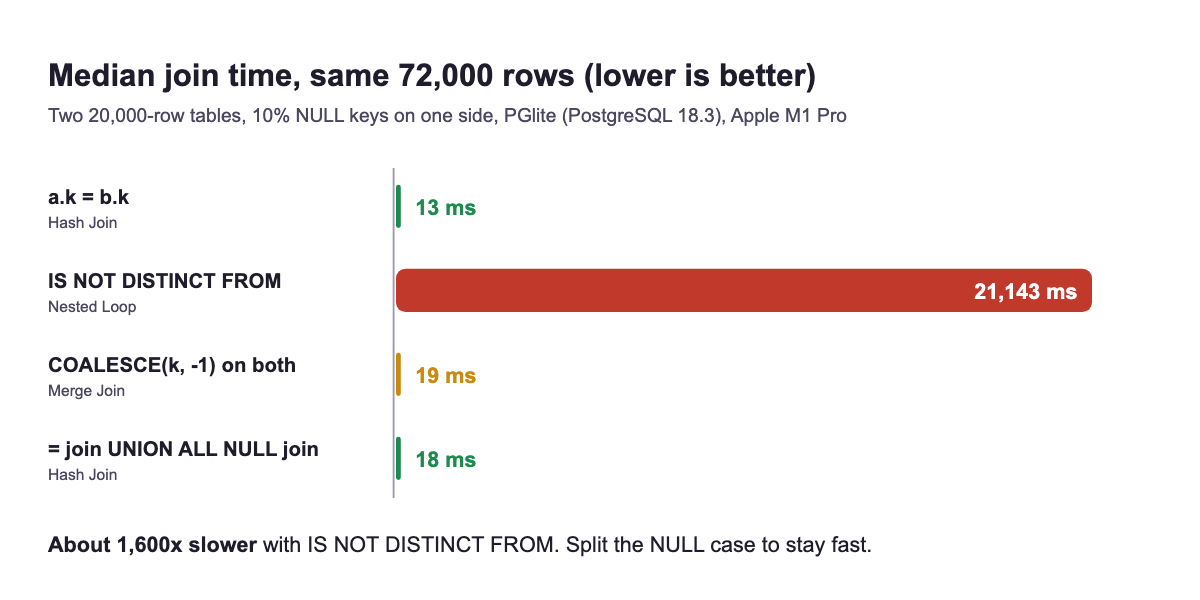
IS NOT DISTINCT FROM was about 1,600 times slower. PostgreSQL can only use hash joins and merge joins with equality operators marked as hashable or mergeable, and IS NOT DISTINCT FROM is not one of them, so it fell back to a nested loop, comparing every row with every row. The explicit OR (a IS NULL AND b IS NULL) form had the same problem. The fast null-safe option is to split the query:
SELECT ... FROM a JOIN b ON a.k = b.k                        -- hashable
UNION ALL
SELECT ... FROM a JOIN b ON a.k IS NULL AND b.k IS NULL      -- the NULL case
COALESCE was also fast, but it carries the collision risk from Example 6.
A second surprise: NULLs on both sides multiply. When both tables had 2,000 NULL keys, the null-safe join matched every NULL with every NULL and returned 4,072,000 rows instead of 72,000. Before making a join null-safe, check how many NULLs each side has, or deduplicate first.
Timings come from one laptop and a WebAssembly build of PostgreSQL. Server databases will be faster, and other engines (SQL Server, Snowflake, Spark) may plan these joins differently. The lesson holds: check the query plan with EXPLAIN before shipping a null-safe join on big tables.
pandas merge vs SQL JOIN: missing keys DO match
Example 12: the same data in pandas
Many analysts move between SQL and pandas, and this is where NULL behaviour flips. pandas merge matches missing keys (NaN or None) to each other. The pandas documentation calls this out as different from SQL.
import pandas as pd

t1 = pd.DataFrame({"id": [1, 1, 2, None, None]})
t2 = pd.DataFrame({"id": [1, 2, 2, None, 3]})
print(len(t1.merge(t2, on="id", how="inner")))6The same puzzle that returned 4 rows in SQL returns 6 in pandas (version 3.1.1), because the two missing ids in t1 matched the one in t2. The composite-key example behaves the same way: pandas kept the ('West', NaN) row that SQL dropped.
To get SQL behaviour, drop missing keys first:
sql_like = t1.dropna(subset=["id"]).merge(t2.dropna(subset=["id"]), on="id", how="inner")
print(len(sql_like))   # 4
For a SQL-style LEFT JOIN, drop missing keys from the right side only and use indicator=True to see what matched:
left = t1.merge(t2.dropna(subset=["id"]), on="id", how="left", indicator=True) id _merge
1.0 both
1.0 both
2.0 both
2.0 both
NaN left_only
NaN left_onlyPySpark DataFrames follow SQL rules (NULLs do not match) unless you use eqNullSafe.
NULL handling in joins: a checklist
1. Profile join keys first. Run COUNT(*) - COUNT(key) on both tables to see how many NULLs you are dealing with.
2. Decide what NULL means. "Unknown" (do not match) or "not applicable / all" (should match). Only the second case needs a null-safe join.
3. Pick the join type from the table you cannot lose. Usually LEFT JOIN from that table.
4. Compare row counts and totals before and after every join.
5. Use NOT EXISTS, not NOT IN, for "never" questions.
6. Count the right table's key (COUNT(o.order_id)), not COUNT(*), after a LEFT JOIN.
7. Put right-table filters in ON, not WHERE, when you want to keep unmatched rows.
8. Use IS DISTINCT FROM instead of <> when the column can be NULL.
9. Prefer IS NOT DISTINCT FROM over COALESCE placeholders, and check EXPLAIN on large tables. Use the UNION ALL split if it falls back to a nested loop.
10. In pandas, drop or fill missing keys before merge if you want SQL behaviour.
Common mistakes with NULLs in joins
- Assuming
NULL = NULLis true, or that it is false. It is unknown. - Using an INNER JOIN and losing rows with NULL keys without noticing (Example 3).
- Treating every NULL after a LEFT JOIN as "no match" (Example 4).
- Joining on
COALESCE(col, 'N/A')when'N/A'can appear in real data (Example 6). - Writing
NOT IN (subquery)on a nullable column (Example 7). - Using
COUNT(*)to count matches after a LEFT JOIN (Example 8). - Filtering with
<>and losing NULL rows (Example 9). - Filtering the right table in WHERE after a LEFT JOIN (Example 10).
- Making a big join null-safe without checking the plan or the NULL counts (Example 11).
- Expecting pandas
mergeto behave like SQL (Example 12).
SQL interview questions on NULLs and joins
1. What does SELECT NULL = NULL return? NULL (unknown), not true or false.
2. t1 has (1, 1, 2, NULL, NULL) and t2 has (1, 2, 2, NULL, 3). How many rows does each join return? INNER 4, LEFT 6, RIGHT 6, FULL 8, CROSS 25.
3. Do NULL keys match in an INNER JOIN? No. Use IS NOT DISTINCT FROM or <=> if they should.
4. Why does WHERE id NOT IN (SELECT id FROM t) return no rows? Because t.id contains a NULL, so every comparison includes x <> NULL, which is unknown.
5. NOT IN vs NOT EXISTS: which is safer? NOT EXISTS, because it is not affected by NULLs in the subquery.
6. How do you find rows in A with no match in B? LEFT JOIN B ... WHERE B.primary_key IS NULL, or NOT EXISTS.
7. *Difference between `COUNT() and COUNT(column)?** COUNT(*) counts rows. COUNT(column)` counts non-NULL values.
8. How do you join two tables on a nullable column in MySQL? With the <=> operator: ON a.col <=> b.col.
9. Why might a null-safe join be slow? The database may not use a hash or merge join for it and fall back to a nested loop. Split the NULL case with UNION ALL.
10. How does pandas merge treat NaN keys? It matches them to each other, unlike SQL.
Practise these on real data with the products never ordered and null-safe order totals problems in our free SQL interview questions set.
Learn it live: NULL handling, joins and data quality checks are core skills in our Data Analytics with Agentic AI program, with mentors reviewing your SQL on real business data. Not sure where to start? Talk to a mentor.
Key takeaways
- In SQL, NULL means unknown, so
NULL = NULLis unknown and NULL join keys never match with=. - INNER JOIN drops NULL-key rows. LEFT JOIN keeps them with NULLs on the right. In our example, an INNER JOIN under-reported revenue by 17.6%.
- To match NULL to NULL, use
IS NOT DISTINCT FROM,<=>in MySQL,ISin SQLite, or the explicitOR ... IS NULLform. NOT INreturns nothing if its subquery contains a NULL. UseNOT EXISTS.- After a LEFT JOIN, use
COUNT(right_key)andCOALESCE(SUM(...), 0). - Null-safe joins can be much slower (21 s vs 13 ms in our test) and can multiply NULL rows. Check
EXPLAINand NULL counts. - pandas
mergematches missing keys to each other, the opposite of SQL.
Frequently asked questions
Does NULL equal NULL in SQL?
No. In SQL, NULL = NULL returns NULL, which means unknown. It is neither true nor false. Use IS NULL to test for NULL, and IS NOT DISTINCT FROM to compare two values that may be NULL.
Why are rows with NULL values missing after my join?
A join keeps a row only when its ON condition is true. Any comparison with NULL is unknown, so rows with a NULL join key never match. An INNER JOIN drops them. Use a LEFT JOIN to keep them, or a null-safe comparison if NULL should match NULL.
How do I join on NULL values in SQL?
Use a null-safe comparison: IS NOT DISTINCT FROM in PostgreSQL, SQL Server 2022+, BigQuery, Snowflake and DuckDB, <=> in MySQL, MariaDB and Spark SQL, or IS in SQLite. In any database, you can write a = b OR (a IS NULL AND b IS NULL).
Does a LEFT JOIN return NULL values?
Yes. When a left-table row has no match, the LEFT JOIN keeps it and returns NULL for every column from the right table. A left row with a NULL join key always gets NULLs on the right, because NULL cannot match.
Why does NOT IN return no rows?
If the list or subquery contains a NULL, x NOT IN (...) includes the comparison x <> NULL, which is unknown. So the whole condition can never be true. Use NOT EXISTS, or filter out NULLs inside the subquery.
What is the difference between IS DISTINCT FROM and <>?
<> returns unknown when either side is NULL, so those rows are filtered out. IS DISTINCT FROM treats NULL as a comparable value: it returns true when only one side is NULL and false when both are NULL.
Is IS NOT DISTINCT FROM slow?
It can be. In our PostgreSQL test, it made the planner use a nested loop instead of a hash join: 21,143 ms instead of 13 ms on the same result. Splitting the query into an equality join plus a separate NULL-to-NULL join with UNION ALL ran in 18 ms.
How does pandas merge handle NaN keys?
Unlike SQL, pandas merge matches missing keys (NaN or None) to each other. In our test, the same data returned 6 rows in pandas and 4 rows in SQL. Drop missing keys with dropna before merging to get SQL behaviour.
How do I count matches correctly after a LEFT JOIN?
Count a column from the right table that is never NULL in real matches, such as its primary key: COUNT(o.order_id). COUNT(*) counts the NULL-padded row for unmatched entities as 1.
How does MySQL handle NULL in joins?
The same as standard SQL: = never matches NULL. MySQL adds the null-safe equality operator <=>, which returns 1 when both sides are NULL and 0 when only one side is NULL.
Recommended reading and practice on Skillancy
- Joins in SQL: INNER, LEFT, RIGHT, FULL and Self Joins with Examples
- CTE in SQL: How to Use WITH Clauses and Recursive CTEs
- Window Functions in SQL: ROW_NUMBER, RANK, LAG, Running Totals and Frames
- Data Analyst Interview Questions for 2026: SQL, Excel, Statistics, Python & Case Rounds
- SQL tutorial lessons: NULL in SQL, LEFT and RIGHT JOIN, FULL OUTER and CROSS JOIN, EXISTS and correlated subqueries
Practice: SQL interview questions · SQL compiler · Python compiler
Sources
- PostgreSQL documentation: Comparison Functions and Operators:
IS [NOT] DISTINCT FROMand NULL comparisons - PostgreSQL documentation: Joined Tables
- PostgreSQL documentation: Operator Optimization Information: which operators can use hash and merge joins
- MySQL 8.4 Reference Manual: Comparison Functions and Operators: the
<=>operator - [SQL Server: IS [NOT] DISTINCT FROM (Transact-SQL)](https://learn.microsoft.com/en-us/sql/t-sql/queries/is-distinct-from-transact-sql)
- Snowflake: EQUAL_NULL
- Spark SQL: NULL semantics
- Modern SQL: IS DISTINCT FROM support by database
- pandas documentation: DataFrame.merge
Reproducibility note
All SQL outputs on this page were produced by running the queries on PGlite 0.5.5 (PostgreSQL 18.3 compiled to WebAssembly, the same engine as the Skillancy SQL compiler) on an Apple M1 Pro laptop, on 20 November 2026. The SQLite results used SQLite 3.51.0 through Python's sqlite3 module, and the pandas results used pandas 3.1.1 on Python 3.13. Timings in Example 11 are medians of three runs on one machine and will differ on server databases. Syntax for databases we did not run (SQL Server, MySQL, Oracle, BigQuery, Snowflake, Spark, DuckDB) comes from their official documentation and the Modern SQL support table listed above.
Learn it live: Want to write SQL that holds up on messy real data? Explore Data Analytics with Agentic AI, or talk to a mentor. Learn. Build. Get hired.
Get the Skillancy field notes
One email a week: AI and analytics guides, cohort dates and hiring signals. No spam, unsubscribe anytime.