
MCP vs A2A vs Function Calling: How AI Agents Talk to Tools and Each Other (Python Tutorial with Real Output)
By Skillancy Editorial Team · 17 November 2026 · 47 min read
Reviewed by Rishav Kumar, Principal Data Analyst, Walmart Global Tech
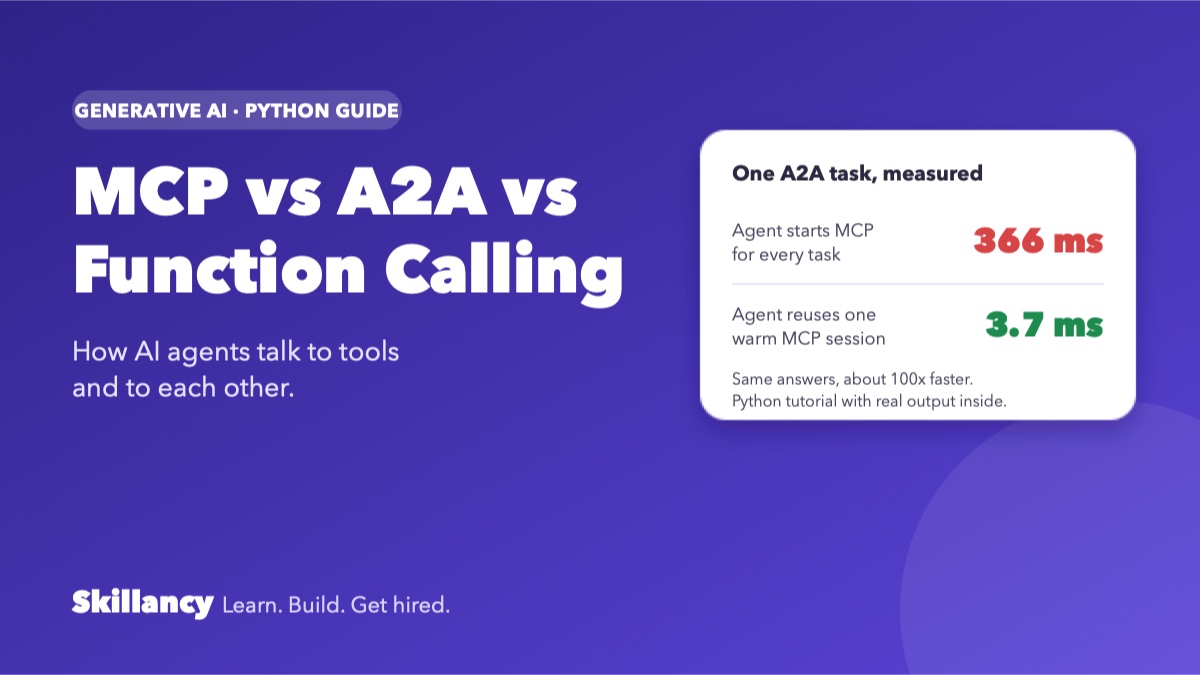
Function calling, MCP and A2A are the three ways an AI agent reaches beyond its own model. They are often compared as if you must pick one, but they solve different problems at different layers, and most real systems use all three together. This guide explains what each one connects, how they fit together, and when to use which. Then you build all three in Python around one small Indian online store: a function-calling loop, an MCP server for the same tools, and two agents that talk over A2A. Every output is copied from a real run, including the failure tests and a latency experiment that shows the most common performance mistake in multi-agent systems.
| Question | Short answer |
|---|---|
| What is function calling? | A model feature: the model returns a structured tool request, and your application executes it |
| What is MCP? | An open protocol that standardises how AI apps discover and use tools, resources and prompts |
| What is A2A? | An open protocol for independent AI agents to discover each other and collaborate on tasks as peers |
| Which one connects to tools? | Function calling (inside one app) and MCP (across apps) |
| Which one connects agents to agents? | A2A |
| Are they competitors? | No. A2A agents often use MCP internally, and MCP hosts usually use function calling to let the model pick tools |
| Who maintains MCP and A2A? | Both are now hosted by the Agentic AI Foundation under the Linux Foundation |
| What will you build here? | One store's tools exposed three ways, two agents talking over A2A, and a latency experiment, all in plain Python with no API key |
| Biggest mistake? | Treating a remote agent's or tool's output as trusted. Every layer is an injection surface |
Learn it live: Want to build multi-agent systems on real data, with a mentor reviewing your code? Explore our Generative AI program, or talk to a mentor for a plan that fits your background.
What is the difference between MCP, A2A and function calling?
The quickest way to see the difference is to ask one question of each: what is on the other end of the connection?
- Function calling: the other end is a function in your own code. The model never runs anything. It only produces a JSON request that matches a schema you supplied, and your application decides whether and how to run it.
- MCP: the other end is a tool or data source published by a server. The server can be on your laptop or on the internet, written by you or by someone else. Your agent discovers what the server offers and calls it through a standard protocol.
- A2A: the other end is another agent, which has its own model, its own tools and its own judgement. You do not call its functions. You send it a message describing a task, and it decides how to do the work, asks you for missing information, streams progress and returns results.
Put differently, function calling and MCP are about using capabilities, while A2A is about delegating responsibility. If you would describe the other side as "a function", you want function calling or MCP. If you would describe it as "a colleague", you want A2A.
If you are new to agents, read AI Agents & Multi-Agent Orchestration: The Complete 2026 Guide first, and our MCP tutorial if you have never built an MCP server. This guide builds on both.
MCP vs A2A vs function calling: the full comparison
This is the table most readers are looking for.
| Function calling | MCP (Model Context Protocol) | A2A (Agent2Agent) | |
|---|---|---|---|
| What it connects | A model to functions in one app | An agent or AI app to tools, data and prompts | An agent to other agents |
| What it is | A model/API feature | An open protocol | An open protocol |
| Who executes the work | Your application code | The MCP server | The remote agent, using its own model and tools |
| Discovery | None. You send the tool list with every request | Yes. The client lists a server's tools, resources and prompts | Yes. Each agent publishes an Agent Card at /.well-known/agent-card.json |
| Message format | Provider-specific JSON (tool definitions use JSON Schema) | JSON-RPC 2.0 | JSON-RPC 2.0, gRPC or HTTP+JSON/REST |
| Transport | Part of the model API call | stdio (local) or Streamable HTTP (remote) | HTTP(S), with Server-Sent Events for streaming and webhooks for push notifications |
| State | Stateless. Your app holds the conversation | Stateless core since the 2026-07-28 spec revision | Stateful tasks with IDs, a lifecycle and history |
| Long-running work | You build it yourself | Optional Tasks extension | Built in: tasks can stream, pause for input, and notify later |
| Visibility into the other side | Full: it is your code | Partial: you see tool names, schemas and descriptions | Opaque by design: you see skills, not internals |
| Authentication | Your app's own credentials | OAuth-based authorization for remote servers | Security schemes declared in the Agent Card (API key, HTTP auth, OAuth 2.0, OpenID Connect, mutual TLS) |
| Typical use | A chatbot that calls three of its own functions | One tool server reused by many AI apps | A support agent handing a billing question to a billing agent owned by another team |
| Python package used here | None (plain Python) | mcp | a2a-sdk |
The simple mental model:
- Use function calling when one application needs a handful of its own functions.
- Use MCP when a capability should be reusable across AI apps, or you want to plug into the ecosystem of existing servers.
- Use A2A when the thing on the other end makes its own decisions, is owned by another team or vendor, or works for longer than one request.
- Use all three in larger systems. They stack.
How they stack: one request through all three layers
Here is the system you will build, and the order in which the layers are crossed.
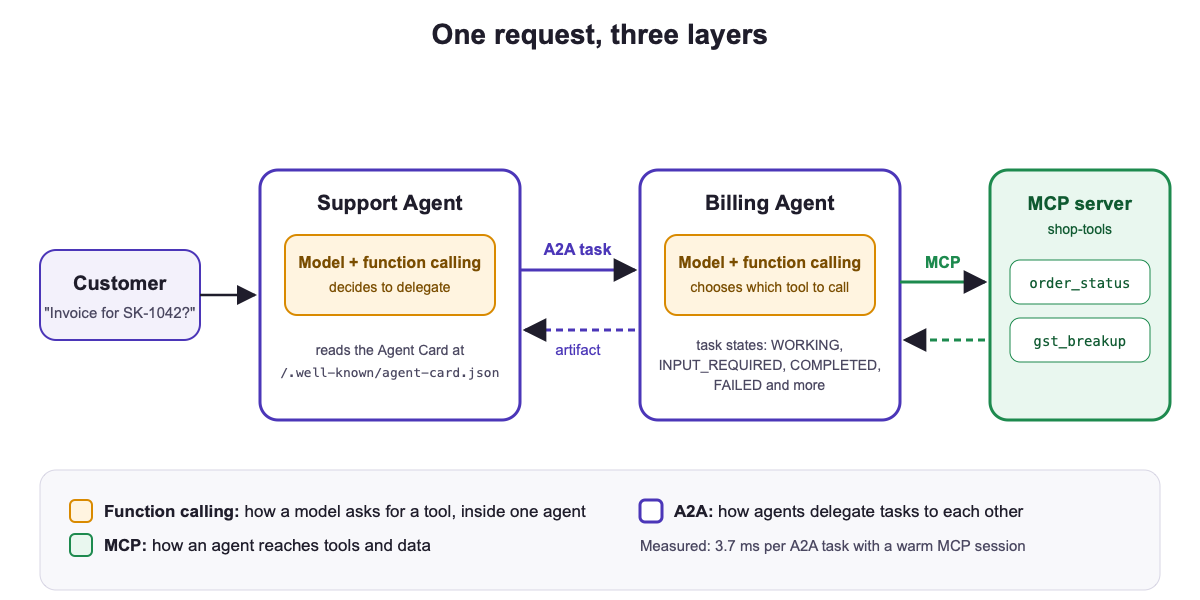
1. A customer asks the Support Agent: "What is the invoice total for SK-1042?"
2. The Support Agent does not own billing data. It reads the Billing Agent's Agent Card, sees an invoice_summary skill, and sends it a task over A2A.
3. The Billing Agent reaches its tools, order_status and gst_breakup, through an MCP server.
4. Inside an agent that uses an LLM, the model picks which tool to call through function calling. The MCP host turns the server's tool list into function definitions, the model returns a tool call, and the host executes it over MCP.
5. The Billing Agent returns an artifact (the invoice summary) and marks the task completed. The Support Agent writes the reply.
The A2A specification itself describes this split. Its appendix on MCP says MCP standardises how agents "connect to and interact with tools, APIs, data sources", while A2A standardises how agents "communicate and collaborate with each other as peers", and that an A2A server agent "might use MCP" to fulfil a task.
Function calling, explained
Function calling (also called tool calling or tool use) lets a language model respond with a structured request instead of plain text. You describe each tool with a name, a description and a JSON Schema for its arguments. The model reads those descriptions and, when a tool would help, returns something like this:
{"name": "gst_breakup", "arguments": "{\"taxable_value\": 2999.0, \"gst_rate\": 18}"}Three facts matter more than any API detail:
- The model does not run the function. Your code does. That makes function calling the place where you validate arguments, check permissions and decide what actually happens.
- It is per request. You send the tool definitions with each API call. There is no discovery and no reuse across apps.
- It is provider-specific. OpenAI introduced function calling in its API in June 2023, and other providers followed with their own formats. The ideas are the same, but the field names differ: one provider wraps the schema in
parameters, another calls itinput_schema. Code written for one provider needs a small adapter for another.
"Function calling vs tool calling" is a naming question, not a technical one. Most providers now say "tools", and the older name "function calling" stuck because it came first. Structured outputs are a close cousin: the same schema-following machinery, but used to shape the final answer rather than to request an action. OpenAI's strict mode, announced in August 2024, constrains the model's output to the supplied JSON Schema.
MCP, explained in one section
You can read our full MCP tutorial for the details. The short version:
- An MCP server exposes tools (actions), resources (data to read) and prompts (reusable templates).
- An MCP host (a chat app, IDE or your own agent) connects through a client, discovers what the server offers and calls it.
- Messages are JSON-RPC 2.0, sent over stdio for local servers or Streamable HTTP for remote ones.
- The current specification revision, 2026-07-28, made the core protocol stateless: requests are self-contained and capability negotiation happens per request.
- Anthropic introduced MCP in November 2024 and donated it in December 2025 to the Agentic AI Foundation, a Linux Foundation fund.
Function calling vs MCP is the comparison people search most, and the answer is that they sit at different layers. MCP standardises how tools are published and discovered. Function calling is how a model chooses a tool. An MCP host typically takes the tools it discovered and hands them to the model as function definitions. You will do exactly that conversion in Step 3, in four lines.
A2A, explained
A2A (Agent2Agent) is an open protocol for communication between independent, possibly opaque, AI agents. Its specification states the goal plainly: agents should be able to collaborate "without needing access to each other's internal state, memory, or tools."
The five building blocks
| Building block | What it is | In our demo |
|---|---|---|
| Agent Card | A JSON document describing the agent: name, description, skills, endpoints, supported bindings and auth requirements. Served at /.well-known/agent-card.json | The Billing Agent's card with one skill, invoice_summary |
| Task | A stateful unit of work with an ID and a lifecycle | One task per customer question |
| Message | One turn of communication from the user side or the agent side, made of parts | "What is the invoice total for SK-1042?" |
| Part | The smallest unit of content: text, a file or URL, or structured data | A text summary plus a JSON data part |
| Artifact | An output the agent produced for the task, made of parts | The invoice |
The task lifecycle
A2A tasks move through defined states. In the version 1.0 specification they are: SUBMITTED, WORKING, INPUT_REQUIRED, AUTH_REQUIRED, COMPLETED, FAILED, CANCELED and REJECTED (each prefixed TASK_STATE_ on the wire). INPUT_REQUIRED and AUTH_REQUIRED pause a task until the client responds. The last four are terminal.
That lifecycle is the biggest practical difference from function calling and MCP. An A2A agent can say "I need more information" and wait, can stream progress, and can finish hours later and notify you by webhook. A function call cannot.
Operations and bindings
The core operations are SendMessage, SendStreamingMessage, GetTask, ListTasks, CancelTask and SubscribeToTask, plus operations for push-notification configuration and an authenticated extended Agent Card. They can be carried over three standard protocol bindings: JSON-RPC 2.0 over HTTP, gRPC, or HTTP+JSON/REST.
Where A2A stands now
| When | What happened |
|---|---|
| Apr 2025 | Google launches A2A with more than 50 supporting organisations |
| Jun 2025 | A2A moves to the Linux Foundation, with AWS, Cisco, Google, Microsoft, Salesforce, SAP and ServiceNow as founding members |
| Aug 2025 | IBM's Agent Communication Protocol (ACP) merges into A2A |
| Mar 2026 | Version 1.0, the first stable specification, ships, adding multi-protocol support, multi-tenancy, modernised security flows and Signed Agent Cards |
| Apr 2026 | The Linux Foundation reports more than 150 supporting organisations, more than 22,000 GitHub stars on the core repository, SDKs in five languages, and integrations in Azure AI Foundry, Copilot Studio and Amazon Bedrock AgentCore |
| Aug 2026 | A2A joins MCP as a hosted project of the Agentic AI Foundation |
Two practical takeaways. First, the "MCP vs A2A" rivalry story is out of date: both protocols now live under the same neutral foundation. Second, many A2A tutorials online were written for the pre-1.0 SDKs and will not run on current versions. The code below uses a2a-sdk 1.3.0, which implements specification 1.0.
What we will build
One small online store, shop.py, with three orders and two pieces of business logic: look up an order, and split GST into CGST and SGST. Then we expose that same logic three ways:
1. Function calling: a tool loop in which a model asks for tools and the app runs them, with two failure tests.
2. MCP: the same tools published once as an MCP server, discovered and called by a client, then converted back into function-calling format.
3. A2A: a Billing Agent that serves an Agent Card and uses the MCP server internally, plus a Support Agent that discovers it, delegates tasks, handles a follow-up question and watches a streamed task.
Then we run an experiment that measures what each layer costs.
Everything runs on a laptop with no API key. Like our eval harness tutorial, the function-calling demo uses a deterministic stand-in for the model, so every reader gets the same output. Step 2 shows how to swap in a real model.
Prefer to practise Python basics first? Use the free Python tutorial and run snippets in the online Python compiler.
Step 0: set up your environment
We ran everything on Python 3.13.9 with mcp 2.3.0 and a2a-sdk 1.3.0.
python -m venv .venv
source .venv/bin/activate        # Windows: .venv\Scripts\activate
pip install "mcp==2.3.0" "a2a-sdk[http-server]==1.3.0" uvicorn httpx
Version notes that will save you an hour. (1) Inmcp2.x the server class isMCPServerfrommcp.server.mcpserver, not the olderFastMCPimport that many tutorials still show. (2)a2a-sdk1.x implements A2A specification 1.0. Message, task and card objects are protocol-buffer types, task states look likeTASK_STATE_COMPLETED, and older 0.x imports such asA2AStarletteApplicationno longer apply. If you follow an older tutorial, pin the old SDK or use the code here.
Create a folder and put every file below in it.
Step 1: the business logic
Save this as shop.py. It knows nothing about AI. That separation is deliberate: the same functions will be exposed three different ways.
"""Shared business logic for the demo: a tiny online store."""

ORDERS = {
    "SK-1042": {"item": "Bluetooth headphones", "city": "Pune",
                "taxable_value": 2999.0, "gst_rate": 18, "status": "shipped", "eta_days": 2},
    "SK-1043": {"item": "Cotton kurta", "city": "Lucknow",
                "taxable_value": 899.0, "gst_rate": 5, "status": "packed", "eta_days": 4},
    "SK-1044": {"item": "Steel water bottle", "city": "Kochi",
                "taxable_value": 649.0, "gst_rate": 18, "status": "delivered", "eta_days": 0},
}

def order_status(order_id: str) -> dict:
    """Look up one order by its ID, for example SK-1042."""
    order = ORDERS.get(order_id.strip().upper())
    if order is None:
        raise ValueError(f"No order with ID {order_id!r}")
    return {"order_id": order_id.upper(), "item": order["item"], "status": order["status"],
            "eta_days": order["eta_days"], "taxable_value": order["taxable_value"],
            "gst_rate": order["gst_rate"]}

def gst_breakup(taxable_value: float, gst_rate: int) -> dict:
    """Split GST into CGST and SGST for an intra-state sale and return the invoice total."""
    if taxable_value <= 0:
        raise ValueError("taxable_value must be greater than 0")
    if not 0 <= gst_rate <= 40:
        raise ValueError("gst_rate must be between 0 and 40")
    gst = round(taxable_value * gst_rate / 100, 2)
    cgst = round(gst / 2, 2)
    sgst = round(gst - cgst, 2)  # so CGST + SGST always equals total GST
    return {"taxable_value": taxable_value, "cgst": cgst,
            "sgst": sgst, "total_gst": gst,
            "invoice_total": round(taxable_value + gst, 2)}
Two details worth copying into real projects:
- Raise clear errors.
ValueError("No order with ID 'SK-9999'")is something a model or another agent can read and act on. - Make money add up. Splitting ₹44.95 of GST in half gives ₹22.475, which rounds up to ₹22.48 twice and produces a total of ₹44.96, one paisa too much. Computing SGST as
gst - cgstkeeps CGST + SGST equal to the total GST. The GST rates in the demo data are illustrative, not tax advice.
Step 2: function calling, the model asks and your app decides
Save this as fc_demo.py. The "model" here is a deterministic stand-in that returns messages in the same shape a chat-completions API does. Everything else is exactly what you would write around a real model.
"""Part 1: function calling. The app owns the tools, the model only asks."""
import json, re
from shop import order_status, gst_breakup

# 1. Describe each tool with JSON Schema. This is what the model reads.
TOOLS = [
    {"type": "function", "function": {
        "name": "order_status",
        "description": "Get status, delivery estimate, taxable value and GST rate for one order.",
        "parameters": {"type": "object",
                       "properties": {"order_id": {"type": "string", "description": "Order ID, e.g. SK-1042"}},
                       "required": ["order_id"], "additionalProperties": False}}},
    {"type": "function", "function": {
        "name": "gst_breakup",
        "description": "Split GST into CGST and SGST and return the invoice total.",
        "parameters": {"type": "object",
                       "properties": {"taxable_value": {"type": "number"},
                                      "gst_rate": {"type": "integer"}},
                       "required": ["taxable_value", "gst_rate"], "additionalProperties": False}}},
]
REGISTRY = {"order_status": order_status, "gst_breakup": gst_breakup}
JSON_TYPES = {"string": str, "number": (int, float), "integer": int}

# 2. A deterministic stand-in for the model, so every run gives the same output.
#    It returns messages in the same shape a real chat-completions API does.
def fake_model(messages, tools, bug=None):
    last = messages[-1]
    if last["role"] == "user":
        order_id = re.search(r"SK-\d+", last["content"]).group()
        args = {"order_id": order_id}
        name = "order_status"
        if bug == "unknown_tool":
            name, args = "refund_order", {"order_id": order_id}
        return {"role": "assistant", "content": None, "tool_calls": [
            {"id": "call_1", "type": "function",
             "function": {"name": name, "arguments": json.dumps(args)}}]}
    results = [json.loads(m["content"]) for m in messages if m["role"] == "tool"]
    if len(results) == 1 and "gst_rate" in results[0]:
        o = results[0]
        args = {"taxable_value": o["taxable_value"], "gst_rate": o["gst_rate"]}
        if bug == "bad_args":
            args = {"taxable_value": "two thousand", "gst_rate": 18}
        return {"role": "assistant", "content": None, "tool_calls": [
            {"id": "call_2", "type": "function",
             "function": {"name": "gst_breakup", "arguments": json.dumps(args)}}]}
    if any("error" in r for r in results):
        return {"role": "assistant", "content": "Sorry, I could not complete that: "
                + next(r["error"] for r in results if "error" in r)}
    o, g = results
    return {"role": "assistant", "content":
            f"Order {o['order_id']} ({o['item']}) is {o['status']}, arriving in {o['eta_days']} days. "
            f"Invoice total Rs {g['invoice_total']} including Rs {g['total_gst']} GST "
            f"(CGST {g['cgst']} + SGST {g['sgst']})."}

# 3. Never trust the model's arguments: check them against the schema first.
def validate(args, schema):
    missing = [k for k in schema["required"] if k not in args]
    extra = [k for k in args if k not in schema["properties"]]
    wrong = [k for k, v in args.items() if k in schema["properties"]
             and not isinstance(v, JSON_TYPES[schema["properties"][k]["type"]])]
    if missing or extra or wrong:
        return f"invalid arguments: missing={missing} extra={extra} wrong_type={wrong}"
    return None

# 4. The loop: ask the model, run any tool it requests, send results back.
def run(question, bug=None, max_steps=5):
    messages = [{"role": "user", "content": question}]
    schemas = {t["function"]["name"]: t["function"]["parameters"] for t in TOOLS}
    for step in range(1, max_steps + 1):
        reply = fake_model(messages, TOOLS, bug=bug)
        messages.append(reply)
        if not reply.get("tool_calls"):
            print(f"[step {step}] answer: {reply['content']}")
            return reply["content"]
        for call in reply["tool_calls"]:
            name = call["function"]["name"]
            args = json.loads(call["function"]["arguments"])
            print(f"[step {step}] model asked for {name}({args})")
            if name not in REGISTRY:
                result = {"error": f"unknown tool {name!r}"}
            elif problem := validate(args, schemas[name]):
                result = {"error": problem}
            else:
                try:
                    result = REGISTRY[name](**args)
                except ValueError as e:
                    result = {"error": str(e)}
            print(f"[step {step}] app returned {result}")
            messages.append({"role": "tool", "tool_call_id": call["id"], "content": json.dumps(result)})
    return "stopped: too many steps"

if __name__ == "__main__":
    print("== Happy path")
    run("What will I pay for order SK-1042, and when does it arrive?")
    print("\n== Failure test 1: model invents a tool")
    run("Refund order SK-1042", bug="unknown_tool")
    print("\n== Failure test 2: model sends the wrong argument type")
    run("What will I pay for order SK-1043?", bug="bad_args")
What each part does:
| Part | Why it is written this way |
|---|---|
TOOLS | The tool definitions the model reads. Name, description and JSON Schema are the whole interface, so write them for a model |
"additionalProperties": False | Rejects arguments you did not ask for. Strict modes at model providers rely on schemas like this |
REGISTRY | An allow-list. Only functions in this dictionary can ever run, whatever the model asks for |
validate() | Checks required keys, unknown keys and types before anything runs. Never trust model arguments |
run() | The tool loop: call the model, execute requested tools, append results as tool messages, repeat until the model answers |
max_steps | A hard stop so a confused model cannot loop forever and burn tokens |
Run it with python fc_demo.py.
The real output
This output was copied from an actual run of the code above:
== Happy path
[step 1] model asked for order_status({'order_id': 'SK-1042'})
[step 1] app returned {'order_id': 'SK-1042', 'item': 'Bluetooth headphones', 'status': 'shipped', 'eta_days': 2, 'taxable_value': 2999.0, 'gst_rate': 18}
[step 2] model asked for gst_breakup({'taxable_value': 2999.0, 'gst_rate': 18})
[step 2] app returned {'taxable_value': 2999.0, 'cgst': 269.91, 'sgst': 269.91, 'total_gst': 539.82, 'invoice_total': 3538.82}
[step 3] answer: Order SK-1042 (Bluetooth headphones) is shipped, arriving in 2 days. Invoice total Rs 3538.82 including Rs 539.82 GST (CGST 269.91 + SGST 269.91).

== Failure test 1: model invents a tool
[step 1] model asked for refund_order({'order_id': 'SK-1042'})
[step 1] app returned {'error': "unknown tool 'refund_order'"}
[step 2] answer: Sorry, I could not complete that: unknown tool 'refund_order'

== Failure test 2: model sends the wrong argument type
[step 1] model asked for order_status({'order_id': 'SK-1043'})
[step 1] app returned {'order_id': 'SK-1043', 'item': 'Cotton kurta', 'status': 'packed', 'eta_days': 4, 'taxable_value': 899.0, 'gst_rate': 5}
[step 2] model asked for gst_breakup({'taxable_value': 'two thousand', 'gst_rate': 18})
[step 2] app returned {'error': "invalid arguments: missing=[] extra=[] wrong_type=['taxable_value']"}
[step 3] answer: Sorry, I could not complete that: invalid arguments: missing=[] extra=[] wrong_type=['taxable_value']
What the output teaches
| Observation | Lesson |
|---|---|
| The model needed two tool calls before it could answer | Real questions chain tools. The loop, not a single call, is the unit of work |
| ₹2,999 × 18% = ₹539.82 GST, and ₹2,999 + ₹539.82 = ₹3,538.82 | Check one result by hand. A loop that returns confident wrong numbers is worse than none |
refund_order was refused because it is not in REGISTRY | Models do invent tools. An allow-list turns that into a readable error instead of a crash or, worse, an action |
"two thousand" was caught by validate() before gst_breakup ran | Type checks belong in your code, even when the provider offers a strict mode |
Swapping in a real model
To use a real model, replace fake_model with your provider's chat call and pass the same TOOLS. The snippet below is illustrative and was not executed here. It follows the OpenAI Python SDK's chat-completions shape; other providers use the same idea with different field names.
from openai import OpenAI
client = OpenAI()  # reads OPENAI_API_KEY from the environment

def real_model(messages, tools, bug=None):
    resp = client.chat.completions.create(model="YOUR_MODEL", messages=messages, tools=tools)
    return resp.choices[0].message.model_dump(exclude_none=True)
Where function calling stops. Look at what we had to hard-code: the tool definitions, the registry and the dispatch logic all live inside this one app. A second app that wants the same tools has to copy all of it. That is the problem MCP solves.
Step 3: MCP, publish the tools once
Save this as mcp_server.py. It wraps the same two functions from shop.py.
"""Part 2: the same two functions, published once as an MCP server."""
from typing import TypedDict
from mcp.server.mcpserver import MCPServer
from mcp.server.mcpserver.exceptions import ToolError
import shop

mcp = MCPServer("shop-tools")

class Order(TypedDict):
    order_id: str
    item: str
    status: str
    eta_days: int
    taxable_value: float
    gst_rate: int

class Invoice(TypedDict):
    taxable_value: float
    cgst: float
    sgst: float
    total_gst: float
    invoice_total: float

@mcp.tool()
def order_status(order_id: str) -> Order:
    """Get status, delivery estimate, taxable value and GST rate for one order, e.g. SK-1042."""
    try:
        return shop.order_status(order_id)
    except ValueError as e:
        raise ToolError(str(e))  # deliberate, safe-to-show message

@mcp.tool()
def gst_breakup(taxable_value: float, gst_rate: int) -> Invoice:
    """Split GST into CGST and SGST and return the invoice total. gst_rate is a percentage, 0 to 40."""
    try:
        return shop.gst_breakup(taxable_value, gst_rate)
    except ValueError as e:
        raise ToolError(str(e))

if __name__ == "__main__":
    mcp.run()  # stdio
Then save this client as mcp_client.py. It discovers the tools, calls them, runs two failure tests and converts the discovered tools into function-calling format.
"""Discover the server's tools, call them, then turn them into function-calling tools."""
import asyncio, json, sys
from mcp import Client, StdioServerParameters

params = StdioServerParameters(command=sys.executable, args=["mcp_server.py"])

def to_function_tool(t):
    """An MCP tool already carries a JSON Schema, so converting it is a few lines."""
    return {"type": "function", "function": {
        "name": t.name, "description": t.description, "parameters": t.input_schema}}

async def main():
    async with Client(params) as client:
        tools = (await client.list_tools()).tools
        print("== Discovered tools")
        for t in tools:
            print(f"- {t.name}: {json.dumps(t.input_schema)}")

        print("\n== Call order_status")
        res = await client.call_tool("order_status", {"order_id": "SK-1043"})
        print(res.structured_content)

        print("\n== Call gst_breakup")
        res = await client.call_tool("gst_breakup", {"taxable_value": 899.0, "gst_rate": 5})
        print(res.structured_content)

        print("\n== Failure test 1: unknown order")
        res = await client.call_tool("order_status", {"order_id": "SK-9999"})
        print("is_error:", res.is_error, "|", res.content[0].text)

        print("\n== Failure test 2: wrong argument type")
        res = await client.call_tool("gst_breakup", {"taxable_value": "two thousand", "gst_rate": 18})
        print("is_error:", res.is_error, "|", res.content[0].text[:160])

        print("\n== Same tools, converted for a function-calling model")
        print(json.dumps(to_function_tool(tools[1]), indent=2))

asyncio.run(main())
Run python mcp_client.py. The client launches the server itself as a subprocess.
The real output
== Discovered tools
- order_status: {"type": "object", "properties": {"order_id": {"title": "Order Id", "type": "string"}}, "required": ["order_id"], "title": "order_statusArguments"}
- gst_breakup: {"type": "object", "properties": {"taxable_value": {"title": "Taxable Value", "type": "number"}, "gst_rate": {"title": "Gst Rate", "type": "integer"}}, "required": ["taxable_value", "gst_rate"], "title": "gst_breakupArguments"}

== Call order_status
{'order_id': 'SK-1043', 'item': 'Cotton kurta', 'status': 'packed', 'eta_days': 4, 'taxable_value': 899.0, 'gst_rate': 5}

== Call gst_breakup
{'taxable_value': 899.0, 'cgst': 22.48, 'sgst': 22.47, 'total_gst': 44.95, 'invoice_total': 943.95}

== Failure test 1: unknown order
is_error: True | Error executing tool order_status: No order with ID 'SK-9999'

== Failure test 2: wrong argument type
is_error: True | Error executing tool gst_breakup: 1 validation error for gst_breakupArguments
taxable_value
  Input should be a valid number, unable to parse string as a number

== Same tools, converted for a function-calling model
{
  "type": "function",
  "function": {
    "name": "gst_breakup",
    "description": "Split GST into CGST and SGST and return the invoice total. gst_rate is a percentage, 0 to 40.",
    "parameters": {
      "type": "object",
      "properties": {
        "taxable_value": {
          "title": "Taxable Value",
          "type": "number"
        },
        "gst_rate": {
          "title": "Gst Rate",
          "type": "integer"
        }
      },
      "required": [
        "taxable_value",
        "gst_rate"
      ],
      "title": "gst_breakupArguments"
    }
  }
}
What the output teaches
| Observation | Lesson |
|---|---|
| The input schemas were generated from the Python type hints | In MCP the function signature is the contract. float became "number" and int became "integer" |
The TypedDict return types gave clean structured_content | Declare return types so clients and models get structured data, not just text |
| Wrong types were rejected by the SDK before the function ran | MCP servers validate arguments against the schema for you, which function calling left to us in Step 2 |
Only our deliberate ToolError message reached the client | Unexpected exceptions are reported to the model as a generic "Error executing tool" message, so internal details do not leak. Raise ToolError with a safe message when you want the caller to see why |
| The converted tool is a valid function-calling definition | This is how MCP and function calling meet. A host lists MCP tools, hands them to the model as functions, and routes the model's tool calls back to the server |
Where MCP stops. MCP gave us reusable tools. But a tool does what it is told, once, and returns. It cannot ask "which order?", work for an hour, or decide to use a different tool. When the other side needs judgement and its own lifecycle, you are talking to an agent, and that is A2A.
Step 4: A2A, build a Billing Agent
Save this as billing_agent.py. It is a complete A2A server with an Agent Card, and it reaches its tools over MCP.
"""Part 3: a Billing Agent that other agents can reach over A2A.
Inside, it uses MCP to reach its tools. Callers never see that."""
import os, re, sys
import uvicorn
from starlette.applications import Starlette
from mcp import Client, StdioServerParameters
from a2a.helpers import get_message_text, new_task_from_user_message, new_text_message, new_text_part, new_data_part
from a2a.server.agent_execution import AgentExecutor, RequestContext
from a2a.server.events import EventQueue
from a2a.server.request_handlers import DefaultRequestHandler
from a2a.server.routes import create_agent_card_routes, create_jsonrpc_routes
from a2a.server.tasks import InMemoryTaskStore, TaskUpdater
from a2a.types import AgentCapabilities, AgentCard, AgentInterface, AgentSkill

PORT = int(os.environ.get("PORT", 9999))
MCP_SERVER = StdioServerParameters(command=sys.executable, args=["mcp_server.py"])

# 1. The Agent Card: the public description other agents discover.
card = AgentCard(
    name="Billing Agent",
    description="Answers invoice questions for SK- orders: status, delivery estimate and GST breakup.",
    version="1.0.0",
    default_input_modes=["text/plain"],
    default_output_modes=["text/plain", "application/json"],
    capabilities=AgentCapabilities(streaming=True),
    supported_interfaces=[AgentInterface(protocol_binding="JSONRPC",
                                         url=f"http://127.0.0.1:{PORT}", protocol_version="1.0")],
    skills=[AgentSkill(id="invoice_summary", name="Invoice summary",
                       description="Given an order ID like SK-1042, returns status, ETA and GST breakup.",
                       tags=["billing", "gst", "orders"],
                       examples=["What is the invoice total for SK-1042?"])],
)

# 2. The executor: what the agent does when a message arrives.
class BillingExecutor(AgentExecutor):
    async def execute(self, context: RequestContext, event_queue: EventQueue) -> None:
        task = context.current_task or new_task_from_user_message(context.message)
        if not context.current_task:
            await event_queue.enqueue_event(task)
        updater = TaskUpdater(event_queue=event_queue, task_id=task.id, context_id=task.context_id)
        await updater.start_work(new_text_message("Looking up the order..."))

        match = re.search(r"SK-\d+", get_message_text(context.message).upper())
        if not match:
            await updater.requires_input(new_text_message("Which order ID? It looks like SK-1042."))
            return

        async with Client(MCP_SERVER) as tools:          # agent -> tools, over MCP
            res = await tools.call_tool("order_status", {"order_id": match.group()})
            if res.is_error:
                await updater.failed(new_text_message(res.content[0].text))
                return
            order = res.structured_content
            res = await tools.call_tool("gst_breakup", {"taxable_value": order["taxable_value"],
                                                        "gst_rate": order["gst_rate"]})
            invoice = res.structured_content

        summary = (f"{order['order_id']} ({order['item']}) is {order['status']}, ETA {order['eta_days']} days. "
                   f"Invoice total Rs {invoice['invoice_total']} incl. Rs {invoice['total_gst']} GST.")
        await updater.add_artifact(name="invoice",
                                   parts=[new_text_part(summary), new_data_part({**order, **invoice})])
        await updater.complete()

    async def cancel(self, context: RequestContext, event_queue: EventQueue) -> None:
        raise NotImplementedError("cancel is not supported")

# 3. Wire it up: an Agent Card route plus a JSON-RPC endpoint.
handler = DefaultRequestHandler(agent_executor=BillingExecutor(),
                                task_store=InMemoryTaskStore(), agent_card=card)
app = Starlette(routes=[*create_agent_card_routes(card), *create_jsonrpc_routes(handler, "/")])

if __name__ == "__main__":
    uvicorn.run(app, host="127.0.0.1", port=PORT, log_level="warning")
What each part does:
| Part | Why it is written this way |
|---|---|
AgentCard | The public description other agents discover. Skills, input/output modes and endpoints tell callers what to send |
AgentSkill with examples | Examples help a calling agent's model decide when to delegate here, the way docstrings help with tools |
supported_interfaces | Lists the protocol binding (JSON-RPC here) and URL. A card can list several bindings |
start_work, requires_input, failed, complete | Each call moves the task through the A2A lifecycle and tells the caller where it stands |
add_artifact with a text part and a data part | Humans get readable text and machines get JSON, in one result |
async with Client(MCP_SERVER) | The agent uses MCP for its tools. Callers never see this, which is exactly the opacity A2A is designed for |
Start it in its own terminal:
python billing_agent.pyAny HTTP client can now read its card. This is the real response from curl http://127.0.0.1:9999/.well-known/agent-card.json, formatted for reading:
{
    "name": "Billing Agent",
    "description": "Answers invoice questions for SK- orders: status, delivery estimate and GST breakup.",
    "supportedInterfaces": [
        {
            "url": "http://127.0.0.1:9999",
            "protocolBinding": "JSONRPC",
            "protocolVersion": "1.0"
        }
    ],
    "version": "1.0.0",
    "capabilities": {
        "streaming": true
    },
    "defaultInputModes": [
        "text/plain"
    ],
    "defaultOutputModes": [
        "text/plain",
        "application/json"
    ],
    "skills": [
        {
            "id": "invoice_summary",
            "name": "Invoice summary",
            "description": "Given an order ID like SK-1042, returns status, ETA and GST breakup.",
            "tags": [
                "billing",
                "gst",
                "orders"
            ],
            "examples": [
                "What is the invoice total for SK-1042?"
            ]
        }
    ]
}
Step 5: A2A, build a Support Agent that delegates
Save this as support_agent.py. In a real system this would be an LLM agent that decides when to delegate. Here it sends fixed questions so the protocol is easy to see.
"""Part 3, the other side: a Support Agent that delegates billing questions over A2A."""
import asyncio, httpx
from google.protobuf.json_format import MessageToDict
from a2a.client import A2ACardResolver, ClientConfig, create_client
from a2a.helpers import new_text_message
from a2a.types import Role, SendMessageRequest, TaskState

BILLING_AGENT = "http://127.0.0.1:9999"

def show(task):
    state = TaskState.Name(task.status.state)
    note = task.status.message.parts[0].text if task.status.message.parts else ""
    print(f"  state: {state}" + (f" | agent says: {note}" if note else ""))
    for artifact in task.artifacts:
        for part in artifact.parts:
            if part.HasField("text"):
                print(f"  artifact text: {part.text}")
            if part.HasField("data"):
                data = MessageToDict(part.data)
                print(f"  artifact data: invoice_total={data['invoice_total']}, cgst={data['cgst']}, sgst={data['sgst']}")

async def ask(client, text, task=None):
    msg = new_text_message(text, role=Role.ROLE_USER,
                           task_id=task.id if task else None,
                           context_id=task.context_id if task else None)
    async for chunk in client.send_message(SendMessageRequest(message=msg)):
        return chunk.task

async def main():
    # 1. Discovery: read the Agent Card from the well-known URL.
    async with httpx.AsyncClient() as http:
        card = await A2ACardResolver(httpx_client=http, base_url=BILLING_AGENT).get_agent_card()
    print("== Discovered agent:", card.name, "| skills:", [s.id for s in card.skills],
          "| binding:", card.supported_interfaces[0].protocol_binding)

    client = await create_client(agent=card, client_config=ClientConfig(streaming=False))

    print("\n== Task 1: a complete request")
    show(await ask(client, "What is the invoice total for sk-1042?"))

    print("\n== Task 2: missing information, then a follow-up on the same task")
    task = await ask(client, "How much GST did I pay on my kurta?")
    show(task)
    task2 = await ask(client, "It is SK-1043", task=task)
    print("  same task id:", task2.id == task.id)
    show(task2)

    print("\n== Task 3: failure test, an order that does not exist")
    show(await ask(client, "Invoice for SK-9999 please"))
    await client.close()

    print("\n== Streaming: watch the task move through its states")
    stream = await create_client(agent=card, client_config=ClientConfig(streaming=True))
    msg = new_text_message("Invoice for SK-1044", role=Role.ROLE_USER)
    async for event in stream.send_message(SendMessageRequest(message=msg)):
        kind = event.WhichOneof("payload")
        if kind == "task":
            print("  event: task created, state", TaskState.Name(event.task.status.state))
        elif kind == "status_update":
            print("  event: status ->", TaskState.Name(event.status_update.status.state))
        elif kind == "artifact_update":
            print("  event: artifact ->", event.artifact_update.artifact.parts[0].text)
    await stream.close()

asyncio.run(main())
With the Billing Agent running, run python support_agent.py in a second terminal.
The real output
== Discovered agent: Billing Agent | skills: ['invoice_summary'] | binding: JSONRPC

== Task 1: a complete request
  state: TASK_STATE_COMPLETED
  artifact text: SK-1042 (Bluetooth headphones) is shipped, ETA 2 days. Invoice total Rs 3538.82 incl. Rs 539.82 GST.
  artifact data: invoice_total=3538.82, cgst=269.91, sgst=269.91

== Task 2: missing information, then a follow-up on the same task
  state: TASK_STATE_INPUT_REQUIRED | agent says: Which order ID? It looks like SK-1042.
  same task id: True
  state: TASK_STATE_COMPLETED
  artifact text: SK-1043 (Cotton kurta) is packed, ETA 4 days. Invoice total Rs 943.95 incl. Rs 44.95 GST.
  artifact data: invoice_total=943.95, cgst=22.48, sgst=22.47

== Task 3: failure test, an order that does not exist
  state: TASK_STATE_FAILED | agent says: Error executing tool order_status: No order with ID 'SK-9999'

== Streaming: watch the task move through its states
  event: task created, state TASK_STATE_SUBMITTED
  event: status -> TASK_STATE_WORKING
  event: artifact -> SK-1044 (Steel water bottle) is delivered, ETA 0 days. Invoice total Rs 765.82 incl. Rs 116.82 GST.
  event: status -> TASK_STATE_COMPLETED
What the output teaches
| Observation | Lesson |
|---|---|
| The Support Agent found the skill by reading the card, with nothing hard-coded except a base URL | Discovery works at the agent level the way list_tools works at the tool level |
Task 2 paused in INPUT_REQUIRED, and the follow-up continued the same task ID | A2A tasks are conversations with state. Function calls and MCP tool calls have no equivalent |
| ₹649 × 18% = ₹116.82, and ₹649 + ₹116.82 = ₹765.82 | Verify at least one number end to end, across both protocols |
Task 3 ended in FAILED with a readable reason | Failures are states the caller can branch on, not exceptions it has to parse |
The stream showed SUBMITTED, WORKING, an artifact, then COMPLETED | Long-running agents can report progress as they go, over Server-Sent Events |
| The Support Agent never learned that MCP was involved | A2A agents are opaque. You can change the Billing Agent's tools, model or framework without breaking callers |
Learn it live: Building agents that delegate safely is easier with a mentor beside you. See the Generative AI program and the Data Analytics with Agentic AI program, or practise related skills with Python interview questions.
The experiment: what does each layer cost?
Protocols add hops, and hops add time. We measured each layer with bench.py (in the downloadable code), taking the median of thousands of direct calls, 300 MCP calls, 10 cold MCP connections and 50 to 200 A2A tasks. These are real numbers from one run on an Apple M1 Pro laptop, before any language model is involved.
Python 3.13.9
direct Python call             : 0.001 ms
function-calling dispatch      : 0.004 ms  (app side only, no model)
MCP tool call, warm stdio      : 0.73 ms
MCP connect + list tools, cold : 360.36 ms
A2A task, agent opens MCP      : 365.796 ms
A2A task, agent reuses MCP : 3.685 ms| Layer | Median time | What it includes |
|---|---|---|
| Direct Python call | 0.001 ms | Just the function |
| Function-calling dispatch | 0.004 ms | Parse JSON arguments, validate, run, serialise. The model's own time is not included |
| MCP tool call, warm session | 0.73 ms | One JSON-RPC round trip to a server process over stdio |
| MCP connect and list tools, cold | 360.36 ms | Start a new server process, connect and discover tools |
| A2A task, agent opens MCP per task | 365.796 ms | HTTP round trip, task lifecycle, plus a cold MCP start inside the agent |
| A2A task, agent reuses a warm MCP session | 3.685 ms | HTTP round trip, task lifecycle and two warm MCP calls |
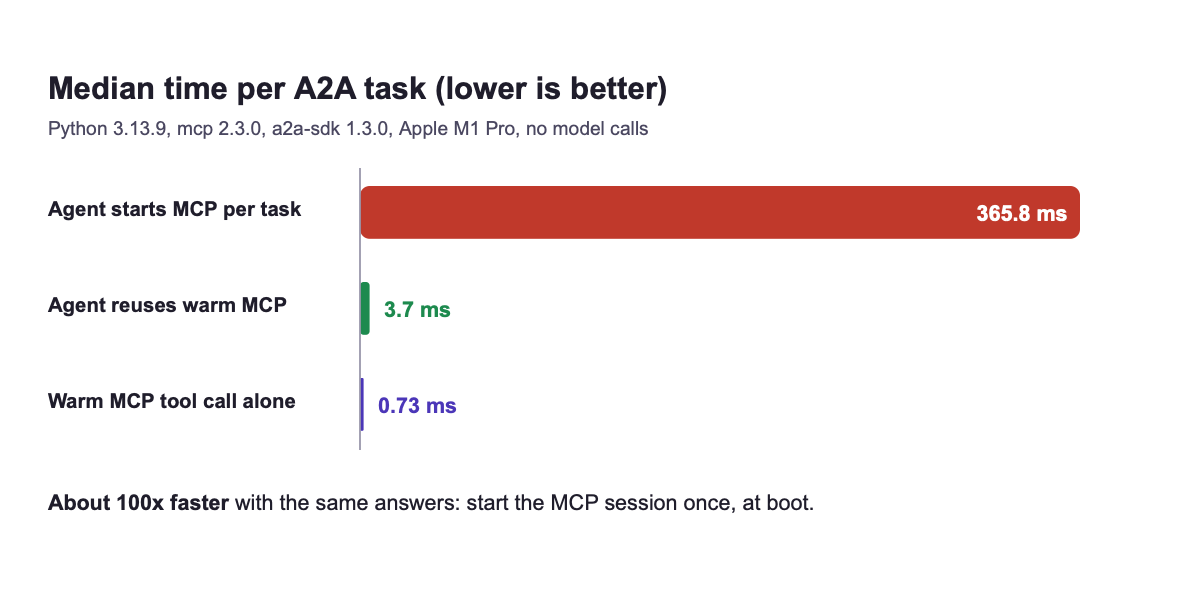
The surprise is the fifth row. Our first Billing Agent spent almost all of its time starting the MCP server again for every task. The protocol overhead of A2A itself was small. The fix is to start the MCP session once when the agent boots and reuse it. This is the complete change, saved as billing_agent_warm.py:
@@ -1,6 +1,6 @@
 """Part 3: a Billing Agent that other agents can reach over A2A.
 Inside, it uses MCP to reach its tools. Callers never see that."""
-import os, re, sys
+import contextlib, os, re, sys
 import uvicorn
 from starlette.applications import Starlette
 from mcp import Client, StdioServerParameters
@@ -46,15 +46,15 @@
             await updater.requires_input(new_text_message("Which order ID? It looks like SK-1042."))
             return

-        async with Client(MCP_SERVER) as tools:          # agent -> tools, over MCP
-            res = await tools.call_tool("order_status", {"order_id": match.group()})
-            if res.is_error:
-                await updater.failed(new_text_message(res.content[0].text))
-                return
-            order = res.structured_content
-            res = await tools.call_tool("gst_breakup", {"taxable_value": order["taxable_value"],
-                                                        "gst_rate": order["gst_rate"]})
-            invoice = res.structured_content
+        tools = TOOLS["client"]                      # one warm MCP session, reused
+        res = await tools.call_tool("order_status", {"order_id": match.group()})
+        if res.is_error:
+            await updater.failed(new_text_message(res.content[0].text))
+            return
+        order = res.structured_content
+        res = await tools.call_tool("gst_breakup", {"taxable_value": order["taxable_value"],
+                                                    "gst_rate": order["gst_rate"]})
+        invoice = res.structured_content

         summary = (f"{order['order_id']} ({order['item']}) is {order['status']}, ETA {order['eta_days']} days. "
                    f"Invoice total Rs {invoice['invoice_total']} incl. Rs {invoice['total_gst']} GST.")
@@ -69,7 +69,18 @@
 # 3. Wire it up: an Agent Card route plus a JSON-RPC endpoint.
 handler = DefaultRequestHandler(agent_executor=BillingExecutor(),
                                 task_store=InMemoryTaskStore(), agent_card=card)
-app = Starlette(routes=[*create_agent_card_routes(card), *create_jsonrpc_routes(handler, "/")])
+TOOLS = {}

+
+@contextlib.asynccontextmanager
+async def lifespan(app):
+    async with Client(MCP_SERVER) as client:   # start the MCP server once, at boot
+        TOOLS["client"] = client
+        yield
+
+
+app = Starlette(routes=[*create_agent_card_routes(card), *create_jsonrpc_routes(handler, "/")],
+                lifespan=lifespan)
+
 if __name__ == "__main__":
     uvicorn.run(app, host="127.0.0.1", port=PORT, log_level="warning")
Same answers, about 100 times faster (365.796 ms to 3.685 ms). Three lessons:
1. Keep connections warm. Start MCP sessions and HTTP clients once per process, not once per request. This is the most common performance bug in multi-agent prototypes.
2. Protocol overhead is rarely the bottleneck. A warm MCP call cost under a millisecond, and a full A2A task with two tool calls under 4 ms here. A single language-model call usually costs far more, so choose protocols for design reasons, not to save a millisecond.
3. Measure before you optimise. Without the benchmark, the slow agent looks like "A2A is slow". The data says the real cost was process start-up.
Treat these numbers as one laptop run, not a universal benchmark. Remote servers add network latency, and a real agent adds model time on every step.
When should you use function calling, MCP or A2A?
Use this as a decision guide.
| Your situation | Use | Why |
|---|---|---|
| One app, a few functions of its own, one model provider | Function calling | Simplest option. No extra process or protocol |
| You want the same tools in a chat app, an IDE and your own agent | MCP | Write the server once, every MCP host can use it |
| You want to use existing tools such as GitHub, databases or file systems | MCP | A large ecosystem of servers already exists |
| You need tool access to work the same way across model providers | MCP | The server does not care which model the host uses |
| Another team owns the capability and will change its internals | A2A | The Agent Card is a stable contract. Internals stay private |
| The work takes minutes or hours, or needs a human in the middle | A2A | Tasks can stream, pause for input and send push notifications |
| A vendor offers an agent, not an API | A2A | You delegate to it without seeing its prompts or tools |
| A multi-agent system built in one framework, in one codebase | The framework's own handoffs | A2A shines across boundaries. Inside one process, a framework such as LangGraph may be simpler. See our LangGraph multi-agent tutorial |
| An enterprise system with many agents and many tools | All three | A2A between agents, MCP from each agent to its tools, function calling inside each agent's model loop |
A rule you can remember: if you can write the other side's behaviour as a function signature, use function calling or MCP. If you would write it as a job description, use A2A.
MCP vs API vs A2A vs agent skills: the related terms
Readers often meet these together. Here is how they relate.
| Term | What it is | How it relates |
|---|---|---|
| REST API | An interface for software to call a service | Most MCP servers and many A2A agents wrap an existing API |
| Function calling / tool calling | A model feature for requesting tool execution | How a model chooses among tools, whether they come from your code or from MCP |
| Structured outputs | Schema-constrained model output | Shapes the final answer, rather than requesting an action |
| MCP | Agent-to-tool protocol | Standardises tool, resource and prompt access across AI apps |
| A2A | Agent-to-agent protocol | Standardises discovery, tasks and results between independent agents |
| ACP | IBM's Agent Communication Protocol | Merged into A2A in August 2025. New projects should use A2A |
| Agent skills | Packaged instructions and scripts an agent loads when a task matches | Teach an agent how to do something. MCP gives it access, and A2A lets it delegate |
| AGENTS.md | A file of instructions and conventions for coding agents in a repository | Another Agentic AI Foundation project, at the configuration layer rather than the communication layer |
Security: every layer is an injection surface
More layers mean more places where untrusted text can turn into actions. These are the risks to design for.
| Risk | Where it appears | Defence |
|---|---|---|
| Invented tools or arguments | Function calling | An allow-list registry and argument validation, as in Step 2 |
| Prompt injection through tool results | Function calling and MCP | Treat every tool result as data, never as instructions. Limit what tools can do |
| Tool poisoning | MCP | Review tool descriptions before trusting a server. Pin versions and watch for changes |
| Over-broad credentials | MCP and A2A | Least privilege: read-only by default, one credential per server or agent |
| Agent impersonation | A2A | Verify who you are talking to. Use HTTPS, the auth schemes in the Agent Card, and Signed Agent Cards where supported |
| Injection through another agent's output | A2A | A remote agent's artifact is untrusted input. Never let it trigger irreversible actions without checks or human approval |
| Leaking internal errors | MCP and A2A | Return deliberate, safe error messages, like the ToolError in Step 3 |
| Unauthenticated endpoints | MCP (remote) and A2A | Never expose a server or agent to the internet without authentication. Our demo binds to 127.0.0.1 for this reason |
Simon Willison's "lethal trifecta" is a useful test for any agent design: an agent that has access to private data, is exposed to untrusted content, and can communicate externally can be tricked into leaking that data. Multi-agent systems make it easy to assemble all three by accident, so check every agent and every tool against it.
A rule you can remember: whatever crosses a protocol boundary is untrusted, whether it is a model's tool call, an MCP result or another agent's artifact.
From demo to production: what changes
1. Serve over real networks, with auth. Remote MCP servers use Streamable HTTP with OAuth-based authorization. A2A agents declare their security schemes in the Agent Card, and the specification requires servers to reject requests with missing or invalid credentials.
2. Keep sessions warm and pooled, as the experiment showed. One MCP session per agent process, and reuse the A2A client.
3. Persist A2A tasks. InMemoryTaskStore loses every task on restart. Use a durable store so INPUT_REQUIRED tasks survive deployments.
4. Use streaming and push notifications for slow work. Stream progress for tasks that take seconds. Use push notifications (webhooks) for tasks that take minutes or hours, rather than keeping a connection open.
5. Version your contracts. Tool schemas and Agent Cards are APIs. Change them carefully, version them, and test callers before you deploy.
6. Trace across layers. Log each A2A task ID alongside the MCP calls it triggered, so you can follow one customer question through every hop.
Production checklist
| Area | What to do | Why |
|---|---|---|
| Tool scope | Narrow, named tools instead of a generic query or shell tool | Smaller blast radius and better tool choice by the model |
| Validation | Validate every argument at every layer | Models send unexpected values, and attackers send hostile ones |
| Credentials | Least privilege, one set per server and per agent | A tricked agent cannot do more than its credential allows |
| Auth | OAuth or equivalent on every remote MCP server and A2A agent | Unauthenticated endpoints get found and abused |
| Discovery | Serve accurate Agent Cards and honest tool descriptions | Callers and models decide based on what you publish |
| State | Durable task store for A2A, stateless MCP servers | Survives restarts and scales horizontally |
| Performance | Warm sessions, connection pooling, timeouts | Start-up cost dominated our cold benchmark |
| Human approval | Required for any action that writes, pays, sends or deletes | Keeps a person in the loop for irreversible actions |
| Observability | Log task IDs, tool calls, arguments and outcomes | You cannot debug or audit what you did not record |
| Evaluation | Test tool selection and task outcomes with a fixed question set | See our eval harness guide |
| Versions | Pin SDK and specification versions and re-test on upgrade | Both SDKs changed their APIs between major versions |
Common mistakes
| Mistake | Why it hurts | Do this instead |
|---|---|---|
| Treating MCP and A2A as competitors | You pick one and then rebuild with the other | Use MCP for tools and A2A for agents. They stack |
| Using A2A where a tool would do | Extra moving parts for a stateless lookup | If it fits a function signature, make it a tool |
| Using function calling for shared tools | Every app copies the same definitions and dispatch code | Publish the tools once as an MCP server |
| Starting an MCP server per request | About 100 times slower in our experiment | Start it once and reuse the session |
| Following a pre-1.0 A2A tutorial | Imports and types have changed | Use a2a-sdk 1.x and the 1.0 specification |
| Trusting another agent's output | Injected instructions travel across agents | Treat artifacts as untrusted data and gate risky actions |
| Leaking stack traces to callers | Internal details help attackers and confuse models | Return deliberate, safe error messages |
| Exposing agents without auth | Anyone can send tasks | Declare and enforce security schemes from day one |
| Skipping the follow-up path | Agents fail on incomplete questions | Use INPUT_REQUIRED and continue the same task |
Interview questions on MCP, A2A and function calling
These come up in GenAI engineer and AI engineer interviews, especially for roles that build agents. Practise answering each in under a minute.
1. Explain the difference between function calling, MCP and A2A. Function calling is a model feature that returns a structured tool request for your app to execute. MCP is a protocol that standardises how AI apps discover and call tools and data. A2A is a protocol for independent agents to delegate tasks to each other as peers.
2. Does the model execute the function in function calling? No. The model only returns the name and arguments. The application validates and runs the function, then sends the result back.
3. How do MCP and function calling work together? An MCP host lists the server's tools, passes them to the model as function definitions, and routes the model's tool calls back to the MCP server.
4. What is an Agent Card? A JSON document an A2A agent publishes, usually at /.well-known/agent-card.json, describing its identity, skills, endpoints, supported bindings and authentication requirements.
5. Why is A2A stateful when MCP's core is stateless? A2A models work as tasks with a lifecycle, because delegated work can take a long time, need more input or need approval. MCP tool calls are self-contained requests, which keeps servers simple and easy to scale.
6. When would you not use A2A? When the other side is a simple, stateless capability that fits a function signature, or when all agents live in one codebase and framework, where native handoffs are simpler.
7. How would you secure a multi-agent system? Least-privilege credentials per agent and tool, authentication on every endpoint, validation at every boundary, treating all tool results and agent artifacts as untrusted, human approval for irreversible actions, and full tracing.
8. An agent is slow. How would you find out why? Measure each hop separately, as in our experiment. In our case, cold MCP start-up per task, not the protocol, caused about 99% of the latency.
Want to rehearse these out loud? Book a mock interview.
MCP and A2A for data analysts: where it actually helps
You do not need to be an AI engineer for these protocols to matter.
- Governed data access through MCP. Expose agreed metrics as read-only MCP tools so every AI app computes "revenue" the same way. Our semantic layer and MCP guide shows how.
- Specialist analytics agents through A2A. A forecasting agent, a data-quality agent and a reporting agent, each owned by a different team, can work together through Agent Cards and tasks instead of shared code.
- Long-running analysis. A2A tasks suit jobs such as month-end reconciliation that take minutes, need a human sign-off midway, and should notify you when done.
- Cross-vendor workflows. When your BI tool's agent and your CRM's agent both speak A2A, you can connect them without either vendor exposing internals.
If you are planning a career around this, see How to Become an AI Engineer in India and the Forward Deployed Engineer guide.
Where to go next
1. Put a real model in the loop. Swap fake_model for a real provider and let the model choose between the MCP tools converted in Step 3.
2. Make the Support Agent an LLM agent. Give it the Billing Agent's skill as a tool and let the model decide when to delegate.
3. Add a second specialist, such as a Returns Agent with its own card, and route between the two.
4. Add authentication. Declare a security scheme in the Agent Card and enforce it.
5. Persist tasks with a durable task store and test that an INPUT_REQUIRED task survives a restart.
6. Evaluate it. Write ten questions with known answers and check tool choice, task state and numbers, using our eval harness guide.
7. Turn it into a portfolio project. A small multi-agent system with protocol boundaries, failure tests and a latency benchmark is strong evidence in an AI engineer interview.
Learn it live: Want a mentor to review your first multi-agent system? Join a cohort of the Generative AI program or book a mock interview to practise explaining it under pressure.
Frequently asked questions
What is the difference between MCP and A2A?
MCP connects an agent to tools and data. A2A connects an agent to other agents. A system can use both: an agent receives tasks over A2A and uses MCP to reach the tools it needs to complete them.
Is function calling the same as tool calling?
Yes, in practice. "Function calling" is the older name, and most providers now call the feature "tools" or "tool use". Both mean the model returns a structured request to call a tool, and your application runs it.
What is the difference between function calling and MCP?
Function calling is how a model chooses a tool inside one application. MCP is how tools are published and discovered so many applications can reuse them. MCP hosts usually turn MCP tools into function definitions for the model.
Does A2A replace MCP?
No. They solve different problems and are designed to work together. The A2A specification describes MCP as complementary, and both are now hosted by the Agentic AI Foundation.
What is an Agent Card in A2A?
An Agent Card is a JSON document that describes an A2A agent: its name, description, skills, endpoints, supported protocol bindings and authentication requirements. Agents usually serve it at /.well-known/agent-card.json so others can discover them.
Who created A2A, and who maintains it now?
Google launched A2A in April 2025. It moved to the Linux Foundation in June 2025, absorbed IBM's ACP in August 2025, released its first stable version, 1.0, in March 2026, and joined the Agentic AI Foundation as a hosted project in August 2026.
Do I need an LLM to try MCP or A2A?
No. Both are protocols, so you can build and test servers and agents with plain Python, as in this guide. You need a model only when an agent should decide for itself which tool to call or which agent to delegate to.
Which should I learn first: function calling, MCP or A2A?
Learn function calling first, because it explains how models use tools at all. Then learn MCP, which is the most widely adopted way to connect tools. Learn A2A when you start building systems with more than one agent.
Is A2A secure?
The protocol supports standard web security, including API keys, OAuth 2.0, OpenID Connect and mutual TLS, declared in the Agent Card, and version 1.0 added Signed Agent Cards. Real security still depends on your implementation: authenticate every endpoint, use least privilege and treat other agents' outputs as untrusted.
What transports and formats does A2A use?
A2A 1.0 defines three standard bindings: JSON-RPC 2.0 over HTTP, gRPC, and HTTP+JSON/REST. Streaming uses Server-Sent Events, and long-running tasks can use push notifications over webhooks.
What happened to ACP?
IBM's Agent Communication Protocol merged into A2A in August 2025. New projects should use A2A.
Recommended reading and practice on Skillancy
- What Is MCP (Model Context Protocol)? Build Your First MCP Server in Python
- AI Agents & Multi-Agent Orchestration: The Complete 2026 Guide
- How to Build a Multi-Agent Workflow in Python with LangGraph
- Semantic Layers and MCP: The Skill That Makes AI Analytics Agents Actually Work
- How to Evaluate an LLM App: Build an Eval Harness in Python
- Prompt Engineering for LLMs: The Complete 2026 Guide
- Generative AI Roadmap: From LLM Fundamentals to RAG and AI Agents
- How to Become an AI Engineer in India
- Practice: Python interview questions · Python compiler · Mock interviews
Sources
- Agent2Agent (A2A) Protocol Specification, version 1.0.0: data model, task states, operations, protocol bindings, authentication, the
/.well-known/agent-card.jsondiscovery URI and Appendix B on the relationship to MCP - Linux Foundation: A2A Protocol surpasses 150 organizations, lands in major cloud platforms (9 April 2026): 150+ organisations, version 1.0 features, 22,000+ GitHub stars, five SDK languages, Azure AI Foundry, Copilot Studio and Amazon Bedrock AgentCore
- Agentic AI Foundation: A2A joins AAIF (17 August 2026): A2A as a hosted project alongside MCP, AGENTS.md and goose; version 1.0 in March 2026; ACP merger in August 2025
- Microsoft Agent Framework: A2A v1 is here: the protocol reached v1 while some SDK packages remained in preview
- Model Context Protocol specification (latest): revision 2026-07-28, JSON-RPC 2.0, stateless self-contained requests, server and client features, security principles
- A2A Python SDK (a2a-python) and the official helloworld sample
- MCP Python SDK
- OpenAI: Function calling and other API updates (June 2023)
- OpenAI: Introducing Structured Outputs in the API and Simon Willison's notes on it (August 2024)
- Simon Willison: The lethal trifecta for AI agents
- Skillancy: What Is MCP? Build Your First MCP Server in Python: MCP history, transports and security
Reproducibility note
All code in Steps 1 to 5 and the experiment was run on Python 3.13.9 with mcp 2.3.0, a2a-sdk 1.3.0, uvicorn 0.54.0, starlette 1.10.0 and httpx 0.28.1, on an Apple M1 Pro laptop running macOS 14.7. Every output block was copied from those runs. Task IDs are random, so yours will differ. The "model" in Step 2 is a deterministic stand-in so that results are reproducible; the real-model snippet is illustrative and was not executed. Benchmark figures are medians from one run on one machine and will vary with hardware, operating system and load. Specification facts come from the A2A 1.0 and MCP 2026-07-28 specifications; adoption figures and dates come from the Linux Foundation and Agentic AI Foundation announcements listed above. Both SDKs changed their APIs between major versions, so check your installed versions first.
Learn it live: Ready to build agents that talk to tools and to each other? Explore the Generative AI program or Data Analytics with Agentic AI, or talk to a mentor. Learn. Build. Get hired.
Get the Skillancy field notes
One email a week: AI and analytics guides, cohort dates and hiring signals. No spam, unsubscribe anytime.